
agent-peek
v0.2.3
Published
Read-only peek into other AI agent chat sessions.

Maintainers
 akhileshrangani4
Readme
agent-peek


Read-only visibility into your other AI agent sessions.
agent-peek lets one local agent ask what another local agent is doing without
writing into its transcript, stealing focus, or rereading the whole session on
every poll. It ships as a CLI, MCP server, and TypeScript library.
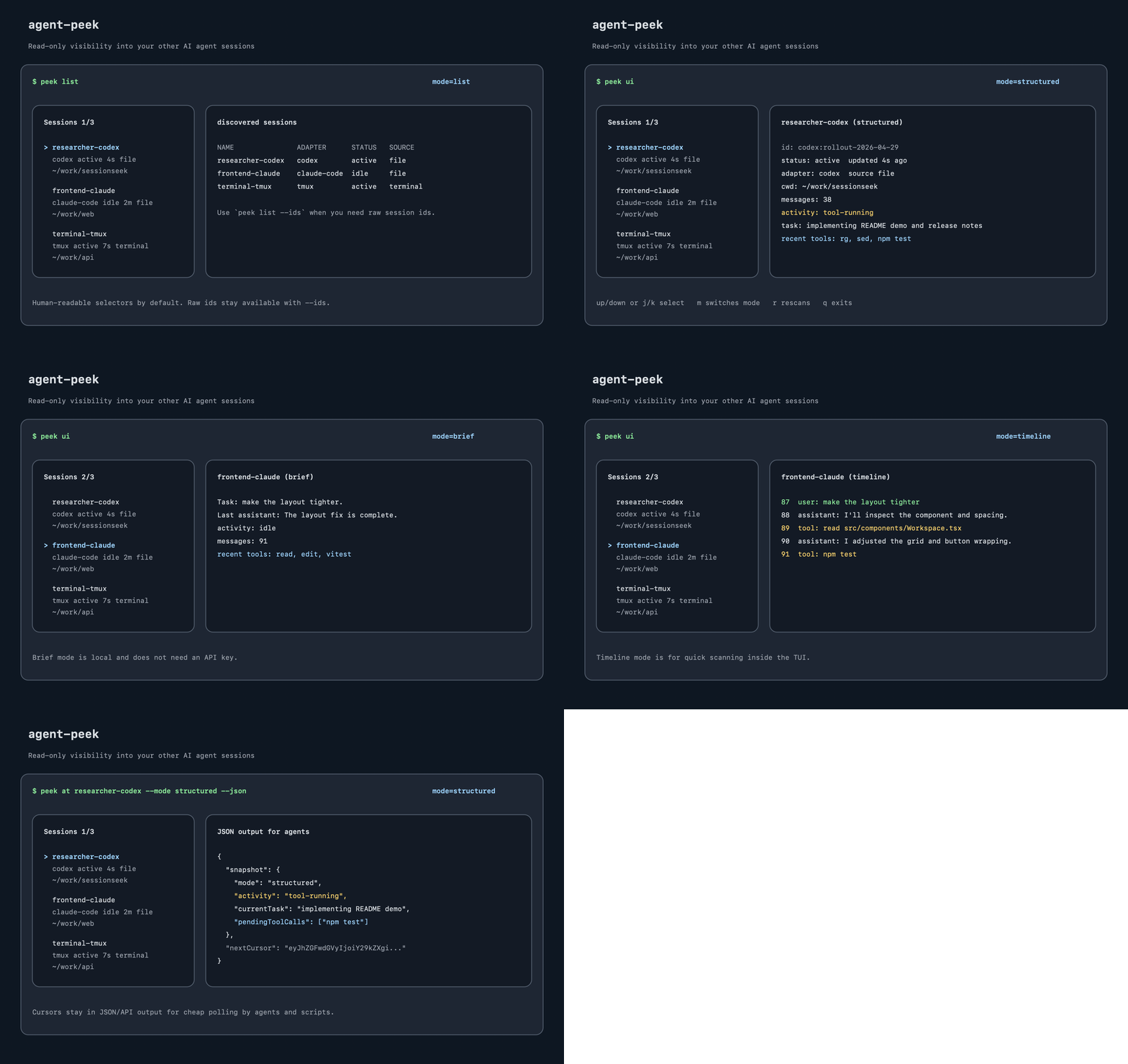
Why
When you run multiple coding agents in parallel, each one normally works in its own bubble. That leads to duplicated research, missed discoveries, and agents editing around each other without context.
agent-peek gives them a shared read-only window:
- Humans can browse active sessions with
peek ui. - Agents can call
peek at <session> --jsonor the MCP tools. - Scripts can poll cheaply with cursors via
--since. - Session transcripts are never modified.
Install
npm i -g agent-peekInstalled commands:
peek— CLIapeek— alias forpeek, useful if another tool owns that nameagent-peek-mcp— MCP server for Claude Code, Codex, and other MCP clients
Quick Start
List discovered sessions:
peek listOpen the interactive browser:
peek uiPeek at a session by display name, id, tag, or cwd:
peek at researcher-codex --mode structuredGet a compact local summary without an API key:
peek at researcher-codex --mode briefGive a session a stable name:
peek tag researcher-codex as researcher
peek at researcher --mode brief
CLI
Common commands:
peek list                                 # show discovered sessions
peek list --adapter claude-code           # scan/list one adapter
peek list --all                           # include ended sessions
peek list --terminals                     # include tmux/screen terminal captures
peek list --ids                           # show raw session ids
peek list --json                          # machine-readable list
peek list adapters                        # show installed adapters
peek help                                 # focused command overview
peek version                              # installed version
peek update                               # update global install from npm
peek update --check                       # check latest version without installing
peek doctor                               # adapter availability and setup hints
peek coord                                # summarize nearby agents in this cwd

peek ui                                   # interactive terminal browser
peek ui --adapter codex
peek ui --all
peek ui --terminals

peek at <name|id|tag|cwd>                 # raw snapshot
peek at <selector> --mode structured      # normalized status/task/tool fields
peek at <selector> --mode brief           # compact local summary, no API key
peek at <selector> --mode handoff         # decisions, next actions, files, questions
peek at <selector> --since <cursor>       # only messages since prior peek
peek at <selector> --first 20             # first 20 raw messages
peek at <selector> --last 50              # last 50 raw messages
peek at <selector> --around 100 --limit 30 # raw window around message 100
peek at <selector> --last 50 --reverse    # newest-first raw output
peek at <selector> --tools                # include tool-only raw messages

peek tag <selector> as researcher
peek untag researcher
peek register <adapter:id> at <path> [--as <name>]
peek forget <id>
Default peek list output is compact and human-first:
NAME               ADAPTER  STATUS  UPDATED  SOURCE  CWD
sessionseek-codex  codex    active  0s ago   file    ~/Documents/sessionseek/sessionseek
The NAME column is the selector to use with peek at. Raw ids stay available
with peek list --ids, and JSON output includes both id and displayName.
Peek Modes
peek at supports five scriptable output modes:
| Mode | Use it for | API key |
| --- | --- | --- |
| raw | Reading transcript messages directly. Best for debugging or inspecting exactly what happened. | No |
| structured | Stable fields for agents: current task, activity, last messages, pending tools, recent tools. | No |
| brief | A compact local summary built from structured fields. Good default for humans and scripts that do not need raw logs. | No |
| handoff | Local structured handoff: decisions, open questions, next actions, touched files, and tools. | No |
| summary | Optional sentence-style summary. De-emphasized for agent loops; prefer brief unless you explicitly need prose. Can use Anthropic when configured. | No |
Raw mode has pagination controls:
peek at researcher --first 25
peek at researcher --last 100
peek at researcher --last 100 --offset 100
peek at researcher --around 250 --limit 40
peek at researcher --last 50 --reverse
By default, raw mode hides tool-only messages and tool-call status lines to keep
the output readable. Add --tools or --verbose when you need that detail.
summary is available for prose summaries, but it is not the recommended
agent-facing default. Prefer brief for low-latency local inspection. If you
want hosted LLM summaries, set ANTHROPIC_API_KEY. To force local summaries on
a machine that also has an Anthropic key, set:
AGENT_PEEK_SUMMARY_PROVIDER=localTimeline is not a peek at --mode value. It is an interactive-only view inside
peek ui.
Terminal UI
peek ui is for humans browsing in a real terminal. It shows a session list and
a detail pane for the selected session.
It starts in structured mode. Press m or Tab to cycle through:
structured— current task, activity, last messages, pending tools, recent toolsbrief— compact local summary, no API keytimeline— chronological role/text timeline for quick scanningraw— recent transcript messagessummary— optional sentence-style summary
There is no separate command-line flag for timeline yet; open peek ui, then
press m/Tab until the header shows mode=timeline.
The detail pane shows useful metadata: raw id, adapter, source type, status, tag, cwd, transcript path, and last update time. It intentionally does not show cursors; cursors are for JSON/API callers that need incremental polling.
Keyboard controls:
- up/down or
j/k— select a session - Enter or Space — refresh the selected session detail
mor Tab — switch detail moder— rescan sessionsqor Escape — exit
For pipes, scripts, and agent harnesses, use peek list, peek at, and
peek at --json instead of peek ui.
Agent-Friendly Output
CLI failures are printed to stderr in a stable shape:
error: session_not_found
message: No session matched selector: worker
hint: Use `peek list` to get the current displayName values.
next:
  - peek list
  - peek list --ids
exitCode: 2
Cursor polling lets an agent fetch only new messages after a prior peek:
peek at researcher --mode raw --json
peek at researcher --mode raw --since <nextCursor> --json
For parallel work, peek coord gives agents a compact coordination digest:
peek coord . --writing
peek check src/core/engine.ts
peek claim src/core/engine.ts --ttl 2m --as codex-main
peek release <claim-id> --claim-id --json
Useful details:
peek coord . --writingshows active writers and file claims, hiding idle noise.peek check <file>exits0when clear and1on conflict.peek check --files-from changed-files.txtbulk-checks a planned edit.peek claim <file> --ttl 2mbroadcasts temporary write intent.peek check <file> --as <owner>ignores your own claims in claim-then-check loops.peek release <claim-id> --claim-id --files-from done-files.txtpartially releases a claim.peek coord . --since-file .peek-cursor --json --fields currentTask,intent,activeWritingFilesis the polling-friendly JSON path.
Claims are cooperative local signals, not authentication or access control. Use them to help well-behaved agents avoid overlap.
MCP
The MCP server command is:
agent-peek-mcpExposed tools:
list_sessions— list discovered sessions with display names.peek_session— read one session snapshot.coordination_digest— summarize nearby session activity and overlap.tag_session— assign a stable tag.
Exposed resources:
agent-peek://sessions— active sessions as JSON.agent-peek://session/{selector}/brief— brief snapshot for one session.agent-peek://session/{selector}/handoff— handoff snapshot for one session.agent-peek://session/{selector}/tail— raw tail for one session.
Exposed prompts:
coordinate-agents— check nearby agents before continuing work.session-handoff— prepare a concise handoff from one session.avoid-overlap— inspect overlap hints before editing files.
It is a local stdio server. Different clients use different config shapes.
Claude Code
Add it from the CLI:
claude mcp add agent-peek agent-peek-mcpOr add a project-scoped .mcp.json:
{
  "mcpServers": {
    "agent-peek": {
      "command": "agent-peek-mcp"
    }
  }
}
Codex
Add to ~/.codex/config.toml:
[mcp_servers.agent-peek]
command = "agent-peek-mcp"
Cursor
Add to global ~/.cursor/mcp.json or project .cursor/mcp.json:
{
  "mcpServers": {
    "agent-peek": {
      "command": "agent-peek-mcp"
    }
  }
}
Windsurf
Add to ~/.codeium/mcp_config.json:
{
  "mcpServers": {
    "agent-peek": {
      "command": "agent-peek-mcp"
    }
  }
}
Gemini CLI
Add to user ~/.gemini/settings.json or project .gemini/settings.json:
{
  "mcpServers": {
    "agent-peek": {
      "command": "agent-peek-mcp"
    }
  }
}
Or use Gemini's MCP command:
gemini mcp add agent-peek agent-peek-mcpCline
Cline CLI uses ~/.cline/data/settings/cline_mcp_settings.json. The VS Code
extension opens its own cline_mcp_settings.json from the MCP Servers settings.
{
  "mcpServers": {
    "agent-peek": {
      "command": "agent-peek-mcp",
      "disabled": false
    }
  }
}
VS Code
VS Code uses top-level servers, not mcpServers. Add to workspace
.vscode/mcp.json or your user-profile mcp.json:
{
  "servers": {
    "agent-peek": {
      "type": "stdio",
      "command": "agent-peek-mcp"
    }
  }
}
Tools exposed:
list_sessionspeek_sessiontag_session
Config references: Claude Code, Codex, Cursor, Windsurf, Gemini CLI, Cline, and VS Code.
Agent Skill
This repo includes an installable skill at skills/agent-peek. Use it when you
want another agent to learn the peek workflow and the MCP configs above.
Install it with the npx skills CLI:
npx skills add akhileshrangani4/agent-peekThe installer is interactive and will guide scope/agent choices. For a non-interactive global install:
npx skills add akhileshrangani4/agent-peek --skill agent-peek -g -yTo target specific agents non-interactively:
npx skills add akhileshrangani4/agent-peek --skill agent-peek -a codex -a claude-code -g -yFlags: -g installs globally for your user, and -y skips confirmation
prompts. Omit -g if you only want the skill installed into the current
project.
The skill teaches agents to:
- install or verify
agent-peek - run
peek doctor,peek list, and boundedpeek atcommands - configure MCP for Claude Code, Codex, Cursor, Windsurf, Gemini CLI, Cline, and VS Code
- report what another session is doing without modifying that session
Library
import { createEngine } from "agent-peek";

const engine = await createEngine();
const sessions = await engine.list();

const result = await engine.peek("researcher", { mode: "brief" });
const firstPage = await engine.peek("researcher", { mode: "raw", from: "start", limit: 50 });

console.log(result.snapshot);
console.log(result.nextCursor);
Built-In Adapters
claude-code— reads~/.claude/projects/*/<uuid>.jsonlcodex— reads Codex CLI transcripts in~/.codex/sessions/<YYYY>/<MM>/<DD>/rollout-*.jsonlcopilot-cli— reads GitHub Copilot CLI session-state directories in~/.copilot/session-state/*gemini— reads Gemini CLI transcripts in~/.gemini/tmp/<project>/chats/session-*.jsongoose— reads Goose session records in~/.local/share/goose/sessions/sessions.dbopencode— reads OpenCode filesystem storage in~/.local/share/opencode/storage/{session,message,part}screen— captures GNU screen scrollback viahardcopy -htmux— captures tmux pane output
Terminal adapters are opt-in for default CLI/MCP listing because they capture
terminal scrollback, not structured agent transcript files. Use
peek list --terminals or peek list --adapter tmux.
External Adapters
Set AGENT_PEEK_ADAPTER_PATH to a colon-separated list of adapter modules.
Each module's default export must implement the Adapter interface from
agent-peek/adapter.
Security Model
agent-peek is same-user, same-machine only.
- No remote transport is exposed by the package.
- Access control is your local filesystem permissions.
- Session access is read-only.
agent-peeknever writes to another agent's transcript.
License
MIT