
agent-plugins-conformance-kit
v1.0.0
Published
Conformance test suite for Agent Plugins 1.0.0 client loaders: a fixture corpus, a runner, and an adapter contract.

Maintainers
 booyaka
Readme
agent-plugins-conformance-kit
A conformance test suite for Agent Plugins 1.0.0 client loaders. It ships 133 real plugin directories on disk, each paired with the load report a conformant client has to produce for it, plus a runner that diffs your client's answer against the corpus.
Why this exists
Six things that have already gone wrong, all in the last few months:
- agentplugins/agent-plugins-spec#77.
The published
plugin.schema.jsonsetsadditionalProperties: false, but §5.2 says a client MUST report an unknown top-level field, ignore it, and keep loading. §8.1 says the same for a non-objectextensions. Validate-and-reject, the obvious implementation, is non-conformant in both cases and the schema cannot express the difference. - openai/codex#39895. A root
plugin.jsonrouted Codex through the Agent Plugins loader, which has no hook support, so every hook declared in.codex-plugin/plugin.jsonstopped running. No warning, no error, no log line. Two plugins were dead for a week. - can1357/oh-my-pi#8853. omp 17.3.5
routes any package declaring an
agent-plugins.org$schemato its strict provider, which drops anySKILL.mdcarrying a frontmatter key outside the Agent Skills set. - EveryInc/compound-engineering-plugin#1411.
The downstream half of that: 3 of 33 skills loading, every
/skill:command gone. The fix was to delete$schemafrom the root manifest, so conforming cost them the standard. - dotnet/skills#1087. First-party manifests
with no
$schemaand withskills,agentsandmcpServersas top-level fields. Kiro reportedplugin.json has an unsupported or missing $schemaand refused the package. Adding$schemawas necessary but not sufficient: it then loaded with every functional component excluded. - VS Code's own troubleshooting page.
The largest shipping client has no validation surface at all. It tells you to open
SKILL.mdand check thenamefield by hand, because "Invalid names cause the skill to be silently skipped."
Every one of these is a loader disagreeing with the specification, and every one of them was found by a user rather than by a test. That is the gap this fills.
This tests clients, not packages. If you want to check a plugin you are publishing, use @hiai-gg/agent-plugins-doctor or @booyaka/mcp-vet. They do the package-side job and this kit deliberately does not.
Install
npm install --save-dev agent-plugins-conformance-kitNode 22 or newer.
Quick start
Write an adapter. It takes a plugin directory as argv[2] and prints one JSON load
report to stdout. That is the whole contract, and it is usually about twenty lines:
#!/usr/bin/env node
import { loadPlugin } from 'your-client';

const result = await loadPlugin(process.argv[2]);

console.log(JSON.stringify({
  rejected: result.ok ? null : result.reason,
  loaded: {
    skills: result.skills?.map((s) => s.name) ?? [],
    mcpServers: result.servers?.map((s) => s.name) ?? [],
  },
  skipped: result.dropped?.map((d) => ({ what: d.path })) ?? [],
  reported: result.warnings?.map((w) => ({ field: w.field })) ?? [],
}));
Then run the suite:
npx apconform run --adapter ./my-adapter.mjsADAPTERS.md has the full contract, including the skipped path vocabulary and how to
use a non-Node adapter.
Real output
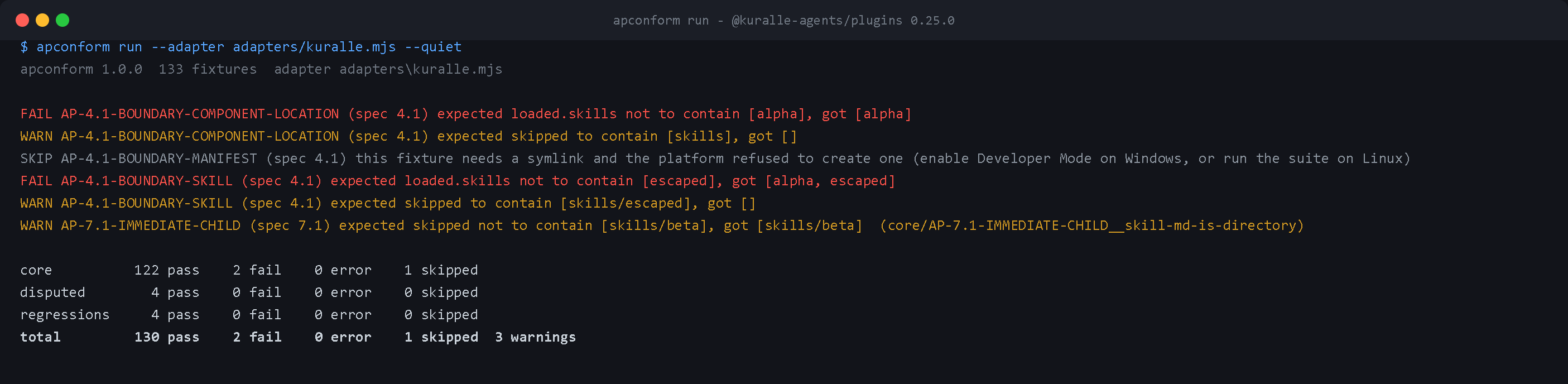
The run pictured at the top of this file, as text. It drives the published
@kuralle-agents/plugins 0.25.0
loader through adapters/kuralle.mjs. Both the image and this block come from
npm run capture:images, which renders real output, so neither can drift from what the
tool prints:
$ node dist/cli.js run --adapter adapters/kuralle.mjs --quiet
apconform 1.0.0  133 fixtures  adapter adapters\kuralle.mjs

SKIP AP-4.1-BOUNDARY-MANIFEST (spec 4.1) this fixture needs a symlink and the platform refused to create one (enable Developer Mode on Windows, or run the suite on Linux)
FAIL AP-4.1-BOUNDARY-COMPONENT-LOCATION (spec 4.1) expected loaded.skills not to contain [alpha], got [alpha]
WARN AP-4.1-BOUNDARY-COMPONENT-LOCATION (spec 4.1) expected skipped to contain [skills], got []
FAIL AP-4.1-BOUNDARY-SKILL (spec 4.1) expected loaded.skills not to contain [escaped], got [alpha, escaped]
WARN AP-4.1-BOUNDARY-SKILL (spec 4.1) expected skipped to contain [skills/escaped], got []
WARN AP-7.1-IMMEDIATE-CHILD (spec 7.1) expected skipped not to contain [skills/beta], got [skills/beta]  (core/AP-7.1-IMMEDIATE-CHILD__skill-md-is-directory)
FAIL AP-8.1-EXTENSIONS-MEMBER-OBJECTS (spec 8.1) expected rejected=<non-null>, got rejected=null

core          122 pass    3 fail    0 error    1 skipped
disputed        3 pass    0 fail    0 error    0 skipped
regressions     4 pass    0 fail    0 error    0 skipped
total         129 pass    3 fail    0 error    1 skipped  3 warnings
129 of 133, and the three failures are real:
§4.1 boundary rule 3, AP-4.1-BOUNDARY-SKILL. A directory link under skills/
pointing outside the plugin root is followed, and the skill behind it is loaded. The
specification says the client MUST skip it. Verified by hand: the discovered SKILL.md
resolves to <tmp>/outside/escaped/SKILL.md while the plugin root is <tmp>/plugin.
§4.1 boundary rule 2, AP-4.1-BOUNDARY-COMPONENT-LOCATION. Same gap one level up. A
skills/ location that is itself a link out of the root should invalidate the component
type; instead the skills behind it load.
§5.2 via §8.1, AP-8.1-EXTENSIONS-MEMBER-OBJECTS. extensions: { "com.example.client":
"enabled" } is reported and dropped, and the plugin loads. §8.1's report-and-ignore
exception covers a non-object extensions field, not a non-object member value, so this
falls back to §5.2 and is fatal. This is exactly the narrow exception being widened by
accident, which is what makes it worth a fixture.
That run is on Windows, where AP-4.1-BOUNDARY-MANIFEST reports SKIP because it needs a
file symlink and Windows refuses to create one without Developer Mode. On Linux and macOS
it runs and passes, so the totals there are 130 pass, 3 fail, 0 skipped. This loader does
enforce containment on plugin.json itself, which makes the two boundary rules it misses
look more like an oversight than a design choice.
The three WARN lines are SHOULD-level, not MUST-level. See "MUST, SHOULD and open
questions" below.
The corpus also records choices the specification leaves open. Against this loader:
sse servers load rather than being skipped, a skill carrying argument-hint and
disable-model-invocation loads (the lenient side of oh-my-pi#8853, all 30 of 30), a
link to a target inside the plugin root is not followed, and "command": "node server.js
--port 8080" is accepted as a bare executable name.
The corpus
fixtures/
├── core/          126 fixtures. The specification states the required outcome directly.
├── disputed/        3 fixtures. More than one outcome is conformant. Recorded, not graded.
└── regressions/     4 fixtures. Ported from a real bug report, with the issue cited.
Each fixture is a directory holding a real plugin/ tree and a fixture.json:
{
  "ruleId": "AP-5.2-UNKNOWN-FIELD",
  "confidence": "core",
  "spec": "5.2",
  "title": "an unknown top-level manifest field is reported and ignored",
  "rationale": "The published plugin.schema.json sets additionalProperties: false, so the obvious implementation (validate, reject on failure) is non-conformant here. This is the case spec issue #77 describes.",
  "quote": "Clients MUST report and ignore each unknown field and MUST continue loading the plugin if the manifest otherwise satisfies this section.",
  "issue": "https://github.com/agentplugins/agent-plugins-spec/issues/77",
  "observability": "report",
  "expect": {
    "rejected": null,
    "loaded": { "skills": [], "mcpServers": [] },
    "skipped": [],
    "reported": [{ "field": "skills", "ruleId": "AP-5.2-UNKNOWN-FIELD" }]
  }
}
rules.json holds all 89 rules behind those fixtures. Every one carries the normative
sentence verbatim, and npm run verify:sources proves each quote is still a byte-identical
substring of the published spec/1.0.0.md. apconform explain <rule-id> prints one:
$ npx apconform explain AP-7.1-DEPTH
AP-7.1-DEPTH
  specification  §7.1 of Agent Plugins 1.0.0
  severity       accept - The client must load this. Rejecting or skipping is the failure.
  confidence     core - The specification states the required outcome directly.

  "Clients MUST NOT recursively search deeper descendants for additional skills."

  https://raw.githubusercontent.com/agentplugins/agent-plugins-spec/main/spec/1.0.0.md
checklist.json maps every item on the
official non-normative client checklist
onto the rules that cover it, and states plainly where coverage is partial and why. It is
used to audit the rule table for gaps, never as a source of requirements: fixtures cite
specification sections.
MUST, SHOULD and open questions
A suite that grades everything equally is a suite people turn off. Three distinctions run through the whole corpus.
rejected is compared on rejectedness, not on the string. The specification defines no
rejection vocabulary, so your reason is echoed in failure output and never asserted.
Reporting a skipped component is a SHOULD. §7.1 and §7.2.2 say the client SHOULD report
an invalid skill or server entry, so a mismatch in skipped is a warning. Whether the
component actually loaded is a MUST, and that is checked against loaded. The two rules
that produce reported entries both say MUST report, so those are failures. Pass
--strict-reporting to promote the warnings.
Some outcomes are genuinely open. Where the specification permits more than one answer,
the fixture accepts both and records which one your client chose as a note. sse support
is OPTIONAL, §4.1 symlinks to in-root targets MAY resolve, and Agent Skills lists its
frontmatter fields without saying the set is closed. That last one is oh-my-pi#8853, and a
corpus that graded it would be picking a side in an argument the specification has not
settled.
Some rules are only partly observable through a load report. Whether PLUGIN_ROOT and
PLUGIN_DATA reach a subprocess environment, and what ${PLUGIN_DATA} expands to inside
args, are not visible in a report about what loaded. Those fixtures are marked
"observability": "partial" and carry a note saying exactly what is and is not asserted.
apconform list flags them. Eight fixtures are partial; the other 125 are fully asserted.
Adopting it on a client that already has failures
Nobody wires a new conformance suite into CI and gets a green run. Gate on change instead:
apconform run --adapter ./adapter.mjs --baseline conformance-baseline.json --update-baselineCommit that file. From then on, --baseline conformance-baseline.json without
--update-baseline fails only on fixtures that regressed. Everything already failing is
reported as known and does not gate, fixtures you have since fixed print as FIXED, and
a fixture that is new to the corpus after a kit upgrade has to pass on its own, because
new coverage is exactly the thing you want to hear about.
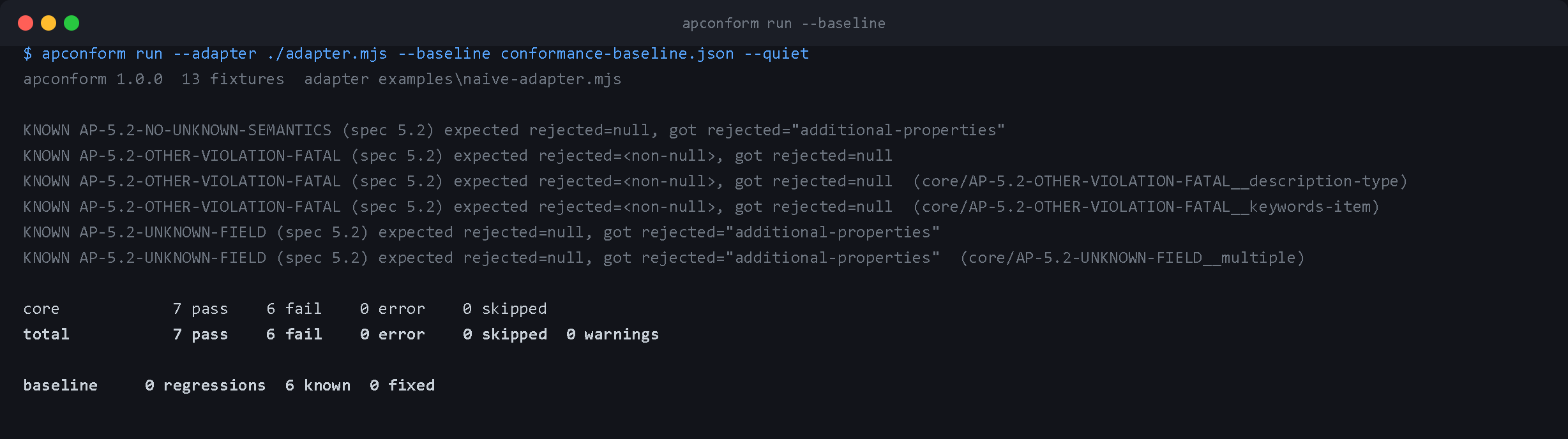
A failure the baseline already records prints as KNOWN rather than as a red FAIL the
summary then contradicts:
GitHub Action
- uses: Booyaka101/agent-plugins-conformance-kit@v1
  with:
    adapter: ./conformance/adapter.mjs
    only: core
Inputs: adapter (required), only, fixture, strict-reporting, timeout, baseline,
update-baseline, json, junit, version, fail-on-error. Outputs: report, passed, failed. It writes the summary
to the job summary and the full result to apconform-report.json.
Set fail-on-error: false to report without gating while you work through the list.
CLI
apconform run --adapter <path> [options]
apconform list [options]
apconform rules [--json]
apconform explain <rule-id>
apconform verify
apconform show <fixture-id>
| Option | Meaning |
| --- | --- |
| --adapter <path> | The executable to test. Required for run. |
| --adapter-exec <cmd> | Launch the adapter with this program instead of guessing from the extension. |
| --only <groups> | core, disputed, regressions or all. Comma-separated. |
| --fixture <substring> | Run only fixtures whose id contains this text. |
| --json <file> | Write the full machine-readable result here. |
| --junit <file> | Write JUnit XML, for CI systems that render test reports. |
| --strict-reporting | Treat SHOULD-report mismatches as failures. |
| --timeout <ms> | Per-fixture adapter timeout. Default 30000. |
| --concurrency <n> | Adapters to run at once. Default min(8, cpus). |
| --fixtures <dir> | Use a different corpus root. |
| --baseline <file> | Gate on change against this file instead of on the total. |
| --update-baseline | Write the current result to --baseline and exit 0. |
| --quiet | Only print the summary and anything that is not a clean pass. |
Exit codes: 0 all passed, 1 conformance failures or adapter errors, 2 the suite
could not run at all.
apconform show <fixture-id> prints a fixture: the rule it tests, the normative sentence,
the plugin tree on disk, the manifest and mcp.json, and the expected load report. It is
the fastest way to answer "what is this failing fixture actually doing".
apconform verify checks the corpus against itself: every fixture names a real rule, sits
in the folder its confidence implies, quotes that rule correctly, and expects only
component names that exist on disk with matching SKILL.md frontmatter.
Limitations
- A load report describes what a client loaded. It cannot see subprocess environments, network access, or expanded placeholder values, so §9 is covered only where a violation changes what loads. The eight partial fixtures say so individually.
AP-5.2-NO-SCHEMA-FETCHneeds the network to be unavailable to bite. Run the suite offline to make it a real assertion.- One fixture needs a file symlink and reports
SKIPon Windows without Developer Mode. - The kit targets Agent Plugins 1.0.0 only. It has no compatibility-policy opinion about older or newer versions beyond rejecting identifiers it does not recognize.
- The corpus tests loading. It does not start MCP servers or execute skills.
Development
npm install
npm test              # builds, then runs 476 tests
npm run verify:sources # checks every quote against the live specification
npm test runs the diff engine against synthetic reports, asserts every rule quote is
verbatim in the published spec, walks the whole corpus for self-consistency, and drives
the runner end to end against a perfect-client echo adapter and against a deliberately
broken, hanging and non-JSON one.
To run the suite against the reference loader locally:
npm install --no-save @kuralle-agents/plugins @kuralle-agents/fs
node dist/cli.js run --adapter adapters/kuralle.mjs
examples/naive-adapter.mjs is a deliberately non-conformant loader, written the way an
implementer reaches for first. It is not a client and exists to show what the suite
catches:
$ node dist/cli.js run --adapter examples/naive-adapter.mjs --quiet
...
FAIL AP-5.2-UNKNOWN-FIELD (spec 5.2) expected rejected=null, got rejected="additional-properties"
...
total          68 pass   64 fail    0 error    1 skipped  52 warnings
npm run capture:images regenerates the README images from real output. The SVGs need
nothing; the PNGs need a Chrome on --remote-debugging-port=9222, because npm strips SVG
from rendered READMEs.
Contributing a fixture
Add a directory under fixtures/core/<RULE-ID>/ (or <RULE-ID>__<variant> if the rule
already has one), put a real plugin tree in plugin/, write fixture.json, and run
apconform verify. If the rule is new, add it to rules.json with the normative sentence
copied byte for byte and run npm run verify:sources.
If a fixture encodes an outcome the specification does not actually require, it belongs in
fixtures/disputed/ with a note saying why, not in core/.
Where this should go first
The highest-value thing to do with a new conformance suite is not to announce it, it is to use it. Comment on agentplugins/agent-plugins-spec#77 with the two fixtures that encode the disagreement it describes, since that issue is already asking for something executable and the maintainers are the exact audience. The findings in "Real output" above should be filed against kuralle/kuralle-agents the same way, one issue per boundary rule with the fixture id and the reproduction. A suite that has already found three real defects argues for itself better than a launch post does.
License
MIT