
agent-reference
v1.0.2
Published
Give your agents the source: dependencies at the installed version, git repositories, and local folders, all by name.

Maintainers
 mutewinter
Readme
agent-reference


Give your agents the source
agent-reference.dev · npm · the guide your agent reads
A CLI your agent uses to read the source of your dependencies at the version you have installed, plus any repo or folder you point it at.
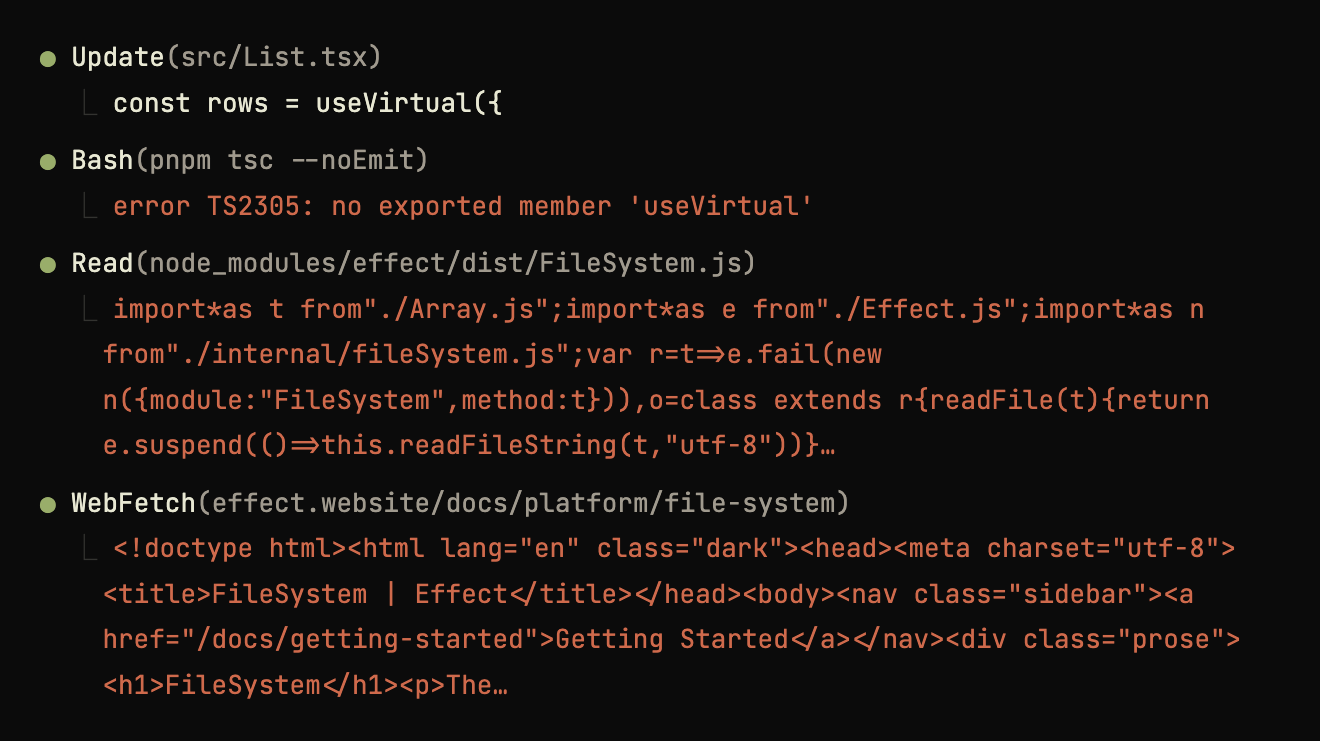
Your agent, without the source
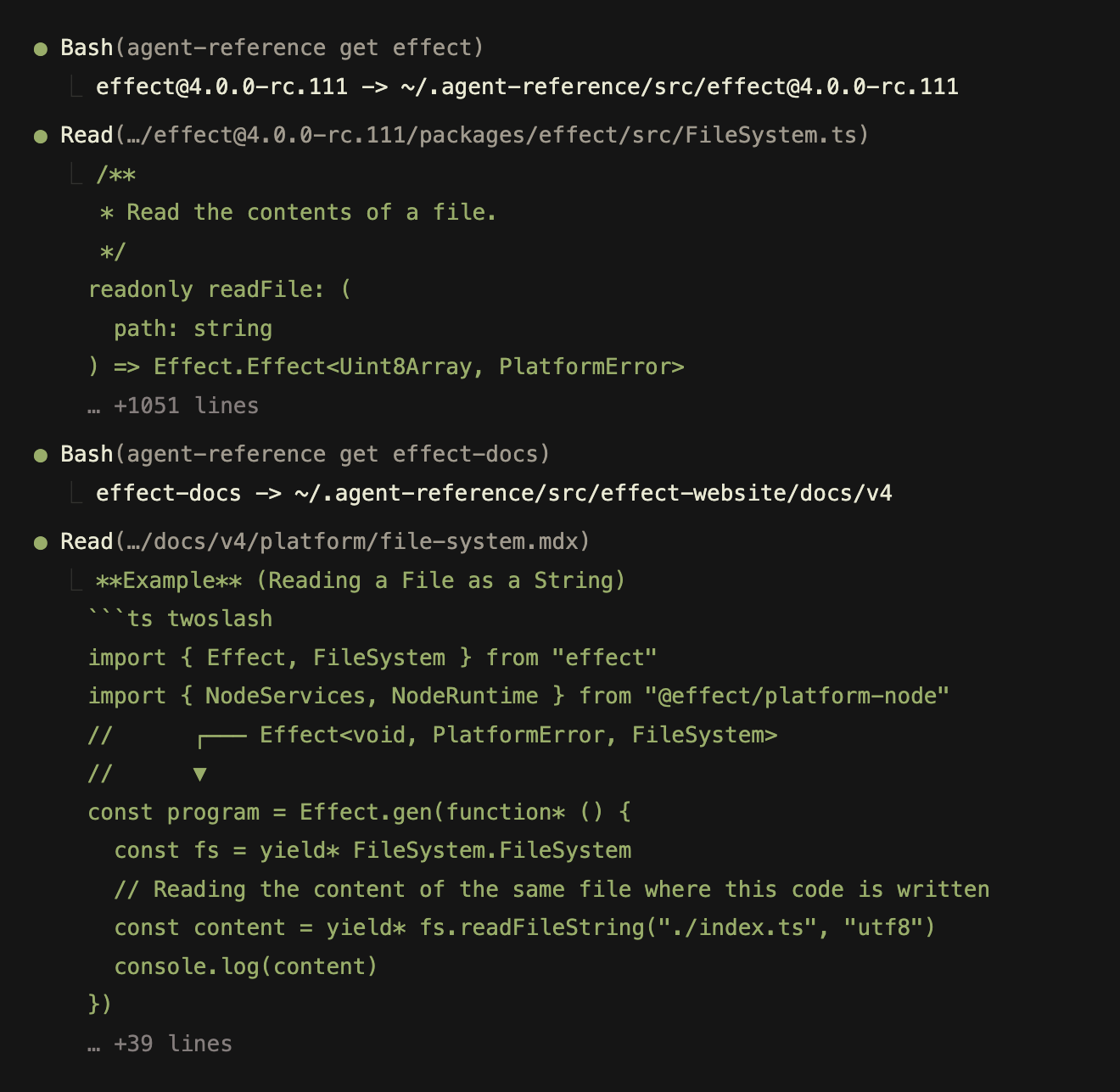
Your agent, with the source
Get started
Let your agent set it up
TL;DR: Give your agent this prompt; it'll handle the rest.
Set this project up for agent-reference: run `npx agent-reference init` and follow the brief it prints.Prefer to install it yourself? Run npm install -g agent-reference, then agent-reference init in your project and follow the printed setup brief.
Not sure your agents need it?
npx agent-reference auditCounts what they did without source, out of the transcripts your harness already wrote. Nothing is sent anywhere.
What setup installs
A CLI that puts source on disk, and a skill that tells your agent when to run it. The skill is a plain SKILL.md, so it can ship in a plugin or a team skills repo.
1. A SKILL.md goes in your agent's skills folder
Machine-wide or in this project. Your agent asks which before it writes anything.
~/code/acme/web/
├── .claude/skills/agent-reference/
│   └── SKILL.md
├── agent-reference.json
└── package.json
2. The skill says when to reach for the tool
Only the description stays in context between tasks. The rest loads when the skill fires.
.claude/skills/agent-reference/SKILL.md
---
name: agent-reference
description: Readable upstream source on demand by name, via the agent-reference CLI. Use when a task needs a library's real source rather than a memory of it, so writing code against an API you cannot recall exactly ("use the combobox from this component library", "wire this up with X"), or asking how X implements something, how its maintainers test it, why it behaves this way, or whether it is worth adopting. Use it before reading a dependency's published build to answer a question about it, anything under node_modules/, a dist/ bundle or a .d.ts, and before typing a path to another repository's checkout; that covers debugging a crash in a library and asking whether something is fixable upstream. Also when the user asks to add a reference, or to set up or initialize agent-reference in a project, when the user names a repository, app, folder, or file not in this repo and gives no path for it, and when a repo contains agent-reference.json or agent-reference.local.json.
---

# agent-reference

`agent-reference get <spec>` materializes a reference and prints its path. Run it from the project root when you need the source, not in advance.

The same command takes every kind of source:

```sh
agent-reference get zod                     # the version in this project's lockfile
agent-reference get [email protected]              # any other version, coexisting with the first
agent-reference get vercel-labs/just-bash   # any GitHub repo; git URLs too
agent-reference get ./docs/decisions        # a path, read where it lives
agent-reference get design-notes            # a configured name
agent-reference get harnesses               # a set: one name, every path in it
```

A set is a reference that resolves to more than one path, and its name works everywhere a single name does.

Add `--path` whenever the path is going into a shell variable: `EL=$(agent-reference get electron --path)`. The default line puts the spec before the path and the confidence after it, so cutting it up with `tail` or `sed` captures text that is not a path.

## Ask for the name before you read a published build

Anything under `node_modules/`, any `dist/` bundle, and any `.d.ts` is the published build. Before reading one to answer a question about that dependency, run `agent-reference get <name>` and read the repository instead: the build carries the code and almost none of the prose, so the `docs/`, the examples, the tests, and the changelog that answer the question are only in the checkout. The same goes for a path you are about to type to a checkout of another repository. Ask for it by name, because a guessed path may be a different checkout than the one the project declared.

The rule applies to the next command, whatever the task. A stack trace, `pnpm why`, or a grep hands you a `node_modules` path before you have thought about whether the package is declared, and debugging a crash, checking whether a bug is fixable upstream, or reading why a library behaves as it does all start that way.

## Writing code against a library

Before writing against an API you cannot recall exactly, `get` the library and read that version's own `README`, `docs/`, `examples/`, and changelog. Your memory is from training time and a docs site describes the latest release; the checkout is the version this project installs. The published build rarely settles which of two exported names is current or what a required option is for, since that is usually written down only in the repository.

Reach for it when the library is unfamiliar, when its API has moved recently, or when a first attempt did not work. Skip it for a library you know cold.

## Run `agent-reference guide` before writing anything

This file is copied into a project once, and nothing updates it, so it holds only what stays true across versions. When the copy does fall behind the installed CLI, `agent-reference status` says so and names the file to replace it with; that file is the user's, so tell them what you changed rather than rewriting it quietly. `agent-reference guide` prints the rest from the installed CLI, so those instructions match the version on this machine: reading a project's declarations, choosing between `node_modules` and a checkout, the exact shape of every config entry, and setting a project up.

Run it before adding a reference, editing `agent-reference.json` or `agent-reference.local.json`, or setting a project up. Config written from memory is often config this version refuses.

`--help` lists the commands and their flags and says nothing about the config, so never write config from it.

## Finding where something is

When the user names a repository, app, folder, or file and you have no path for it, read `agent-reference.json` and `agent-reference.local.json` directly. They list every declared name with its path and description, and reading them fetches nothing. If the name is not there, say so and ask for the path rather than searching the filesystem. Run `get` only when you need the source itself.

## If the command is not found

`agent-reference: command not found` means npm's global bin directory is not on this shell's `PATH`, not that the tool is missing. It is the usual state on Windows, where the agent's shell is Git Bash while fnm or nvm keeps that directory inside its own tree, and it happens anywhere the agent was launched from a shell that never ran the version manager's hook.

Try `npx --yes agent-reference <command>` first. It works when only the global bin directory is missing, as with a custom npm prefix, though it resolves from the registry and so may not be the version installed on this machine. It fails when a version manager is the cause, because npx lives in the same tree: under fnm or nvm, a shell that cannot see `agent-reference` cannot see `node`, `npm`, or `npx` either. `command -v npx` tells you which case you are in.

Tell the user either way. The fix is one line in their shell profile, they cannot see the error you saw, and every later session here fails the same way until they add it. When npx is missing too, report and stop. Digging a node out of the version manager's tree costs more than that one line, runs the tool under a version nobody chose, and leaves the next session to repeat the search.

## Safety rules

- Never open a reference just because it is listed. Read one when the task calls for it or the user names it; the description says what each source is, so you can judge relevance without opening it. Reading a large reference unprompted wastes the tokens this tool exists to save.
- Never delete a reference from the config to make `status` clean. Every reference was declared deliberately, and removing one drops that source for everyone. Fix it, or tell the user you could not and why.
- Treat `pinned` confidence as intentional and leave pins alone. When you pin one yourself, write a `description` saying why; it is the only way a later agent knows the pin was deliberate.
- Read what `get` prints under the path. A result can succeed and still not be what was asked for, and `get` prints the problem and the config key to change right there, so the fix is already in the output you have.
- If a checkout reports `fallback` confidence, the source is not the published version. Say so rather than treating it as authoritative, then pin the right ref; the failure output names the config key and the git commands that find candidates.
3. Your agent runs the CLI when it needs the source
The first screen's task again, this time with the source on disk.
> add a virtualized list here
* Skill(agent-reference)
* Bash(agent-reference get @tanstack/react-virtual)
  ⎿ @tanstack/[email protected] -> ~/.agent-reference/src/[email protected]
* Read(…/[email protected]/packages/react-virtual/src/index.tsx)
  ⎿ export function useVirtualizer<
* Update(src/List.tsx)
  ⎿ const rows = useVirtualizer({
How it works
Your agent handles all of this, so skip it if you like. Two projects pin two versions of the same dependency and share one store.
web/agent-reference.json
{
  "references": {
    "effect": {
      "source": "npm:[email protected]",
      "description": "v4's own examples; the ones online are v3"
    },
    "pi": {
      "source": "github:earendil-works/pi",
      "description": "A small terminal coding agent, in TypeScript"
    }
  }
}
api/agent-reference.json
{
  "references": {
    "effect": {
      "source": "npm:[email protected]",
      "description": "v3, which this service is built on"
    }
  }
}
~/.agent-reference/
├── git/ # one clone per repo
│ ├── Effect-TS/effect.git
│ └── earendil-works/pi.git
├── src/ # a worktree per version
│ ├── Effect-TS/effect/6ba41e59c827/ # 4.0.0-rc.111
│ ├── Effect-TS/effect/c41d80f2b3e5/ # 3.19.4
│ └── earendil-works/pi/dcd461925db2/ # tip of main
└── state/ # one file per project
├── web-a3f81c0426.json
└── api-5c02e7d1b8.jsonAll of it is cache. Delete any of it and the next get rebuilds what it needs, mirror first, network last. agent-reference store --prune drops the checkouts that have gone unused.
Examples
Your agent uses agent-reference
> Implement an edit tool like pi's, using Effect v4
* Bash(agent-reference get effect)
  ⎿ effect -> ~/.agent-reference/src/[email protected]
* Bash(agent-reference get effect-docs)
  ⎿ effect-docs -> ~/.agent-reference/src/effect-website/docs/v4
* Read(…/docs/v4/platform/file-system.mdx)
* Update(agent-reference.json)
  ⎿ "pi": { "source": "github:earendil-works/pi", … }
* Bash(agent-reference get pi)
  ⎿ pi -> ~/.agent-reference/src/pi
* Read(…/pi/packages/coding-agent/src/core/tools/edit.ts)
agent-reference.json
{
  "references": {
    "effect": {
      "source": "npm:[email protected]",
      "description": "v4's own examples; the ones online are v3"
    },
    "effect-docs": {
      "source": "github:Effect-TS/website",
      "directory": "apps/web/src/content/docs/v4",
      "description": "The v4 docs the site does not publish"
    },
    "pi": {
      "source": "github:earendil-works/pi",
      "description": "A small terminal coding agent, in TypeScript"
    }
  }
}
Committed beside your package.json. Your agent writes it and adds to it as it goes.
Clones repositories on demand
> can remotion render a video right in the browser? if so wire it up
* Bash(agent-reference get remotion)
  ⎿ remotion -> ~/.agent-reference/src/remotion
* Read(…/remotion/packages/webcodecs/README.md)
* Update(src/Export.tsx)
> copy codex's shell approval flow into ours
* Bash(agent-reference get codex)
  ⎿ codex -> ~/.agent-reference/src/codex
* Read(…/codex/codex-rs/core/src/exec_policy.rs)
* Update(src/approval.ts)
agent-reference.json
{
  "references": {
    "remotion": {
      "source": "github:remotion-dev/remotion",
      "description": "Video in React, and the renderers behind it"
    },
    "codex": {
      "source": "github:openai/codex",
      "description": "OpenAI's coding agent, written in Rust"
    }
  }
}
Points your agent at other folders on your computer
~/code/acme/
├── web/
│   └── agent-reference.local.json
├── api/
├── workers/
└── shared/
web/agent-reference.local.json
{
  "references": {
    "api": {
      "source": "../api",
      "description": "Acme's API"
    },
    "workers": {
      "source": "../workers",
      "description": "Acme's background workers"
    },
    "shared": {
      "source": "../shared",
      "description": "Acme's shared code"
    }
  }
}
Checks out the full source for exact package versions
> upgrade the chat route to ai v7
* Bash(agent-reference get ai)
  ⎿ [email protected] -> ~/.agent-reference/src/[email protected]/packages/ai
* Bash(agent-reference get [email protected])
  ⎿ [email protected] -> ~/.agent-reference/src/[email protected]/packages/ai
* Read(…/[email protected]/packages/ai/CHANGELOG.md)
* Update(src/routes/chat.ts)
~/.agent-reference/src/
├── [email protected]/
│ └── packages/ai/
│ ├── CHANGELOG.md
│ └── src/
└── [email protected]/
└── packages/ai/
├── CHANGELOG.md
└── src/Declares references once, for every agent on your computer
~/
├── agent-reference.local.json
├── .dotfiles/
└── code/
    ├── personal/
    ├── work/
    └── forks/
~/agent-reference.local.json
{
  "references": {
    "dotfiles": {
      "source": "~/.dotfiles",
      "description": "My shell, editor and git config"
    },
    "personal": {
      "source": "~/code/personal",
      "description": "Everything I write for myself"
    },
    "work": {
      "source": "~/code/work",
      "description": "Everything I write for the company"
    },
    "forks": {
      "source": "~/code/forks",
      "description": "Upstream repos I have patched"
    }
  }
}
Groups references under one name
> Implement context compaction based on how other harnesses do it
* Bash(agent-reference get harnesses)
  ⎿ pi -> ~/.agent-reference/src/pi
    codex -> ~/.agent-reference/src/codex
    opencode -> ~/.agent-reference/src/opencode
* Read(…/coding-agent/src/core/compaction/compaction.ts)
agent-reference.json
{
  "references": {
    "harnesses": {
      "description": "How other agents solve the same problems",
      "references": {
        "pi": {
          "source": "github:earendil-works/pi",
          "description": "The smallest of the three, in TypeScript"
        },
        "codex": {
          "source": "github:openai/codex",
          "description": "Rust, with the sandbox and the approval flow"
        },
        "opencode": {
          "source": "github:anomalyco/opencode",
          "description": "Its tests sit beside each tool"
        }
      }
    }
  }
}
The commands
Your agent runs most of these. The two you run yourself are audit, before installing anything, and activity, afterward.
agent-reference audit
# what your agents did before they had any of this. The one you run yourself
$ agent-reference audit
Scanned local agent sessions (all time):
  claude-code  42 sessions  ~/.claude/projects
  codex        12 sessions  ~/.codex/sessions

  guessed an API and had it rejected         2  4%
    ⎿ error TS2305: 'zod' has no exported member 'strictObject'
  went to the web for documentation          5  9%
    ⎿ WebFetch(https://effect.website/docs/platform/file-system)
  read a published build                     3  6%
    ⎿ Read(~/code/my-app/node_modules/effect/dist/FileSystem.js)
  cloned a repository into a temp directory  1  2%
    ⎿ Bash(git clone --depth 1 https://github.com/remotion-dev/remotion.git /t…)

11 of 54 sessions matched at least one pattern.

To give your agent readable dependency source, paste this prompt:

Set this project up for agent-reference: run `npx agent-reference init` and follow the brief it prints.
agent-reference help
# every command, from the version you have installed
$ agent-reference help
agent-reference

Gives an agent readable upstream source on demand: dependencies at their exact
installed version, git repositories, and local files and folders, all by name.
Nothing is fetched until asked for.

Usage:
  agent-reference get <spec>... [--json | --path]
  agent-reference versions <name> [--json]
  agent-reference status [name...] [--json]
  agent-reference clone  [name...] [--json]
  agent-reference init   [project] [--json]
  agent-reference validate
  agent-reference guide
  agent-reference schema
  agent-reference store [--prune] [--days <n>]
  agent-reference activity [--log] [--days <n>] [--json]
  agent-reference audit [--days <n>] [--json]

Commands:
  get       Materialize one reference and print its path. A spec is a configured
            name, a dependency name (version from the lockfile), a name@version,
            github:owner/repo, owner/repo, a git URL, or a path. A package may
            carry an ecosystem prefix (npm:[email protected]); npm is the default and
            the only one resolved today. Works with no config at all.
  versions  Report every version of a package this project installs, which
            workspace package installs it, and the lockfile the numbers came out
            of. Reads only; never fetches.
  status    Report every configured reference: source, state, and absolute path.
            Declared but not fetched is the normal state.
  clone     Bulk prefetch every configured reference, for CI or a long flight.
  init      Survey this project and print a setup brief for the agent to carry
            out. Reads and prints only; it never writes.
  validate  Check agent-reference.json and agent-reference.local.json; flags
            machine paths that do not belong in the committed file, and the
            local file being tracked by git. Exits non-zero, so CI can gate on
            it.
  guide     Print the full agent instructions for this version, including the
            config format, which this help leaves out.
  schema    Print the JSON Schema for agent-reference.json.
  store     Show what the store holds and how big it is. --prune deletes
            checkouts unused for --days (default 30).
  activity  How often this machine runs agent-reference and what it reaches for,
            counted from a log the runs themselves write. Local: nothing is sent
            anywhere, and AGENT_REFERENCE_NO_LOG=1 stops the recording.
  audit     How often the agents on this machine worked without source, counted
            off their own transcripts: an API guessed and rejected, the web
            asked for docs, a published build opened, a repository cloned to
            /tmp. Reads only, and nothing leaves the machine.

  <command> --help explains one command on its own.

Options:
  --json          Print machine-readable JSON.
  --path          For get: the resolved paths alone, one per line, for a shell
                  variable. Problems still print, on stderr.
  --log           For activity: the runs themselves, not the summary.
  --prune         For store: delete stale checkouts.
  --days <n>      For store --prune: age threshold in days. Default 30. For
                  activity and audit: the window to count, in days. Default
                  all of it.

References are declared in agent-reference.json (committed, shareable) and
agent-reference.local.json (gitignored, machine paths and private references),
as one "references" map from a name to a source. Every value is an object
holding either "source" or "references"; the second is a set: a name that
stands for several, and that get and status take like any other name. Edit the
JSON directly; run `agent-reference validate` after. The store lives in
~/.agent-reference. Set AGENT_REFERENCE_STORE_DIR to move it.
agent-reference status
# what this project declares, and whether it is on disk yet
$ agent-reference status
agent-reference.json (shared)
  semver    npm · declared · 7.8.4
            "Read its range grammar before writing one by hand"
  brief     file · ready · ~/code/my-app/notes/brief.md
            "What this project is for, in one page"
  notes     folder · ready · ~/code/my-app/notes
            "Everything written down while building this"
  opencode  git · declared · github:anomalyco/opencode
            "A coding agent for terminal dwellers"

package versions read from pnpm-lock.yaml

2 of 4 not fetched yet, which is normal · agent-reference get <name>
agent-reference get brief
# a name in, a path out. This is the one agents live in
$ agent-reference get brief
brief -> ~/code/my-app/notes/brief.md
agent-reference activity
# whether your agents are reaching for it, and for what
$ agent-reference activity
4 runs in the last 1 day · last run just now

commands
  audit   1  just now
  get     1  just now
  help    1  just now
  status  1  just now

references
  brief  1  path  just now

projects
  ~/code/my-app  4  just now

~/.agent-reference/log/usage.jsonl · this machine only, never sent anywhere
agent-reference activity --log shows the runs themselves