
agent-swarm-kit
v6.0.0
Published
A TypeScript library for building orchestrated framework-agnostic multi-agent AI systems

Maintainers
 tripolskypetr
Readme
🐝 Agent Swarm Kit
A lightweight TypeScript library for building orchestrated, framework-agnostic multi-agent AI systems.


Unleash the power of collaborative AI with agent-swarm-kit! This library empowers you to create intelligent, modular agent networks that work together seamlessly—perfect for automating workflows, solving complex problems, or designing next-gen AI systems. With a simple API, robust validation, and flexible architecture, it’s your toolkit for building smarter solutions, faster.
📚 Full Documentation | 🌟 Try It Now
✨ Why Choose Agent Swarm Kit?
🧪 Conversation Testbed: Includes a unit testing framework with tool and agent override capabilities, enabling developers to simulate and validate agent interactions and tool integrations in isolated environments. ✅
🌐 Model Context Protocol Ready: Seamlessly connect agents to multiple remote MCP servers, allowing integration with external tools written in various languages (e.g., C#, Python) via the reusable Model Context Protocol, originally developed for Claude Desktop. 🔗
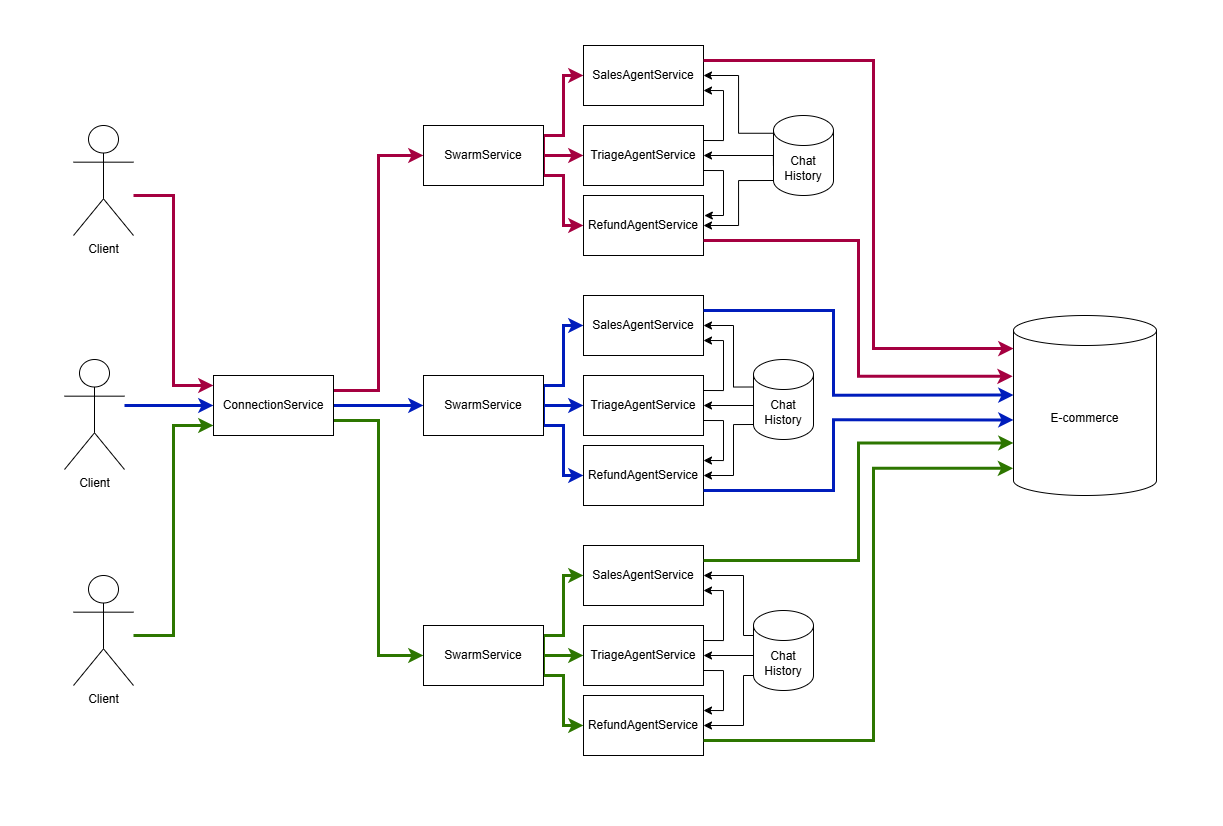
⚙️ Automatic Client Session Orchestration: Automatically manages client sessions, handling message history, agent navigation, and resource disposal for efficient and scalable real-time interactions. 🔄
👥 Operator Support: Supports navigation to human operators through tool calls, enabling seamless escalation of conversations from AI agents to human support for enhanced user experience. 🙋
🤖 Swarm of OpenAI, Grok, and Claude in One Chat: An agent-agnostic framework that allows a single chat to leverage multiple AI models (e.g., OpenAI, Grok, Claude) within a swarm, providing flexibility and diversity in agent capabilities. 🧠
📝 Agent Schema to Markdown: Generates Markdown documentation from agent schemas automatically in CI/CD, keeping project managers and teams updated on agent prompts, tools, and swarm structures without manual reporting. Changes are reflected instantly, streamlining communication and project tracking. 📊
💾 Redis Storage Integration: Persists state management, RAG (Retrieval-Augmented Generation) search data, and chat history in Redis, ensuring reliable, scalable, and high-performance storage. This enables safe and consistent access to agent states, vector search results, and conversation histories across distributed systems (Microservices). 🗄️
🔄 Chat Independent Background Agent Sessions: Enables the swarm to perform complex data processing computations in isolated contexts, such as financial analytics, allowing agents to handle intensive tasks like market trend analysis or portfolio optimization without interfering with the primary chat flow. Works the same way like fork in POSIX. 🔀
🚀 Getting Started
Want a real-world demo? Check out our Binance Candle Chat—a practical example of a sales agent in action! 📈
First Look
Read the detailed instructions by the link 📖
Installation
Get up and running in seconds:
npm install agent-swarm-kitQuick Example
Here’s a taste of what agent-swarm-kit can do—create a swarm with a triage agent that navigates to specialized agents:
import {
  addAgent,
  addCompletion,
  addSwarm,
  addTool,
  changeAgent,
  execute,
  session,
  Adapter
} from "agent-swarm-kit";

const NAVIGATE_TOOL = addTool({
  toolName: "navigate-tool",
  call: async (clientId, agentName, { to }) => {
    await changeAgent(to, clientId);
    await execute("Navigation complete. Notify the user", clientId);
  },
  validate: async () => true,
  type: "function",
  function: {
    name: "navigate-tool",
    description: "The tool for navigation",
    parameters: {
      type: "object",
      properties: {
        to: {
          type: "string",
          description: "The target agent for navigation",
        },
      },
      required: ["to"],
    },
  },
});

const ollama = new Ollama({ host: CC_OLLAMA_HOST });

const MOCK_COMPLETION = addCompletion({
  completionName: "navigate-completion",
  /**
   * Use whatever you want: NVIDIA NIM, OpenAI, GPT4All, Ollama or LM Studio
   * Even mock it for unit test of tool integration like it done in `test` folder
   *
   * @see https://github.com/tripolskypetr/agent-swarm-kit/tree/master/test
   */
  getCompletion: Adapter.fromOllama(ollama, "nemotron-mini:4b"), // "tripolskypetr/gemma3-tools:4b"
});

const TRIAGE_AGENT = addAgent({
  agentName: "triage-agent",
  completion: MOCK_COMPLETION,
  prompt: "You are to triage a users request, and call a tool to transfer to the right agent. There are two agents available: `sales-agent` and `refund-agent`",
  tools: [NAVIGATE_TOOL],
});

const SALES_AGENT = addAgent({
  agentName: "sales-agent",
  completion: MOCK_COMPLETION,
  prompt: "You are a sales agent that handles all actions related to placing the order to purchase an item.",
  tools: [NAVIGATE_TOOL],
});

const REDUND_AGENT = addAgent({
  agentName: "refund-agent",
  completion: MOCK_COMPLETION,
  prompt: "You are a refund agent that handles all actions related to refunds after a return has been processed.",
  tools: [NAVIGATE_TOOL],
});

const TEST_SWARM = addSwarm({
  agentList: [TRIAGE_AGENT, SALES_AGENT, REDUND_AGENT],
  defaultAgent: TRIAGE_AGENT,
  swarmName: "navigation-swarm",
});

...

app.get("/api/v1/session/:clientId", upgradeWebSocket((ctx) => {
  const clientId = ctx.req.param("clientId");

  const { complete, dispose } = session(clientId, TEST_SWARM)

  return {
    onMessage: async (event, ws) => {
      const message = event.data.toString();
      ws.send(await complete(message));
    },
    onClose: async () => {
      await dispose();
    },
  }
}));
The feature of this library is dependency inversion for agents injection. The agents are being lazy loaded during runtime, so you can declare them in separate modules and connect them to swarm with a string constant 🧩
export enum ToolName {
  TestTool = "test-tool",
}

export enum AgentName {
  TestAgent = "test-agent",
}

export enum CompletionName {
  TestCompletion = "test-completion"
}

export enum SwarmName {
  TestSwarm = "test-swarm"
}

...

addTool({
    toolName: ToolName.TestTool
    ...
})

addAgent({
  agentName: AgentName.TestAgent,
  completion: CompletionName.TestCompletion,
  prompt: "...",
  tools: [ToolName.TestTool],
});

addSwarm({
  agentList: [AgentName.TestAgent],
  defaultAgent: AgentName.TestAgent,
  swarmName: SwarmName.TestSwarm,
});

const { complete, dispose } = session(clientId, SwarmName.TestSwarm)

complete("I need a refund!").then(console.log);
🌟 Key Features
- 🤝 Agent Orchestration: Seamlessly switch between agents (e.g., triage → sales) with a single tool call. 🔄
- 📜 Shared History: Agents share a rotating 25-message history, scoped to
assistantanduserroles. 🗂️ - 🛠️ Custom Tools: Define tools with validation and execution logic tailored to your needs. 🔧
- 🛡️ Model Recovery: Automatically rescues invalid outputs with smart fallbacks like "Sorry, I missed that." 🚑
- 📦 Dependency Inversion: Lazy-load agents at runtime for modular, scalable designs. 🧩
🎯 Use Cases
- 🤖 Workflow Automation: Automate customer support with triage, sales, and refund agents. 📞
- 🤝 Collaborative AI: Build systems where agents solve problems together. 🧑🤝🧑
- 📋 Task Distribution: Assign specialized tasks to dedicated agents. 📤
- 💬 Chatbots & Beyond: Create dynamic, multi-role conversational systems. 🌐
📖 API Highlights
- 🛠️
addAgent: Define agents with custom prompts, tools, and completions. 🤖 - 🌐
addSwarm: Group agents into a coordinated network. 🕸️ - 🔄
session: Start a client session with real-time message handling. 📨 - 🔧
addTool: Create reusable tools with validation and execution logic. 🛠️ - 🔍
Storage.take: Search and retrieve data using embeddings (e.g., vector search, RAG). 📊
Check out the API Reference for more! 📚
🛠 Advanced Example: Vector Search with Embeddings
Integrate vector search with embeddings (RAG) for smarter agents:
import { addAgent, addSwarm, addStorage, addEmbedding, session, Storage } from "agent-swarm-kit";
import { Ollama } from "ollama";

const ollama = new Ollama();

// Define an embedding with similarity calculation
const NOMIC_EMBEDDING = addEmbedding({
  embeddingName: "nomic_embedding",
  calculateSimilarity: (a, b) => {
    return tidy(() => {
      const tensorA = tensor1d(a);
      const tensorB = tensor1d(b);
      const dotProduct = sum(mul(tensorA, tensorB));
      const normA = norm(tensorA);
      const normB = norm(tensorB);
      const cosineData = div(dotProduct, mul(normA, normB)).dataSync();
      const cosineSimilarity = cosineData[0];
      return cosineSimilarity;
    });
  },
  createEmbedding: async (text) => {
    const { embedding } = await ollama.embeddings({
      model: "nomic-embed-text",
      prompt: text,
    });
    return embedding;
  },
});

// Set up storage with sample data
const TEST_STORAGE = addStorage({
  storageName: "test_storage",
  embedding: NOMIC_EMBEDDING,
  createIndex: ({ description }) => description,
  getData: () => JSON.parse(readFileSync("./data.json", "utf8")).slice(0, 100),
});

// Create an agent with storage
const TEST_AGENT = addAgent({
  agentName: "test_agent",
  completion: TEST_COMPLETION
  prompt: "...",
  storages: [TEST_STORAGE],
});

// Build the swarm
const TEST_SWARM = addSwarm({
  swarmName: "test_swarm",
  agentList: [TEST_AGENT],
  defaultAgent: TEST_AGENT,
});

// Talk with a client
const { complete } = session("client-123", TEST_SWARM);
complete("I need a refund!").then(console.log);

...

export interface PhoneModel {
    id: number;
    title: string;
    description: string;
    diagonal: number;
}

// Use vector search in a tool call
Storage.take<PhoneModel>({
  search: "8 inch phone",
  agentName: AgentName.TestAgent,
  clientId,
  storageName: StorageName.PhoneStorage,
  total: 1,
  score: 0.68,
}).then((phones) => console.log(phones));
🧩 Demo Projects
Here’s a rundown of the demo projects showcasing agent-swarm-kit in action:
📈 binance-candle-chat: A cryptocurrency trading swarm with a triage agent routing to specialized trader agents (BTC, ETH, BNB, XRP, SOL) that calculate buy/sell orders and predict trends using OpenAI completion. 💹
🖥️ it-consulting-swarm: A multi-agent system with a triage agent routing queries to specialized agents for tech trends, cybersecurity, environment, health, and finance, all powered by OpenAI completion. 🔒
💊 langchain-stream: A pharma sales demo with a triage agent using Cohere completion and LangChain for real-time token streaming, alongside Ollama and LMStudio, to assist with consultations and cart operations. 🛒
💾 redis-persist-chat: A chat system with a triage agent using Saiga Yandex GPT, persisting chat history and states (like Tic-tac-toe) in Redis, with policies to restrict sensitive topics. 🎲
🌐 nginx-balancer-chat: A test environment demonstrating load balancing across 5 chat instances via Nginx, with a single agent reporting the server port using OpenAI completion. ⚖️
🔄 cohere-token-rotate: A pharma sales system with a triage agent using Cohere completion and a token rotation mechanism (10 trial tokens in parallel) for optimized API performance. 🔧
🎙️ whisper-voice-chat: A voice-based chat system using Whisper for real-time transcription and a single test agent powered by Nemotron Mini (via Ollama) to handle user interactions. 🗣️
📱 telegram-ollama-chat: A Telegram-based pharma sales chatbot with a triage agent routing requests to a sales agent, both using Ollama for natural conversations and managing product data from a shared storage. 💬
🛍️ repl-phone-seller: A REPL terminal app featuring a sales agent that helps users add phones to a cart, leveraging Ollama completions and tools for searching phones by keywords or diagonal size. 📲
🌐 client-server-chat: A WebSocket-based pharma sales demo with a single test agent using Saiga Yandex GPT to provide consultations and manage a cart. 🛠️
❓ Orchestration Principles
🤖 Several chatgpt sessions (agents) execute tool calls. Each agent can use different model, for example, mistral 7b for small talk, nemotron for business conversation. 🧠
🌐 The agent swarm navigate messages to the active chatgpt session (agent) for each
WebSocketchannel by usingclientIdurl parameter 🔗🔄 The active chatgpt session (agent) in the swarm could be changed by executing function tool. ⚙️
📜 Each client sessions share the same chat message history for all agents. Each client chat history keep the last 25 messages with rotation. Only
assistantandusermessages are shared between chatgpt sessions (agents), thesystemandtoolmessages are agent-scoped so each agent knows only those tools related to It. As a result, each chatgpt session (agent) has it's unique system prompt. 🗂️🛡️ If the agent output do not pass the validation (not existing tool call, tool call with invalid arguments, empty output, XML tags in output or JSON in output by default), the resque algorithm will try to fix the model. At first it will hide the previos messeges from a model, if this will not help, it return a placeholder like
Sorry, I missed that. Could you say it again?🚑
⚡ Multithreading
The following example demonstrates how to use a background agent to generate a Bitcoin trading report using a fork-like mechanism, ensuring the process runs independently of the main chat session:
import { inject } from "../../../core/di";
import { TYPES } from "../../../core/types";
import { log } from "pinolog";
import { fork, overrideAgent, scope } from "agent-swarm-kit";
import { randomString, str, ttl } from "functools-kit";
import { SwarmName } from "../../../../enum/SwarmName";
import SwingRangeReportPrivateService from "../private/SwingRangeReportPrivateService";
import { AgentName } from "../../../../enum/AgentName";

const REPORT_TTL = 30 * 60 * 1_000;

export class SwingRangeReportPublicService {
  private swingRangeReportPrivateService =
    inject<SwingRangeReportPrivateService>(
      TYPES.swingRangeReportPrivateService
    );

  public getBtcReport = ttl(
    async () => {
      log("swingRangeReportPublicService getBtcReport");
      return await scope(async () => {
        overrideAgent({
          agentName: AgentName.ReportAgent,
          systemDynamic: async () => str.newline([
            `Current date/time: ${new Date().toISOString()}`,
            "In the report, be sure to write the date of the indicators you refer to.",
            "Give priority to the last relevant indicator in the report",
          ]),
          mcp: [],
        });
        return await fork(
          async (clientId, agentName) => {
            return await this.swingRangeReportPrivateService.getBtcReport(
              clientId,
              agentName
            );
          },
          {
            clientId: `swing-range-report_${randomString()}`,
            swarmName: SwarmName.ReportSwarm,
          }
        );
      });
    },
    {
      timeout: REPORT_TTL,
    }
  );
}

export default SwingRangeReportPublicService;
P.S. openai threads doc 📖
🔌 Tool and System Prompt Reflection
Enhance your LLMs with flexible, runtime-configurable tools and system prompts using agent-swarm-kit. The library allows you to define tools with dynamic interfaces, enabling agents to adapt their functionality based on context or agent-specific requirements. This makes it easy to integrate specialized capabilities, like fetching real-time data or generating reports without additional tool arguments, with minimal boilerplate. 🛠️
addTool({
  toolName: ToolName.FetchShortRangeEmaSignals,
  type: "function",
  call: async ({ toolId, clientId, agentName, isLast }) => {
    const symbol = ioc.signalMetaService.getSymbolForAgent(agentName);
    const content =
      await ioc.shortRangeMathService.generateShortRangeReport(symbol);
    await commitToolOutput(toolId, content, clientId, agentName);
    if (isLast) {
      await execute("", clientId, agentName);
    }
  },
  function: (_, agentName) => {
    const displayName = ioc.signalMetaService.getDispayNameForAgent(agentName);
    return {
      name: ToolName.FetchShortRangeEmaSignals,
      description: `Fetch a short range EMA signals table for ${displayName}.`,
      parameters: {
        type: "object",
        properties: {},
        required: [],
      },
    };
  },
});Example: Below is a tool that dynamically fetches short-range EMA (Exponential Moving Average) signals for a trading agent, with a description tailored to the agent's display name 🌐
📝 Structured JSON Output With Validation
Create structured JSON outputs with precise schemas and robust validation! 📝 Ensure AI responses meet your needs with custom rules and automatic retries. 🔄 Integrate seamlessly with OpenAI, Ollama, or Claude. 🌐 Dynamic history guides consistent results for workflows or chatbots. 🗂️ Simple TypeScript API scales effortlessly with error recovery. 🛠️
import { addOutlineSchema, IOutlineFormat } from "agent-swarm-kit";

const format: IOutlineFormat = {
  type: "object",
  properties: {
    take_profit_price: { type: "number", description: "Take profit price in USD" },
    stop_loss_price: { type: "number", description: "Stop-loss price in USD" },
    description: { type: "string", description: "User-friendly explanation of risks, min 10 sentences" },
    reasoning: { type: "string", description: "Technical analysis, min 15 sentences" },
  },
  required: ["take_profit_price", "stop_loss_price", "description", "reasoning"],
};

addOutlineSchema({
  outlineName: "signal_plutus",
  format,
  prompt: "Generate crypto trading signals based on price and volume indicators in JSON format.",
  completion: "grok-mini-outline",
  getOutlineHistory: async ({ history, param }) => {
    const signalReport = await ioc.signalReportService.getSignalReport(param);
    await commitReports(history, signalReport);
    await history.push({ role: "user", content: "Generate JSON based on reports." });
  },
  validations: [
    {
      validate: ({ data }) => {
        if (data.action !== "buy") return;
        const stopLossChange = percentDiff(data.current_price, data.stop_loss_price);
        if (stopLossChange > CC_LADDER_STOP_LOSS) {
          throw new Error(`Stop loss must not exceed -${CC_LADDER_STOP_LOSS}%`);
        }
      },
      docDescription: "Checks stop-loss price against max loss percentage.",
    },
    {
      validate: ({ data }) => {
        if (data.action !== "buy") return;
        const sellChange = percentDiff(data.current_price, data.take_profit_price);
        if (sellChange > CC_LADDER_TAKE_PROFIT) {
          throw new Error(`Take profit must not exceed +${CC_LADDER_TAKE_PROFIT}%`);
        }
      },
      docDescription: "Checks take-profit price against max profit percentage.",
    },
  ],
});
P.S. Outlines by dottxt doc 📖
✅ Tested & Reliable
agent-swarm-kit comes with a robust test suite covering:
- 🛡️ Validation: Ensures all components (agents, tools, swarms) are properly configured. ✅
- 🚑 Recovery: Handles edge cases like invalid tool calls or empty outputs. 🛠️
- 🔄 Navigation: Smoothly switches between agents without deadlocks. 🌐
- ⚡ Performance: Efficient connection disposal and history management. 📈
See the Test Cases section in the docs for details. 📚
🌍 Ecosystem
The agent-swarm-kit ecosystem extends beyond the core library, offering complementary tools to enhance your multi-agent AI development experience. One such tool is:
AI Fundamental Analysis Backtester
The node-ccxt-backtest is an AI-driven trading strategy framework built on the ReAct (Reason + Act) pattern. Instead of hardcoded indicators, it replaces rule-based logic with reasoning: 8 specialist LLM agents independently research the market via iterative web search, covering on-chain reserves, capital flows, network fundamentals, smart money activity, macro environment, and price history — then a portfolio manager synthesises all findings into a single BUY/SELL/WAIT signal.
Key Features
🕵️ 8 Specialist Agents: Each covers a distinct analytical angle (balance sheet, cash flow, valuation, income, insider transactions, news, macro, technical) with no context overlap between them.
🔒 Anti-Bias Prompting: Agents are instructed to reject undated sources, avoid look-ahead bias, bias toward negative signals, and require multiple queries before concluding.
🔬 Two-Stage Pipeline: Stage 1 produces a daily fundamental signal (cached to disk); Stage 2 applies an hourly technical entry filter using the last 240 one-minute candles before placing any order.
🏗️ Structured Output via Tool-Call Forcing: JSON schema compliance is enforced by wrapping the schema into a
provide_answertool, with automatic retry andjsonrepairfor malformed responses.📋 Multiple Run Modes: Supports
--backtest,--paper,--live,--pine, and--dumpCLI flags via CCXT.
Use Case
Ideal for researchers and quant developers who want to evaluate LLM-based fundamental analysis as a trading signal source. Use it standalone or combine with agent-swarm-kit to embed the research pipeline into a broader multi-agent system.
Get Started
Clone the repository and set the OLLAMA_TOKEN environment variable. Optionally configure Telegram notifications and run with the desired CLI mode.
Multi-User Telegram Agent Swarm
The node-ollama-telegram-agent-swarm is a production-ready reference implementation of a multi-user Telegram chatbot powered by Ollama and agent-swarm-kit. It demonstrates how to handle concurrent chat sessions with isolated per-user history, agent navigation, and tool call integration — with a detailed walkthrough of the library's core API.
Key Features
💬 Multi-User Sessions: Each Telegram user gets an independent swarm session with its own conversation history and active agent state.
🔄 Agent Navigation: A triage agent routes users to a pharma sales agent via tool calls, with automatic greeting injection on agent switch.
🛠️ Runtime System Prompt Injection: Uses
commitSystemMessageto dynamically supplement agent context mid-conversation (e.g., suppressing recursive tool calls after a successful search).📖 Comprehensive API Walkthrough: Covers
addAgent,addCompletion,addTool,changeAgent,execute,commitToolOutput,commitSystemMessage,commitFlush,getLastUserMessage, and more.🔌 Provider-Agnostic: Completion interface works identically with Ollama, OpenAI, DeepSeek, or any other provider without changing business logic.
Use Case
A practical starting point for anyone building a Telegram bot with agent-swarm-kit. The codebase is intentionally readable and serves as living documentation for the library's orchestration model.
Get Started
Clone the repository, configure Ollama, and connect a Telegram bot token. The swarm handles session lifecycle, message routing, and agent recovery automatically.
Trading Signals MCP Server
The Trading Signals MCP Server is a comprehensive technical analysis service designed to provide real-time cryptocurrency trading signals and market insights through the Binance exchange. It delivers multi-timeframe analysis, advanced technical indicators, order book data, and historical candle patterns to support informed trading decisions using the Model Context Protocol (MCP) framework.
Key Features
📈 Multi-Timeframe Analysis: Supports 1-minute to 1-hour candles for different trading strategies (scalping, day trading, swing trading)
📊 Technical Indicators: RSI, MACD, Bollinger Bands, Fibonacci levels, ATR, Stochastic, ADX, and more
📚 Order Book Analysis: Real-time liquidity zones and whale order detection
💹 Volume Analysis: Pivot points, volume spikes, and institutional activity detection
⚡ Trend Slope Analysis: Minute-by-minute trend slope for immediate momentum shifts
🕐 Historical Data: OHLCV data with volatility metrics across multiple timeframes
Use Case
Ideal for integrating trading intelligence into AI agents within agent-swarm-kit. Use it to build agents that analyze market conditions, generate trading signals, or provide investment insights. The MCP framework ensures structured data delivery for seamless AI model integration.
Get Started
Install via NPX with no setup required, or clone the repository for local deployment. Perfect for combining with agent-swarm-kit to create sophisticated trading analysis agents.
Agent Tune Dataset Constructor
The Agent Tune Dataset Constructor is a React-based tool designed for crafting fine-tuning datasets tailored for AI models, published on GitHub Pages at agent-tune.github.io. It provides a dynamic, user-friendly interface with list and grid layouts, enabling you to define user inputs, preferred and non-preferred outputs, and multi-turn chat histories—complete with tool definitions and calls. Built with the react-declarative library and styled using Material-UI, it’s optimized for creating JSONL files compatible with OpenAI’s fine-tuning API. 🛠️
Key Features
📝 Dynamic Forms: Build dataset entries with configurable user inputs, outputs, and tools (up to five per entry), featuring autocomplete for tool names and enum values. 💻
💬 Chat History: Include conversational context with tool calls, supporting up to five messages per entry. 🗂️
💾 Data Management: Import/export datasets as JSONL files (
SFTandDPOboth), with automatictool_call_idgeneration, and persist changes to local storage. 📥✅ Validation: Ensures tool consistency, message order, and data integrity. 🛡️
🚀 Ease of Use: Navigate with breadcrumbs, save drafts, and export directly for fine-tuning with commands like openai api fine_tunes.create. 📤
Use Case
Perfect for preparing training data to fine-tune agents within agent-swarm-kit, Agent Tune lets you define precise behaviors—like how a sales agent responds or a triage agent routes requests—before integrating them into your swarm. Export your dataset and fine-tune your models to enhance performance across your agent network. 🌐
Get Started
Visit agent-tune.github.io to try it out, or clone the repository to customize it further. Combine it with agent-swarm-kit for a seamless workflow from dataset creation to agent deployment. 🚀
🤝 Contribute
We’d love your input! Fork the repo, submit a PR, or open an issue on GitHub. 🙌
📜 License
MIT © tripolskypetr 🖋️