
agent-tank
v0.9.11
Published
Monitor and query usage limits for LLM CLI tools (Claude, Antigravity, Codex) via HTTP API

Maintainers
 propr
proprReadme
Agent Tank
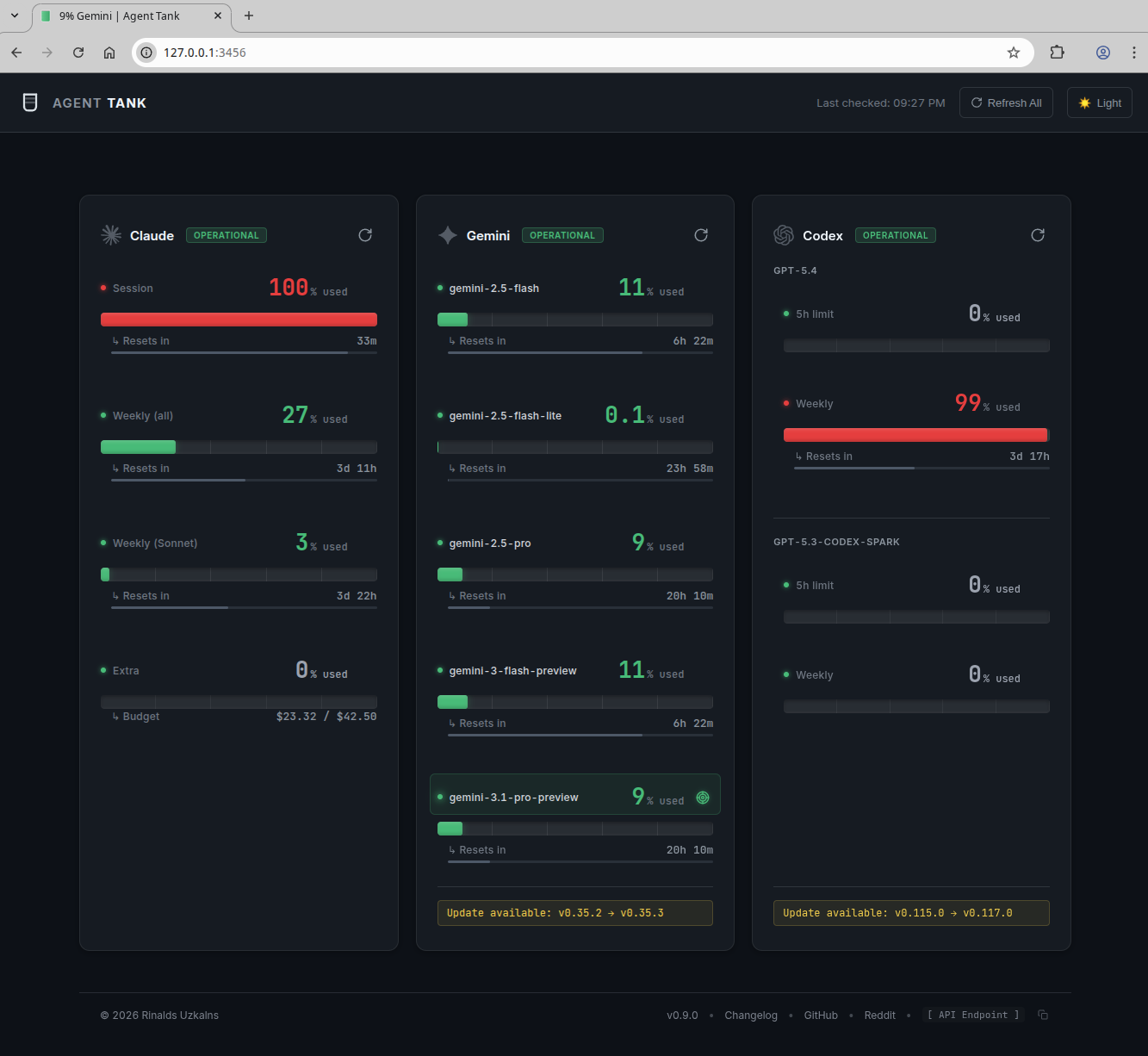
Agent Tank is a local dashboard and HTTP API for monitoring usage limits in AI coding agent CLIs.
It supports:
- Claude Code
- Antigravity CLI
- OpenAI Codex
How It Gets the Data
This is the part that matters.
Agent Tank reads usage directly from the local CLI tools you already use. It launches the installed CLIs locally, runs their built-in usage commands, and parses the output into a unified web UI and JSON API.
- Claude: runs
/usage - Antigravity: runs
/usage - Codex: prefers JSON-RPC
account/rateLimits/read, falls back to/status
What it does not do:
- It does not scrape provider websites
- It does not read browser cookies
- It does not depend on a logged-in browser session
- It does not MITM or inspect your network traffic
- It does not send your usage data to a remote service
If you have seen other tools built around log-file heuristics or browser-session scraping, Agent Tank is deliberately not that.
Who It Is For
Agent Tank is meant for subscription-based coding agent products where the CLI itself exposes session or limit information.
Examples:
- Claude Code Pro / Max
- Antigravity CLI with supported subscription plans
- ChatGPT Codex with supported plans
It is not for:
- pay-as-you-go API key billing
- cost tracking for API requests
- provider billing dashboards
If you need API spend tracking, use the provider’s billing tools instead.
Quick Start
Install
npm install -g agent-tankOr run it directly:
npx agent-tankRun from Source
If you want to run the latest code from a checkout instead of the published package:
# 1. Clone the repo
git clone https://github.com/integry/agent-tank.git
cd agent-tank

# 2. Install dependencies (compiles node-pty natively)
npm install

# 3. Run it
npm start          # = node bin/agent-tank.js
By default it auto-discovers installed CLIs and serves the dashboard + API at http://127.0.0.1:3456.
To pass flags, call the entry point directly (npm start does not forward arguments cleanly):
node bin/agent-tank.js --claude --codex --port 8080
node bin/agent-tank.js --once --json          # one-shot, prints JSON, no server
node bin/agent-tank.js --no-docker            # localhost only
node bin/agent-tank.js --help                 # full option list
Prerequisites:
- Node.js 18+
node-ptyis a native module, sonpm installneeds Python 3.8+ and C/C++ build tools. See Installation Notes if the build fails.- At least one supported CLI installed and authenticated on your
PATH(claude,agy, orcodex).
Other useful scripts:
npm test           # run all tests
npm run lint       # check code style
npm run rebuild    # rebuild node-pty against a detected Python
First Run
# Auto-discover installed agents and start the web UI + API
agent-tank
By default it starts on:
http://127.0.0.1:3456If Docker is available, Agent Tank asks Docker for the active bridge gateway addresses and binds them by default so containers on the same host can reach it without exposing it on the public interface. If Docker is unavailable, it falls back to local bridge interface detection.
Use this if you want localhost only:
agent-tank --no-dockerMost Common Commands
# Monitor only specific agents
agent-tank --claude --agy

# Use a custom port
agent-tank --port 8080

# Keep Agent Tank running after closing this terminal
agent-tank --background

# Fetch once and print JSON
agent-tank --once --json

# Show the installed Agent Tank version
agent-tank --version

# Require at least 60 seconds between refreshes for the same agent
agent-tank --refresh-cooldown 60
What You Get
Web UI
- Single-page dashboard for all supported agents
- Live refresh
- Reset countdowns
- Pace indicators
- Browser-tab tracking via title and favicon updates
HTTP API
GET /statusGET /status/:agentPOST /refreshPOST /refresh/:agentGET /configGET /historyGET /history/:agent
Supported Metrics
| Agent | Method | Metrics |
|---|---|---|
| Claude | PTY /usage or Anthropic OAuth API | Current session, weekly all-models, weekly Fable allowance (Max accounts only) |
| Antigravity | PTY /usage | Per-model quota availability and reset windows when reported |
| Codex | JSON-RPC preferred, PTY fallback | 5-hour limits, weekly limits, model/account info |
Basic Usage
Auto-Discover Everything
agent-tankMonitor Specific Agents
agent-tank --claude --codexOne-Shot Scripting Mode
agent-tank --once --jsonBackground Server Mode
agent-tank --backgroundThis starts Agent Tank as a detached process, prints the background PID, and exits the parent command.
Bind to a Different Host or Port
agent-tank --host 0.0.0.0 --port 8080Disable Docker Bridge Binding
agent-tank --no-dockerDisable Background Refresh
agent-tank --auto-refresh-mode noneSlow Down Agent Refreshes
By default, Agent Tank will not refresh the same agent more than once every 30 seconds, even if the refresh is triggered manually or by detected CLI activity. This reduces unnecessary polling and helps avoid CLI-side rate limiting.
agent-tank --refresh-cooldown 60Set it to 0 to disable the cooldown entirely.
Command Line Options
Options:
  --claude              Enable Claude monitoring
  --agy                 Enable Antigravity monitoring
  --codex               Enable Codex monitoring
  --agent <spec>        Add an account as provider[:alias][=config-path] (repeatable)
  --port <port>         HTTP server port (default: 3456)
  --host <host>         Bind address (default: 127.0.0.1 + Docker bridge when available)
  --docker              Enable Docker bridge bind when --host is omitted (default: true)
  --auth-user <user>    HTTP Basic Auth username
  --auth-pass <pass>    HTTP Basic Auth password
  --auth-token <token>  API key for Bearer token auth
  --fresh-process       Spawn a new process per refresh (default: false)
  --claude-api          Use direct Anthropic API for Claude usage (faster, 60s refresh)
  --config, -c          Path to config file (JSON)
  --version, -v         Show version
  --auto-discover       Auto-discover available agents (default: true)
  --auto-refresh        Enable/disable background auto-refresh (default: true)
  --auto-refresh-mode <mode>         Refresh mode: none, interval, activity (default: activity)
  --auto-refresh-interval <seconds>  Auto-refresh interval in seconds (default: 60, 0 = disabled)
  --refresh-cooldown <seconds>       Minimum time between refreshes per agent (default: 30, 0 = disabled)
  --activity-debounce <ms>           Activity debounce interval in milliseconds (default: 5000)
  --keepalive           Enable/disable session keepalive (default: true)
  --keepalive-interval <seconds>     Session keepalive interval in seconds (default: 300, 0 = disabled)
  --history-retention-days <days>    Days to retain usage history (default: 14)
  --once                Fetch usage once and exit (no HTTP server)
  --json                Output pure JSON (suppress logging, use with --once)
  --background          Start Agent Tank as a detached background process
  --help, -h            Show this help message
Configuration
Environment Variables
Environment variables override CLI flags and config file values. Background mode has
three exceptions: --no-background, --once, and --json suppress
AGENT_TANK_BACKGROUND=1 for that run.
| Variable | Description |
|---|---|
| AGENT_TANK_USER | Basic auth username |
| AGENT_TANK_PASS | Basic auth password |
| AGENT_TANK_TOKEN | Bearer token auth |
| AGENT_TANK_HOST | Bind address |
| AGENT_TANK_DOCKER | Enable/disable Docker bridge bind when --host is omitted |
| AGENT_TANK_FRESH_PROCESS | Use fresh process per refresh (1/true) |
| AGENT_TANK_CLAUDE_API | Use Claude API mode (1/true) |
| AGENT_TANK_AUTO_REFRESH | Enable/disable auto-refresh |
| AGENT_TANK_AUTO_REFRESH_MODE | none, interval, or activity |
| AGENT_TANK_AUTO_REFRESH_INTERVAL | Auto-refresh interval in seconds |
| AGENT_TANK_REFRESH_COOLDOWN | Minimum time between refreshes per agent in seconds |
| AGENT_TANK_ACTIVITY_DEBOUNCE | Activity debounce interval in milliseconds |
| AGENT_TANK_KEEPALIVE | Enable/disable keepalive |
| AGENT_TANK_KEEPALIVE_INTERVAL | Keepalive interval in seconds |
| AGENT_TANK_HISTORY_RETENTION_DAYS | History retention window |
| AGENT_TANK_BACKGROUND | Start as a detached background process (1/true) |
| AGENT_TANK_BACKGROUND_LOG | Background child stdout/stderr log path (defaults to a temp file) |
| AGENT_TANK_BACKGROUND_GRACE_MS | Parent startup grace period before reporting background success; success means the child survived this period |
Config File
Use the agents array to monitor multiple accounts, including multiple accounts
from the same provider. Each entry accepts a provider, an optional unique id
and display alias, and an optional configPath directory:
{
  "agents": [
    {
      "provider": "codex",
      "id": "work",
      "alias": "Work",
      "configPath": "/srv/accounts/codex-work"
    },
    {
      "provider": "codex",
      "id": "personal",
      "alias": "Personal",
      "configPath": "/srv/accounts/codex-personal"
    },
    {
      "provider": "claude",
      "id": "client-a",
      "alias": "Client A",
      "configPath": "./accounts/claude-client-a"
    }
  ],
  "port": 8080,
  "dockerAccess": true,
  "claudeApi": false,
  "refreshCooldown": 30,
  "autoRefresh": {
    "mode": "activity",
    "interval": 60,
    "activityDebounce": 5000,
    "refreshCooldown": 30
  },
  "keepalive": {
    "enabled": true,
    "interval": 300
  },
  "history": {
    "retentionDays": 14
  }
}
Relative account paths are resolved relative to the JSON config file, and ~/
paths are expanded to the current user's home directory. The path
is passed to the provider CLI as its config home: CLAUDE_CONFIG_DIR for Claude,
CODEX_HOME for Codex, and GEMINI_CLI_HOME for Antigravity. Legacy top-level
settings such as "claude": true remain supported for single default accounts.
Run with:
agent-tank -c config.jsonThe same setup can be supplied directly on the command line. Repeat --agent
once per account:
agent-tank \
  --agent codex:work=/srv/accounts/codex-work \
  --agent codex:personal=/srv/accounts/codex-personal
The id (or CLI alias after :) is the key returned by /status and is used
by account-specific status, history, and refresh endpoints. IDs may contain
letters, numbers, dots, underscores, and hyphens. If both id and alias are
set in JSON, id is the API key and alias is the dashboard label.
Antigravity
Antigravity support uses the agy CLI and reads the interactive /usage output.
In --once mode, Agent Tank prints the result and exits immediately after the output is flushed.
Examples:
agent-tank --agy
agent-tank --agy --once --json
Each entry in usage.models reports the quota left, the countdown Antigravity
displays (Resets in on older builds, Refreshes in on the grouped
Models & Quota screen), the absolute instant that countdown points at, and the
cycle the limit belongs to. A limit showing Quota available has no pending
reset, so its reset fields are null.
{
  "model": "Gemini · Five Hour Limit Remaining",
  "usageLeft": 90.31,
  "percentUsed": 9.7,
  "resetsIn": "58m",
  "resetsInSeconds": 3480,
  "resetsAt": "2026-09-23T11:52:00.000Z",
  "cycle": "fiveHour",
  "group": "Gemini"
}
HTTP API
Endpoints
| Method | Endpoint | Description |
|---|---|---|
| GET | / | HTML status page |
| GET | /status | JSON status for all agents |
| GET | /status/:id | JSON status for one configured account |
| GET | /config | Auto-refresh and history config |
| GET | /history | History summary |
| GET | /history/:id | History for one configured account |
| POST | /refresh | Refresh all agents |
| POST | /refresh/:id | Refresh one configured account |
Example GET /status
{
  "claude": {
    "name": "claude",
    "id": "claude",
    "alias": null,
    "provider": "claude",
    "usage": {
      "session": {
        "label": "Current session",
        "percent": 42,
        "resetsAt": "10pm (Europe/London)",
        "resetsIn": "12m",
        "resetsInSeconds": 764
      },
      "weeklyAll": {
        "label": "Current week (all models)",
        "percent": 31,
        "resetsAt": "Mar 13, 3am (Europe/London)",
        "resetsIn": "4d 5h",
        "resetsInSeconds": 364364
      },
      "weeklyFable": {
        "label": "Current week (Fable)",
        "percent": 82,
        "resetsAt": "Mar 13, 3am (Europe/London)",
        "resetsIn": "4d 5h",
        "resetsInSeconds": 364364
      }
    },
    "metadata": {
      "email": "[email protected]",
      "version": "2.1.71"
    },
    "lastUpdated": "2026-03-08T21:47:15.090Z",
    "error": null,
    "isRefreshing": false
  },
  "codex": {
    "name": "codex",
    "usage": {
      "fiveHour": {
        "percentUsed": 0,
        "resetsAt": "02:44 on 9 Mar",
        "resetsIn": "4h 56m",
        "resetsInSeconds": 17807
      },
      "weekly": {
        "percentUsed": 0,
        "resetsAt": "21:44 on 15 Mar",
        "resetsIn": "6d 23h",
        "resetsInSeconds": 604607
      }
    },
    "metadata": {
      "email": "[email protected]",
      "model": "gpt-5.3-codex"
    },
    "lastUpdated": "2026-03-08T21:47:12.648Z",
    "error": null,
    "isRefreshing": false
  }
}
Claude API Mode
By default, Claude usage is collected via PTY by running /usage.
With --claude-api, Agent Tank uses the Anthropic OAuth usage API instead. This is usually faster and supports a shorter refresh interval.
agent-tank --claude --claude-apiHow it works:
- reads the same Claude OAuth credentials the CLI already uses
- calls
https://api.anthropic.com/api/oauth/usage - refreshes expired OAuth tokens when needed
- falls back to PTY mode if the API path fails
You can also enable it with:
AGENT_TANK_CLAUDE_API=1 agent-tank --claudeAuto-Refresh Modes
Agent Tank supports three refresh strategies:
| Mode | Description |
|---|---|
| activity | Default. Watches known local agent directories and refreshes when activity is detected |
| interval | Refreshes on a fixed timer |
| none | No background refresh. Use manual refresh only |
Examples:
# Default mode
agent-tank

# Interval polling
agent-tank --auto-refresh-mode interval

# Manual-only mode
agent-tank --auto-refresh-mode none

# Longer activity debounce
agent-tank --activity-debounce 10000
Activity-Based Polling
In activity mode, Agent Tank watches common local directories:
- Claude:
~/.config/claude/projects/,~/.claude/ - Codex:
~/.codex/sessions/,~/.codex/ - Antigravity:
~/.gemini/antigravity-cli/
If no suitable directories are found, it falls back to interval mode.
Session Keepalive
Keepalive helps persistent PTY-backed sessions stay warm.
# Default keepalive
agent-tank

# Every 10 minutes
agent-tank --keepalive-interval 600

# Disable keepalive
agent-tank --no-keepalive
Notes:
- disabled automatically in
--fresh-process - disabled automatically in
--once - not needed for Codex JSON-RPC mode
Usage History and Pace
Agent Tank stores usage snapshots and calculates whether a metric is being consumed faster than the time window would suggest.
You can configure retention:
agent-tank --history-retention-days 7History endpoints:
GET /historyGET /history/:agent
Installation Notes
Build Requirements
node-pty requires native compilation support.
You need:
- Python 3.8+
- C/C++ build tools
- Node.js development headers
Ubuntu / Debian
sudo apt-get install python3.11 python3.11-dev build-essential nodejs-devFedora / RHEL / CentOS
sudo dnf install python3.11 python3.11-devel gcc gcc-c++ make nodejs-developenSUSE
sudo zypper install python311 python311-devel gcc gcc-c++ make nodejs20-develmacOS
xcode-select --install
brew install [email protected]
Windows
- Install Python 3.11+
- Install Visual Studio Build Tools
CLI Requirements
You need at least one supported CLI installed and authenticated.
- Claude Code as
claude- Version 2.0+ required for
/usage
- Version 2.0+ required for
- Antigravity CLI as
agy/usagecommand support required
- OpenAI Codex as
codex
Useful checks:
claude --version
agy --version
codex --version
Programmatic Usage
const { AgentTank } = require('agent-tank');

const watcher = new AgentTank({
  agents: [
    { provider: 'codex', id: 'work', configPath: '/srv/accounts/codex-work' },
    { provider: 'codex', id: 'personal', configPath: '/srv/accounts/codex-personal' },
    'agy'
  ],
  port: 3456,
  autoDiscover: true
});

await watcher.start();

const status = watcher.getStatus();
console.log(status);

await watcher.refreshAgent('work');

watcher.stop();
Troubleshooting
gyp ERR! during install
This usually means your system is missing Python, compiler tools, or Node headers.
Try:
PYTHON=/usr/bin/python3.11 npm install
npm run rebuild
Timeout waiting for usage data
- make sure the CLI works on its own
- make sure the CLI is authenticated
- check for trust prompts, auth prompts, or update prompts
- try
--fresh-process - try disabling keepalive or background refresh while debugging
No agents found
Make sure at least one supported CLI is installed and on your PATH.
Port already in use
agent-tank --port 8080Community
Author
License
MIT
Contributing
Pull requests are welcome.