
agent-token-meter
v1.4.4
Published
Burn-rate meter for AI coding agents. Surfaces quadratic session cost and reasoning-workspace drift; nudges curated handoffs at 50/75/90% via a bundled agent protocol so context resets at position 0 instead of /compact summarizing under pressure. Zero dep

Maintainers
 albertkd
Readme
Agent Token Meter






A speedometer for your context window. Zero dependencies. Single file. Answers one question: should I reset my context right now?
AI coding agents bill linearly per token — but session cost grows quadratically, not just linearly, because every turn resends the entire history. A 100-turn conversation doesn't cost 10× a 10-turn one. It costs roughly 90× (worked example in "Why short sessions win" below). And reasoning quality degrades well before the context window actually fills — the model attends more weakly to the middle of a long conversation than to its start and recent tail, so drift sets in long before you hit any limit. Most developers have no real-time visibility into either.
Agent Token Meter watches your coding agent's session and shows you the burn rate, acceleration, and estimated calls until auto-compaction — so you know when to curate a handoff and reset, not just how much you've spent after the fact.
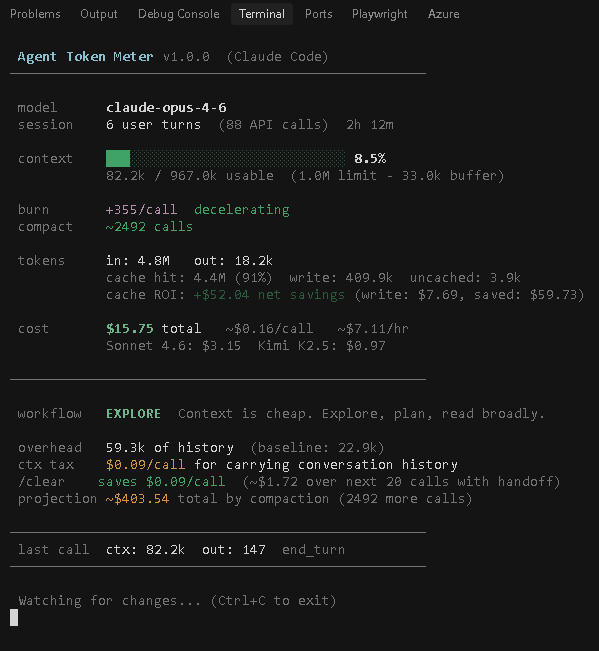
 Agent Token Meter v1.4.4 · Claude Code
 agent-token-meter · 80ff748f
════════════════════════════════════════════════════════════
 MULTIPLIER   ×15.7 ↑   $0.88 now   $0.05 fresh
 ⚠ CLEAR — fill 51% (overhead 48%) · reset in ~642 turns
════════════════════════════════════════════════════════════
 NOW
 context  ███████████████░░░░░░░░░░░░░░░  51% [SOFTENING]
 burn         +738 tok/call ↑
 last turn    492.9k in · 1.5k out · end_turn
────────────────────────────────────────────────────────────
 IF YOU CLEAR
 per call     save $0.69
 next 20      save ~$13.79
 steps        curate handoff → /clear → reload (lands at position 0)
────────────────────────────────────────────────────────────
 HANDOFF SECTIONS
 mission · constraints · decisions · open · next · files · avoid
────────────────────────────────────────────────────────────
 SESSION
 spend        $304.04 · 27 turns · 7h 47m · $39.06/hr
 cache        98% hit · saved $1557.60 · 121.9M in · 991.9k out
 output       991.9k total · 0.8% of inputs
 alt models   Sonnet 4.6 $60.81   Kimi K2.5 $22.48
════════════════════════════════════════════════════════════
 Watching · Ctrl+C to exit
The headline is the ×N.N multiplier — how much each call costs vs. a fresh-conversation call. ×1–×2 green, ×3 yellow, ×4+ red, ×5+ red background. The second line is a phase banner that fuses status (BUILD/HANDOFF/CLEAR), context fill, and reset ETA into one scannable sentence. When context exceeds the usable limit you see ⚠ HANDOFF AND CLEAR — context N% OVER · reset overdue Nm instead.
Supported agents
| Agent | Status | Session logs |
|---|---|---|
| Claude Code | Supported | ~/.claude/projects/{project}/{session}.jsonl |
| Cursor | Planned | — |
| Windsurf | Planned | — |
Adding a new agent requires only a profile object and a parser function. See the AGENTS object in token-meter.mjs.
Install
Quick start
In a separate terminal pane, alongside Claude Code:
npx agent-token-meterNothing to install. npx downloads the latest version on demand, runs it against your active Claude Code session, and shows the dashboard. Close with Ctrl+C.
Prerequisite: Claude Code is running (or has run in this project before) — the meter reads its session logs from ~/.claude/projects/. If you've never used Claude Code in this directory, start a session there first, then launch the meter.
Full agentic setup (one-time per project)
To let the agent itself respond to the meter's threshold nudges and follow the bundled handoff protocol:
npx agent-token-meter --install-hooks --install-protocolThis wires two things at once:
- Threshold hooks →
~/.claude/hooks/token-meter-hook.mjsplus three event registrations in~/.claude/settings.json(PostToolUse,SessionStart,PostCompact) - Agent protocol →
./AGENT-PROTOCOL.mdin this project, plus a single@importline in./CLAUDE.md
Both are atomic, idempotent, and reversible:
npx agent-token-meter --uninstall-hooks       # remove hooks only
npx agent-token-meter --uninstall-protocol    # remove protocol only
See Threshold hooks and Agent Protocol sections below for what each piece does. Complete file-write scope is enumerated in SECURITY.md.
Alternate install methods
# System-wide install — adds `agent-token-meter` to your PATH
npm i -g agent-token-meter
agent-token-meter

# From source — clone and run directly
git clone https://github.com/albertdobmeyer/agent-token-meter
cd agent-token-meter
node token-meter.mjs
Heads-up about the npm-page install snippet
npm's landing page displays npm i agent-token-meter as the default install command for every package. For our CLI-only package, that command works but only drops the binary into ./node_modules/.bin/ of whatever directory you're in — your shell won't find it on PATH. If you copied that snippet from the npm page and the agent-token-meter command isn't recognized, use npx agent-token-meter (Quick start above) or npm i -g agent-token-meter instead.
Requirements: Node.js 18+ (zero dependencies).
Threshold hooks (agent integration)
The token meter can nudge your AI agent directly inside the conversation. Instead of polling or injecting on every turn, it uses threshold triggers — the agent gets a one-line system reminder only when context crosses a reasoning-degradation boundary. The 50/75/90% marks correspond to curation is still cheap, drift is setting in, and attention degraded — cost biting hard. Zero tokens injected when below those marks.
Install hooks
npx agent-token-meter --install-hooksThis copies a lightweight hook script to ~/.claude/hooks/ and registers it as a PostToolUse hook in ~/.claude/settings.json. The hook fires after every tool call but stays silent unless a threshold is crossed.
Currently supported for: Claude Code.
What the agent sees
| Threshold | Nudge |
|---|---|
| 50% | [Token Meter] Context 50%. Reasoning still sharp — start drafting the handoff at ./handoff-<id>.md (per AGENT-PROTOCOL.md if present). |
| 75% | [Token Meter] Context 75%. Drift zone — finish ./handoff-<id>.md now while curation is still cheap. Prepare to request /clear from the user. |
| 90% | [Token Meter] Context 90%. ~$X.XX/call tax + attention degrading. Confirm ./handoff-<id>.md is complete, then ask the user to /clear and reload by saying "continue from ./handoff-<id>.md". |
| Compaction | [Token Meter] Compaction detected (Nx). Context reset to X%. Position bias reset to fresh; thresholds re-armed. Write a fresh ./handoff-<id>.md now — the auto-summary is a fallback, not a substitute. |
Each threshold fires once per session. When auto-compaction happens, thresholds above the new fill level are re-armed. The nudges aren't budget alarms — they're cues at the points where the cost of not curating starts to outweigh the cost of curating.
How it works
The hook script (~/.claude/hooks/token-meter-hook.mjs) typically runs in under 50ms:
- Finds the active session JSONL file
- Parses it for current context size and model
- Computes fill % against the model's context limit
- Checks against thresholds stored in a tiny state file
- If no threshold crossed — exits silently (no output, zero tokens injected)
- If a threshold is crossed — emits one line via
additionalContext
State is tracked in ~/.claude/token-meter-hook-state.json to prevent re-firing.
Uninstall hooks
npx agent-token-meter --uninstall-hooksRemoves the hook script, state file, and settings entry. Your existing hooks are preserved.
Two tools, two purposes
| | Dashboard (npx agent-token-meter) | Hooks (--install-hooks) |
|---|---|---|
| Audience | You (the developer) | The AI agent |
| Display | Full real-time dashboard in split terminal | One-line system reminder |
| Frequency | Continuous live updates | Only at 50/75/90% thresholds |
| Token cost | Zero (separate process) | ~4 lines total across entire session |
| Purpose | Spot the curation moment, monitor burn rate | Nudge the agent to curate a handoff at reasoning-degradation moments |
Use both together: the dashboard for your situational awareness, the hooks for the agent's.
Agent Protocol — the contract between hook and agent
The threshold hook fires a one-line system reminder. That reminder is imperative but compact — and a frontier model has to infer the rest: what to write, where to save it, what to tell the human at 90%, how the next session should pick up. v1.4 closes that gap with a bundled Agent Protocol document.
What it is
AGENT-PROTOCOL.md is a one-page markdown file that lives at the project root. It tells the agent exactly:
- The handoff file schema (7 sections: Mission, Constraints, Decisions, Open threads, Next step, Files touched, Avoid)
- The filename convention (
./handoff-{shortId}.md) - The exact phrase to say to the user at 90% ("Please run
/clear, then reload by saying: 'continue from ./handoff-{id}.md'") - The fallback procedure when auto-compaction fires anyway (write a fresh handoff from post-compaction state)
- The bootstrap protocol when a fresh session sees a prior handoff (read it first, confirm with user, then resume)
- An optional handoff-vs-memory decision rubric for projects using Claude Code's auto-memory system
How to install
# Full setup — protocol file + CLAUDE.md import line
npx agent-token-meter --install-protocol

# Just the protocol file, no CLAUDE.md edit
npx agent-token-meter --install-protocol --no-claude-md

# Print the protocol to stdout for piping (zero side effects)
npx agent-token-meter --emit-agent-protocol | clip   # Windows
npx agent-token-meter --emit-agent-protocol | pbcopy # macOS

# Combined install — hooks + protocol in one command
npx agent-token-meter --install-hooks --install-protocol

# Remove cleanly
npx agent-token-meter --uninstall-protocol
When you run --install-protocol, the meter writes AGENT-PROTOCOL.md into your project root and adds a single import line to your CLAUDE.md:
<!-- agent-token-meter:protocol-start -->
## Token meter protocol
This project uses agent-token-meter. Read @AGENT-PROTOCOL.md and follow it when you see `[Token Meter]` system reminders.
<!-- agent-token-meter:protocol-end -->
Claude Code auto-loads CLAUDE.md and follows @imports, so the protocol lands in the agent's context at session start — and survives /compact because CLAUDE.md is re-injected from disk after compaction.
What changes for the agent
Without the protocol, the 75% nudge says "finish the handoff file now" — the agent has to invent what "the handoff file" contains. With the protocol installed, the agent reads the document at session start and knows the 7-section schema, the filename convention, and the exact request-to-clear phrasing. The nudges themselves remain compact; they reference the protocol but don't repeat it.
What changes for the human
The setup cost is one command. After that, an ideal session looks like:
- You start a session and ignore the meter for the first 50% of context
- At 50%, the agent (not you) recognizes the nudge and begins drafting
./handoff-{shortId}.md - At 75%, the agent finalizes the file
- At 90%, the agent stops, confirms the handoff is complete, and tells you the literal phrase to use: "Please run /clear, then reload by saying: 'continue from ./handoff-{id}.md'"
- You run
/clearand reload as instructed - The next session's
SessionStarthook fires a one-line read-this-first nudge pointing at the handoff - The agent reads the handoff, confirms with you, and resumes exactly where it left off
If you never read the README mid-session — that's the design goal.
Multi-event hooks
Installing hooks in v1.4 registers three event handlers, not just one:
| Event | What we do |
|---|---|
| PostToolUse | Existing threshold nudges (50/75/90%) and heuristic compaction detection |
| SessionStart | Bootstrap-from-handoff nudge if a recent ./handoff-*.md is found in cwd |
| PostCompact | Explicit compaction nudge with re-arm + fresh-handoff instruction |
Older Claude Code versions that don't fire SessionStart or PostCompact fall back to the heuristic path — no breakage, just slightly lazier signal timing.
Usage
Run in a split terminal pane alongside your coding agent:
# Scoped to current project by default — watches sessions in this cwd only
npx agent-token-meter

# Watch any session machine-wide (pre-1.2 behavior)
npx agent-token-meter --all-projects

# List sessions active in the last 10 min (scoped to cwd unless --all-projects)
npx agent-token-meter --sessions

# Lock to a specific session by short id or path (disables auto-follow)
npx agent-token-meter --session 32891718

# Pin to the initial session without auto-follow
npx agent-token-meter --no-follow

# Specify agent explicitly
npx agent-token-meter --agent claude-code

# List supported agents and detection status
npx agent-token-meter --agents

# List all sessions ever (cost summary)
npx agent-token-meter --all

# Filter by project name substring
npx agent-token-meter --project my-app
Which session is being watched?
The meter watches one session at a time, scoped to your current working directory by default. Launch it from ~/code/my-project and it only considers sessions in that project — never a newer one from an unrelated repo. It derives the project directory from cwd using Claude Code's own naming scheme (replace /, \, : each with -: ~/code/my-project → -Users-you-code-my-project).
The dashboard header shows both the project directory name and the short session id:
Agent Token Meter v1.4.4 · Claude Code
agent-token-meter · 6cfb4866
The line-2 project name is the basename of your current working directory (e.g. agent-token-meter) when the watched session is in cwd. In --all-projects mode, or when watching a session outside cwd via --session, it falls back to Claude Code's encoded form (e.g. B--AKD-DEV-WORK-portfolio-productivity-agent-token-meter) as the unambiguous identifier. The short session id is always present as the secondary signal — it matches what /status shows in Claude Code.
A transient cyan line at the bottom of the dashboard cycles through 2–3 startup slides (each ~4–5s, then the line goes quiet) so the numbers above never shift:
| Slide | When it shows |
|---|---|
| no sessions in cwd (<project>) · watching newest globally · --all-projects to keep this mode | You launched from a directory with no Claude Code sessions — fell back to global scan |
| follow mode on · switches to newest in this project after 30s idle | Default mode |
| +N other active in this project · --sessions to list · --session <id> to pin | Multiple sessions open in the same project |
| new session segment · prior <id> (2.8MB, 26m ago) · metrics cover this segment only | Claude Code just rolled over to a fresh .jsonl — a long conversation now lives across two files |
| pinned to <id> · auto-follow off | --no-follow or --session is active |
| → switched to <project> · <id> | Auto-follow just jumped (one-shot notice) |
Escape hatches:
npx agent-token-meter --all-projects        # watch any session machine-wide
npx agent-token-meter --sessions            # list sessions active in last 10 min
npx agent-token-meter --session 6cfb4866    # lock to one by short id
npx agent-token-meter --no-follow           # pin to initial pick, never switch
Multiple Claude Code terminals
With cwd-scoping, you can safely run one meter per project in separate terminal panes — they won't stomp on each other. Inside a single project, if you have two Claude Code instances running (e.g. a main chat and a sub-agent), auto-follow switches between them after 30 seconds of local idle on the current one. Cross-project switching only happens if you pass --all-projects.
Orphan protection: the meter polls process.ppid every 5 seconds and exits if the launching shell is gone. It also exits on stdin end/close. On Windows this fixes the long-standing problem where killing the npx wrapper leaves the grandchild node.exe running forever — closing your terminal now cleanly takes the meter down with it.
For agents: if your agent reads the meter output (e.g. via tee to a log file), it can compare the short session id in the header against its own session file to confirm the numbers belong to its conversation. A mismatch means the meter is watching a sibling session.
Session rollovers
Claude Code doesn't always append a conversation to the same .jsonl. Starting a new session in the same cwd — via /resume, claude --continue, a fresh claude invocation, or recovery after a crash — opens a new session file that picks up from a handoff while the prior file sits stale on disk. The meter always watches one file at a time, so after a rollover it reports on the new segment only. A multi-hour conversation can briefly look like a short one until the new file grows.
The meter detects this pattern at startup and queues a slide so the scope isn't ambiguous:
new session segment · prior fa7a76de (2.8MB, 26m ago) · metrics cover this segment onlyThe slide fires when the current file has ≤5 user turns and a sibling .jsonl ≥100KB exists in the same project directory. No aggregation happens — the numbers stay faithful to the live file; the slide just makes the scope explicit. To inspect the prior segment, jump to it, or see cumulative cost across every segment:
npx agent-token-meter --sessions              # list recent sessions in this project
npx agent-token-meter --session fa7a76de      # lock to the prior segment
npx agent-token-meter --all                   # cost summary across every session in this project
Terminal setup
Windows Terminal: Right-click tab > Split Pane > run the meter in the smaller pane.
macOS/Linux: tmux split-window -h 'npx agent-token-meter' or use iTerm2 split panes.
VS Code: Split terminal (Ctrl+Shift+5), run in the second pane.
Why this exists
Most coding agents have some form of cost or context display, but none tell you the rate of change — which is what actually matters for making decisions. And none surface reasoning-degradation cues — the points where your context is filling not just expensively, but counterproductively.
| Question | Built-in | Agent Token Meter | |---|:---:|:---:| | How much have I spent? | Sometimes | Yes | | How full is my context? | Sometimes | Yes | | How fast is it filling? | | Yes | | Is the rate increasing? | | Yes | | When will compaction trigger? | | Yes | | Did compaction happen? | | Yes | | Am I past the drift zone (reasoning quality cliff)? | | Yes | | Is now the right moment to curate a handoff? | | Yes | | How much does my history cost per call? | | Yes | | How much would resetting save me? | | Yes | | Can the agent nudge itself at the curation moment? | | Yes |
Reading the display
×N.N multiplier + phase banner (the headline)
 MULTIPLIER   ×7.6 ↑        $0.52 now   $0.04 fresh
 BUILD — productive zone, reasoning sharp · fill 22% (overhead 18%) · reset in ~442 turns
The headline answers the question "should I reset?" before anything else. The multiplier is currentContext / baseline — per-call cost ratio vs. a fresh conversation, displayed with one decimal of precision. The arrow tracks acceleration (↑/=/↓). now is the current per-call cost; fresh is what a fresh-conversation call would cost.
The phase banner compresses state + action into one sentence: phase name (EXPLORE / BUILD / HANDOFF / CLEAR), short rationale, both context signals — fill N% (raw window consumption) and (overhead M%) (history accumulated since baseline) — and the reset ETA in turns. When context has already exceeded usable, the banner switches to ⚠ HANDOFF AND CLEAR — context N% OVER · reset overdue Nm.
Color bands on the multiplier (cost axis only — reasoning-quality is reported separately on the context-bar line):
- ×1–×2 green — fresh or productive, nothing to do
- ×3 yellow — plan a handoff
- ×4+ red — conversation history is taxing you heavily
- ×5+ red background — stop and reset now
NOW — what's the current state
 NOW
 context  ██████░░░░░░░░░░░░░░░░░░░░░░░░  22% [SHARP]
 burn         +1706 tok/call ↑
last turn 212.5k in · 231 out · tool_use- context — a 30-cell visual bar tinted by reasoning zone, plus fill % and the zone tag itself (
[SHARP]/[SOFTENING]/[DRIFT]/[TOLERANCE]/[OVER]). The zone signal lives only here — it doesn't duplicate on the multiplier line above. - burn — average context growth per call over the last 10 calls. Arrow shows acceleration trend.
- last turn — latest API call's context, output tokens, and stop reason. Useful for spotting which turns are driving burn.
- (if a compaction has occurred this session) the section header reads
NOW (post-compaction × 1)— a persistent reminder that this session's reasoning workspace was reset at least once by/compact.
IF YOU CLEAR — the actionable projection
 IF YOU CLEAR
 per call     save $0.27
 reasoning    DRIFT → SHARP
 next 20      save ~$5.48
steps curate handoff → /clear → reload (lands at position 0)- per call — what you'd save on every subsequent call by writing a ~2k handoff file and resetting. (Shown only when the cost-savings trigger fires.)
- reasoning — current reasoning zone → what
/clearwould reset you to. (Shown only when the attention-degradation trigger fires — i.e. zone isDRIFT,TOLERANCE, orOVER.) - next 20 — cumulative savings over the next 20 calls.
- steps — the literal workflow: curate the handoff file, run
/clear, reload — your handoff lands at position 0 of the fresh session, in the model's high-attention zone.
This section appears when either trigger fires — meaningful cost savings or a degraded reasoning zone. Below both, it stays silent to keep the dashboard quiet.
HANDOFF SECTIONS — schema reminder
 HANDOFF SECTIONS
 mission · constraints · decisions · open · next · files · avoid
A one-line reminder of the 7-section schema your handoff file should contain. The widget appears only during HANDOFF and RESET phases, when you're actually about to write the file. The full schema with examples lives in the bundled AGENT-PROTOCOL.md — installed via npx agent-token-meter --install-protocol.
SESSION — the post-game breakdown
 SESSION
 spend        $75.93 · 16 turns · 11h 55m · $6.36/hr
 cache        97% hit · saved $350.12 · 27.7M in · 286.2k out
 output       286.2k total · 1.0% of inputs
alt models Sonnet 4.6 $15.19 Kimi K2.5 $5.35- spend — total cost, user turn count, session duration, cost per hour.
- cache — hit rate, cache ROI (net savings from caching), total billed input/output tokens.
- output — cumulative generated output tokens and the output-vs-input ratio. The model's generated output competes for the same active reasoning workspace as the input — a high ratio (>3%) means the agent is producing a lot relative to what it's reading, and that consumes attention budget too. Surfaces a yellow
⚠ verboseflag past 3%. - alt models — what the same workload would have cost on other providers. Customize via config file.
How it works
Coding agents write conversation logs as JSONL files. Each API response includes a usage object:
{
  "input_tokens": 3,
  "output_tokens": 1247,
  "cache_creation_input_tokens": 2841,
  "cache_read_input_tokens": 89339
}
Agent Token Meter watches the active session file with fs.watch (falling back to polling), parses usage entries, and computes derived metrics: burn rate, acceleration, compaction prediction, and cost estimates.
A background scan every 3 seconds tracks which session is most recently active. If a different session starts growing and the current one has been idle for 30 s or more, the meter switches to it — so it follows you when you jump between Claude Code terminals. For the hook, Claude Code passes the session id and transcript path on stdin, so threshold state is tracked per session and concurrent instances don't suppress each other's nudges.
The session-file watcher is strictly read-only. It never modifies your session logs and makes no network calls. All filesystem writes (hook install, agent protocol install, hook state file) live behind explicit opt-in flags and are enumerated in SECURITY.md.
Pricing
Built-in rates (as of v1.4):
| Model | Input | Output | Cache Write | Cache Read | Context | |---|---|---|---|---|---| | Opus 4.7 | $15/M | $75/M | $18.75/M | $1.50/M | 1M | | Opus 4.6 | $15/M | $75/M | $18.75/M | $1.50/M | 1M | | Sonnet 4.6 | $3/M | $15/M | $3.75/M | $0.30/M | 1M | | Haiku 4.5 | $0.80/M | $4/M | $1.00/M | $0.08/M | 200K | | Kimi K2.5 | $0.60/M | $3.00/M | $0.60/M | $0.15/M | 262K | | Kimi K2 Thinking | $0.60/M | $2.50/M | $0.60/M | $0.15/M | 262K |
Opus 4.7 rates mirror Opus 4.6 as a conservative default — Anthropic has kept Opus family pricing consistent. Override via
~/.claude/token-meter.jsonif that changes.
Custom providers
Add or override providers via config file (location depends on agent):
{
  "compare": ["claude-sonnet-4-6", "kimi-k2.5", "my-provider"],
  "providers": {
    "my-provider": {
      "input": 1.0,
      "output": 5.0,
      "cacheWrite": 1.25,
      "cacheRead": 0.1,
      "context": 128000,
      "label": "My LLM"
    }
  }
}
Why short sessions win
Two independent reasons to curate a handoff early instead of riding a long conversation into auto-compaction. Either one alone justifies the workflow; together they make it obvious.
1. Cumulative cost is quadratic, even when per-token pricing is flat
Providers bill linearly per token. But every agent message sends the entire conversation history as input, so the total tokens processed across N turns is 1 + 2 + … + N = N(N+1)/2. That's quadratic in N, not linear — even though no pricing tier changed. The bite isn't in any single call's sticker; it's the cumulative drag of carrying history forward.
If each turn adds ~2k tokens of context:
| Turns | Context sent this turn | Cumulative input billed | |---|---|---| | 10 | 20k | 110k | | 50 | 100k | 2.55M | | 100 | 200k | 10.1M |
A 100-turn session bills ~90× a 10-turn one, not 10×. Short sessions win even when nothing about the pricing tier changes.
Prompt caching is a partial mitigant, not a refutation. Cached reads cost ~10% of fresh input ($1.50/M vs $15/M on Opus), so a session with a 97% cache hit rate runs at roughly a 10× discount on the input bill. But the shape doesn't change: per-call cost still grows linearly with n (you read the whole history every turn, even if cheaply), so cumulative spend stays O(n²) — just with a smaller coefficient. And the cache TTL is ~5 minutes; idle past that and you're paying full price on the next call.
The meter shows both sides honestly. The SESSION zone reports cache hit rate and net cache savings alongside the raw spend — so the discount is visible, but so is the underlying curve.
2. Reasoning quality degrades before recall does — and a curated handoff resets position bias
The single most important distinction in current long-context LLM behavior is the gap between retrieval reach and active reasoning workspace — these scale very differently. Modern frontier models (Opus 4.x, Sonnet 4.x) score near-perfect on needle-in-haystack benchmarks: they can quote anything from anywhere in a 1M-token window. But quoting is referencing, not reasoning. The active reasoning workspace — the slice over which the model maintains tight dependency tracking, global consistency, and coherent multi-step inference — is far smaller than the advertised context limit and degrades gradually as more material competes within it.
Gary Capps' article The Hidden Constraint in LLM Systems (May 2026) frames this precisely: large context windows behave like searchable memory feeding a constrained reasoning workspace, not uniformly active thought. The folk "first paragraph + last few pages" intuition is oversimplified, but it's still closer to the truth than the marketed "1M-token thinking" framing — and the distinction it points at is about reasoning, not referencing. The article ships with the package as a reference; its pages-based table mapping active reasoning budget to expected competence (1–3 pages: excellent; 25–40 pages: degrading; 75+: mostly retrieval behavior) is the most useful operating-zone guide for production use we've seen. See CREDITS.md for full attribution.
Two consequences matter especially for coding agents:
- Generated output competes for the same budget. A model producing a long answer, a large diff, or verbose tool output occupies the same active workspace the input material is using. The budget isn't just consumed by what you sent — it's also consumed by what the model is producing right now.
- Dependency density matters more than raw size. Ten pages of tightly-coupled code (variable relationships, cross-references, state transitions) stresses the workspace earlier than a hundred pages of loose reference docs. Coding sessions sit on the dense-dependency end of the curve.
Layered on top, the canonical "Lost in the Middle" effect (Liu et al. 2023; RULER and NoLiMa follow-ups) shows that within whatever reasoning workspace exists, attention is U-shaped — the start and recent tail are weighted heavily, the middle underweighted. For coding agents this shows up as drift, not amnesia: subtle departures from earlier constraints, half-remembered decisions, mounting "I forgot we already tried that" moments. The state you care about is buried in the region the model is already attending to least.
This is the sharper reason a curated handoff beats a long conversation — it isn't just shorter, it resets position bias and recompacts the active workspace around what actually matters. The decisions, constraints, and open threads you write down land at position 0 in the fresh session, in the high-attention zone, and the workspace is no longer cluttered with dense interdependencies from a phase you've moved past. You're moving the important state back to where the model actually weighs it, in the form the model can actually use.
The actionable consequence: operate in the competence zone, not the tolerance zone. The lower end of any model's capability range is where it's reliable; the upper end is where it occasionally succeeds under favorable conditions. A curated handoff at 50–75% keeps you in the competence zone; riding to 90%+ and trusting /compact puts you in the tolerance zone.
Why a written handoff beats /compact
/compact is opaque, lossy, and non-deterministic. A handoff file is the opposite:
- Reviewable — you read it before continuing
- Diffable — version-controllable alongside the code it describes
- Deterministic — same bootstrap every time you reload
- Selective — you choose what survives, not the model
There's a deeper problem with auto-compact, beyond the audit-trail argument: the model is summarizing its own conversation under context pressure — the exact moment its attention is most degraded. You're asking it to decide what matters at the moment it's least able to tell. A handoff you curate at 50–75% inverts this: you write the bootstrap while the agent's reasoning is still sharp, then reload into a fresh, position-bias-friendly session.
This is the engineering-artifact argument, and it stands independently of either claim above: even if a future model fully eliminated mid-context reasoning drift, a written handoff would still be the better way to start the next session — for the same reason a commit message is better than running git diff from memory.
The operating discipline
Both arguments point at the same workflow: short, deliberate sessions, with handoff documents you curate while your context is still sharp — not summaries the model improvises once its attention is already degraded. Agent Token Meter exists to surface the moment when that curation is still cheap, via the real-time per-call multiplier and the 50/75/90% threshold nudges.
Composing with Claude Code's memory system
Claude Code ships with a per-project auto-memory system — MEMORY.md plus detail files at ~/.claude/projects/{project}/memory/. That system uses the same architectural pattern as agent-token-meter, applied at a different timescale:
| | agent-token-meter | Claude Code memory |
|------------------------------|-------------------|----------------------|
| Scope | Within-session | Across-session |
| Trigger to curate | 50/75/90% fill | Non-derivable facts |
| What lands at position 0 next | The handoff file (next session) | MEMORY.md (every session) |
| Failure mode if you don't curate | /compact summarizes under pressure | Facts re-derived or lost |
The two are complementary, not overlapping:
- The handoff captures in-flight task state — relevant for one continuation, then archival
- Memory captures durable, non-derivable knowledge — relevant for every future session in this project
A sophisticated workflow uses both: at curation moments, sort what you're about to write down by lifespan. If it would still be useful in a session three weeks from now in this same project, it's memory. If it's useful only for the next continuation, it's a handoff. The bundled AGENT-PROTOCOL.md includes this rubric so the agent can apply it directly.
Both tools inherit the same underlying claim from Gary Capps' The Hidden Constraint in LLM Systems: retrieval feeding a constrained reasoning workspace is the design pattern, not a quirk of any one tool. The meter is the within-session version of what Claude Code's memory system does across sessions.
License
MIT