
agent-wechat-bridge
v0.5.0
Published
WeChat (iLink bot) bridge for coding agents: OpenCode plugin, Codex hooks and a standalone daemon. Push replies, approve and reply from WeChat.

Maintainers
 xixi37520
Readme
agent-wechat-bridge
Drive your coding agents from WeChat. agent-wechat-bridge connects OpenCode (a V2 server plugin) and Codex (hooks) to a WeChat ClawBot (the iLink bot API). Replies are pushed to your phone, you approve permission requests and answer the agent's questions by replying, and you can send new messages, images and files to any conversation. Node standard library only, no dependencies.
The full documentation is in Chinese: 中文说明.
| Chat with a Codex desktop conversation | Switch models with /model | 帮助 (help) |
| --- | --- | --- |
| 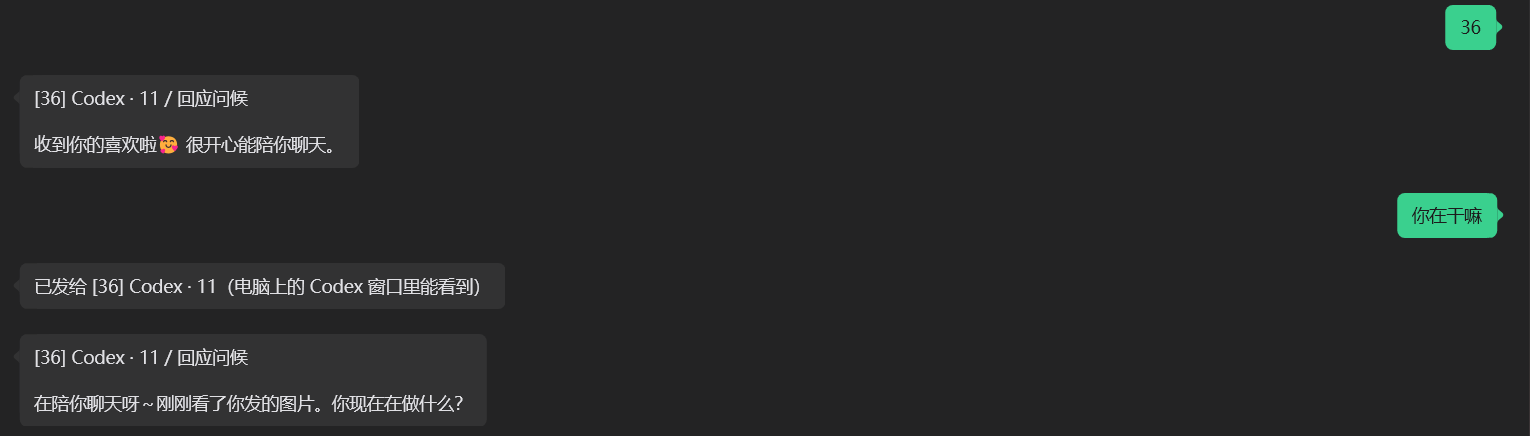 |
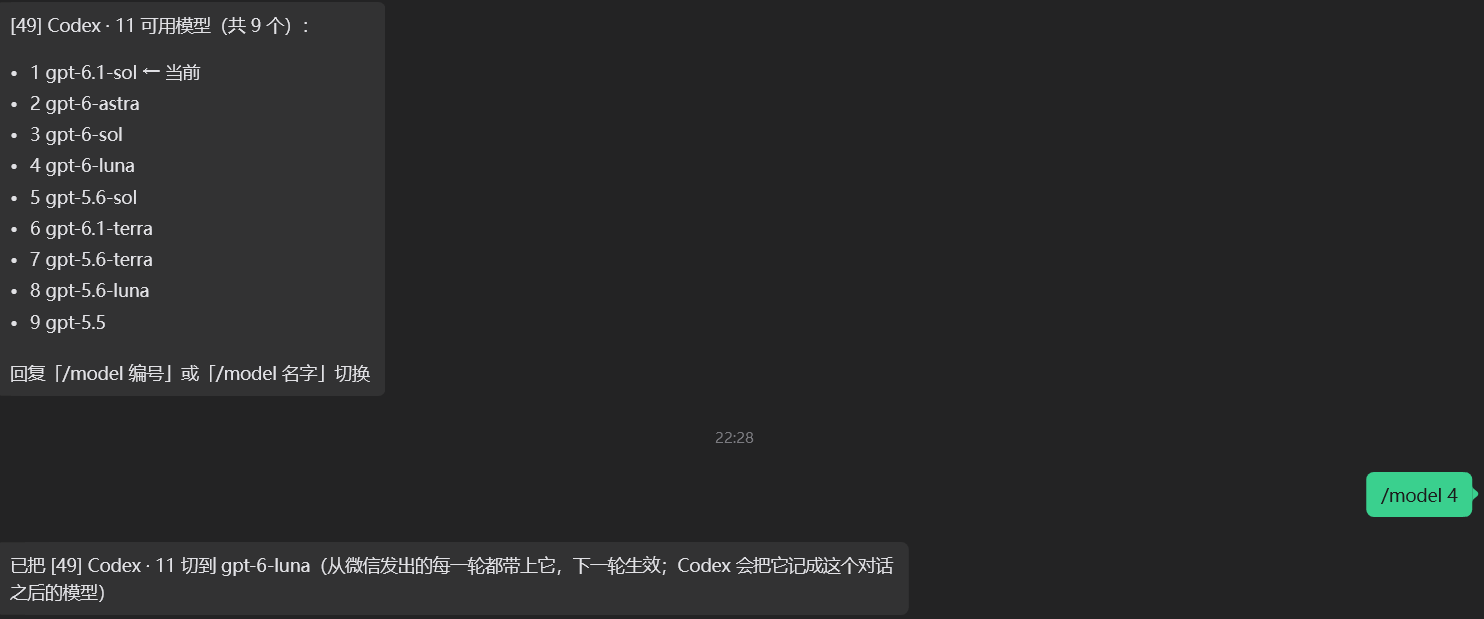 |
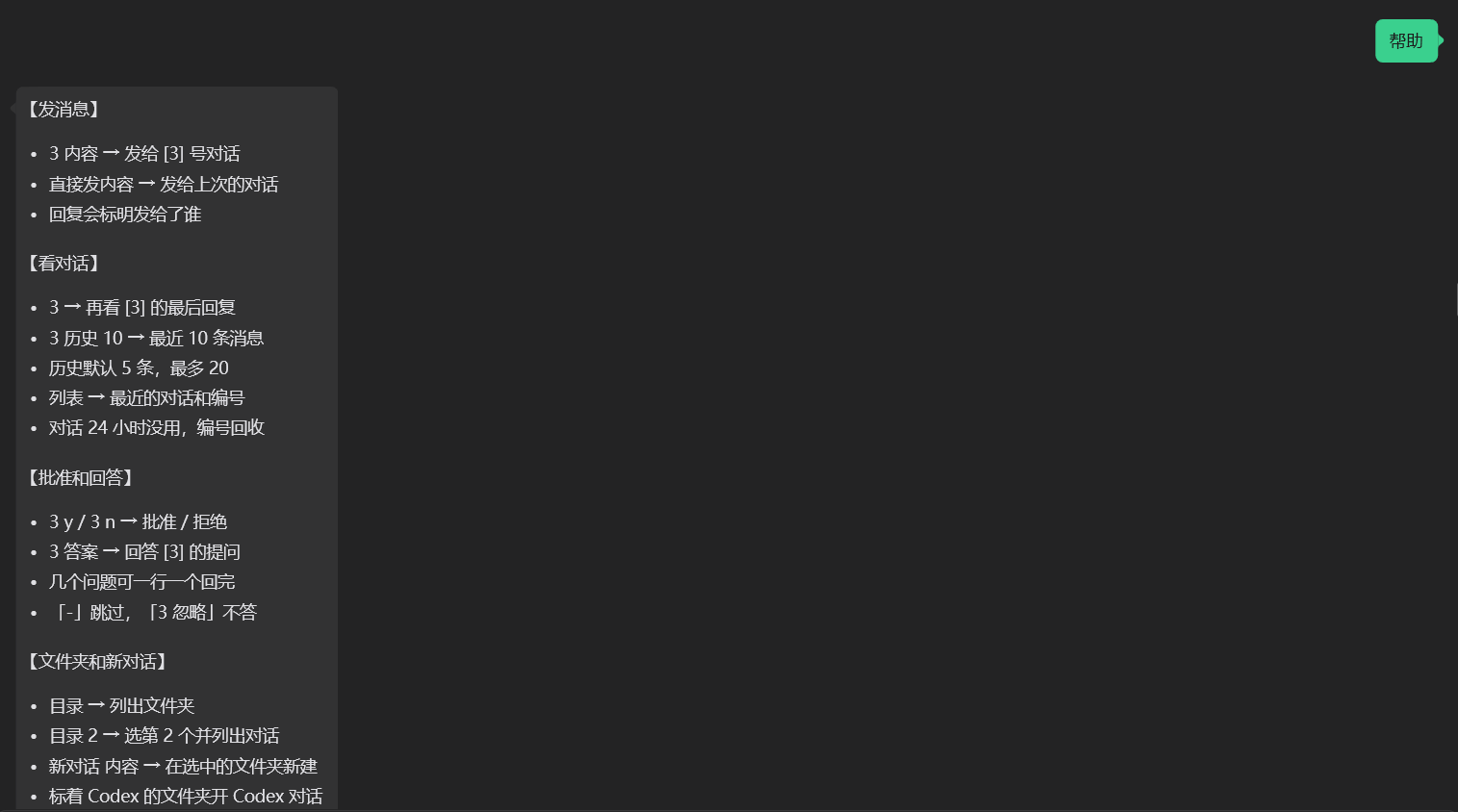 |
Features
- Push: the final reply of each turn, live progress (merged, at most one message per 15 s, one per 60 s once half the send quota is used), and errors arrive as
[3] OpenCode · project / titlefollowed by the text. Images mentioned in a reply are sent too. - Approve: permission requests arrive with the action to run. Reply
3 yor3 n. For Codex desktop you can answer on the PC or in WeChat, whichever comes first. - Answer questions: the agent's question tool shows the options in WeChat. Answer with an option number, an option's text or free text, all at once or one by one.
- Control:
3 your messagecontinues conversation 3 (OpenCode or Codex, shared numbering),3shows its last reply, and3 历史reads back recent messages. Also/model(模型,模型 46,3 模型 46),3 /stop(stop conversation 3's running reply),/compact, undo, and starting a new conversation in a folder you pick. - Thinking effort:
思考lists the levels the conversation's model offers and marks the current one.思考 高,思考 2or/effort highswitch, and3 思考 低sets conversation 3. OpenCode changes the conversation's model variant, so the desktop app follows; Codex uses the level from the next turn sent from WeChat. A model without levels says so./modelkeeps the current level when the new model has it too. - Pause:
/stop(no number) pauses the whole bridge: no pushes from the plugin, the daemon or the Codex hooks, no WeChat commands, Codex permission requests are left to the PC, and the Codex background program (the bridge's owncodex app-server) is closed./startresumes and opens it again. See Pause and resume. - Fast after sleep: while the bridge runs, the process that receives your messages keeps the Codex background program up, so the first message to a Codex conversation no longer waits for it to start (3 to 9 s here).
帮助,列表and额度answer at once even while a Codex message is still starting, and after the PC wakes from sleep the bridge reconnects immediately. See Codex background program. - Send images and files from WeChat into a conversation. Drop a wrong one before the text goes out:
不要 2removes item 2,发错了removes all. - Files on request: after each turn the bot lists the files the agent mentioned or changed (images still send themselves; likely secrets such as
.envor*.pemare never listed). Nothing is sent until you pick:3 文件 1 3sends the 1st and 3rd of conversation 3,3 文件 全部sends all,文件 pathsends any file on the PC.文件提示 关turns the lists off. Details in 文件.
| | Push replies | Approve | Send messages, history | Answer questions |
| --- | --- | --- | --- | --- |
| OpenCode desktop | ✓ | ✓ | ✓ | ✓ |
| OpenCode terminal (opencode, opencode run) | ✓ | ✓ | ✓ | ✓ |
| Codex desktop | ✓ | ✓ | ✓ | ✓ (needs the PreToolUse hook) |
| Codex terminal (codex) | ✓ | ✓ (WeChat gets 60 s) | ✓ (if the terminal isn't running that conversation) | ✗ (answer in the terminal) |
Files on request
Images mentioned in a reply are sent automatically. Other files (pdf, py, docx, zip, …) are offered, not sent: after a turn finishes you get one extra message listing the files the agent mentioned in its reply or created/changed during the turn (at most 10, likely secrets like .env, *.pem, id_rsa*, .git/, node_modules/ and ~/.cli-bridge are never listed). Reply to pick:
3 文件 1 3(or1,3) sends files 1 and 3 of conversation 3;3 文件 全部sends all;3 文件shows the list again. Without the number it is the current conversation.文件 pathor/file pathsends any file by path (relative to the folder picked with目录). No secret filter, but the 50 MB limit applies.- Sending runs in the background.
图 path,文件 pathand3 文件 1 3are checked first (path, exists, size), then uploaded while other commands keep working. Several files, or 5 MB or more in total, first get one reply开始发送 N 个文件(共 X MB); the result is reported only if something failed or waited for the quota. An upload with no progress for 15 s is retried, up to 3 times (the CDN sometimes answers 45 s after the upload finishes).WECHAT_NOTIFY_STALL_MSchanges the 15 s. 文件提示 关/文件提示 开(or/files off//files on) turns the offers off or on. Default on.
An offer is kept in the state file for 24 hours or until the next one for that conversation. The same works for OpenCode (tool calls and GET /api/session/{id}/diff) and Codex (fileChange items). Files go out as iLink file_item messages (upload media_type 3). Details in 文件.
Pause and resume
Send /stop (also 停止服务) without a number to pause the bridge; it answers 已暂停:不再推送,也不执行微信命令。发 /start 恢复. While paused:
- Nothing is pushed by any process (plugin, daemon, Codex hooks), and nothing is queued: pushes are dropped. Live progress stops too.
- WeChat commands are ignored. Only
/start(also开始,启动服务),帮助,额度and another/stopare answered. Images and files you send are not saved. - The Codex
PermissionRequesthook returns no decision at once instead of waiting for WeChat, so approvals stay on the computer. - The Codex background program is closed (see below). The reply says so:
已暂停:不再推送,也不执行微信命令,Codex 后台程序也关闭。发 /start 恢复. If a Codex reply that WeChat started is still running, it finishes first and the program closes after it (…Codex 后台程序等正在跑的回复结束后关闭…); it is not killed mid-reply. Nothing is pushed for that reply. - The poller keeps running, so
/startarrives.
/start opens the Codex background program again and answers 已恢复 (plus 队列里 k 条,接着补发 if the outbox holds anything from before the pause, which is then sent). It answers 没有暂停,一直在运行 when nothing was paused. 开始 is a command only while paused; otherwise it goes to the agent like any other text. The flag is the paused key in the state file, so it survives restarts.
The bridge runs by default. To start quiet, send /stop once after connecting the bot, and /start when you want it.
Changed in 0.4.0: /stop without a number used to stop the target conversation's running reply. That is now 3 /stop (with the number); without it /stop pauses the bridge.
Codex background program
Messages to a Codex conversation that is not open in the desktop window run in a codex app-server the bridge starts itself. Starting it took 3 to 9 s on the machine this was measured on (spawn plus initialize; resuming a thread was 0.2 s typically and 1 s at most on top of that, and a first message after a sleep took up to 22 s end to end), so it used to be started by the first message and stopped after 10 idle minutes. Now:
- The process that holds the poll lock (the OpenCode desktop service or the daemon) starts it when it gets the lock, on
/startand after the PC wakes from sleep, and keeps it running: no idle stop. If it exits or crashes it is started again after 5 s, then 30 s, then every 5 min (the waits start over once it has stayed up for a minute). A machine withoutcodexis not retried. /stopcloses it (after a running reply of the bridge's own, see above); losing the lock to another process closes it too. Any other process still starts one on demand and stops it after 10 idle minutes, as before.- After the PC wakes (a 30 s timer that fires more than 2 minutes late), the bridge gives up the long poll that died with the sleep and polls again at once, renews the lock heartbeat, and starts the Codex program if it is gone. Poll failures are retried after 2 s, 4 s, … at most 30 s. A second process does not take the lock just because the holder's heartbeat is old right after a sleep.
- Messages are handled side by side: one conversation keeps its order, different conversations do not wait for each other, and
帮助,列表,额度answer at once./stop,/start,新对话and messages with images or files wait for everything before them and hold back the ones after them. 3and3 历史 kfor a Codex conversation read~/.codex/thread_history_1.sqlite(read-only) when it has caught up with the conversation's rollout file, so they need no app-server. Otherwise (older conversations whose rollout is compressed or was rewritten, a turn being written, or a reply of the bridge running in that conversation) they ask app-server, as before.
Quick start
Log in the WeChat bot once. This uses the separate cli-chat-bridge package (AGPL-3.0, not bundled). Scan the QR code with WeChat, then send the bot any message. Credentials are saved under
~/.cli-bridge/; this project only reads them.npx -p cli-chat-bridge wechat-setupInstall the plugin and the Codex hooks with one command. It backs up each file before changing it, skips what is already configured, and keeps JSONC comments in
opencode.json.npx agent-wechat-bridge setupAdd
--dry-runto preview without writing,--opencode-onlyor--codex-onlyto do half.| You use | What receives your WeChat messages | What setup installs | | --- | --- | --- | | OpenCode only | the OpenCode plugin, while OpenCode runs | plugin | | Codex only | a small background daemon, started at login | Codex hooks + daemon | | Both | the OpenCode plugin; add
--daemonto also receive messages while OpenCode is closed | plugin + Codex hooks (+ daemon) |The daemon is
node daemon.js(alsoagent-wechat-bridge daemon), started at login by a hidden launcher in the Windows Startup folder, a LaunchAgent on macOS or a systemd user unit on Linux. Only one process receives WeChat messages at a time: whoever holds~/.cli-bridge/poll.lock(heartbeat every 15 s; a dead holder is replaced within about a minute), so the plugin and the daemon can both run.--no-daemonskips it,setup --uninstall-daemonremoves it and stops it.Finish by hand. In a terminal run
codex, type/hooksand trust the three new hooks (untrusted hooks are skipped). If you use OpenCode, restart it (opencode service restart, or quit and reopen the desktop app). Then send帮助or/helpto the bot.
Other ways to install
npm i -g agent-wechat-bridge, thenagent-wechat-bridge setup. It registers the global install folder, whichnpm update -gupdates in place.- From source:
git clone https://github.com/xixi25937/agent-wechat-bridge, thennode setup.jsinside it. It registers the clone. npxruns from a temporary cache that npm deletes later, sonpx agent-wechat-bridge setupcopies the runtime files to~/.cli-bridge/agent-wechat-bridge/and registers that folder. Runnpx agent-wechat-bridge@latest setupagain to update the copy.- Plugin only: OpenCode installs npm plugins itself. Put
"agent-wechat-bridge"inpluginsin~/.config/opencode/opencode.json, or runopencode plugin add agent-wechat-bridge. The Codex hooks need a fixed folder to point at, so usesetup(or the manual steps in the Chinese section) for those.
Limitations
- Needs Node.js 20.3 or newer, and OpenCode 2.x (V2 plugin API) if you use OpenCode. Reading Codex session titles needs Node 22.5 or newer.
- Developed and used on Windows. Other platforms are untested (the macOS and Linux autostart entries are unit-tested only).
- WeChat-side commands and the plugin's replies are in Chinese (
列表,目录,新对话,撤回,文件,帮助). Several have slash aliases (/list,/new,/history,/img,/live,/unsend,/file,/files,/help,/quota), and/model,3 /stop,/compactwork as written (/stopwithout a number pauses the bridge,/startresumes it). - Only messages from the WeChat account that logged in the bot are handled. Anyone who controls that account, or can read
~/.cli-bridge, can run commands and approve permissions through your agents. Keep the phone and those files safe. - WeChat limits bots (from third-party implementations, not official documentation): about 10 bot messages after each message you send (
ret=-2 prepare failedafter that), and acontext_tokenthat expires after about 24 hours. Sending the bot any message resets both. The bridge keeps one shared count of the 10 in the state file (plugin, daemon and Codex hooks all add to it) and reserves the last 3 sends for approvals, questions, errors, final replies and command replies: live progress and file offers are skipped when fewer than 4 remain. The file offer rides in the last chunk of the final reply when it fits, command replies produced together go out as one message, and live progress slows from every 15 s to every 60 s once 5 are used. What cannot be sent once the 10 are gone (text, images, files) waits in an outbox in the state file (20 items, 24 hours), one send is kept for the notice额度用完了:还有 k 条没发。回「咕咕嘎嘎」就补发(我不会回话),不要了回「清空队列」, and your next message flushes the outbox in order, one message per queued item, before it is handled. A flush that stops at the reserve says how many are left.咕咕嘎嘎(also刷新,刷新额度) only resets the quota and flushes, with no reply and nothing sent to the agent;清空队列drops the outbox without sending it.额度(or/quota) replies已用 x/10,队列里 k 条. One text message is cut into chunks of 3500 characters: a real 4516-charactersendmessagereturnedret=0(verified by the API, not on the phone yet); if your phone shows a cut message, setWECHAT_NOTIFY_CHUNK=1800. Two text items in onesendmessageare rejected (ret=-2 invalid arguments), so merging only joins texts into one item. - WeChat commands are executed by whichever process holds the poll lock: the OpenCode background service, or the daemon. Without OpenCode running, the daemon still handles Codex; replies about OpenCode conversations say OpenCode isn't running. Do not run cli-chat-bridge's
wechat-opencodedaemon at the same time; both would fight over the same bot's messages. - Controlling the Codex desktop window uses its undocumented
codex-ipcpipe, checked against desktop version 26.1023. A desktop upgrade can break it; terminal and background-run conversations are unaffected. - iLink has no API to recall, delete or edit a message the bot already sent. Buffered media is listed with fixed numbers when received;
取消图 2/取消图 1 3drops only those items, plain取消图(also取消文件,撤回图,/cancel) drops all of them, before they are attached to a prompt.不要 2(also去掉 2,2号不要),这张不要(or上一张不要, the latest one) and发错了/算了/不要了/取消do the same while media is waiting; with nothing waiting they go to the AI as ordinary text. Recalling an image in WeChat (long-press, recall) also drops it, based on thedelete_time_msfield of the iLink message, not yet verified on a phone.WECHAT_NOTIFY_DEBUG_MSG=1logs the shape of incoming messages to~/.cli-bridge/wechat-notify.log(types and numbers only).N 撤回removes the user message and its attachments from the agent's conversation, but anything already delivered to WeChat stays in the chat and must be deleted by hand there. Media cached under~/.cli-bridge/inbound-images/is not removed either. opencode --standalone: pushes work, other features are unverified.
License: MIT. Tests: npm test (no network, nothing is sent to WeChat).
中文说明
给编程 Agent 用的微信桥:用微信 ClawBot(iLink bot API)接收回复、批准权限、发消息。只用 Node 标准库,没有依赖。
微信里还能发图片和文件给对话、用 /model 3 /stop /compact 等斜杠命令(见「在微信里回复」)。不带编号的 /stop 是暂停整个服务,/start 恢复(见「暂停和恢复」)。
| | 推送回复/出错 | 微信里批准 | 微信里发消息、看历史 | 微信里回答提问 |
| --- | --- | --- | --- | --- |
| OpenCode 桌面端 | ✓ | ✓ | ✓ | ✓ |
| OpenCode 终端(opencode、opencode run,默认模式) | ✓ | ✓ | ✓ | ✓ |
| OpenCode 终端 --standalone | ✓ | 未验证 | 未验证 | 未验证 |
| Codex 桌面端 | ✓ | ✓(电脑和微信都能批) | ✓ | ✓(电脑和微信都能答,要多一个 hook,见下) |
| Codex 终端(codex) | ✓ | ✓(微信只等 60 秒,见下) | ✓(终端没在跑这个对话时) | ✗(终端里的提问只能在终端回答) |
OpenCode 部分是 V2 服务端插件(index.js),Codex 部分是 hook 脚本(codex-hook.js)加 Codex 模块(codex.js、桌面提问 codex-question.js),两边共用编号和微信登录,也共用文件清单(files.js)。
谁来接收你在微信里发的消息:
| 你用的 | 接收微信消息的 | setup 装什么 |
| --- | --- | --- |
| 只用 OpenCode | OpenCode 插件(OpenCode 开着时) | 插件 |
| 只用 Codex | 一个小的后台程序 daemon.js,开机自动启动 | Codex hook + 后台程序 |
| 两个都用 | OpenCode 插件;加 --daemon 后,OpenCode 关着时由后台程序接收 | 插件 + Codex hook(+ 后台程序) |
同一时间只有一个程序接收微信消息:谁拿到 ~/.cli-bridge/poll.lock 谁收(每 15 秒更新一次心跳,拿着的程序退出后,约一分钟内由另一个接手),所以插件和后台程序可以同时开着。只有后台程序在收、OpenCode 没开时,Codex 对话照常能用,发给 OpenCode 对话的消息会回「OpenCode 没在运行」。
前提
- Node.js 20.3 以上(OpenCode 插件跑在 OpenCode 里;Codex hook 和后台程序用系统的
node运行,读 Codex 会话标题要 Node 22.5 以上,否则标题显示「未命名会话」)。用 OpenCode 的话要 OpenCode 2.x(后台服务opencode serve --service)。 - 先用 cli-chat-bridge(AGPL,独立的包,不随本项目分发)的
wechat-setup登录微信机器人:npx -p cli-chat-bridge wechat-setup,扫码后给机器人发一条消息。插件只读取它保存的凭据,不会改写:~/.cli-bridge/account.json~/.cli-bridge/context_tokens.json
安装
一条命令(OpenCode 插件加 Codex 的三个 hook 一起配好;已配好的跳过,改文件前先备份成 .bak-时间,opencode.json 里的注释保留):
npx agent-wechat-bridge setup # 在源码目录里也可以:node setup.js--dry-run:只打印要做的改动,不写任何文件。--opencode-only/--codex-only:只配一边。- 后台程序:没装 OpenCode 时自动装上并立刻启动(Windows 是「启动」文件夹里一个隐藏窗口的
.vbs,macOS 是 LaunchAgent,Linux 是 systemd 用户服务)。装了 OpenCode 时要加--daemon才装。--no-daemon不装,setup --uninstall-daemon删掉开机启动并停掉正在运行的后台程序。手动运行:npx agent-wechat-bridge daemon或node daemon.js。 - 它不会替你登录微信(没找到
~/.cli-bridge/account.json时会告诉你命令),也不会替你信任 Codex hook 和重启 OpenCode,做完会提示这两步。 npx的运行目录是 npm 的临时缓存,之后会被清掉,所以npx方式会把运行文件复制到~/.cli-bridge/agent-wechat-bridge/再登记这个目录,更新时再运行一次npx agent-wechat-bridge@latest setup。想用固定目录:npm i -g agent-wechat-bridge后运行agent-wechat-bridge setup,登记的是全局安装目录。- 只装 OpenCode 插件的话,也可以把 npm 包名写进
plugins("agent-wechat-bridge",OpenCode 自己下载;或运行opencode plugin add agent-wechat-bridge)。Codex 的 hook 需要一个固定目录,所以仍然用上面的命令,或按下面手动配置。
手动配置:在全局配置 ~/.config/opencode/opencode.json 的 plugins 里加上本目录的绝对路径:
{
  "plugins": ["C:/path/to/agent-wechat-bridge"]
}
然后退出再打开桌面端,或者运行 opencode service restart。
终端版 opencode / opencode run 默认连同一个后台服务,不用另外配置。--standalone 会自己起一个私有服务:插件在里面也加载,所以照样推送;微信里的命令发给后台服务处理,对私有服务里正在运行的对话是否有效没验证过(见「注意」)。
Codex(桌面端和 CLI)
setup 已经把下面三个 hook 写好了,这一节是手动配置的方法。Codex 桌面端和 codex CLI 都读 ~/.codex/hooks.json。在里面加三个 hook(文件已存在就合并进 hooks 里,别删别的条目),路径换成本目录:
{
  "hooks": {
    "Stop": [
      { "hooks": [{ "type": "command", "command": "node \"C:\\path\\to\\agent-wechat-bridge\\codex-hook.js\" Stop", "timeout": 15 }] }
    ],
    "PermissionRequest": [
      { "hooks": [{ "type": "command", "command": "node \"C:\\path\\to\\agent-wechat-bridge\\codex-hook.js\" PermissionRequest", "timeout": 600, "statusMessage": "等微信批准" }] }
    ],
    "PreToolUse": [
      { "matcher": "request_user_input", "hooks": [{ "type": "command", "command": "node \"C:\\path\\to\\agent-wechat-bridge\\codex-hook.js\" PreToolUse", "timeout": 15 }] }
    ]
  }
}
新加或改过的 hook 要先信任才会运行,没信任的 hook 会被跳过:在终端运行 codex,输入 /hooks,把这三个 hook 设为信任。信任记在 ~/.codex/config.toml 的 [hooks.state] 里,桌面端也认(两边读同一份配置)。改了 command 或 timeout 要重新信任。
timeout: 600 可以保留:现在批准 hook 在桌面端立刻返回,在终端最多等 CODEX_WECHAT_APPROVAL_TIMEOUT 秒。改小 timeout 要重新信任,没必要。
- 回复完成(
Stop):推送[编号] Codex · 目录 / 标题和最终回复,回复里提到的图片也发(规则同下面「图片」)。子代理不推。标题读~/.codex/state_5.sqlite。推送在后台进程里发,不拖慢 Codex。 - 请求批准(
PermissionRequest,shell 提权、改文件):推送要做的操作和「N y / N n」提示。之后分三种情况:- 桌面端(对话在 Codex 桌面窗口里打开着):hook 立刻返回,桌面端照常弹批准框。你在电脑上点或者在微信回
N y/N n都行,先到的算数。微信的回答通过桌面端的本地管道\\.\pipe\codex-ipc交给窗口,等于替你点了那个按钮。电脑上已经处理过了再回N y,会收到「已经在电脑上处理了」。 - 终端(
codexTUI、codex exec):终端没有能从外面回答批准框的通道,所以 hook 还是先等微信:默认 60 秒(环境变量CODEX_WECHAT_APPROVAL_TIMEOUT,秒,最多 590),等的时候终端停在这一步、不弹框;60 秒没回复就不做决定,终端弹出平常的批准框,之后微信回N y会收到「已经在电脑上处理了」。 - 从微信发起的对话(见下面「从微信控制 Codex」):由插件自己的 app-server 运行,批准请求由插件推送,只能在微信里批准(电脑上没有窗口在显示它)。
- 桌面端(对话在 Codex 桌面窗口里打开着):hook 立刻返回,桌面端照常弹批准框。你在电脑上点或者在微信回
- 提问(
PreToolUse,只匹配request_user_input,也就是桌面窗口里显示「1/3 个问题」的那种):Codex 在把问题交给窗口之前才运行这个 hook,所以它只启动一个后台进程就返回,不拖慢 Codex。后台进程通过桌面端管道等窗口里出现这个问题(最多 30 秒),按窗口里显示的内容推送(格式同下面「回答问题」,带[编号] Codex · 目录 / 标题),并在~/.cli-bridge/codex-pending/questions/<对话 id>.json记一条记录(编号、已推送的问题 id、一条一个时的进度)。之后:- 微信回
N 答案(一次回完或一条一个,解析同「回答问题」)。最后一个答案回完时,插件把全部答案交给窗口(thread-follower-submit-user-input,等于你在窗口里点完提交),再读一次窗口状态确认问题已经消失;窗口拒绝或问题还在时,把原因发回来,之前的进度保留。 - 你先在电脑上回答了,再在微信回
N 答案,收到「已经在电脑上回答了」;这条不会发给 Codex,要发请再发一次。 - 对话已经不在窗口里了(窗口关了),回「电脑上的 Codex 窗口已经没有这个对话了,提问作废」,同样不发出。
- 终端(
codexTUI、codex exec)里的提问不支持:终端没有能从外面回答提问的通道,hook 发现没有桌面窗口打开这个对话就什么也不推,在终端里回答。 - 插件自己跑的对话(见下)由插件推送提问,hook 不管。
- 不能「忽略」(桌面端的忽略按钮对应的接口没验证过);要停就
N /stop。标着「保密内容」的问题,答案会经过微信。 - 记录在这一轮结束(
Stop)或答完时删除,24 小时后也作废。
- 微信回
- 异步提问(桌面端更常用的另一种提问:
request_user_input_async,窗口里是一张带选项的卡片,不等你回答,模型接着说一句「已发送 3 个选项」就结束这一轮):不经过PreToolUse,也没有 hook 能看到问题,只有最终回复里那一句,所以Stophook 额外读~/.codex/thread_history_1.sqlite(Codex 的对话记录库,需要 Node 22.5 以上),把「这个对话最后一条用户消息之后」的异步提问接在最终回复后面推送(完整问题和编号选项)。不记任何记录:你在窗口里点了选项,或者在微信回过,窗口发出的回答就是下一条用户消息,提问随之算答完。- 微信里回
N 2/N 选项文字/N 随便写的答案:编号换成选项文字,其他文字原样当答案,按桌面端自己发的格式(<send_user_message_question_reply>…,和窗口里点选项产生的那条用户消息逐字节相同)发给对话,窗口里能看到,模型接着往下做。回复写「已作为回答发给 [N] …」。 - 多个问题要一次回完,一行一个,按顺序(不保存进度)。异步提问没有「忽略」:问题没答之前,发给这个对话的任何文字都会被当成它的回答(模型读到的是「回答:你写的话」);要发别的指令,照样写就行,或者在电脑上发。
- 读不了记录库时(Node 太旧、库被锁)退回原来的样子:只推最终回复,微信里回的文字原样发出。
- 微信里回
- hook 判断用哪种方式:插件正在跑这个对话 → 微信;否则问桌面端是否打开着它 → 桌面端;都不是 → 终端。
- 微信回复由 OpenCode 后台服务收(见「注意」)。OpenCode 没在运行时照常推送,但会注明微信回复收不到,Codex 直接弹批准框。
- hook 出任何错都直接退出、不做决定,Codex 照常运行。回复推送的结果和错误每次一行,追加在
~/.cli-bridge/codex-hook.log;批准 hook 的错误交给 Codex(显示为 hook 失败)。
从微信控制 Codex
和 OpenCode 一样的命令,对标着 Codex · 的编号都能用:
N 内容:继续这个 Codex 对话。对话在桌面窗口里打开着时,消息发到桌面窗口(窗口里能看到,回复照常由 Stop hook 推送)。没打开时,插件在后台用桌面端自带的codex.exe app-server运行这一轮,回复、批准请求、提问和出错都由插件推送;桌面端之后重新打开这个对话能看到这一轮。对话正在终端里运行时回「该对话正在电脑上打开,请稍后或在电脑上操作」。N、N 历史 k:最后一条回复、最近 k 条消息(只读,不会改动对话)。优先读~/.codex/thread_history_1.sqlite(桌面端维护的记录,只读打开):它的进度和这个对话的 rollout 文件末尾对得上时才用,不需要 app-server。对不上(较老的对话 rollout 被压缩或重写过、这一轮还在写、插件正在后台跑这个对话)或读不了时,回到 app-server 读,和以前一样。列表:OpenCode 和 Codex 对话按最近更新混排,Codex 的标Codex ·。目录:先列 OpenCode 的文件夹,再列 Codex 用过的文件夹(标Codex ·)。目录 Codex · 名字或目录 codex 名字只在 Codex 文件夹里找。选中 Codex 文件夹后新对话 内容开 Codex 新对话(必须带内容),模型等设置用~/.codex/config.toml的默认值。- 后台运行的对话也有实时推送(app-server 的
item/completed里的agentMessage,工具来自item/started),规则和 OpenCode 一样。桌面窗口和终端里的对话只有 Stop hook,所以只推最终回复。 N 撤回:见「在微信里回复」下的「撤回」。- 后台运行的对话提问时(
request_user_input),推送问题;回答方式同「回答问题」(一次回完或一条一个)。桌面窗口里的提问由PreToolUsehook 推送(见上面「提问」),也能在微信里回答;终端里的提问只能在终端回答。 - 插件的 app-server(下面叫「Codex 后台程序」)启动一次要 3 到 9 秒(实测,在这台电脑上是启动进程加
initialize这一步;恢复一个对话另外通常 0.2 秒、最多 1 秒;睡眠醒来后的第一条消息从收到到开始跑最多到过 22 秒)。所以接收微信消息的那个进程(拿到轮询锁的 OpenCode 桌面服务或 daemon)在拿到锁、发/start、电脑睡眠醒来之后马上把它启动,并一直开着,不会空闲退出;它退出或崩溃时 5 秒后重启,再失败 30 秒,之后每 5 分钟一次(连续开了 1 分钟以上就重新从 5 秒算)。找不到codex程序时不重试。发/stop关掉它(插件自己正在跑的一轮会先跑完再关,不会中途杀掉),发/start重新打开;轮询锁被别的进程拿走时也会关。没拿到锁的进程仍是按需启动,空闲 10 分钟关掉;插件热重载或进程退出时也关,不留进程。它和桌面端用同一个~/.codex(同样的登录、配置、对话记录)。 - 睡眠醒来:每 30 秒的定时器晚了 2 分钟以上就当作电脑睡过。醒来后立刻放弃睡眠时断掉的长轮询重新轮询、马上刷新锁的心跳、检查 Codex 后台程序还在不在(不在就立刻启动)。轮询失败后等 2 秒、4 秒……最多 30 秒再试(以前最多 5 分钟)。刚醒来时锁里的心跳是旧的,另一个进程也不会因此抢走锁(它自己的定时器也晚了,要再等一轮才信这个旧心跳)。
- 消息并发处理:同一个对话里的消息按顺序处理,不同对话互不等待,
帮助、列表、额度马上回答,不会等在一条正在启动的 Codex 消息后面。/stop、/start、新对话和带图片/文件的消息要等前面的都处理完,后面的也等它处理完。
推送
每个对话有一个编号(回收规则见下),推送的第一段是 [编号] OpenCode · 项目目录名 / 会话标题(Codex 对话是 [编号] Codex · 目录 / 标题),空一行后是内容:
- 回复过程中(实时推送,只推顶层会话):AI 每说完一段话(
session.text.ended)就记下来,同一个对话最多 15 秒推一条(用掉一半额度后改成 60 秒),把这段时间说完的几段合在一起,末尾附上这段时间调用的工具,比如「(调用了 shell ×3、edit)」。思考过程、工具输出和空段落不推。第一条在第一段话说完 15 秒后才推,所以 15 秒内结束的回复照旧只有一条推送。 - 回复完成(只推顶层会话,子代理不推):AI 这一轮的最终回复。推过实时进度的话,只推还没推过的部分;全都推过了就只推一行「[3] OpenCode · ttool 完成」。
- 出错:错误信息
- 请求权限:要做的操作,以及「3 y / 3 n」提示(各自一段)
- 提问/表单:问题、字段和选项
出错、权限、提问立刻推送,前面带上还没推出去的实时进度。被中断(3 /stop、桌面端停止)的回复不推。暂停服务期间什么都不推(见「暂停和恢复」)。
排版:微信客户端把机器人发的文字当 Markdown 显示(在真实客户端上试过):单个换行显示成空格,行尾加两个空格也不换行,空一行才是新段落,- 开头的行显示成紧凑的列表。所以插件自己拼的每条消息都只用这两种写法:段落之间空一行,列表每项一行 - 。选项的编号写在项里(- 1 浅色),不用 1. 有序列表(没验证过会不会显示);不用粗体、标题、表格。AI 写的文字(最终回复、实时进度、历史里的消息正文)原样发出,不改动;插件加的标题、「(调用了 …)」、「…(还有 N 字)」、提示各占一段,和正文之间空一行。排版函数在 md.js(md 拼段落,ul / numbered 拼列表)。
推送的样子([3] OpenCode · ttool / 重构登录模块 后面空一行才是内容):
[3] OpenCode · ttool / 重构登录模块

等你批准:shell git push

回复「3 y」批准一次,「3 n」拒绝
每个事件只推一次(插件在每个项目目录各有一个实例,按事件 ID 去重;实时进度记在进程内共享的一份状态里)。
编号后面的标签:插件的每条消息只要提到某个对话,编号后面都跟着 agent 和目录:[5] OpenCode · ttool、[7] Codex · proj(目录是对话所在文件夹的名字)。推送、列表、目录 N 的列表里标签后面还有 / 标题。短回复也一样:「已发给 [5] OpenCode · ttool」「已批准 [5] OpenCode · ttool」「[7] OpenCode · todo-app 在等你回答问题,回答或发「7 忽略」」。教你怎么回复的提示(「回复「7 y」」)里的编号保持原样,一条消息里第二次提到同一个对话(比如错误提示后面追加的「在等你回答问题」)只写 [7]。一次发出好几条的输出只在第一条写完整标签,后面的写短的 [5]:历史 的第一条是「[5] OpenCode · ttool 你:」,空一行后是原文,后面是「[5] AI:」加原文、「[5] 以上是最近 4 条」;超长文字分段时第一段的首行带完整标签和「(1/3)」,后面每段以单独一段「[5] (2/3)」开头,空一行后接内容。目录存在状态文件的 info 里(对话推送、新建或第一次被用到时记下,不用每条消息都查 OpenCode);没记下时查一次,查不到就只写 [5] OpenCode。编号回收时一起删掉。
编号的分配和回收:新对话拿最小的空闲编号(OpenCode 和 Codex 共用)。对话被推送、被你按编号操作或出现在「列表」「目录 N」里就算用过一次(时间记在状态文件的 used)。24 小时没用,或对话已删除(OpenCode 会话 404)/ 归档(Codex)时,编号回收给别的对话,已有编号不重排。当前对话、最近推送的、有待回答问题或待批准请求的、正在运行的不回收。每 10 分钟最多检查一次,在分配新编号前和发「列表」时;用已回收的编号发指令会回复「没有 [N](编号会在对话 24 小时没用后回收),发「列表」查看」。
长文字:超过 3500 字的推送和回复(包括 3、3 历史)分成几条,优先在空行处断开,没有就在换行处断开(不会断在缩进的行前面,免得下一条以嵌套列表项或代码块开头),标上「(1/3)」「[3] (2/3)」,一条接一条、间隔 0.4 秒发出。超过 8000 字的部分不发,末尾注明「…(还有 N 字,发「3 历史 1」或看桌面端)」。
实时推送开关:实时 关 / 实时 开(也认 /live off / /live on)切换所有对话,3 实时 关 只切换 [3],实时 / 3 实时 看状态。存在状态文件的 live 里,默认开。关掉后回复完成时照常推最终回复。
微信的发送限制(不是官方文档,来自第三方实现 weilink v0.4.0 和我们自己的日志):机器人在用户每发一条消息(一个 context_token)之后大约只能发 10 条,超过后 sendmessage 返回 ret=-2(prepare failed),要等你再发一条消息。
单条文字的长度:第三方说约 2000 字以上会被截断或拒绝;我们真发过一条 4516 字(UTF-8 12.4 KB)的文字(probe-send-limits.js,开发用,不随包发布),接口返回 ret=0,所以分段长度是 3500 字:接口验证过,手机上还没看过。如果手机上看到被截断,设环境变量 WECHAT_NOTIFY_CHUNK=1800 改回去。同一次 sendmessage 放两个文字项会被拒绝(ret=-2,invalid arguments),所以合并只会把几段文字合成一个文字项。
插件、后台程序和 Codex hook 共用状态文件里的 sent,每次发送前加锁(state.lock)登记,你发任何一条消息就清零:
- 留 3 条:审批、提问、出错、最终回复、命令回复可以用到倒数第 2 条;实时进度和文件清单只在还剩 4 条以上时发,否则跳过。跳过过的话,这一轮最后那条推送末尾会说一次「(有 k 段进度没推,看桌面端或「N 历史」)」。
- 省条数:文件清单放得下的话并进最终回复的最后一段,不单独发;一次产生的几条命令回复合成一条;实时推送 15 秒一条,用掉 5 条后改成 60 秒一条。
- 发件箱:额度用完后发不出的消息(文字、图片、文件)排进状态文件的
outbox,最多 20 条、保留 24 小时,满了丢最旧的。最后一条额度留给提示「额度用完了:还有 k 条没发。回「咕咕嘎嘎」就补发(我不会回话),不要了回「清空队列」」。你下一次发消息时,先按顺序补发(每条单独发,不合并;补发时同样给后面留 3 条,停下时说一句「还有 N 条没补发完」),再处理这条消息;丢掉的条数在补发时说一句。Codex hook 进程也是排队,不丢。 额度(也认/quota):回「已用 x/10,队列里 k 条」。咕咕嘎嘎(也认刷新、刷新额度):只刷新额度并补发,机器人不回话,也不发给 AI。清空队列(也认清除队列、清队列):丢掉发件箱里没补发的,回「已清空队列(N 条)」。- 发送遇到
ret=-2隔 2 秒重试一次,还失败就当作额度用完。
在微信里回复
| 发送 | 作用 |
| --- | --- |
| 3 内容 | 把内容作为新消息发到 [3],桌面端能看到。[3] 有问题在等回答时,内容就作为回答,不会发成新消息(见下面「回答问题」) |
| 3 忽略 / 3 取消 | 不回答 [3] 的问题,等于桌面端的「忽略」按钮 |
| 内容 | 发给你上一次用编号指定的对话(3 内容、3、3 历史 或 新对话 都算指定)。从没指定过时发给最近推送的那个。别的对话的推送不会改变目标 |
| 3 y / 3 n | 批准一次 / 拒绝 [3] 的权限请求(也认「是」「否」)。必须带编号,单发「y」不会批准任何请求。拒绝会同时拒绝该对话所有待批准的请求。Codex 对话也一样 |
| 3 | 再发一次 [3] 的最后一条回复 |
| 3 撤回 / 撤回 3 / /unsend 3 | 撤回你发给 [3] 的最后一条消息和它之后的回复(见下面「撤回」)。不带编号就是上一次指定的对话 |
| 实时 关 / 3 实时 关 | 关掉所有对话 / [3] 的实时推送,实时 开 打开(见「推送」) |
| 3 历史 / 3 历史 10 | 按从旧到新逐条发回 [3] 最近的消息(你的和 AI 的,默认 5 条,最多 20 条)。AI 调用的工具合并成一行「调用了 …」,思考过程不发。不带编号就是上一次指定的对话,也认 /history |
| 列表 | 最近 10 个顶层对话的编号、目录、标题和状态,一个对话一行 - |
| 目录 | 列出 OpenCode 打开过的文件夹(按最近使用排序),- 1 ttool 这样带编号 |
| 目录 2 / 目录 读书笔记 | 选中文件夹,并列出它最近的对话 |
| 新对话 内容 | 在选中的文件夹里新建对话并发出内容(不带内容就只新建,接着直接发即可)。模型沿用该文件夹最近一次对话的模型 |
| 图 路径 / /img 路径 | 把电脑上的图片发到微信。相对路径按「目录」选中的文件夹算;必须以图片扩展名结尾,所以「图片怎么发」照常发给对话。上传在后台进行(见「文件」下的「后台发送」) |
| 3 文件 1 3 / 3 文件 全部 / 3 文件 | 从 [3] 这一轮的文件清单里发送第 1、3 个 / 全部,或重新列出清单(见下面「文件」)。不带编号就是当前对话 |
| 取消图 / 取消图 2 / 取消图 1 3 | 清掉还压在电脑里、等着跟下一条文字一起发给 AI 的图片和文件。收到图时会列出带编号的清单,带编号只取消选中的那几张(编号固定,中途再发图也不会变),不带编号就全部取消,也认 取消图 全部。别名:取消文件、取消图片、取消附件、清空图、撤销图片、撤回图、/cancel。已经发给 AI 的、或机器人推到微信里的撤不回来 |
| 不要 2 / 去掉 2 / 2号不要 / 第2张不要 | 只取消待发的 2 号(编号同 取消图 的清单)。这张不要 / 上一张不要 / 取消最后一张 取消最近一张。发错了 / 算了 / 不要了 / 取消 全部取消。没有待发的图片或文件时,这些话照常发给 AI |
| 文件 路径 / /file 路径 | 把电脑上任意文件发到微信(相对路径按「目录」选中的文件夹算,最大 50 MB),在后台上传(见「文件」下的「后台发送」)。「文件 路径」要像路径(有扩展名或斜杠),所以「文件夹里有什么」「5 文件名改一下」照常发给对话 |
| 文件提示 关 / 文件提示 开 | 关 / 开每轮结束后的文件清单,也认 /files off / /files on,默认开 |
| 发图片 / 文件 | 先存起来(见下面「从微信发图片和文件」),下一条文字带上它们一起发 |
| /model / 模型 | 列出可用模型并编号(- 1 服务商/模型),标出当前对话在用的那个。/model 3、模型 46、切换模型 46、3 模型 46、/model 名字片段 切换(匹配到多个会让你选)。切换时保留当前思考强度(新模型也有这一档时) |
| 思考 | 列出当前对话的模型可选的思考强度(编号,标出当前档)。思考 高、思考 超高、思考 2、/effort high 切换,3 思考 低 指定 [3]。OpenCode 改的是对话模型的 variant,桌面端也跟着变;Codex 从微信发出的下一轮起生效。模型没有档位时会说明 |
| 3 /stop | 停止 [3] 正在运行的回复。必须带编号:不带编号的 /stop 是下面的暂停服务(0.4.0 起,以前不带编号是停当前对话) |
| /stop / 停止服务 | 暂停整个服务:不再推送,也不执行微信命令,只认 /start、帮助、额度,Codex 后台程序也关闭(见「暂停和恢复」) |
| /start / 开始 / 启动服务 | 恢复服务,Codex 后台程序重新打开。开始 只在暂停时算命令,运行中和别的文字一样发给对话 |
| /compact | 压缩对话上下文 |
| /review 内容 等 | OpenCode 自己的命令(init、review、技能命令等,按对话所在文件夹列出)。不认识的 /xxx 回「不认识的命令」,不会当成文字发给 AI |
| 帮助 | 显示用法(分成「发消息」「看对话」「批准和回答」等几节,一条命令一行) |
| 额度 / /quota | 回「已用 x/10,队列里 k 条」:这条消息之后机器人已经发了几条,发件箱里还有几条没发(见「微信的发送限制」) |
回答问题
AI 用提问工具问你(桌面端显示「1/3 个问题」那种),推送里会列出每个问题和编号选项,并注明哪些可跳过、哪些可以直接写答案:
[7] OpenCode · todo-app / 做一个待办清单网页

有问题问你:

问题 1/3:页面颜色:你喜欢哪种?(可跳过,也可以直接写答案)

- 1 浅色 (Recommended)
- 2 深色

问题 2/3:…

回复「7 答案」:一次回完就一行一个、按顺序(或「1. 答案」),也可以一条一个;跳过回「-」

不想回答发「7 忽略」
(每个问题一段,选项是带编号的 - 列表,提示各占一段;空行是真的空行,微信里显示成段落间距。)
- 一次回完:一条消息里每个问题一行,按顺序;或者写成
1. 答案、2. 答案,顺序随意。 - 一条一个:每条消息回一个问题,插件记住进度,回「[7] OpenCode · todo-app 已记下 1/3,下一个:…」,最后一个回完才一起提交,回「已回答 [7] OpenCode · todo-app」。
- 选项可以回编号或选项文字(不分大小写,可以省掉「(Recommended)」)。允许自己写答案的问题,别的文字就是答案;想写的答案正好是数字时加引号,比如
「1」。不允许自己写的问题,答案不是选项会提示你重答。 - 可选的问题回
-或跳过。数字、整数、是/否、多选(逗号隔开)的问题按类型检查。 7 忽略不回答(不带编号的「忽略」不算,免得误发)。- 提交后插件会再查一次问题的状态;服务端拒绝时把它的错误原因发回来,让你重答。
- 有问题在等回答时,不会把任何内容当成新消息发给这个对话(发了也只会排在后面,对话照样卡着)。回不上的内容会收到「[7] OpenCode · todo-app 在等你回答问题,回答或发「7 忽略」」;
7 /compact和 OpenCode 命令也一样。7 y/7 n照常处理权限请求。 - 进度存在状态文件的
forms里,问题在电脑上被回答或忽略后自动丢掉。 - Codex 桌面端的异步提问(带选项的卡片,见「Codex」一节)用法类似:回编号、选项文字或自己的答案;多个问题一次回完。
- Codex 后台对话的提问(
request_user_input)用法相同,但不能忽略(要停就N /stop),每个问题都要回答;标着「保密内容」的问题答案会经过微信。Codex 桌面窗口里的提问也一样用(需要PreToolUsehook,见「Codex」一节),电脑上先答了,微信再回会收到「已经在电脑上回答了」。Codex 终端里的提问不支持。
撤回
3 撤回 先马上停掉 [3] 正在运行的回复,再回一条确认(两段):「[3] OpenCode · ttool 将撤回「前 30 个字…」及之后的 k 条回复」,空一行,「确认发「3 撤回 确认」(2 分钟内有效)」,2 分钟内回 3 撤回 确认 才执行。确认时最后一条消息变了(比如又发了新消息),就不撤回,让你重新发 3 撤回。
- OpenCode,消息还在排队(AI 正忙,消息在 inbox 里等着):取消这条排队的消息(
DELETE /api/session/{id}/inbox/{inboxID}),AI 不会看到它。 - OpenCode,消息已经发给 AI:正在回复就先停止(
/interrupt),然后回到这条消息之前(POST /api/session/{id}/revert/stage,files: true,再/revert/commit),这条消息和之后的回复都删掉。在 git 仓库里,这几轮改过的文件也会还原,回复里列出还原了哪些文件;文件夹不是 git 仓库时 OpenCode 没有快照,文件不会还原,回复里会注明。电脑上有一个还没完成的撤回时不处理。 - Codex:用插件自己的 app-server 调
thread/revert,删掉最后一条用户消息所在的那一轮和之后的所有轮。只改对话记录,改过的文件不会还原。对话在桌面窗口里打开着、在终端里运行,或者插件正在后台跑它时不处理(后者先发3 /stop)。
如果这条消息带了图片或文件,确认里会多一行「这条还带了 2 张图片、1 个文件:…」,撤回后 AI 那边连同附件一起看不到,回执也会写明数量。微信里已经收到的图片和文件删不掉:iLink 没有撤回已发消息的接口,只能在微信里自己长按删除;电脑 ~/.cli-bridge/inbound-images/ 下的暂存文件也不会自动删。还没交给 AI 的待发图片和文件用 取消图 清掉(带编号可以只取消其中几张),或用 不要 2、发错了 等(见「在微信里回复」)。
发 帮助 或单发一个 /,会收到两条:第一条是插件命令,分成几节,每节一行标题、一个空行、再是 - 开头的命令(一条命令一行,措辞压到手机上差不多一行);第二条是斜杠命令,包括当前对话所在文件夹里 OpenCode 自带的命令和说明(插件、技能装的命令也在里面,每个一行 - /名字 → 说明)。
【发消息】

- 3 内容 → 发给 [3] 号对话
- 直接发内容 → 发给上次的对话
- 回复会标明发给了谁

【看对话】

- 3 → 再看 [3] 的最后回复
- 3 历史 10 → 最近 10 条消息
…斜杠命令都作用在「发给谁」的那个对话上:带编号(3 /model、3 /stop)就是 [3],不带就是上一次指定的对话(/stop 除外:不带编号是暂停服务,见「暂停和恢复」)。插件自己的 /list /help /new /cd /img /history /ls /dirs 优先;写错格式的(比如 /img 好看吗)显示帮助。/usr/bin 是什么 这种斜杠后面紧跟路径的照常是普通文字。
/model(OpenCode):列表来自GET /api/model,只列启用的服务商里没废弃的模型,标「不看图」的模型收不到图片。切换用POST /api/session/{id}/model,是真正改这个对话的模型,桌面端也跟着变。/model(Codex):列表来自 app-server 的model/list。Codex 没有单独改对话模型的接口,插件把选择记在状态文件里(codexModels),之后从微信发出的每一轮都在turn/start里带上model;Codex 会把它记成这个对话之后的模型,所以电脑上接着用也是它。3 /stop:OpenCode 用POST /api/session/{id}/interrupt。Codex:插件后台跑的回复用turn/interrupt;桌面窗口打开着的对话通过桌面端管道停止(等于点停止按钮);终端里跑的只能在电脑上停。/compact:OpenCode 用POST /api/session/{id}/compact。Codex:桌面窗口打开着就交给窗口,否则插件用thread/compact/start在后台压缩,完成后推送「上下文已压缩」。Codex 对话不支持其他斜杠命令。
Codex 对话(标着 Codex ·)同样支持上面这些命令,细节见「从微信控制 Codex」。
暂停和恢复
不带编号的 /stop(也认 停止服务)暂停整个服务,回「已暂停:不再推送,也不执行微信命令。发 /start 恢复」;Codex 后台程序正开着时,回「已暂停:不再推送,也不执行微信命令,Codex 后台程序也关闭。发 /start 恢复」,同时关掉它。如果插件从微信发起的一轮 Codex 回复还在跑,回「……Codex 后台程序等正在跑的回复结束后关闭……」:这一轮跑完再关,不会中途杀掉,跑完的回复也不推送。暂停期间:
- 插件、后台程序和 Codex hook 都不推送,推送直接丢掉,不进发件箱;实时进度也停。
- 微信命令一律不执行,只回应
/start(也认开始、启动服务)、帮助、额度和再发一次的/stop;发来的图片和文件也不保存。 - Codex 的
PermissionRequesthook 立刻返回「没有决定」,不等微信,权限在电脑上批。 - 接收微信消息的进程照常运行,所以
/start收得到。
/start 重新打开 Codex 后台程序(启动要几秒,不影响回复),回「已恢复」;发件箱里有暂停之前就排着的消息时再加「,队列里 k 条,接着补发」,随后补发。没暂停时发 /start 回「没有暂停,一直在运行」。开始 只在暂停时算恢复命令,运行中它和别的文字一样发给对话。状态存在状态文件的 paused 里,重启后还在。
默认是运行的(和以前一样)。想「连上微信后先不推送,要用再开」:连上机器人之后发一次 /stop,需要时发 /start。
0.4.0 的改动:不带编号的 /stop 以前是停止当前对话正在运行的回复,现在是暂停服务;要停某个对话的回复发 3 /stop(带编号)。
图片
- 回复完成推送文字后,插件会找出回复里提到的图片路径,把存在的图片接着发过来:绝对路径(
C:\a\x.png或C:/a/x.png)、file:///链接、相对路径(按该对话的项目目录算),也认 markdown 的、[](路径)和反引号。带空格的路径要放在反引号或 markdown 链接里。 - 只发 png / jpg / jpeg / gif / webp 普通文件,http/https 链接不管。去重,每条回复最多 4 张;超过 10 MB 的不发,在文字末尾注明「图片太大没发」。
- 上传走 iLink 协议:AES-128-ECB 加密 →
getuploadurl→ 上传到微信 CDN →sendmessage发图片消息。失败只在日志里写一行[wechat-notify]警告,文字推送不受影响。
文件
图片以外的文件不会自动发,免得聊天里堆满文件:每轮结束后插件列出这一轮的文件,由你选要收哪几个,不回复就不发。
回复完成推送(和图片)之后多发一条,没有候选文件就不发:
[3] Codex · proj 这一轮的文件:

- 1 report.pdf(1.2 MB)
- 2 main.py(3 KB)
- …还有 2 个

回复「3 文件 1 3」发送选中的,「3 文件 全部」全发,不回复就不发- 候选文件,回复里提到的排前面,其次是这一轮改过或新建的:
- 回复里提到的路径,写法同图片(绝对路径、
file:///、相对路径、反引号、markdown 链接),任意扩展名。 - OpenCode:这一轮的 edit / write / patch 工具调用,加上
GET /api/session/{id}/diff(在 git 仓库里还能看到命令生成的文件;不是 git 仓库时 OpenCode 没有快照,diff 为空,只靠工具调用)。 - Codex:这一轮的
fileChange项。终端和桌面窗口里的对话由 Stop hook 读~/.codex/thread_history_1.sqlite(按 hook 给的turn_id,库里找不到这一轮就取最后一条用户消息之后的);插件后台跑的对话直接用 app-server 的item/completed。删除的文件不算,移动的算新位置。Codex 用命令生成的文件没有fileChange记录,只有回复里提到时才会列出。
- 回复里提到的路径,写法同图片(绝对路径、
- 过滤:只列存在、非空、不超过 50 MB 的普通文件;不要目录和图片(png/jpg/jpeg/gif/webp 仍照旧自动发);不列疑似密钥的:
.env*、*.pem、*.key、*.pfx、*.p12、id_rsa*(id_ed25519*等同理)、auth.json、account.json、.netrc、.npmrc、~/.cli-bridge里的任何文件(包括WECHAT_NOTIFY_DIR),以及.git/、node_modules/、.ssh/下的文件。去重,最多列 10 个,多出来的写「…还有 k 个」(想要就用文件 路径)。同名的文件显示相对于对话文件夹的路径。 - 选择:
3 文件 1 3(也认1,3)发第 1、3 个,3 文件 全部全发。在后台一个一个发出(见下一条「后台发送」)。编号不存在时回「没有第 7 个文件(共 3 个)」,一个都不发;文件已经被删了会写在回复里,其余照发。3 文件重新列出清单。不带编号(文件 1 3、文件 全部、文件)就是当前对话。每个文件占一条机器人消息,和别的消息一样受「用户每发一条消息之后大约只能发 10 条」的限制。 - 后台发送:
图 路径、文件 路径、3 文件 1 3先检查路径、是否存在、大小,然后在后台上传,其他命令照常用。多个文件或总共 5 MB 以上,先回一句「开始发送 N 个文件(共 X MB)」;全部成功不再另发消息,有失败或因额度排队才汇报。上传 15 秒没有进展就重试,最多 3 次(实测 CDN 偶尔会在上传完后 45 秒才响应)。环境变量WECHAT_NOTIFY_STALL_MS可以改这 15 秒。 - 清单的保存:存在状态文件的
offers[对话]({files, at}),同一个对话新的清单替换旧的(新一轮没有文件时旧的保留),24 小时后过期,对话编号回收时一起删。Codex 的清单由 Stop hook 进程生成,由拿着poll.lock的那个程序(插件或后台程序)回答,所以都走状态文件(写入和其他数据一样先写临时文件再改名)。 - 按路径发:
文件 路径或/file 路径,相对路径按「目录」选中的文件夹算。这是你明确要的,所以不过滤疑似密钥,但同样限制 50 MB。文件后面不像路径(没有扩展名也没有斜杠)的,比如「文件 太大了怎么办」,照常发给对话;/file后面什么都当路径。 - 开关:
文件提示 关/文件提示 开(/files off//files on;文件提示看状态),对所有对话生效,存在状态文件的filesOff,默认开。关掉后每轮结束不再查文件也不发清单,文件 路径照常用。 - 协议:和图片同一套上传:AES-128-ECB 加密,
getuploadurl(文件的media_type是 3,图片是 1),POST 到 CDN,再sendmessage发type: 4的file_item:file_name、len(原文件大小,字符串)、media(encrypt_query_param、aes_key即 16 字节密钥的 hex 再 base64、encrypt_type: 1)。50 MB 上限是第三方实现 cli-chat-bridge 的默认值;iLink 自己的上限没有文档。上传遇到 CDN 5xx 或断线会重试两次。
从微信发图片和文件
微信里图片和文字是分开的两条消息,所以插件先把图片存起来,等下一条文字:
- 发一张或几张图片:插件下载解密,存到
~/.cli-bridge/inbound-images/<日期>/,回「收到图片(共 k 张),接着发文字说明,会一起发给 [N] OpenCode · 目录」。 - 接着发文字(
内容或3 内容,发给哪个对话照常按编号或上次指定的算):文字和图片一起发出,回复里注明「带了 k 张图片」。新对话 内容也会带上。 - 不想写说明:回
发(或send、图),带编号就是3 图,会用「请看图片」作为文字发出。没有存着的图片时,这几个字会回「没有待发的图片或文件」,不发给 AI。
- 存着的图片 10 分钟内有效,过期丢弃;一次发出后清空。批准(
3 y)、3、3 历史这些命令不会用掉它们。 - 发错了:待发的图片和文件用「在微信里回复」表里的
不要 2、这张不要、发错了等取消。在微信里长按撤回一张图片,也会把它从待发里去掉:依据 iLink 消息的delete_time_ms字段,未经真机验证。设环境变量WECHAT_NOTIFY_DEBUG_MSG=1会在~/.cli-bridge/wechat-notify.log记录收到消息的结构,只记类型和数字字段,不记内容。 - OpenCode:图片以
file:///链接放在 prompt 的files里,服务端读文件、按类型(image/png等)存进消息。Codex:放在turn/start的输入里({"type":"localImage","path":…}),后台运行和桌面窗口两条路径都一样。 - 文件消息也收:存到同一个目录(保留原文件名),下一条文字末尾会附上「微信发来的文件已保存在:路径」,由 AI 自己去读。
- 扩展名按文件头识别(png/jpg/gif/webp/heic/bmp/pdf/zip,认不出是
.bin);不是 png/jpg/gif/webp 的图片按文件处理。超过 20 MB 的不下载。 - 下载走 iLink 协议:
encrypt_query_param→ 微信 CDN/download→ AES-128-ECB 解密(消息里的密钥可能是 32 位 hex、16 字节的 base64,或 hex 字符串的 base64,三种都认)。
注意
- 安全:只处理机器人登录账号本人(
account.json里的userId)发来的消息,其他人发的一律忽略。但能用这个微信号、或能拿到~/.cli-bridge里凭据的人,就能让 OpenCode 执行命令、批准权限。保管好手机和这些文件。 - 不要同时运行 cli-chat-bridge 的
wechat-opencode守护进程。两边会抢同一个机器人的消息。 - 微信的 context_token 大约 24 小时后过期。很久没给机器人发消息时推送会失败(日志里出现
ret=-2),推送会先排进发件箱,你随便给机器人发一条消息就会刷新并补发。 - 接收微信消息的是拿到
~/.cli-bridge/poll.lock的那个程序:OpenCode 桌面端后台服务,或者后台程序daemon.js。其他opencode serve进程只推送;设置WECHAT_NOTIFY_POLL=1后它们也会参与抢锁,WECHAT_NOTIFY_POLL=0则从不接收。不管怎么设,同一时间只有一个程序在收。 - 插件自己的状态(编号、对话所在目录、收消息游标、最新的 context_token、文件清单
offers和文件提示开关filesOff)存在~/.cli-bridge/opencode-wechat-notify.json,OpenCode 和 Codex 共用(Codex 对话的键是codex:<线程 id>)。可以用环境变量WECHAT_NOTIFY_DIR换目录。 opencode --standalone的对话会推送,但微信里的N 内容、N y等命令由后台服务执行。后台服务能读到这个对话(数据库共用),可私有服务里等待中的批准请求它大概率管不到。要在微信里操作就别加--standalone。- 桌面端的
\\.\pipe\codex-ipc是 Codex 桌面端内部用的接口,没有公开文档,参数是从桌面端 26.1023 版本里读出来的(回答提问用的thread-follower-submit-user-input、窗口状态里的提问item/tool/requestUserInput也是;PreToolUse对request_user_input会触发,这一点用 codex-cli 0.165.0 的codex exec实测过,窗口里真实提问的形状只对照过桌面端源码)。桌面端升级后如果微信发消息、批准或回答提问对桌面窗口不起作用,回复里会带出错原因,在电脑上操作即可(终端和后台运行的对话不受影响)。 - 凭据缺失、发送失败或 OpenCode 接口出错时,只在
~/.cli-bridge/wechat-notify.log里写一行警告(插件的控制台输出到不了opencode.log),不影响 OpenCode。
测试
npm test            # 消息排版(每条拼出来的消息没有单个换行,只有空行和 `- ` 列表)、命令解析(含斜杠命令、实时、撤回)、实时进度合并与去重、长文字分段、撤回目标、回答问题(一次回完、一条一个、跳过、忽略、选项匹配)、图片配对、文件头识别、密钥格式、文件清单(候选文件的收集和过滤、疑似密钥、清单文字、`文件` 命令解析、选择、过期、`file_item` 消息,以及对着本机假 iLink 的上传和发送端到端)、格式化、去重、Codex 批准握手、桌面管道(假管道)、桌面提问(等待、回答、提交后回读)、app-server 桥(假 app-server)、app-server 常开(启动、不空闲退出、`/stop` 等当前轮、崩溃后退避重启、丢锁后关闭)、消息并发和顺序、对话记录库读取(和 app-server 的 `turns` 对比)、睡眠醒来(假时钟)、轮询退避上限、`setup` 的 JSONC 和 hooks 合并(含假 HOME 端到端)等自检,不联网
npm run send-test   # 真实发送一条测试消息到微信
手动检查 Codex(每步看微信推送):
- 桌面端发消息:在 Codex 桌面端打开一个对话(窗口里点开就行),微信发
列表找到它的编号 N,发N 只回复:好的。应回「已发给 [N] Codex · 目录(电脑上的 Codex 窗口里能看到)」,窗口里出现这条消息,回复完成后收到推送。 - 桌面端批准:在这个对话里让 Codex 做一件需要批准的事(比如沙盒外写文件)。微信收到「等你批准…(电脑上也可以直接点)」,同时窗口弹出批准框。回
N y,窗口里的批准框应消失、继续执行。再来一次,这次在电脑上点,然后微信回N y,应收到「已经在电脑上处理了」。 - 后台对话:微信发
目录,选一个Codex ·文件夹(目录 编号),发新对话 只回复:好的,应收到「已新建 [M] Codex · 目录」和回复推送;再发M 历史 2。 - 终端批准:在终端运行
codex,让它做一件需要批准的事。微信收到「…(60 秒内没回复就在电脑上处理)」,60 秒内回N y终端继续执行;不回则 60 秒后终端弹出批准框。 - 桌面端提问:先在终端运行
codex,/hooks里信任PreToolUse那一条。在 Codex 桌面端对话里说「用提问工具问我两个问题:颜色(红/蓝)和一个数字」。微信应收到[N] Codex · 目录 / 标题和「问题 1/2…问题 2/2」,窗口里同时显示提问。回N 1(红)再回N 42,窗口里的提问应消失、Codex 继续;再来一次,这次在电脑上答完,微信回N 1应收到「已经在电脑上回答了」。hook 的日志在~/.cli-bridge/codex-hook.log(Question …一行)。
许可证
MIT