
agentpermit
v0.3.0
Published
Vendor-neutral control plane for governed AI agent tool execution


Readme
AgentPermit
AgentPermit is a local, single-user governance gateway for AI agent tool execution. It sits between a standard MCP client and the filesystem or commands an agent wants to use, adding policy decisions, human approvals, bounded execution, snapshots, and an auditable dashboard.
It is designed for a developer workstation. It is not a container, an operating-system sandbox, a multi-user service, or a hosted control plane.
Features
- Standard MCP stdio integration for Claude Code, Codex, and compatible clients.
- Per-run copied workspaces so the source checkout is not edited directly.
- Structured file and command tools with argv-prefix policy rules and bounded output.
- Atomic approval records with stable request fingerprints and one-time consumption.
- SQLite evidence for runs, decisions, approvals, tool results, and snapshots.
- Before/after dashboard diffs that report created, modified, deleted, binary, and oversized files.
- Loopback-only HTML dashboard with reviewer, reason, and CSRF-protected approval forms.
- A deterministic scripted agent kept for demos and evaluation tests; it is not the public integration path.
Install
Install the public npm package globally:
npm install --global [email protected]
agentpermit --version
agentpermit --help
The launcher requires Node.js 18+ and Python 3.10+. It has no npm dependencies or install hooks.
Three-minute quick start
Run the deterministic example from the repository checkout through the installed npm launcher:
agentpermit --home .demo run-script `
  --plan examples\scripted_fix_agent.json `
  --source examples\sample_repo `
  --auto-approve
agentpermit --home .demo runs
agentpermit --home .demo serve --port 8765
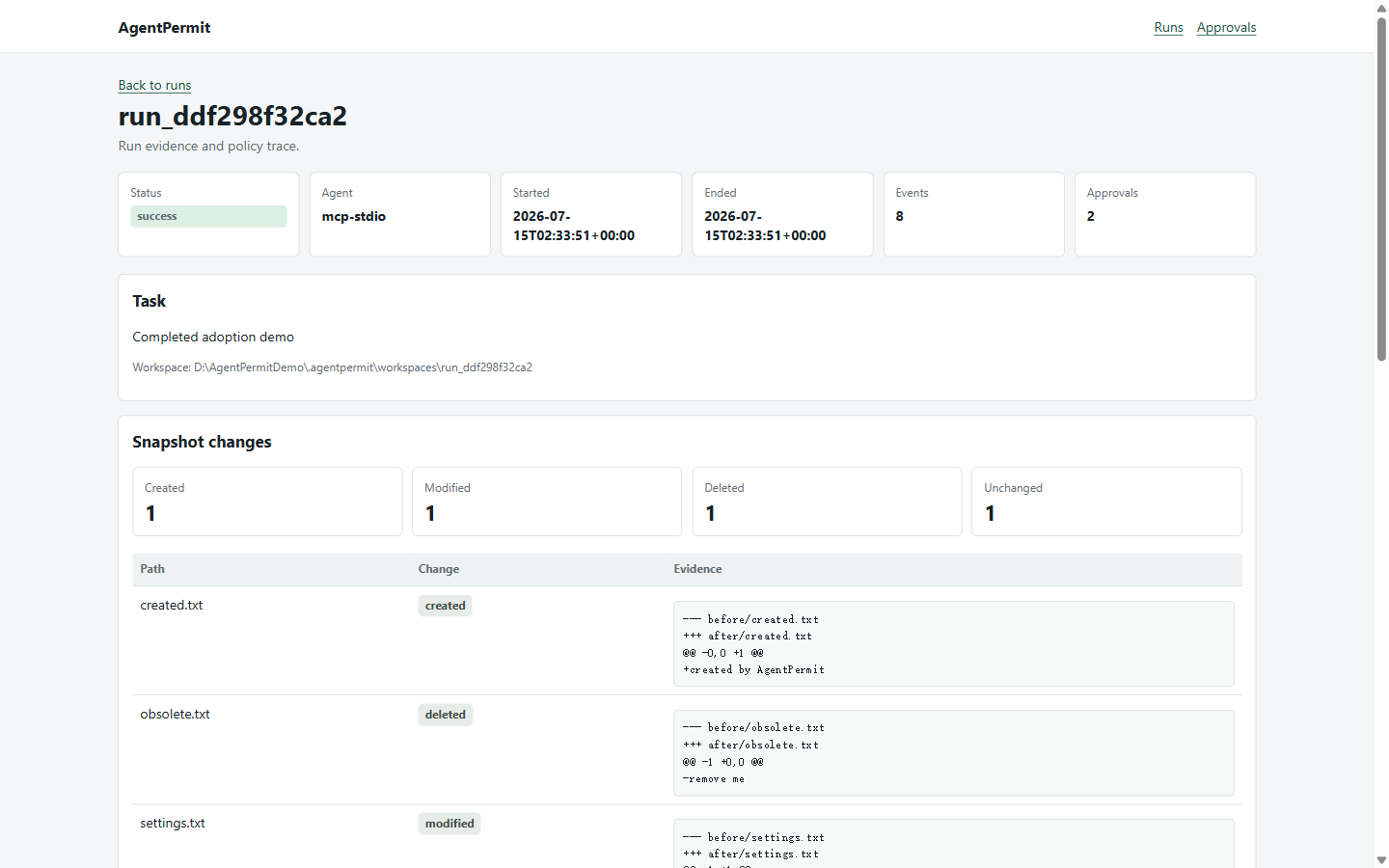
Open http://127.0.0.1:8765. The dashboard shows the completed run, policy trace, approval decision, and bounded snapshot evidence. The original examples\sample_repo remains unchanged.
For a real MCP session, start the server against a source directory and task:
agentpermit --home .demo mcp `
  --source examples\sample_repo `
  --task "Inspect the repository"
The first tools/call creates the governed run. A policy-gated call returns a stable pending approval id; approve it in the dashboard or with agentpermit --home .demo approve <approval_id>, then retry the identical MCP call.
Standard MCP configuration
The public integration is the standard MCP stdio server. Use the exact command shape supported by each client.
Claude Code, project scope:
claude mcp add --scope project agentpermit -- npx --yes [email protected] --home . mcp --source . --task "Govern this workspace"Codex project configuration in .codex/config.toml:
[mcp_servers.agentpermit]
command = "npx"
args = ["--yes", "[email protected]", "--home", ".", "mcp", "--source", ".", "--task", "Govern this workspace"]
Use an absolute path to the npm executable when the client cannot resolve npx. Keep --auto-approve out of client configuration; it is a server-process option for a deliberately trusted local demo only.
The wire sequence is initialize, notifications/initialized, tools/list, then tools/call. See docs/MCP_STDIO.md.
Approval and dashboard workflow
Policy decisions are made by the gateway before a tool executes. Writes and patches require approval by default. The dashboard at http://127.0.0.1:8765 provides:
- Run status and task metadata.
- Approval request, exact redacted arguments, reviewer, and reason.
- Event filters for policy, approval, and tool execution records.
- Snapshot counts and bounded diffs for created, modified, and deleted files.
CLI alternatives use the same .demo home as the run:
agentpermit --home .demo approvals --run-id <run_id>
agentpermit --home .demo approve <approval_id> --approver reviewer --reason "Reviewed exact request"
agentpermit --home .demo reject <approval_id> --approver reviewer --reason "Rejected exact request"
agentpermit --home .demo show <run_id>
agentpermit --home .demo export <run_id> --format html --out report.html
Architecture
Claude Code / Codex / MCP client
              |
       standard MCP stdio
              v
        RuntimeGateway
       /       |       \
   Policy   Approval   AuditStore
      |        |          |
  ToolExecutor ---- WorkspaceManager
              |
       snapshots + dashboard
The gateway owns governance semantics. The MCP server and scripted agent are adapters only. Read docs/ARCHITECTURE.md for boundaries and lifecycle details.
Security limits
AgentPermit binds its dashboard to loopback and is intended for one local user. A copied workspace is an organizational boundary, not a container or OS sandbox. Same-user processes can tamper with local state; allowed commands can access the host filesystem and network according to OS permissions. Redaction and protected globs reduce accidental persistence but are defense in depth, not DLP. Review SECURITY.md before using it with sensitive repositories.
The policy also bounds input before processing: max_mcp_frame_bytes (1,048,576), max_tool_argument_bytes (262,144), max_file_bytes (1,048,576), and max_source_bytes (16,777,216 aggregate copied source bytes). Every value must be a positive integer. Frames and tool arguments over their limits return structured errors; file reads, writes, patches, source copies, and snapshots fail instead of loading oversized content.
Development
python -m pip install -e ".[dev]"
ruff format --check agentpermit tests scripts
ruff check agentpermit tests scripts
mypy --no-incremental agentpermit
python -m pytest --cov=agentpermit --cov-report=term-missing --cov-fail-under=90
python -m build
npm test
npm pack --dry-run
python -m agentpermit --home .eval eval --tasks examples/tasks.jsonl --auto-approve
python scripts/validate_release.py --tag v0.3.0
git diff --check
See CONTRIBUTING.md for changes, tests, and disclosure expectations. The project is MIT licensed; see LICENSE.