
ahaapi
v3.2.0
Published
ahaapi 是一个封装了hash1算法的 前端请求后端api接口的ajax插件
Downloads
64


Readme
#ahaapi 介绍文档
简介
ahaapi 是一个封装了hash1算法的 前端请求后端api接口的ajax插件
前端ajax接口对接层
已兼容 Uniapp || Vue || React
1.安装命令
npm install ahaapi --save2.创建commen文件夹
vue项目在src目录下创建 commen文件夹
uniapp项目在项目根目录下创建commen文件夹
在commen 文件夹中创建 url.js 以及 api.js
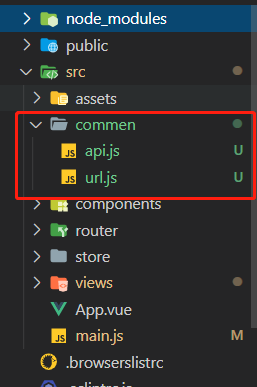
2.1 url.js
/*url.js 后端接口地址前缀 */
 const baseUrl = 'https://baidu.com';  //正式服请求地址前缀--需手动替换前缀
 export default {
     baseUrl,
 }
2.2 api.js
/**
 * 前端ajax接口对接层
 * 已兼容 Uniapp || Vue || React
 *
 */

import util from 'ahaapi'
import url from './url'

let baseUrl = url.baseUrl //后端请求地址前缀
let api = {};

/**
 * @call 参数示例
 * 第一个参数为接口的全部地址(String);
 * 第二个参数cnt为前端传给后端的数据(Object),cnt 没有就传空对象{}
 * 第三个参数为回调方法;
 * 第四个参数表示是否越过Token的验证(Boolean) true:不进行token验证(如登录接口)
 * 第五个参数为请求的具体方法(String) 如:POST GET PUT DELETE等常用请求方法;第四个参数要求:字母必须全部大写
 **/

//注册&&登录-- POST示例 (登录接口需绕过token验证,POST请求时,最后一个参数可省略)
api.login = function (cnt, callback) {
    util.call(baseUrl + '/users/', cnt, callback, true)
}
//获取用户资料--GET示例
api.getUserInfo = function (cnt, callback) {
    util.call(baseUrl + '/role/', cnt, callback, false, 'GET')
}
//读取新闻详情--GET示例  (GET示例--获取详情是根据列表的记录id进行请求,需多传入'id'参数)
api.newsRead = function (id, cnt, callback) {
    util.call(baseUrl + '/news/' + id, cnt, callback, false, 'GET')
}
//设置用户资料--POST示例 (POST请求时,POST可以省略)
api.setUserInfo = function (cnt, callback) {
    util.call(baseUrl + '/role/', cnt, callback, false)
}
//更新用户资料--PUT示例 (PUT 是根据id进行操作,需多传入一个'id'参数)
api.updateCardAuthToken = function (id, cnt, callback) {
    util.call(baseUrl + '/auth/' + id + '/', cnt, callback, false, 'PUT')
}


export default api
3.全局引入
在main.js中引入
import util from 'ahaapi'
import api from './commen/api.js'
在main.js中挂载
//挂载插件
Vue.prototype.$api = api
Vue.prototype.$util = util
4.在组件/页面中使用
 methods: {
    //注册&&登录
    login() {
      let cnt = {
        username: this.tell,
        code: this.code
      };
      this.$api.login(cnt, res => {
        if (res.rc == this.$util.RC.SUCCESS) {
          //这里记得将用户的token保存到缓存
          //vue React 项目
          localStorage.setItem("token", res.token);
          //uniapp 项目
          uni.setStorageSync("token", res.token);
        } else {
          //请求失败
          console.log(res.msg);
        }
      });
    },

    //获取用户资料--GET示例
    getUserInfo() {
      let cnt = {
        userId: this.userId
      };
      this.$api.getUserInfo(cnt, res => {
        if (res.rc == this.$util.RC.SUCCESS) {
          console.log(res);
        } else {
          //请求失败
          console.log(res.msg);
        }
      });
    },

    //读取新闻详情--GET示例
    newsRead() {
      let id = this.id;
      this.$api.newsRead(id, {}, res => {
        if (res.rc == this.$util.RC.SUCCESS) {
          console.log(res);
        } else {
          //请求失败
          console.log(res.msg);
        }
      });
    },
    //设置用户资料--POST示例
    setUserInfo() {
      let cnt = {
        userId: this.userId,
        userName: this.userName,
        userImage: this.userImage,
        nick: this.nick,
        sex: this.sex
      };
      this.$api.setUserInfo(cnt, res => {
        if (res.rc == this.$util.RC.SUCCESS) {
          console.log(res);
        } else {
          //请求失败
          console.log(res.msg);
        }
      });
    },
    //更新用户资料--PUT示例
    updateCardAuthToken() {
      let id = this.userId;
      let cnt = {
        userName: this.userName,
        userImage: this.userImage,
        nick: this.nick,
        sex: this.sex
      };
      this.$api.updateCardAuthToken(cnt, res => {
        if (res.rc == this.$util.RC.SUCCESS) {
          console.log(res);
        } else {
          //请求失败
          console.log(res.msg);
        }
      });
    }
  },