
ahws-dr-svg-sprites
v0.0.5
Published
Create SVG sprites with PNG fallbacks at needed sizes
Downloads
7


Readme
ahws-dr-svg-sprites
Create SVG sprites with PNG fallbacks at needed sizes
Usage
Minimal:
var builder = require("ahws-dr-svg-sprites");
var options = {
	spriteElementPath: "img/logos",
	spritePath: "img/sprites/logo-sprite.svg",
	cssPath: "css/logo-sprite.css"
};
builder(options, function () {
	// sprite was built
});
would yield the following files:
css/logo-sprite.cssimg/sprites/logo-sprite.svgimg/sprites/logo-sprite.png
Advanced:
var builder = require("ahws-dr-svg-sprites");
var options = {
	name: "tv",
	prefix: "dr-logos",
	spriteElementPath: "img/logos/tv",
	spritePath: "img/sprites",
	layout: "packed",
	cssUrl: 'img'
	cssPath: "css",
	cssSuffix: "less",
	cssUnit: "rem",
	sizes: {
		large: 24,
		small: 16
	},
	refSize: "large"
};
builder(options, function () {
	// sprite was built
});
would yield the following files:
css/dr-logos-tv-sprite.lessimg/sprites/dr-logos-tv-sprite.svgimg/sprites/dr-logos-tv-sprite-large.pngimg/sprites/dr-logos-tv-sprite-small.png
Options
options.name
Type: String
Optional
Used when automatically building stylesheet and image filenames.
options.spriteElementPath
Type: String
The base path of the elements to be sprited.
options.spritePath
Type: String
Destination path of the generated sprite images.
If the filename part (ending in .svg) is omitted it will be built from options.prefix, options.name and "sprite".
options.previewPath
Type: String
Default value: ""
Optional
The path where to built a preview page.
If the filename part (ending in .html) is omitted it will be built from options.prefix, options.name and "sprite".
Default is no preview.
options.cssPath
Type: String
Optional
Destination path of the generated stylesheet.
If a filename part is omitted it will get built from options.cssPrefix, options.name, "sprite" and options.cssSuffix.
If left blank only svg sprites and png fallbacks are generated.
options.prefix
Type: String
Default value: ""
Optional
Defines a prefix for the name of the sprite stylesheet, images and classnames.
options.cssPrefix
Type: String
Default value: ""
Optional
Defines a prefix for the name of the sprite stylesheet (this overrides options.prefix if set).
Only used when automatically building stylesheet filenames.
options.cssSuffix
Type: String
Default value: "css"
Optional
Stylesheet filetype suffix.
Only used when automatically building stylesheet filenames.
options.cssSvgPrefix
Type: String
Default value: ".svg"
Optional
Defines a prefix for selectors to target svg sprites.
options.cssPngPrefix
Type: String
Default value: ""
Optional
Defines a prefix for selectors to target png sprites.
options.cssUnit
Type: String
Default value: "px"
Optional
Defines the unit used for dimensions and positions in the stylesheet.
Only other unit that is supported (in a meaningful way) is "rem" - which is used in combination with options.cssBaseFontSize.
options.cssBaseFontSize
Type: String
Default value: 16
Optional
Used to calculate values when using options.cssUnit set to "rem".
options.cssIncludeElementSizes
Type: Boolean
Default value: true
Optional
If set to false width and height for the svg elements will be omitted from the stylesheet. Useful in combination with a options.layout of "alt-diagonal".
options.template
Type: String
Default value: "../templates/stylesheet.hbs"
Optional
Defines the path of the Handlebars template to use for generating the stylesheet.
The data object passed to the Handlebars template is a Sprite instance (see ./lib/Sprite.js).
Templates have a few internal helpers at their disposal:
url: Takes a path (String) and returns a CSS appropriate path.unit: Adds units to a value (Number) if needed and also converts frompxtorem.prefix: Accepts an array of items (Sprite.sizes[].items) and a selector prefix (String). Returns a comma separated prefixed selector for all elements in a size.prefixAll: Accepts an array of sizes (Sprite.sizes) and a selector prefix (String). Returns a comma separated prefixed selector for all elements for all sizes.
options.layout
Type: String
Default value: "horizontal"
Optional
Defines the layout of elements in the sprite. Possible values:
"horizontal": Elements are placed side-by-side."vertical": Elements are placed above eachother."packed": Elements are packed into smallest possible space."diagonal": Elements are distributed from top-left to bottom-right corner."alt-diagonal": Elements are distributed from bottom-left to top-right corner.
options.map
Type: Object|Function
Default value: null
Optional
Can be used to translate svg element basenames (filename without extension) into desired names. Handy if the basenames don't make good classnames (or contain invalid chars).
If an object is supplied it will be used as a lookup table.
If a function is supplied it will be used to transform the svg element basename.
options.unit
Type: Number
Default value: 10
Defines unit size of the grid the sprite elements snap to.
options.refSize
Type: String|Number
Optional
Defines the basic size of your source svg-elements. All other sizes will be calculated relating to this. It can either be a key from the sizes option (which refers to a number) or just a raw number.
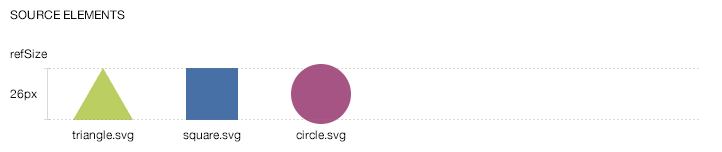
Notice how one source element is bigger than the refSize; this ok - as every element is scaled proportionally.
options.sizes
Type: Object
Optional
A hash of size labels and values (Number) that define the different sizes of the needed sprites.
var options = {
	// some options
	sizes: {
		large: 39,
		small: 13
	},
	refSize: "large",
	// more options
};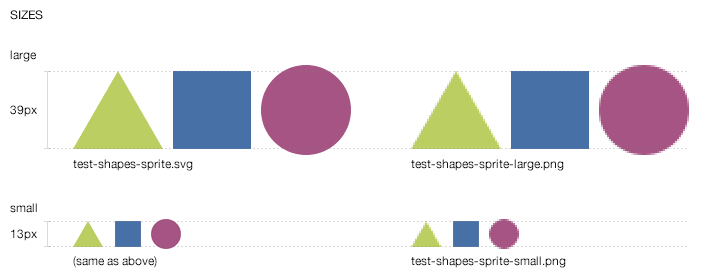
1 SVG sprite is generated and 2 PNG sprites (1 per defined size).
Changelog
0.0.1
FORKED
options.cssUrladded.
0.9.0
Features:
options.layoutadded.options.mapadded.options.templateadded.options.previewPathadded.options.cssSvgPrefixadded.options.cssPngPrefixadded.options.cssUnitadded.options.cssBaseFontSizeadded.options.cssIncludeElementSizesadded.
Changes:
options.sizesandoptions.refSizeare now optional (which also means no size tag is added to classnames ifoptions.sizesis omitted).options.spritePathandoptions.cssPathnow also accept a full path including filename for simpler configuration.