
ai-chat-embed
v0.1.9
Published
Framework-agnostic embed wrapper for ai-suspended-ball-chat
Downloads
74

Maintainers
 mingle998
Readme
ai-chat-embed(AI助手组件)
将 AI-Chat 聊天组件球嵌入任意网站,只需一行 <script>,无需依赖任何框架、无需构建工具。
跨框架接入(核心特性)
ai-chat-embed 的核心目标就是 跨框架、跨技术栈:
- React / Next.js / Vue / Angular / Svelte
- 原生 HTML / 传统多页(JSP、PHP、Rails 模板)
- jQuery、低代码平台、自定义脚本区块
你无需把业务项目改造成 Vue3,只要页面能插入 <script> 即可接入。
本包基于 ai-suspended-ball-chat 封装,将其能力扩展到任意前端技术栈。
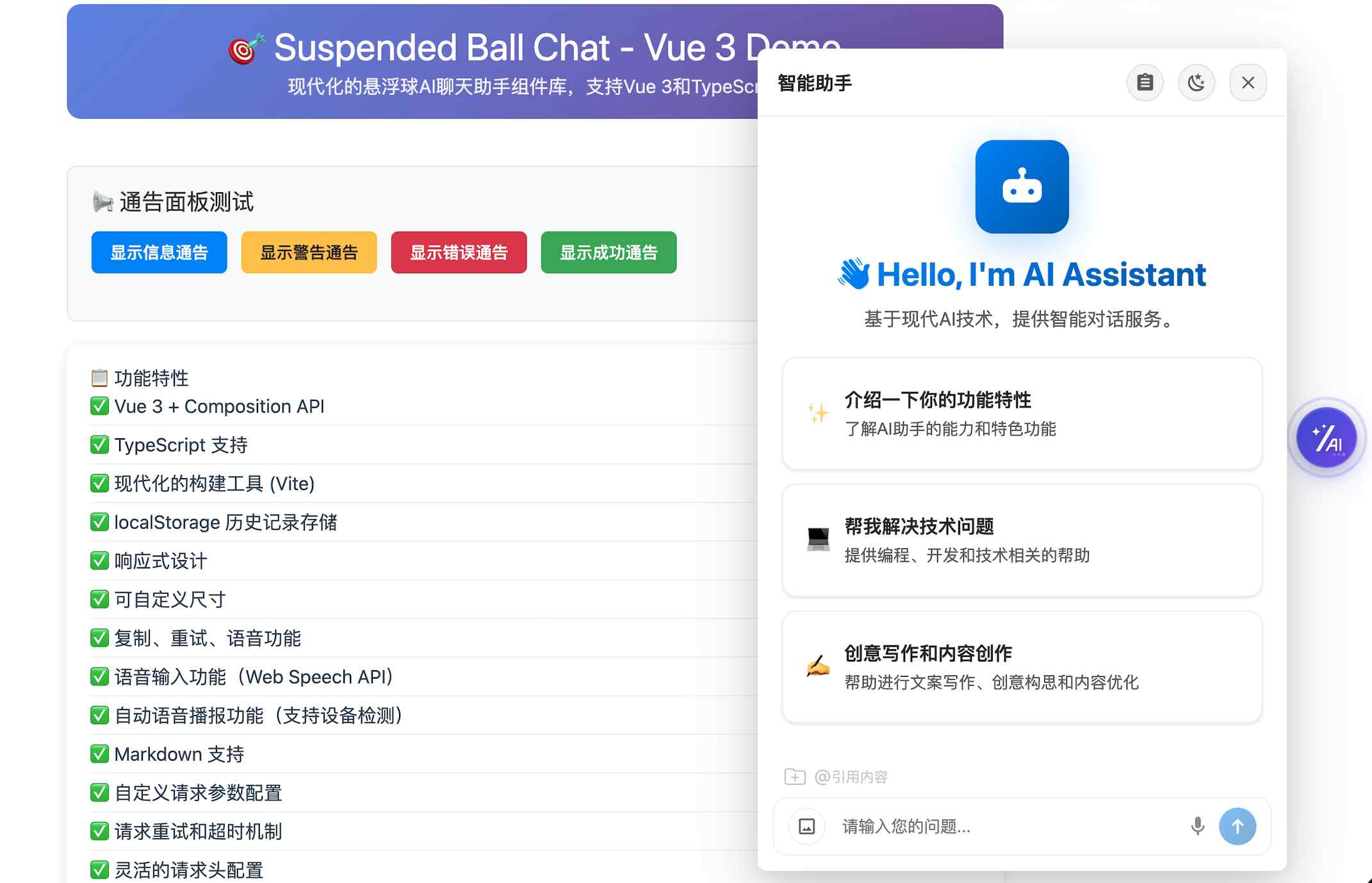
《组件落地场景体验1-AI简历助手》: 点击直达案例1🔗
《组件落地场景体验2-AI编程助手》: 点击直达案例2🔗
🔔 温馨提示: 如果您觉得阅读文档困难,也可以选择咨询在线AI助手: 🤖点击直达咨询→
✨ 特性
- 🚀 即插即用:只需
<script>+AIChatEmbed.init()即可挂载 - 🧩 跨框架接入:React / Vue / Angular / jQuery / 原生 HTML 通用
- 🪄 双模式渲染:支持
ball悬浮球模式与panel内嵌面板模式 - 🔁 实例化调用:
const chat = await init()后可sendMessage / update / destroy - 📡 加载生命周期回调:支持
onEmbedLoading / onEmbedReady / onEmbedError - 🧱 资源自动加载:自动拉取 Vue、lodash、组件 UMD(支持自定义 CDN 地址)
- 🧠 能力透传:原组件方法可通过实例动态透传,减少封装层跟随升级成本
说明:本包重点解决“跨技术栈嵌入与生命周期管理”,具体 AI 业务能力(流式、语音、图片上传、历史记录等)由底层
ai-suspended-ball-chat提供并透传。
一、两种模式
悬浮球模式(默认)
页面右侧出现可拖拽的悬浮球,点击弹出聊天面板,适合全站挂载。
<script src="https://unpkg.com/ai-chat-embed/dist/ai-chat-embed.min.js"></script>
<script>
  AIChatEmbed.init({
    url: "https://your-api-endpoint.com/chat",
    appName: "my-app",
    domainName: "user123",
    enableStreaming: true
  });
  // mode 默认为 "ball",可省略
</script>
面板模式
ChatPanel 内嵌在指定容器中,适合嵌入页面某个固定区域(如侧边栏、弹窗内)。
<div id="my-chat-area" style="width:400px;height:600px;"></div>

<script src="https://unpkg.com/ai-chat-embed/dist/ai-chat-embed.min.js"></script>
<script>
  AIChatEmbed.init({
    mode: "panel",
    mountTo: "#my-chat-area",
    url: "https://your-api-endpoint.com/chat",
    appName: "my-app",
    domainName: "user123",
    enableStreaming: true,
    showCloseButton: false
  });
</script>
二、多技术栈接入示例
React(useEffect)
import { useEffect } from "react";

export default function Page() {
  useEffect(() => {
    let chat;
    const boot = async () => {
      chat = await window.AIChatEmbed.init({
        url: "https://your-api-endpoint.com/chat",
        appName: "react-app",
        domainName: "react-user",
        mode: "ball"
      });
    };
    boot();

    return () => {
      chat?.destroy();
    };
  }, []);

  return <div>My React Page</div>;
}
前提:页面已通过
<script src="https://unpkg.com/ai-chat-embed/dist/ai-chat-embed.min.js"></script>加载 SDK。
原生 HTML
<script src="https://unpkg.com/ai-chat-embed/dist/ai-chat-embed.min.js"></script>
<script>
  (async function () {
    const chat = await AIChatEmbed.init({
      url: "https://your-api-endpoint.com/chat",
      appName: "native-page",
      domainName: "user-001",
      mode: "ball"
    });
    // 主动发一条欢迎消息
    chat.sendMessage("你好,介绍一下你的能力");
  })();
</script>
jQuery 页面
<script src="https://code.jquery.com/jquery-3.7.1.min.js"></script>
<script src="https://unpkg.com/ai-chat-embed/dist/ai-chat-embed.min.js"></script>
<script>
  $(async function () {
    const chat = await AIChatEmbed.init({
      url: "https://your-api-endpoint.com/chat",
      appName: "jquery-app",
      domainName: "jquery-user",
      mode: "panel",
      mountTo: "#chat-container"
    });

    $("#send-btn").on("click", function () {
      chat.sendMessage($("#msg").val());
    });
  });
</script>
Vue 2 (Options API)
<template>
  <div>My Vue 2 Page</div>
</template>

<script>
export default {
  data() {
    return {
      chat: null
    };
  },
  async mounted() {
    this.chat = await window.AIChatEmbed.init({
      url: "https://your-api-endpoint.com/chat",
      appName: "vue2-app",
      domainName: "vue2-user",
      mode: "ball"
    });
  },
  beforeDestroy() {
    this.chat?.destroy();
  }
};
</script>
前提:页面已通过
<script src="https://unpkg.com/ai-chat-embed/dist/ai-chat-embed.min.js"></script>加载 SDK。
三、API
AIChatEmbed.init(options)
初始化并挂载组件,返回 Promise。同一页面重复调用不会重复挂载。
const chat = await AIChatEmbed.init({
  url: "https://your-api-endpoint.com/chat",
  appName: "my-app",
  domainName: "user123",
  enableStreaming: true,
  callbacks: {
    onUserMessage: (msg) => console.log("用户发送:", msg),
    onAssistantMessage: (msg) => console.log("AI 回复:", msg),
    onError: (err) => console.error("出错:", err)
  }
});
可选:你可以在 init 传入封装层生命周期回调,处理首次 CDN 资源加载时的业务 loading:
const chat = await AIChatEmbed.init({
  // ...你的业务配置
  onEmbedLoading: (loading, meta) => {
    // loading=true 开始加载外部资源,false 结束
    // meta: { mode, containerId }
  },
  onEmbedReady: (meta) => {
    // 首次挂载完成后触发(含 elapsedMs)
  },
  onEmbedError: (error, meta) => {
    // 资源加载失败或初始化失败时触发
  }
});
插槽自定义
ai-chat-embed 支持将底层组件的插槽通过 slots 配置传入。可用插槽为 more、welcome、chat-box-head 和 chat-box-footer。插槽值可以是 HTML 字符串、DOM 节点,或接收 slot 参数并返回 HTML 字符串的函数。
默认悬浮球模式(ball)
mode 默认值是 "ball"。悬浮球和展开后的聊天面板默认挂载到 #ai-chat-embed-root,因此可以在 document 上做事件委托,再通过容器 id 限定作用范围。
<script>
  // 不能把 @click / v-on:click 写进 HTML 字符串,它们不会被 Vue 编译。
  document.addEventListener("click", (event) => {
    const target = event.target;
    if (!(target instanceof Element)) return;

    const actionElement = target.closest(
      '#ai-chat-embed-root [data-chat-action]'
    );
    if (!actionElement) return;

    if (actionElement.dataset.chatAction === "human") {
      console.log("悬浮球模式:用户点击了转人工服务");
      // 在这里调用你的业务逻辑,例如打开人工客服窗口。
    }
  });

  const chat = await AIChatEmbed.init({
    // mode 可省略,默认就是 "ball"
    slots: {
      "chat-box-footer": `
        <button type="button" data-chat-action="human">
          转人工服务
        </button>
      `
    }
  });
</script>内嵌面板模式(panel)
panel 模式下,插槽内容位于 mountTo 指定的容器内,可以直接在该容器上绑定事件。
<div id="chat-panel"></div>
<script>
  const chatPanel = document.querySelector("#chat-panel");

  chatPanel.addEventListener("click", (event) => {
    const target = event.target;
    if (!(target instanceof Element)) return;

    const actionElement = target.closest("[data-chat-action]");
    if (!actionElement) return;

    if (actionElement.dataset.chatAction === "human") {
      console.log("面板模式:用户点击了转人工服务");
      // 在这里调用你的业务逻辑,例如打开人工客服窗口。
    }
  });

  const chat = await AIChatEmbed.init({
    mode: "panel",
    mountTo: chatPanel,
    slots: {
      welcome: ({ title }) => `
        <section class="my-welcome">
          <strong>${title}</strong>
          <p>欢迎咨询,请选择一个问题开始。</p>
        </section>
      `,
      "chat-box-head": ({ uiHistory }) =>
        `<div class="my-chat-head">已发送 ${uiHistory.length} 条消息</div>`,
      "chat-box-footer": `
        <button type="button" data-chat-action="human">
          转人工服务
        </button>
      `,
      more: '<a href="/help">帮助中心</a>'
    }
  });
</script>
函数 slot 的参数由底层组件提供:welcome 包含 title、welcomeConfig、presetTasks、onTaskClick;chat-box-head 和 chat-box-footer 包含 uiHistory、showWelcomeScreen、isStreaming;more 的参数取决于底层版本。传入 welcome 后会覆盖默认欢迎内容。HTML 会被转换为 Vue VNode,建议只传入可信内容;需要绑定交互时,可按上面的方式在稳定的外层容器上进行事件委托。
具体支持哪些插槽和配置能力,请查看 ai-suspended-ball-chat 原生组件文档。
chat.update(options)
通过实例动态更新组件配置(如切换标题、接口地址等),无需重新挂载。
chat.update({ title: "新的助手名称" });主动调用能力(关键入口)
初始化返回的实例可直接调用:
const chat = await AIChatEmbed.init({ /* ... */ });
chat.sendMessage("你好,帮我总结今日工作");
chat.getChatState();
chat.stopRequest();
chat.clearHistory();
实例也支持通用调用和动态方法透传(便于对齐底层组件升级):
chat.invoke("sendMessage", "你好");
// 如果底层组件存在 someNewMethod,会自动透传
chat.someNewMethod?.("arg1");
chat.destroy()
通过实例卸载并移除组件,彻底清理 DOM。
chat.destroy();四、配置说明
以下参数由本包提供,用于控制资源加载和挂载行为:
| 参数 | 类型 | 默认值 | 说明 |
| ------ | ------ | -------- | ------ |
| mode | "ball" | "panel" | "ball" | 悬浮球模式或内嵌面板模式 |
| mountTo | string | HTMLElement | "body" | 挂载目标,支持 CSS 选择器或元素引用 |
| containerId | string | "ai-chat-embed-root" / "ai-chat-panel-root" | 挂载容器的 id,ball/panel 模式各有默认值 |
| vueUrl | string | unpkg Vue3 CDN | 自定义 Vue3 全局构建地址 |
| lodashUrl | string | unpkg lodash CDN | 自定义 lodash 全局构建地址(需包含 _.cloneDeep) |
| chatLibUrl | string | unpkg 原组件 UMD 地址 | 自定义原组件 UMD 加载地址,可以按需按选择版本,默认‘正式版’ |
| onEmbedLoading | function | - | 封装层资源加载状态回调:(loading, meta) |
| onEmbedReady | function | - | 封装层初始化完成回调:(meta) |
| onEmbedError | function | - | 封装层初始化失败回调:(error, meta) |
| slots | object | - | 插槽配置:支持 more、welcome、chat-box-head、chat-box-footer等,值可以是 HTML 字符串、DOM 节点或渲染函数 |
其余所有配置(
url、appName、domainName、title、callbacks、enableStreaming等)会直接透传给底层SuspendedBallChat组件。完整配置参考原包文档:ai-suspended-ball-chat
⚠️值得注意点是:在这个组件中使用ai-suspended-ball-chat支持的配置时需要使用驼峰的写法,例如:domainName(而不是写domain-name).
五、适用场景
- 营销页、活动页快速集成 AI 客服
- React / Angular / Svelte 等非 Vue 项目
- 传统 JSP、PHP 等多页应用
- 低代码平台的自定义 HTML 区块
六、高级扩展能力支持
- 如需支持 Mermaid 渲染,请在页面中提前引入:
https://unpkg.com/[email protected]/dist/mermaid.min.js - 如需支持 ECharts 渲染,请在页面中提前引入:
https://unpkg.com/[email protected]/dist/echarts.min.js
七、chatLibUrl版本
- 正式版本: https://unpkg.com/ai-suspended-ball-chat@latest/dist/suspended-ball-chat.umd.js
- alpha版本: https://unpkg.com/ai-suspended-ball-chat@alpha/dist/suspended-ball-chat.umd.js
- beta版本: https://unpkg.com/ai-suspended-ball-chat@beta/dist/suspended-ball-chat.umd.js
Q: 不同版本功能上是否有差异?
A: 是的,当前有三个版本: 正式版、beta版本、alpha版本。他们的差异如下:
正式版: 稳定版,功能最新且齐全,但此版本不支持“独立协议的深度思考模式”,但是你可以通过后端将“思考内容”用
<details><summary >包裹间接实现这个功能.beta版本: 这是一个差异版本,对齐正式版90%的功能,支持“独立协议的深度思考模式”,但是此版本不支持“渲染自定义组件”等功能。
alpha版本: 这是一个实验版本, 对齐正式版100%的功能, 唯一的差异是此版本已经将“对话列表虚拟化”了以提升性能,此版本和主版本一样不支持“独立协议的深度思考模式”, 可能存在一些未知Bug,谨慎使用.
总结: 根据您的需求选择需要的版本, 无特殊需求建议使用正式版。
📄 八、问题与交流
1、问题建议可提交issue: https://github.com/mingle98/ai-chat-embed/issues
2、或者加入我们的QQ群: 592895347