
ai-hp
v0.5.0
Published
An HP bar for your AI accounts: weekly usage limits, reset times and banked resets for all your Claude Code and Codex accounts, in one table

Maintainers
 timtarou
Readme
ai-hp


An HP bar for your AI accounts. Weekly usage limits, reset times and banked resets for all your Claude Code and Codex accounts, in one table with the soonest reset first.
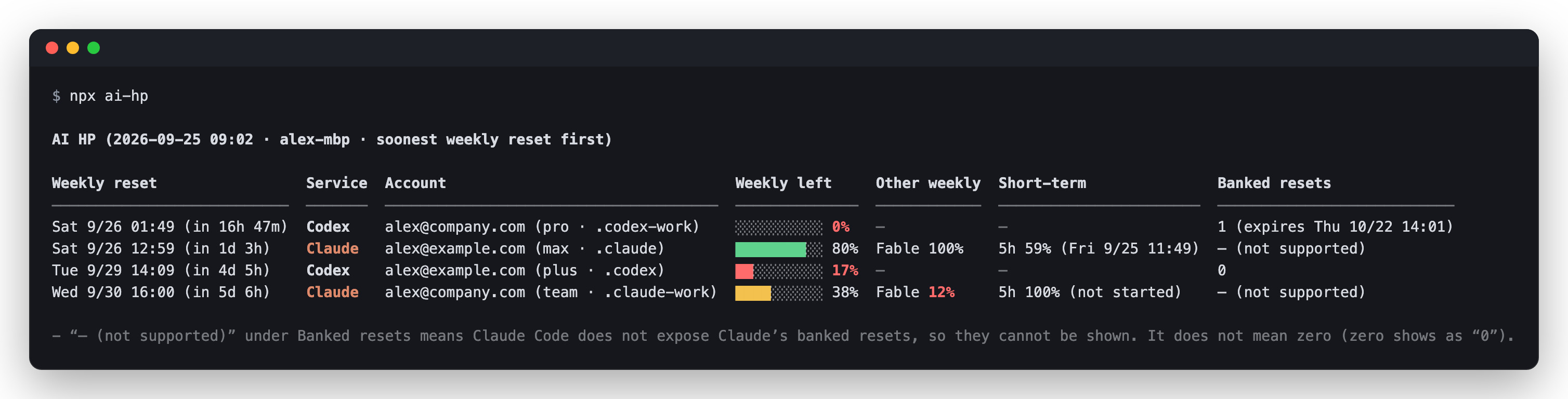
- Every account at once. Personal and work (Team) accounts, Claude Code and Codex, sorted by which weekly limit resets next.
- Zero tokens, no credentials touched. It asks the
claudeandcodexCLIs you already use for their numbers, through their own logins. No prompts are sent, and ai-hp never reads API keys, tokens or browser cookies (only each account's email, to label the rows). - Inside your agent too. It is also a skill for Claude Code and Codex: ask "which account should I use next?" and the agent reads the table for you.
- Small and dependency-free. Node.js 18+, no dependencies, no telemetry, MIT.
Quick start
npx ai-hpThat's it for the terminal. To use it from inside Claude Code or Codex, install the skill:
| Where | Install once | Run with a command | Or just ask |
|---|---|---|---|
| Claude Code | /plugin marketplace add timtarou/ai-hp/plugin install ai-hp@ai-hp | /ai-hp:ai-hp | "How much of my usage limits is left?" |
| Codex | Ask Codex:$skill-installer install https://github.com/timtarou/ai-hp/tree/main/skills/ai-hp into ~/.agents/skills | $ai-hp | "Show my AI HP" |
| Both, with skills.sh | npx skills add timtarou/ai-hp -g | /ai-hp or $ai-hp | "When do my limits reset?" |
| Terminal | Nothing (npx), or npm install -g ai-hp | npx ai-hp or ai-hp | — |
- In Claude Code and Codex, any request about usage limits, remaining quota, reset times or banked resets starts it.
- English or Japanese: ask "in English" / "in Japanese" in Claude Code or Codex, or run
npx ai-hp --lang en(orja). Without it, your OS language is used. - A one-line tip after the table is off by default. Ask for one, or run
npx ai-hp --comment. - Requires Node.js 18+ and the
claudeand/orcodexCLIs you want to cover.
What it shows
- Weekly reset: when each account's weekly limit resets, and how long until then. Rows are sorted by this, across Claude and Codex.
- Weekly left: a 10-cell bar plus the percentage left (red under 20%).
- Other weekly: model-specific weekly limits with their own budget, such as Claude's Fable limit.
- Short-term: the 5-hour limit (Claude, and Codex plans that have one).
- Banked resets: resets you have in reserve, with their expiry (Codex). Claude rows show “— (not supported)”: Claude Code does not expose Claude’s banked resets, so ai-hp cannot show them. This does not mean zero. Zero shows as “0” (see Claude's banked resets).
- A plain “—” under Other weekly or Short-term means that account has no such limit.
- The same email with a personal and a Team plan shows as two rows, because they have separate limits.
- Accounts that could not be read this time show their last values, marked as of ….
- 💬 One-liner (optional): with
--comment, one line of advice for right now goes under the table. When it runs as a skill, Claude or Codex rewrites it on the spot. - In a narrow terminal, each account is shown as a short card instead of a table row.
When the output is not a terminal (the skill, a pipe, a file), ai-hp prints Markdown. --markdown forces it.
### AI HP (2026-09-25 15:02 · my-mac · soonest weekly reset first)

| Weekly reset | Service | Account | Weekly left | Other weekly | Short-term | Banked resets |
|---|---|---|---|---|---|---|
| Sat 9/26 17:49 (in 1d 2h) | Codex | [email protected] (pro · .codex-work) | ░░░░░░░░░░ **0%** | — | — | 1 (expires Fri 10/23 06:01) |
| Sun 9/27 04:59 (in 1d 13h) | Claude | [email protected] (max · .claude) | ████████░░ 80% | Fable 100% | 5h 59% (Fri 9/25 16:49) | — (not supported) |
| Wed 9/30 06:09 (in 4d 15h) | Codex | [email protected] (pro · .codex) | ██░░░░░░░░ **17%** | — | — | 0 |
| Thu 10/1 08:00 (in 5d 16h) | Claude | [email protected] (team · .claude-a-team) | ██████████ 100% | Fable 100% | 5h 100% (not started) | — (not supported) |
How is this different from…
/usagein Claude Code and/statusin Codex. They show the one account you are logged in to, in that tool. ai-hp lists every account on the machine, across both tools, sorted by the next reset.- CodexBar. If you want limits for many providers (Cursor, Gemini, Copilot and more) always visible in your menu bar, with notifications and cost tracking, use CodexBar; it does far more. ai-hp is deliberately narrower:
- It never reads tokens or cookies. It only asks the
claudeandcodexCLIs through their own interfaces. CodexBar mainly reads OAuth tokens or browser cookies and calls the providers' APIs itself. - Several Claude accounts work by logging each into its own config folder (
~/.claude-*), with no extra tool. CodexBar reads several Claude subscriptions through claude-swap or tokens you paste into its config. - Claude and Codex share one table sorted by the next weekly reset, and ai-hp is a Claude Code plugin and a Codex skill, so you can ask "which account should I use next?" inside the agent.
- It never reads tokens or cookies. It only asks the
- Log analyzers (such as ccusage). They estimate tokens and cost from local session logs. ai-hp shows what the servers say is left, and when it resets.
Install in detail
Terminal (npm)
npx ai-hp                  # run the latest version without installing
npm install -g ai-hp       # or install it, then run: ai-hp
Claude Code (plugin)
/plugin marketplace add timtarou/ai-hp
/plugin install ai-hp@ai-hp
Run it with /ai-hp:ai-hp, or just ask, for example "How much of my usage limits is left?"
Codex
Ask Codex:
$skill-installer install https://github.com/timtarou/ai-hp/tree/main/skills/ai-hp into ~/.agents/skills~/.agents/skills is read by every CODEX_HOME, so one install covers all your Codex accounts. Restart Codex, then run it with $ai-hp, or just ask, for example "Show my AI HP".
Codex runs it outside the sandbox (it needs the network and your CLI logins), so approve that when asked.
Claude Code and Codex with skills.sh
npx skills add timtarou/ai-hp -gThe skills CLI copies the skill into each agent's skill folder (~/.claude/skills, ~/.agents/skills, …). Update it later with npx skills update.
From a clone (both tools, updates with git pull)
git clone https://github.com/timtarou/ai-hp.git
cd ai-hp
npm run install-skills     # symlinks the skill into ~/.claude/skills and ~/.agents/skills
npm start                  # run it in the terminal
Then /ai-hp in Claude Code and $ai-hp in Codex, or just ask.
Multiple accounts
ai-hp reads every account logged in on this machine:
| Tool | Folders it reads |
|---|---|
| Claude Code | ~/.claude and ~/.claude-* (CLAUDE_CONFIG_DIR) |
| Codex | ~/.codex and ~/.codex-* (CODEX_HOME) |
Claude with /login switching: only the account currently logged in to ~/.claude can be read. Log each other account into a query-only folder once, and ai-hp reads all of them every time. Your ~/.claude login and /login switching are not affected (Claude Code stores each config folder's login in a separate credential entry).
npx ai-hp add-claude work [email protected]
npx ai-hp add-claude personal [email protected]
Personal and Team plans under the same email are separate accounts: give them separate names and pick the organization during the browser login. The command refuses to overwrite a folder that is already logged in.
Codex: use one CODEX_HOME per account (for example alias codex-work='CODEX_HOME=$HOME/.codex-work codex'). To add one:
npx ai-hp add-codex workFrom a clone, the same scripts are sh skills/ai-hp/scripts/add-claude-account.sh and add-codex-account.sh.
Options
ai-hp [--lang en|ja] [--markdown] [--no-color] [--comment] [--debug]
ai-hp add-claude <name> [email]
ai-hp add-codex <name>
| Setting | Command line | Environment | config.json | Default |
|---|---|---|---|---|
| Language | --lang en\|ja | AI_HP_LANG | "lang" | your OS locale |
| Time zone | | AI_HP_TZ | "timeZone" | your OS time zone |
| Markdown instead of the terminal table | --markdown | | | when the output is not a terminal |
| Colors | --no-color to turn off | NO_COLOR=1, FORCE_COLOR=1 | | in a terminal |
| One-liner after the table | --comment to show, --no-comment to hide | AI_HP_COMMENTARY=1 | "commentary": true | off |
| Raw responses to stderr | --debug | AI_HP_DEBUG=1 | | off |
| Folders to read | | AI_HP_CLAUDE_DIRS, AI_HP_CODEX_HOMES | | auto-detected |
config.json lives in ~/.config/ai-hp/ ($XDG_CONFIG_HOME/ai-hp, or %APPDATA%\ai-hp on Windows).
How it works
| | Source | Tokens used |
|---|---|---|
| Claude | claude -p with the SDK control request get_usage (no hooks, plugins, MCP servers or session files are loaded) | none |
| Codex | codex app-server per CODEX_HOME, with account/read and account/rateLimits/read | none |
Both return the server's current values, so a forced or early reset shows up on the next run. Accounts are queried in parallel (a few seconds in total). ai-hp makes no network requests of its own and collects nothing: the CLIs talk to their own servers with their own logins, and ai-hp reads only the account email and IDs from each CLI's config to label and group the rows. Last values are kept in ~/Library/Caches/ai-hp (macOS), ~/.cache/ai-hp (Linux) or %LOCALAPPDATA%\ai-hp (Windows) and dropped after 14 days.
npm releases are published from GitHub Actions with trusted publishing: no npm token is stored anywhere, and each version published this way carries a provenance attestation, shown on npm, that links it to the commit it was built from.
Claude's banked resets (not shown)
Claude's banked resets are not part of what Claude Code exposes to other tools (get_usage), so ai-hp shows “— (not supported)” for them (not zero). There is a way to read them: calling the usage endpoint that Claude Code itself uses, with your Claude Code login credentials, while identifying as Claude Code. ai-hp does not do this, and we don't recommend it:
- It uses your subscription credentials outside Claude Code and impersonates the official client. That may go against Anthropic's terms and put your account at risk.
- The endpoint is not a public API and can change without notice.
Claude Code itself tells you when you have a reset available, for example when you reach a usage limit.
Limitations
get_usageis marked experimental by Claude Code, andaccount/rateLimits/readbelongs to Codex's app-server protocol. A CLI update can change them; ai-hp then reports the failure under the table instead of guessing values.--debugprints the raw responses for bug reports.- Only accounts logged in on the machine where it runs are listed.
- Adding accounts (
add-claude,add-codex) needs a POSIX shell (macOS, Linux, WSL).
Development
The sources are TypeScript in skills/ai-hp/scripts/; the skill runs the JavaScript build in skills/ai-hp/dist/, which is committed so that it works on Node 18+ without a build step. Development needs Node.js 22.18+ (the tests run the TypeScript directly).
npm install        # TypeScript and @types/node
npm run build      # regenerate skills/ai-hp/dist after changing the sources (a test fails if you forget)
npm test
npm run typecheck
npm run demo       # draw the table with made-up accounts
node scripts/screenshot.ts   # regenerate the images in docs/ (needs Google Chrome)
To release, bump the version in package.json, .claude-plugin/plugin.json and skills/ai-hp/scripts/cli.ts (a test checks they match), rebuild, and publish a GitHub release tagged v<version>. The release workflow publishes to npm.
License
MIT