
ai-nexus
v1.4.4
Published
Unified rule manager for Claude Code, Cursor, and Codex - write once, use everywhere, save tokens
Downloads
2,903

Maintainers
 jsk9999
Readme
한국어 | English
ai-nexus
Write rules once. Use everywhere. Save tokens.
Unified rule manager for Claude Code, Cursor, and Codex.



npx ai-nexus installThe Problem
Every AI coding tool has its own rule format — .claude/rules/*.md, .cursor/rules/*.mdc, .codex/AGENTS.md. You end up maintaining the same rules in multiple places, and they inevitably drift apart. On top of that, every prompt loads all your rules, wasting tokens on irrelevant context.
A recent study from ETH Zurich (138 repos, 5,694 PRs) confirms this: loading all rules at once hurts performance by ~3% and increases cost by 20%+. Even hand-written context files only helped by 4% — and only when kept under 30 lines. The takeaway: less is more, and only relevant rules should be loaded per prompt.
The Solution
ai-nexus lets you write rules once and distribute them across all your tools — while keeping token usage minimal with smart rule loading:
Write once:
  config/rules/commit.md
  config/skills/react.md

Deploy everywhere:
  ✓ Claude Code  → .claude/rules/ (with semantic routing)
  ✓ Cursor       → .cursor/rules/*.mdc (auto-converted)
  ✓ Codex        → .codex/AGENTS.md (aggregated)

One source of truth. Every tool in sync.
Only relevant rules loaded per prompt.
Why ai-nexus?
| | Benefit | Detail |
|---|---|---|
| Only relevant rules loaded | Hundreds of rules installed, only 2-3 loaded per prompt | Semantic Router analyzes your prompt and picks just the rules you need. No unnecessary context = better AI responses + less token waste. |
| Write once, deploy everywhere | One rule file → three tools | Write a single .md rule. ai-nexus auto-converts to .mdc for Cursor and AGENTS.md for Codex. No more copy-pasting. |
| AI-powered rule selection | GPT-4o-mini or Claude Haiku picks rules for you | A hook runs on every prompt, loading only what you need. Costs ~$0.50/month. Falls back to keyword matching with zero cost. |
| Team-wide consistency | Git-based rule sharing | Everyone installs from the same repo. npx ai-nexus update keeps the whole team in sync. |
| Your edits are safe | Non-destructive updates | Install and update never overwrite your local customizations. Only new files are added. |
| Community marketplace | Browse, install, remove — from your browser | npx ai-nexus browse opens a local web UI. Community rules are available instantly after PR merge. |
Quick Start
# Interactive setup wizard (default)
npx ai-nexus install

# Quick install with defaults
npx ai-nexus install -q

# Use your team's rules
npx ai-nexus install --rules github.com/your-org/team-rules
Demo
Setup Wizard

Installed Rules

Supported Tools
| Tool | How it works | Token overhead |
|------|--------------|----------------|
| Claude Code | Semantic Router dynamically swaps rules per prompt | Only relevant rules loaded |
| Cursor | Converts rules to .mdc format; Cursor's built-in search handles filtering | Depends on Cursor's search |
| Codex | Aggregated AGENTS.md (rules merged into single file) | All rules loaded |
How It Works
Claude Code: Semantic Router
A hook runs on every prompt, analyzing what rules you actually need:
~/.claude/
├── hooks/
│   └── semantic-router.cjs   # Runs on each prompt
├── settings.json             # Hook configuration
├── rules/                    # Active rules
└── rules-inactive/           # Parked rules (not loaded)
With AI routing (optional):
export OPENAI_API_KEY=sk-xxx        # or ANTHROPIC_API_KEY
export SEMANTIC_ROUTER_ENABLED=true
GPT-4o-mini or Claude Haiku analyzes your prompt and picks the right rules. Cost: ~$0.50/month. Requires explicit opt-in.
Without AI (default): Keyword matching activates rules based on words in your prompt. Zero cost, no API key needed.
Cursor: Rule Converter
ai-nexus converts .md rules to Cursor's .mdc format, adding description and alwaysApply metadata automatically:
---
description: Git commit message conventions and best practices
alwaysApply: false
---

# Commit Rules
...
After conversion, Cursor's built-in semantic search handles rule filtering — ai-nexus does not run a router for Cursor. The value is unified rule management: write rules once, use them across Claude Code, Cursor, and Codex.
Codex: Aggregated Rules
Individual rule files are aggregated into a single AGENTS.md file, which is loaded at session start. No dynamic loading.
Codex users: select only the rules you need. Since all rules are loaded every session, installing too many wastes tokens. Use the interactive wizard (
npx ai-nexus install) to pick only relevant categories and files. Recommended starting set:rules/essential.md,rules/commit.md,rules/security.md.
Commands
| Command | Description |
|---------|-------------|
| install | Install rules globally (interactive wizard) |
| install -q | Quick install with defaults |
| init | Install in current project (.claude/) |
| update | Sync latest rules (respects local changes) |
| list | Show installed rules |
| test <prompt> | Preview which rules would load |
| search [keyword] | Search community rules from the registry |
| get <filename> | Download a rule from the community registry |
| add <url> | Add rules from a Git repository |
| remove <name> | Remove a rule source |
| browse | Open rule marketplace in browser |
| doctor | Diagnose installation issues |
| uninstall | Remove ai-nexus installation |
Team Rules
Share rules across your team via Git:
# Everyone installs from the same source
npx ai-nexus install --rules github.com/acme/team-rules

# When rules are updated
npx ai-nexus update
Creating a Rules Repository
team-rules/
├── config/
│   ├── rules/           # Core rules (essential.md, security.md)
│   ├── commands/        # Slash commands (/commit, /review)
│   ├── skills/          # Domain knowledge (react.md, rust.md)
│   ├── agents/          # Sub-agents (code-reviewer.md)
│   ├── contexts/        # Context files (@dev, @research)
│   ├── hooks/           # semantic-router.cjs
│   └── settings.json    # Claude Code hook config
└── README.md
Rule Format
---
description: When to load this rule (used by semantic router)
---

# Rule Title

Your rule content...
Update & Local Priority
Rules are installed as independent copies. Your customizations are always safe:
- Existing files are never overwritten during install or update
- Only new files from source are added
npx ai-nexus updatesyncs new rules from the latest package- Use
--forceto override (backup first!)
# This will NOT overwrite your custom commit.md
npx ai-nexus update

# This WILL overwrite everything
npx ai-nexus update --force
Migrating from symlink mode? Just run
npx ai-nexus update— symlinks are automatically converted to copies.
Directory Structure
.ai-nexus/                    # ai-nexus metadata
├── config/                   # Merged rules from all sources
├── sources/                  # Cloned Git repositories
└── meta.json                 # Installation info

.claude/                      # Claude Code
├── hooks/semantic-router.cjs
├── settings.json
├── rules/                    # Copied from .ai-nexus/config/rules
└── commands/                 # Copied from .ai-nexus/config/commands

.cursor/rules/                # Cursor (.mdc files)
├── essential.mdc
└── commit.mdc

.codex/AGENTS.md              # Codex
Examples
Personal Setup
npx ai-nexus install
# Select: Claude Code, Cursor
# Select: rules, commands, hooks, settings
# Template: React/Next.js
Team Setup
# 1. Create team rules repo on GitHub

# 2. Each developer:
npx ai-nexus install --rules github.com/acme/team-rules

# 3. Weekly sync:
npx ai-nexus update
Multi-Source Setup
# Base company rules
npx ai-nexus install --rules github.com/acme/base-rules

# Add frontend team rules
npx ai-nexus add github.com/acme/frontend-rules

# Add security rules
npx ai-nexus add github.com/acme/security-rules

# Update all at once
npx ai-nexus update
Network & Privacy
ai-nexus runs locally. Here is a complete list of network requests the tool may make:
| When | Destination | Purpose | Required? |
|------|-------------|---------|-----------|
| Semantic routing (per prompt) | api.openai.com | AI-powered rule selection via GPT-4o-mini | Opt-in only — requires SEMANTIC_ROUTER_ENABLED=true + OPENAI_API_KEY |
| Semantic routing (per prompt) | api.anthropic.com | AI-powered rule selection via Claude Haiku | Opt-in only — requires SEMANTIC_ROUTER_ENABLED=true + ANTHROPIC_API_KEY |
| search, get, browse | api.github.com | Fetch community rule registry | Only when you run these commands |
| get | raw.githubusercontent.com | Download rule file content | Only when you run get |
| browse | localhost:3847 | Local-only HTTP server for marketplace UI | Bound to 127.0.0.1 — not accessible from other machines |
| install --rules <url> | Git remote host | Clone a team rules repository | Only when you provide a --rules URL |
No telemetry. No analytics. No external data collection.
- API keys are read from environment variables only — never stored on disk or logged.
- Your prompts are sent to OpenAI/Anthropic only when semantic routing is explicitly enabled. Without it, keyword-based fallback runs entirely offline.
- The
browseserver binds to127.0.0.1and is not accessible from the network.
Rule Marketplace
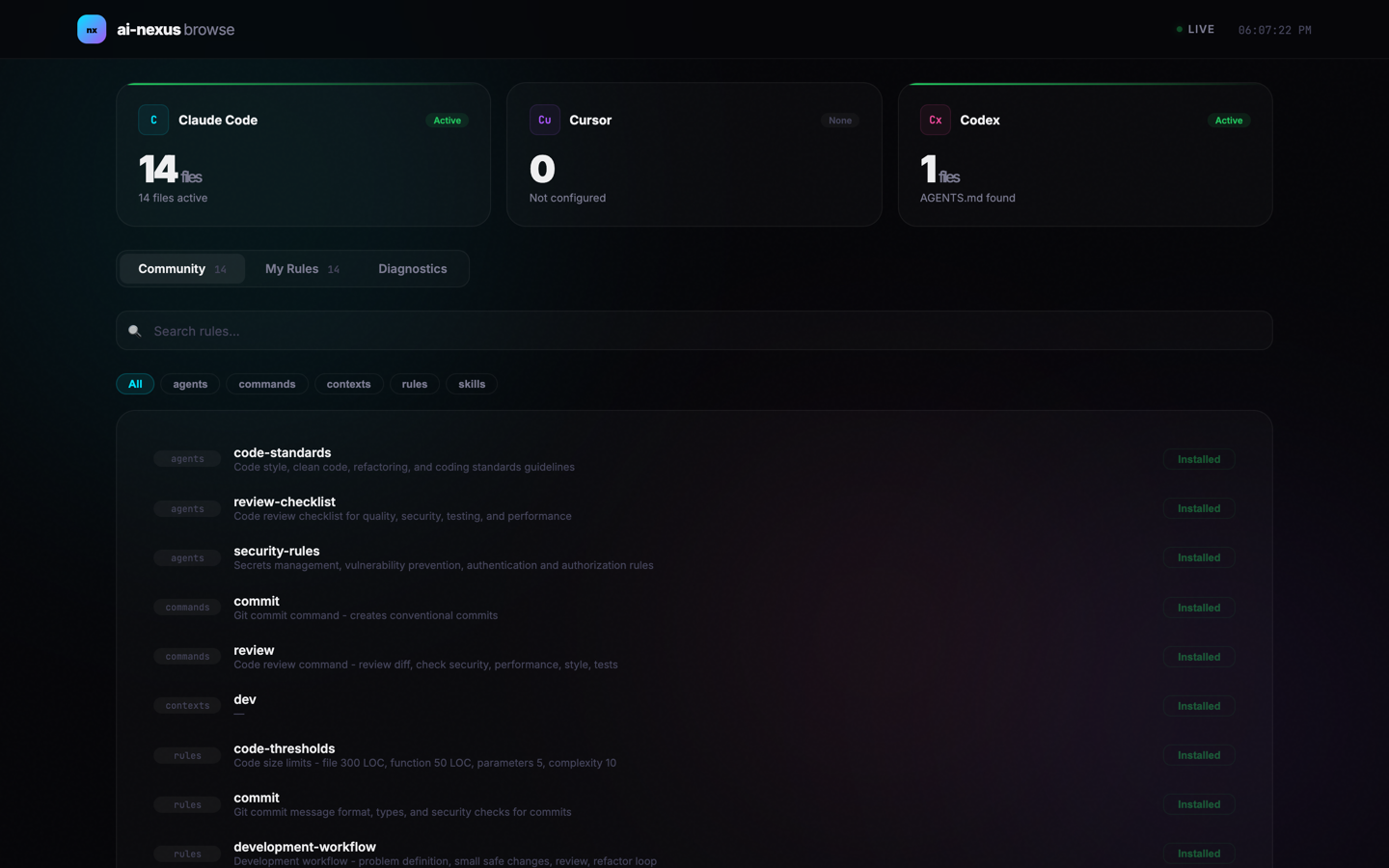
Open the web-based marketplace to search, install, and remove rules with one click:
npx ai-nexus browse- Browse community rules with real-time search and category filters
- Install/remove rules directly from the browser
- View tool status (Claude Code, Cursor, Codex) and diagnostics
- Runs locally on
http://localhost:3847
Community Registry
Browse and download community-contributed rules directly from GitHub — no npm publish needed.
# List all available rules
npx ai-nexus search

# Search by keyword
npx ai-nexus search react
Results for "react":
skills/
react.md - React/Next.js best practices
1 file(s) found.
Use "ai-nexus get <filename>" to download.# Download a rule
npx ai-nexus get react.md
# Specify category when name exists in multiple
npx ai-nexus get commit.md --category commandsRules are downloaded from the latest GitHub repo to ~/.claude/. Anyone can contribute new rules via PR — they become available to search and get immediately after merge.
Testing
Preview which rules would load for a given prompt:
$ npx ai-nexus test "write a react component with hooks"

Selected rules (3):
  • rules/essential.md
  • rules/react.md
  • skills/react.md
Contributing
We welcome rule contributions! Contributed rules are instantly available via ai-nexus search and ai-nexus get — no npm publish needed.
- Suggest a rule: Open a Rule Request
- Submit a rule: See CONTRIBUTING.md for the full guide
# Quick start for contributors
git clone https://github.com/JSK9999/ai-nexus.git
cd ai-nexus && npm install && npm run build

# Add your rule to config/rules/, then test:
node bin/ai-nexus.cjs test "your prompt"
License
Apache 2.0