
ai-notify
v0.10.0
Published
Desktop, sound, and spoken notifications for terminal AI coding agents (Claude Code, Codex, Gemini, ...) — with one mute switch that covers all of them, across every terminal.

Maintainers
 unoemon
Readme
ai-notify
English · 日本語





Know the moment your terminal AI agent needs you — a sound, a spoken read-out, and a desktop banner the instant Claude Code, Codex, or another agent finishes a turn or asks for input. One mute switch covers all of them, across every terminal. No daemon, no background process.

brew install unoryota/tap/ai-notify   # macOS (Homebrew)
# or:  npm i -g ai-notify

ai-notify init        # auto-detects your agents and wires them
That's the whole setup — init finds Claude Code / Codex / Gemini and wires
their hooks. From then on you control everything with one switch:

What makes it different
Plenty of agents go quiet for minutes. ai-notify pulls you back at the right moment — and is built for running many agents at once:
- 🎙️ A different voice per terminal. Give each pane its own spoken voice, so you know which window finished just by listening —
export AI_NOTIFY_VOICE=Eddy(or a VOICEVOX character). - 🌐 Read out in your language. An agent's English reply or prompt is translated before it's spoken/shown (key-less, no cost) — great for non-English speakers.
- 📝 It tells you what was done. The "done" notification summarizes the agent's last reply (from the transcript), not just "finished".
- 🔕 One switch mutes everything. Every agent in every terminal reads the same flag — one tap silences them all for a meeting.
- 🔔 A real menu bar bell, built in.
ai-notify menubar install— no Hammerspoon/SwiftBar required.
A quick tour — translate an agent's reply, list VOICEVOX character voices, and the tsundere persona:

Supported agents
| Agent | Status | How it's wired |
| ----- | ------ | -------------- |
| Claude Code | ✅ | Notification + Stop hooks in ~/.claude/settings.json |
| Codex CLI | ✅ | notify in ~/.codex/config.toml (agent-turn-complete) |
| Gemini CLI | 🧪 detected, hook WIP | PRs welcome |
Adding another agent (aider, opencode, amp, …) is a small PR: drop a file in src/providers/. See CONTRIBUTING.
Commands
ai-notify init [--dry-run] [--only claude,codex]   # wire detected agents
ai-notify use <name> [voice] [vol]                 # set THIS pane's name + voice + tab title, in one go
ai-notify toggle | on | off | status               # the mute switch
ai-notify volume [0.0-2.0]                          # get/set output volume
ai-notify voice [number|name|preview|default]      # pick the spoken voice
ai-notify voicevox [on <id>|off|speakers|test]     # speak in VOICEVOX voices
ai-notify tsundere [on|off|level <0-1>|test]       # tsundere persona (ツン⇄デレ by urgency)
ai-notify translate [on <lang>|off|test]           # speak agent text in your language
ai-notify menubar [install|uninstall|status]       # native menu bar app (macOS)
ai-notify doctor                                   # check deps & wiring
ai-notify uninstall                                # cleanly remove wiring
Set up a pane in one command. Run this in the terminal where the agent runs — it names the pane (spoken in the read-out), picks its voice, sets its volume, and renames the terminal tab, all at once. No menu hopping:
ai-notify use api Kyoko                       # name "api" + voice Kyoko + tab → "api"
ai-notify use web Eddy 0.8                    # + volume 0.8
ai-notify use zunda ずんだもん                 # voice by VOICEVOX character name (or vv3)
ai-notify use エックスズンダモン ずんだもん --tab x_zunda   # spoken name ≠ tab title
ai-notify use clear                           # reset this pane
voice is a say name/number (Kyoko, 3), a VOICEVOX character name (ずんだもん), or vv<id> (vv3). --tab sets a different terminal tab title from the spoken name.
Tab renaming is best-effort — it sends the standard title escape (OSC 0 + 2), which Terminal.app and iTerm2 honor. JetBrains IDEs (WebStorm/IntelliJ) honor it only with the Reworked terminal (default in 2025.2+); some versions reset the name when you re-activate the tab (IDEA-277846). A shell that rewrites the title every prompt can also override it. The spoken name and voice always apply regardless.
Per-window overrides — export these in a terminal before launching the agent:
AI_NOTIFY_LABEL=api               # name this window in the read-out / notification
AI_NOTIFY_VOICE=Eddy              # this window's `say` voice
AI_NOTIFY_VOICEVOX_SPEAKER=3      # this window's VOICEVOX speaker id
AI_NOTIFY_TSUNDERE_LEVEL=0.8      # this window's tsundere baseline (0=デレ … 1=ツン)
AI_NOTIFY_VOLUME=0.5              # this window's volume (0.0–2.0)
🔔 Which events alert
Not every agent event deserves a sound and a banner. ai-notify classifies each one (using Claude Code's notification_type / sub-agent markers) into a kind, and you choose which kinds alert:
ai-notify notify                       # show the matrix
ai-notify notify done off              # finished a turn → stay silent
ai-notify notify subagent-done on      # a sub-agent finished → alert
| kind | when | default |
| ---- | ---- | ------- |
| input | Claude is waiting for your input (idle_prompt) | 🔔 on |
| permission | a permission prompt | 🔔 on |
| info | auth / MCP elicitation (informational) | 🔕 off |
| done | a turn finished (Stop) | 🔔 on |
| subagent-done | a sub-agent finished (SubagentStop) | 🔕 off |
A disabled kind is fully silent — no sound, banner, voice, or popup — but still keeps the waiting state correct (a suppressed done still clears a popup). Same toggles live in the menu bar under 通知する種類. (subagent-done needs ai-notify init once to wire the SubagentStop hook.)
Note: Claude does not emit a notification while merely waiting on a sub-agent to run —
Notificationfires only when you are needed. So "waiting for input" and "busy with a sub-agent" aren't separate notifications; the kinds above are what's actually distinguishable.
🎛️ Native menu bar app — mute, volume, and voices
You can't type into the terminal that's running an agent, so drive everything from the menu bar:
ai-notify menubar install # native menu bar app, starts at loginA monochrome waveform icon shows status by color (Adobe-style): plain when idle, a yellow dot when an agent is waiting for you, red + slash when muted.
- Left-click → menu: a volume slider, a tsundere toggle + デレ⇄ツン slider, the voice list (system + VOICEVOX), and per-pane controls. Each open terminal gets its own spoken name (read out so you know which pane finished), voice, and volume — the row shows each pane's voice at a glance.
- Right-click → instant mute toggle.
- ⚙ 設定… → a settings window with aligned sliders + editable numeric fields (volume, tsundere, war, speed/pitch/intonation) and saveable presets (
ai-notify preset save <name>/load/delete), so you don't re-tune every time.
Left: global volume / tsundere / voices. Right: each pane named and given its own voice (🗣 バックエンド → Kyoko, infra → ずんだもん).
No third-party app needed. Prefer something else? There are drop-in recipes for Hammerspoon, SwiftBar/xbar, Raycast, and the built-in macOS Shortcuts in recipes/. ai-notify status --icon prints just 🔔/🔕 to embed in tmux / your prompt / Claude Code's status line.
Toggling works mid-run: the flag is read the next time an agent fires, so flipping it instantly affects every running agent.
🪧 "Waiting for input" popup
A stopped agent waiting on you is easy to miss across many terminals — especially in IDE terminals (WebStorm, VS Code) that can't show images or rich notifications. Turn on an always-on-top character popup that names the waiting pane and vanishes the moment you respond:
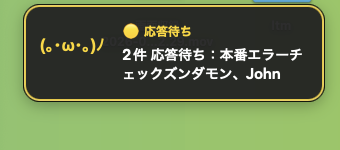
ai-notify popup on                      # enable (also a menu bar toggle: 応答待ちポップアップ)
ai-notify popup image ~/zundamon.png    # your own character (PNG/JPG); default is a kaomoji
ai-notify popup off
Each waiting pane gets its own card at the bottom-right (they stack), and the card shows the pane's VOICEVOX voice character — a pane speaking as ずんだもん shows ずんだもん, one as 春日部つむぎ shows つむぎ. Click a card to dismiss it. macOS-only (needs the menu bar app installed).
ai-notify popup portraits # cache every VOICEVOX character's official portrait (run once; engine must be on)Everything here is also in the menu bar: 応答待ちポップアップ → enable, 待ち時間 (delay), 無視ワード (ignore), and ボイスの立ち絵を取得 (portraits).
Control when it pops up. Not every wait deserves your attention — a quick sub-agent turnaround isn't worth interrupting you, but a real "needs your input" is. Two knobs:
ai-notify popup delay 15                 # only pop up after waiting ≥ 15s (skip transient waits)
ai-notify popup ignore subagent,task     # skip waits whose reason text matches these words
ai-notify popup ignore clear             # remove the filter
The filter matches Claude Code's notification reason (e.g. "waiting for your input" vs a sub-agent message), so you can keep input/permission prompts and silence the rest.
🎙️ VOICEVOX character voices
Optionally speak your notifications in VOICEVOX character voices (e.g. ずんだもん) — free, local, offline.
Needs the VOICEVOX app installed and running. ai-notify calls its local engine; it does not bundle the voices. Without it, ai-notify just uses your OS voice (Samantha, Kyoko, …) — no setup required.
ai-notify voicevox setup walks you through it — it opens the download page, or launches the app and waits for the engine if it's already installed. Then:
ai-notify voicevox setup        # install / launch VOICEVOX
ai-notify voicevox speakers     # list available characters + ids
ai-notify voicevox on 3         # use speaker 3 (e.g. ずんだもん)
Give every pane its own character with AI_NOTIFY_VOICEVOX_SPEAKER. If the engine isn't running, ai-notify silently falls back to the OS voice.
VOICEVOX characters have their own terms of use — credit them per VOICEVOX's guidelines if you share recordings.
🌐 Read out in your language
ai-notify translate on ja       # translate the agent's message, then speak it
ai-notify translate test "I fixed the auth bug and added 3 tests."
Key-less and no cost (one HTTP request; falls back to a localized template offline). The desktop banner still shows the original text.
💢 Tsundere mode (optional, fun)
Give the spoken read-out a tsundere persona whose tone tracks how urgent the event is:
- a failure / dangerous approval → a louder, sharp ツン scolding ("Hey! The build failed — don't just sit there, fix it!")
- a clean pass / no issues → a warm デレ "good job" ("...heh, not bad. N-not that I'm impressed or anything.")
ai-notify tsundere on            # off by default
ai-notify tsundere level 0.6     # baseline 0 (デレ) … 1 (ツン); the menu bar has a slider
ai-notify tsundere test          # hear T3/T2/T1/T0 samples
It's deterministic and offline — phrase banks, no API, no cost. The urgency is a keyword heuristic over the agent's text (so it's best-effort, not a real severity signal), and the desktop banner stays factual. With VOICEVOX the level also picks the character's own ツンツン / あまあま style, so the same character actually sounds harsher or sweeter. lang supports ja and en.
⚔️ War mode (optional, fun)
A separate read-out skin: a military ops room. The level sets the situation, and — combined with the tsundere level (the operator's 好感度) — picks the line:
ai-notify war level 0.85     # the slider's CENTER (0.5) is OFF; away from center = more intense
ai-notify war on/off         # convenience: jump to active / center(off)
ai-notify war test- 平時 — calm radio chatter. 戦闘中 — general quarters, urgent. 危機 — short shouts, louder and faster.
- The tsundere level flavors every band (a warm デレ operator vs a harsh ツン one), so war × tsundere gives 9 distinct moods.
- Both ツンデレ and アドレナリン are slider-only (no on/off checkbox): the slider center = off. They're blue sliders in the menu bar, below 速さ/高さ/抑揚, and in the ⚙ settings window. Every per-pane submenu can override all of these (name, voice, volume, ツンデレ, アドレナリン, 速さ/高さ/抑揚) individually.
⏳ Which window, and what it's asking
Each notification is titled with the window label — ⏳ <label> when an agent is waiting, ✓ <label> when it's done — and the body says what (the translated prompt, or a summary of what was done). Set a short AI_NOTIFY_LABEL per pane and you can tell ten terminals apart at a glance.
How it works
A single mute flag and config under XDG paths — no daemon, no coordination:
${XDG_STATE_HOME:-~/.local/state}/ai-notify/muted     # presence = muted
${XDG_CONFIG_HOME:-~/.config}/ai-notify/config.json   # sounds, voice, options
Each agent's hook calls ai-notify hook --source <agent>, which reads that one flag at fire time. ai-notify config init writes an editable config (per-agent sounds, voice, TTS backend, translation, templates).
Platforms
macOS is fully supported (afplay / say / VOICEVOX / terminal-notifier / native menu bar). Linux is best-effort (paplay/canberra, notify-send, spd-say/espeak, VOICEVOX). Windows plays a beep and speaks via PowerShell. Missing backends degrade silently — they never error.
License
MIT. Zero runtime dependencies.