
ai-sales-card
v1.4.1
Published
腾讯AI名片
Downloads
33


Readme
腾讯 AI 名片小程序
结构
时间原因,使用了原生小程序开发,未使用多端框架。项目结构如下:
-- ci-scripts    # 自动化脚本,接入蓝盾后使用
-- common    # 公共css、js资源,在app.wxss引入
  -- css
    -- color.wxss    # 定义了全局色值
-- components    # 组件,未区分公共组件和业务组件
  -- weui-miniprogram    # weui框架的组件
-- images    # 小程序依赖的图片文件,如tabBar等,业务图片一律上传cdn,减小包尺寸
-- miniprogram_npm    # npm构建文件,业务依赖
-- pages    # 页面
-- services    # 业务通用js封装
  -- api.js    # 接口配置
  -- auth.js    # 授权方法封装,如登录、电话、用户信息等
  -- constants.js    # 通用常量配置
  -- http-config.js    # http通用配置和拦截器
  -- http    # 所有http请求都在这里(login在auth里有一份单独的实现)
-- store    # 全局数据缓存,暂未实现
-- utils    # 工具库
  -- wx-cookie.js    # 微信版本cookie存取实现,可用来代替 storage 的使用
  -- wx-notification.js    # 微信全局通知的实现
  -- wxml-to-canvas.js    # wxml DOM结构转canvas,有坑,避坑使用方法见 /pages/poster/index

# 以下为分包
-- chat-miniprogram    # submodule引入的im工具
项目启动
- 需先申请开通聊天工具仓库(chat-miniprogram,当前小程序子包)权限,仓库地址:https://git.code.oa.com/SALES-CARD-FE/chat-miniprogram;
- 拉取本仓库后在根目录执行
git submodule init和git submodule update npm install或yarn(建议使用 yarn,安装速度会快一个量级)- 小程序开发者工具打开当前项目,操作:
工具 - 构建npm,清除缓存 - 正常情况下项目可以看到项目首页
由于安全原因,登录接口login在服务端校验了各种 header 配置,而开发者工具给所有 post 请求额外的添加了Origin: 127.0.0.1:xxxxx的request header,其中端口号不固定,会导致接口端认为该请求是非法请求,从而被拦截,导致无法登录。解决办法如下:
- 下载 charles 代理软件并安装:charles
- 打开 Charles,选择
Tool - Rewrite,在弹出的对话框中如下操作: 第一步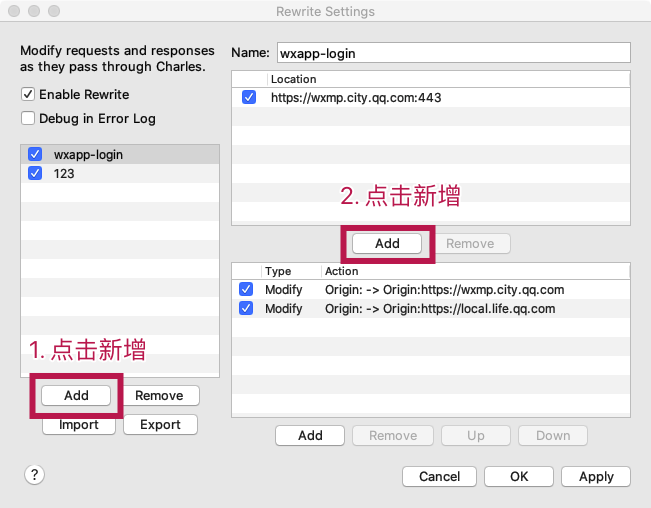 第二步
第二步
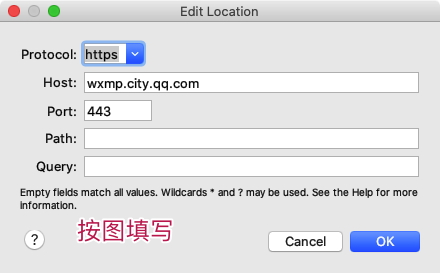 点击 ok 保存
第三步
点击 ok 保存
第三步
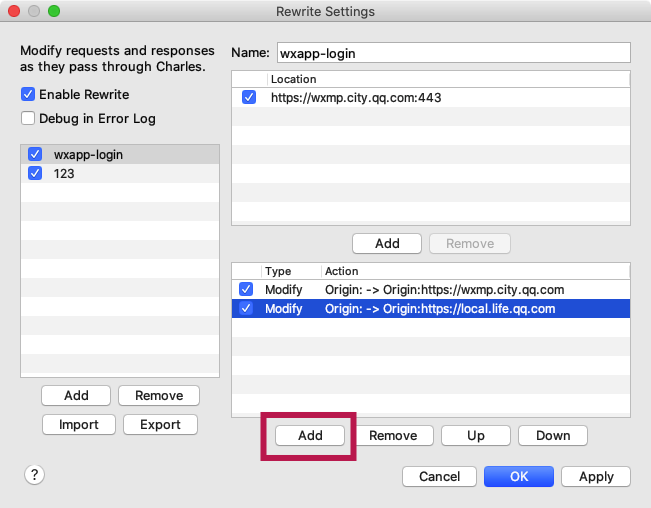 第四步
第四步
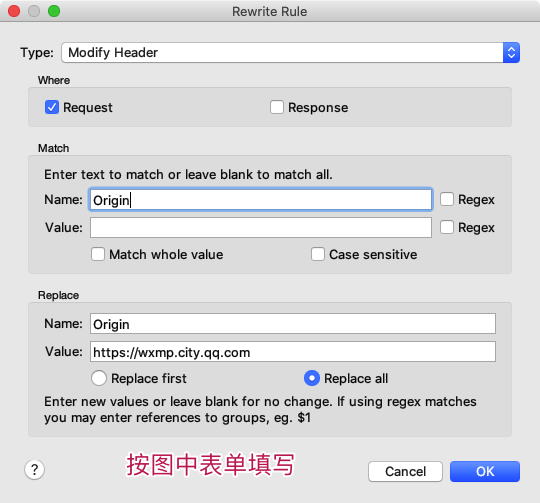 点击 ok 保存
第五步
点击 ok 保存
第五步
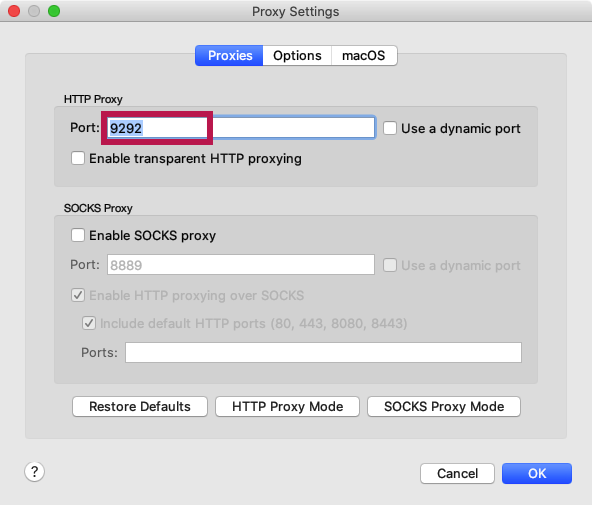 设置你喜欢的端口号,将来开发者工具的代理配置会代理到这个端口上。
这样就为会把所有请求的 Origin 字段替换为接口信任的字段了。但目前还无法正常使用,原因是还没有为开发者工具配置代理。配置开发者工具代理设置,在开发者工具内:
设置 - 代理设置
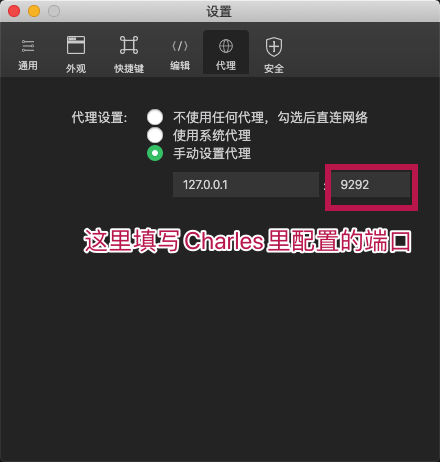 关闭后,mac 系统会提示是否信任该代理,windows 系统不会有提示,选择【是】即可。
由于接口使用 https 请求,而 Charles 默认不使用 SSL 代理,所以还需要在 Charles 打开 SSL Proxy。Charles 操作如下:
关闭后,mac 系统会提示是否信任该代理,windows 系统不会有提示,选择【是】即可。
由于接口使用 https 请求,而 Charles 默认不使用 SSL 代理,所以还需要在 Charles 打开 SSL Proxy。Charles 操作如下:
Proxy - SSL Proxying Setting
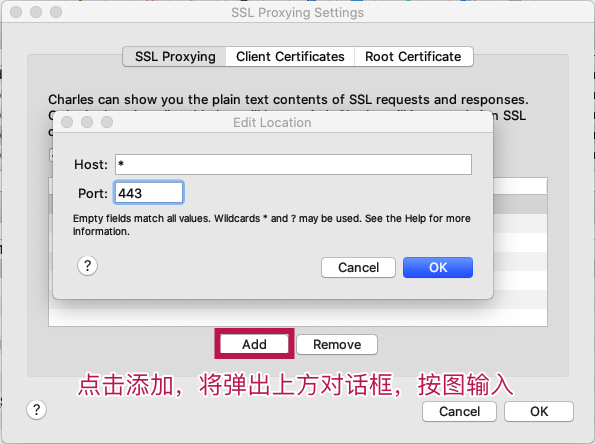 点击所有对话框 OK,保存所有设置。
此时你的 Charles 将可能拦截所有的 https 请求,但由于你的电脑可能没有安装 Charles 的安全证书,所以抓取到的请求都是乱码,最后一步,安装 Charles 安全证书。Charles 内执行:
点击所有对话框 OK,保存所有设置。
此时你的 Charles 将可能拦截所有的 https 请求,但由于你的电脑可能没有安装 Charles 的安全证书,所以抓取到的请求都是乱码,最后一步,安装 Charles 安全证书。Charles 内执行:
Help - SSL Proxying - Install Charles Root Certificate
如果你的电脑没安装过的话,系统会提示你安装证书,一般点击【安装】即可。
安装完成后,所有 post 接口就可以正常请求了。
注意
项目使用了小程序框架新增的useExtendedLib特性,需要nightly版本开发者工具才能支持,所以需要安装使用nightly 版本开发者工具(点击下载)。
规范
文件命名
1. 页面文件
所有/pages下页面文件采用page-a命名
2. 组件文件
所有/components下自有组件使用CamelCase方式命名,不包含第三方组件,如/pages/weui-miniprogram下的组件
3. 其他文件统一中划线命名,some-file.js
变量
变量统一camelCase命名。
// demo
let testParam = 'test';常量统一大写字母加下划线命名CONST_PARAM
// demo
const TEST_STRING = 'TEST';
git 规范
未来上线后,为方便集成 ci 自动发布,暂按以下分支管理
- master 稳定开发分支,相当于 develop 分支
- develop[.group] 开发分支,与 master 相同
- release 线上分支,hotfix 修复基于此分支,发起 mr 会触发发布流程
- feature/xxxx 新功能分支,开发新功能基于此分支,开发完成后合并到 master 或者 develop 分支
- bugfix/xxxx bug 分支
CI
已介入蓝盾构建,分两部分构建,说明如下:
- 开发预览或者版本提测,合并入 master,推送至远程会触发预览构建,构建结果由机器人(robot1)推送至小程序后台,预览二维码推送给对应开发;
- 正式版本发布,在 master(稳定开发/测试)发起 merge request 到 release 分支,release 接受 mr 后会触发构建流程,此时是脚本强制设置环境为正式环境,并提交预览,构建结果有机器人(robot2)推送至小程序后台;
结构图说明:
