
aichat-core
v1.0.15
Published
AI 流式聊天业务核心TS模型封装及业务实现模块

Maintainers
 appleyk
Readme
aichat-core
1. 介绍
简化 LLM 与 MCP 集成的前端核心库(TypeScript)
aichat-core 是一个前端核心库,旨在显著降低在项目中集成 OpenAI 和 MCP 服务的复杂度。它封装了 openai-sdk 和 mcp-sdk,提供了:
- 核心业务模型与流程抽象:预定义了关键业务模型,并实现了结合 MCP 协议的流式聊天核心逻辑。
- 开箱即用的 UI 组件:封装了常用交互组件,包括:
- HTML 代码的实时编辑与预览
- Markdown 内容的优雅渲染
- 支持多轮对话展示的消息项组件
核心价值:开发者只需专注于后端业务逻辑实现和前端 UI 定制,而无需深入处理 LLM 与 MCP 之间复杂的交互细节。aichat-core 为您处理了底层的复杂性,让您更快地构建基于 LLM 和 MCP 的智能对话应用!
2. 更新
2025年8月10日 20:49:41
- 版本名称:1.0.15
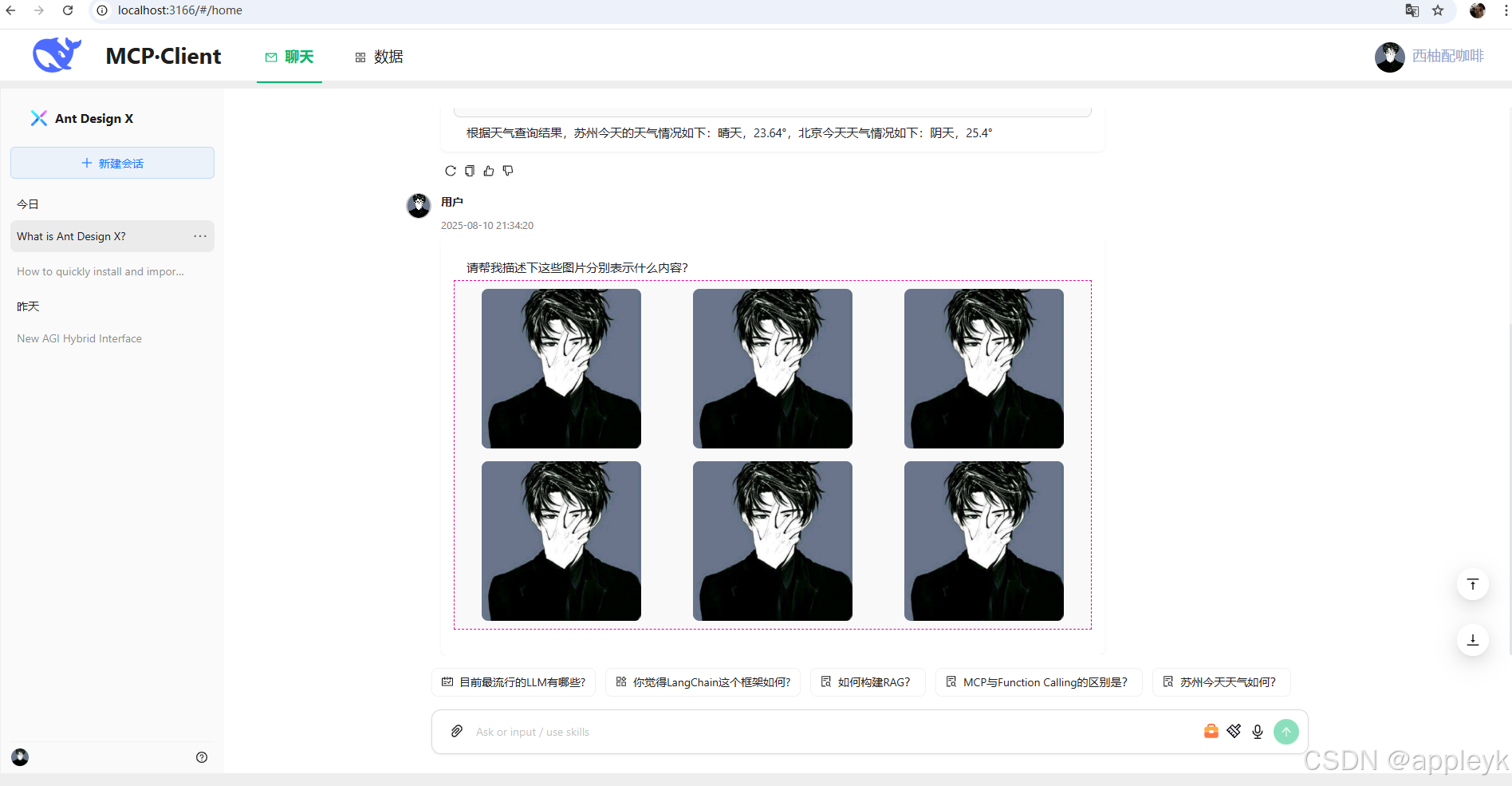
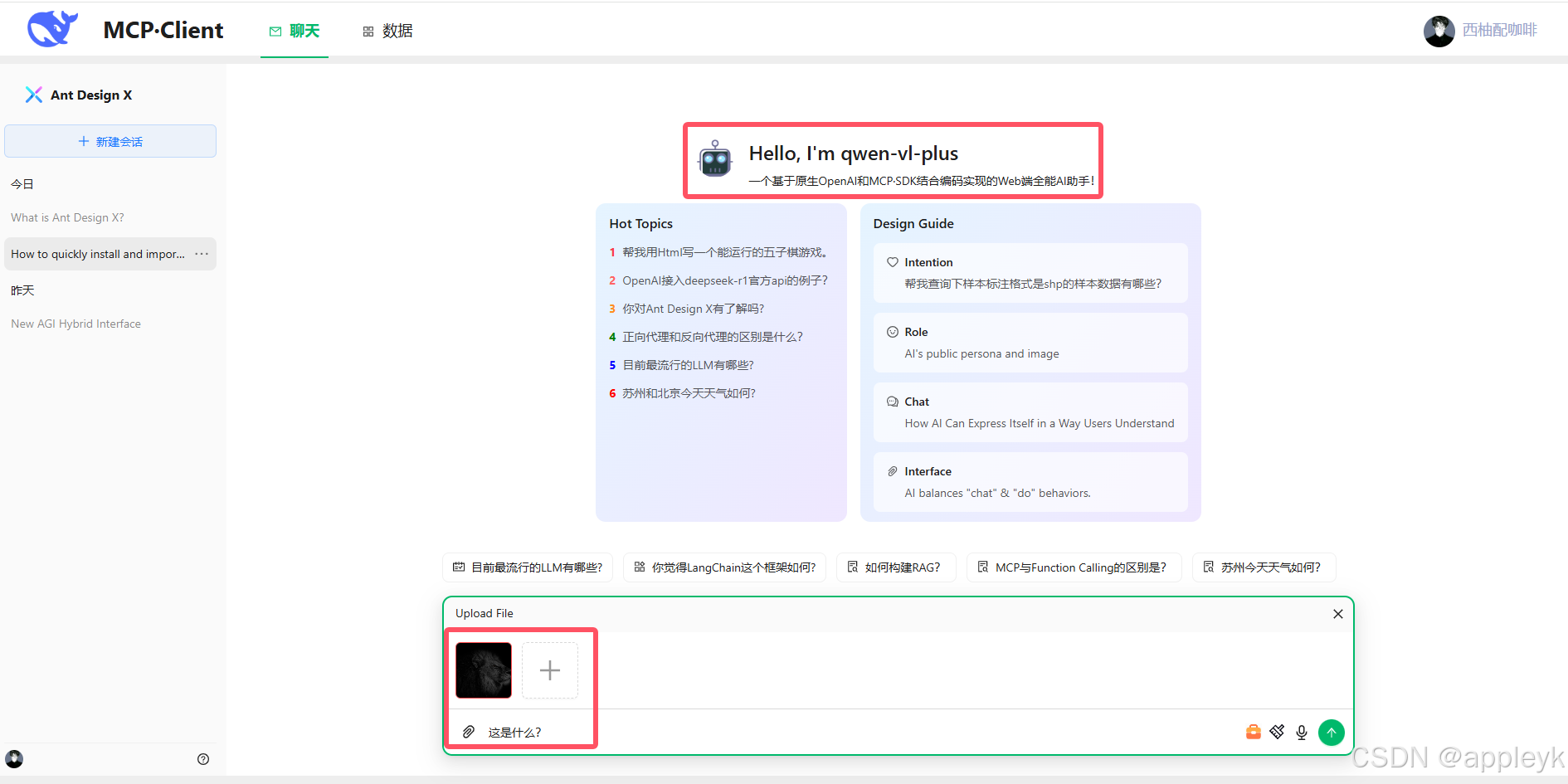
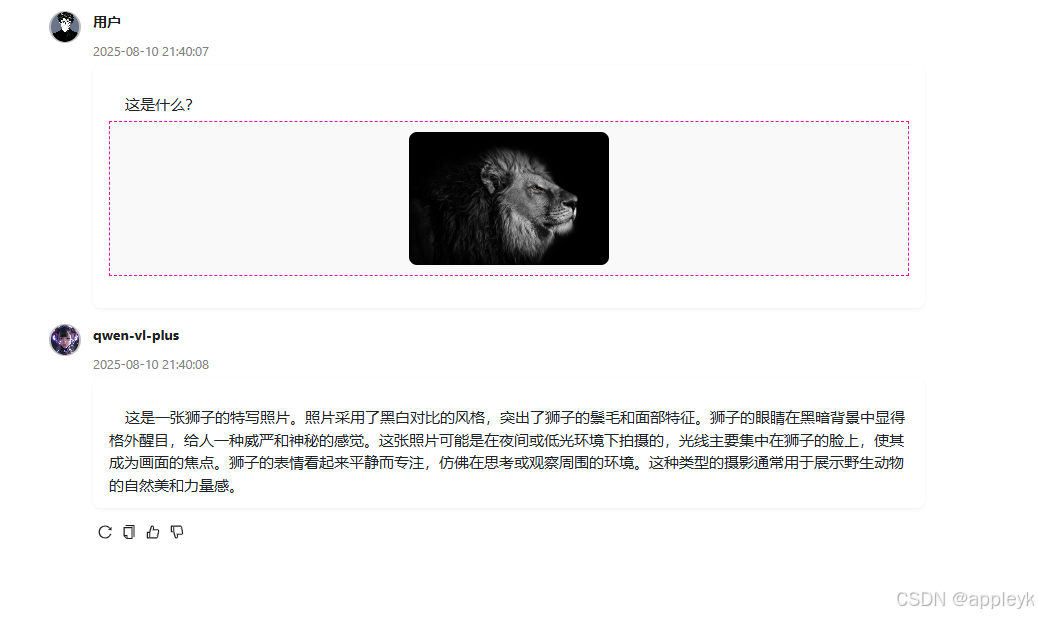
- 主要新增:基于阿里云百炼视觉模型qwen-vl-plus进行图片附件的模拟上传及base64转换后构建对应的context,即content即可以是string类型也可以是数组类型,格式如下:
content: [
            {
              type: "text",
              text: "请帮我描述下这张图片?"
            },
            {
              type: "image_url",
              image_url: { url: LLMUtil.getBase64Data(imageBase64, "image/png") }
            }
]- 实现效果:
3. 使用
3.1 依赖项
install该模块,请注意安装以下对应版本的npm包
    "@modelcontextprotocol/sdk": "^1.15.0",
    "codemirror": "5",
    "github-markdown-css": "^5.8.1",
    "openai": "^5.3.0",
    "react-codemirror2": "^8.0.1",
    "react-json-view": "^1.21.3",
    "react-markdown": "^9.1.0",
    "react-syntax-highlighter": "^15.6.1",
    "rehype-katex": "^7.0.1",
    "rehype-raw": "^7.0.0",
    "remark-gfm": "^4.0.1",
    "remark-math": "^6.0.0"
暴露出来的核心功能:
/** TS类型及核心业务实现客户端类封装 */
import LLMCallBackMessage from "./core/response/LLMCallBackMessage";
import LLMCallBackMessageChoice from "./core/response/LLMCallBackMessageChoice";
import LLMCallBackToolMessage from "./core/response/LLMCallBackToolMessage";
import LLMStreamChoiceDeltaTooCall from "./core/response/LLMStreamChoiceDeltaTooCall"
import LLMUsage from "./core/response/LLMUsage";
import LLMThinkUsage from "./core/response/LLMThinkUsage";
import LLMClient from "./core/LLMClient";
import McpClient from "./core/McpClient";
import McpTool from "./core/McpTool";
import LLMUtil from "./core/LLMUtil";
import ChatMarkDown from "./ui/chat-markdown";
import CodeEditorPreview from "./ui/code-editor-preview";
import ChatBubbleItem from "./ui/chat-bubble-item";
import ChatContent from "./ui/chat-content";
import ChatAttachments from "./ui/chat-attachements";
export {
  LLMCallBackMessage,
  LLMCallBackMessageChoice,
  LLMCallBackToolMessage,
  LLMStreamChoiceDeltaTooCall,
  LLMThinkUsage,
  LLMUsage,
  LLMClient,
  McpClient,
  McpTool,
  LLMUtil,
  ChatMarkDown,
  CodeEditorPreview,
  ChatBubbleItem,
  ChatContent,
  ChatAttachments,
};
3.2 安装
npm install aichat-core or yarn add aichat-core3.3 核心业务模型
LLMCallBackMessage.ts
/** AI响应消息回调对象 */
export default interface LLMCallBackMessage {
    /** 消息ID,一定是有的 */
    id: string | number;
    /** 消息创建时间,一定有的,只不过初始化的时候无,UI回显需要, 案例:1750923621 */
    timed?: number;
    /** 使用的llm模型,一定是有的 */
    model: string;
    /** 消息角色(system、assistant、user、tool)*/
    role: string;
    /** 集成antd design x Bubble的typing属性,true表示设置聊天内容打字动画,false则不使用 */
    typing?: boolean;
    /** 集成antd design x Bubble的loading属性,true表示聊天内容加载,false表示不加载 */
    loading?: boolean;
    /** 消息组,一次LLM响应可能包含多组消息,初始化的时候可空 */
    choices?: LLMCallBackMessageChoice[];
    /** 结束原因:如果是正常结束,值为stop,如果为工具调用,值为tool_calls...etc */
    finishReason?:string;
}
LLMCallBackToolMessage
/** 回调消息选择对象 */
export default interface LLMCallBackMessageChoice {
    /** 消息索引,从1开始(多轮对话,index是累加的) */
    index: number;
    /** 正常响应内容,一定有,就算LLM择取工具时,content也是有值的,只不过是空串 */
    content: string;
    /** 推理内容,不一定有,要看LLM是否具备 */
    reasoning_content?: string;
    /**
     * -1 或 undefined :不带推理
     *  1:思考中
     *  2:思考结束
     */
    thinking?: number;
    /** 工具回调消息(主要作为一个缓冲,在UI层进行展示) */
    toolsCallDes?:string;
    /** 回调工具消息数组(最后执行完了才有值) */
    tools?: LLMCallBackToolMessage[];
    /** 消耗的token统计,有些模型没有这个*/
    usage?: LLMMessageUsage;
}
LLMCallBackToolMessage
/** 工具调用消息回调对象 */
export default interface LLMCallBackToolMessage {
  /** 调用id */
  id:string;
  /** 函数的索引 */
  index: number;
  /** 函数的名称 */
  name: string;
  /** 函数的参数,这个选填,如果能弄过来更好,便于后续错误调试 */
  arguments?: any;
  /** 函数调用的结果内容 */
  content?: string;
}
LLMClient.ts
/**
 * @description 用于与 OpenAI 和 MCP 服务进行交互,支持流式聊天和工具调用。
 * @author appleyk<[email protected]>
 * @github https://github.com/kobeyk
 * @date 2025年7月9日21:44:02
 */
export default class LLMClient {
   // 定义常量类型(防止魔法值)
  public static readonly CONTENT_THINKING = "thinking";
  public static readonly TYPE_FUNCTION = "function";
  public static readonly TYPE_STRING = "string";
  public static readonly REASON_STOP = "stop";
  public static readonly REASON_TOO_CALLS = "tool_calls";
  public static readonly ROLE_AI = "assistant";
  public static readonly ROLE_SYSTEM = "system";
  public static readonly ROLE_USER = "user";
  public static readonly ROLE_TOOL = "tool";
  public static readonly THINGKING_START_TAG = "<think>";
  public static readonly THINGKING_END_TAG = "</think>";
  private static readonly TOOLS_CALLING_DESC = "工具正在调用的路上,请稍等...";
  private static readonly TOOLS_CALLED_DESC  = "工具调用已完成,结果如下:";
  // llm大模型对象
  llm: OpenAI;
  // mcp客户端对象(二次封装),不一定有,一旦有,必须初始化和进行"三次握手"后才可以正常使用mcp服务端提供的能力
  mcpClient?: McpClient;
  // 模型名称
  modelName: string;
  // mcpServer服务器连接地址
  mcpServer = "";
  // mcp工具列表
  tools: McpTool[] = [];
  // 初始化mcp的状态,默认false,如果开启llm流式聊天前,这个状态为false,则报错
  initMcpState = false;
  // 思考状态(每一次消息问答结束后,thinkState要回归false)
  thinkState = false;
  // 流式调用是否开启console.log模式,主要输出每一步的chukn对象
  private logDebug = false;
  /**
   * 工具选择,none:不使用任何 | auto:LLM自动选择 | required:必须要调用1个或多个工具 | 或者指定只使用哪个工具
   * Controls which (if any) tool is called by the model. `none` means the model will
   * not call any tool and instead generates a message. `auto` means the model can
   * pick between generating a message or calling one or more tools. `required` means
   * the model must call one or more tools. Specifying a particular tool via
   * `{"type": "function", "function": {"name": "my_function"}}` forces the model to
   * call that tool.
   *
   * `none` is the default when no tools are present. `auto` is the default if tools
   * are present.
   */
  private toolChoice:
    | "none"
    | "auto"
    | "required"
    | ChatCompletionNamedToolChoice;
  /**
   * 构造器
   * @param mcpServer mcp服务器连接地址(目前仅支持streamable http,后续再放开stdio和sse),如果空的话,则表示外部不使用mcp
   * @param mcpClientName mcpClient名称
   * @param apiKey llm访问接口对应的key,如果没有,填写"EMPTY",默认值走系统配置,如需要指定外部传进来
   * @param baseUrl llm访问接口的地址,目前走的是openai标准,大部分llm都支持,除了少数,后续可能要支持下(再说),默认值走系统配置,如需要指定外部传进来
   * @param modelName llm模型的名称,这个需要发起llm聊天的时候指定,默认值走系统配置,如需要指定外部传进来
   */
  constructor(
    mcpServer = "",
    mcpClientName = "",
    apiKey: string,
    baseUrl: string,
    modelName: string
  ) {
    // 使用llm,必须要实例化OpenAI实例对象
    this.llm = new OpenAI({
      apiKey: apiKey,
      baseURL: baseUrl,
      dangerouslyAllowBrowser: true, // web端直接调用openai是不安全的,这个要开启
    });
    // 使用llm,必须要指定模型的名称
    this.modelName = modelName;
    this.toolChoice = "auto";
    // 表示使用mcp来为llm提供外部工具调用参考
    if (mcpServer !== "") {
      this.mcpServer = mcpServer;
      this.mcpClient = new McpClient(mcpClientName);
    }
  }
    /**
   * 流式聊天升级版(支持多轮对话)
   * @param messages  消息上下文(多轮多话要把上一轮对话的结果加进去)
   * @param onContentCallBack 文本内容回调函数
   * @param onCallToolsCallBack 工具回调函数,如果传入空列表,则表示一轮工具调用结束
   * @param onCallToolResultCallBack 工具调用执行结果回调函数,name->result键值对
   * @param callBackMessage 回调消息大对象(包含的信息相当全)
   * @param controllerRef 请求中断控制器
   * @param loop 对话轮数
   */
  async chatStreamLLMV2(
    messages: ChatCompletionMessageParam[],
    onContentCallBack: (callBackMessage: LLMCallBackMessage) => void,
    onCallToolsCallBack: (_toolCalls: LLMStreamChoiceDeltaTooCall[]) => void,
    onCallToolResultCallBack: (name: string, result: any) => void,
    callBackMessage: LLMCallBackMessage,
    controllerRef: AbortController | null,
    loop: number = 1 // 轮数
  ) {
    const stream = await this.genLLMStream(messages, controllerRef);
    if (stream && typeof stream[Symbol.asyncIterator] === LLMClient.TYPE_FUNCTION) {
      let _toolCalls: LLMStreamChoiceDeltaTooCall[] = [];
      for await (const chunk of stream) {
        /** 如果usage包含且内容不等于null,则说明本次结束 */
        callBackMessage.timed = chunk.created;
        callBackMessage.model = chunk.model;
        let usage = chunk.usage;
        if (usage) {
          let _choices = callBackMessage.choices
          if (_choices && _choices.length > 0) {
            let _choiceMessage = this.filterChoiceMessage(callBackMessage, loop);
            _choiceMessage.index = loop;
            _choiceMessage.thinking = 2;
            _choiceMessage.reasoning_content = "";
            _choiceMessage.content = "";
            _choiceMessage.usage = {
              completion_tokens: usage.completion_tokens,
              prompt_tokens: usage.prompt_tokens,
              total_tokens: usage.total_tokens
            }
            let newCallBackMessage = JSON.parse(JSON.stringify(callBackMessage))
            onContentCallBack(newCallBackMessage);
          }
          break;
        }
        /** 判断chunk.choices[0]是否有finish_reason字段,如果有赋值 */
        let finishReason = chunk.choices[0].finish_reason ?? "";
        if (finishReason !== "") {
          await this.dealFinishReason(
            finishReason,
            _toolCalls,
            messages,
            onContentCallBack,
            onCallToolsCallBack,
            onCallToolResultCallBack,
            callBackMessage,
            controllerRef,
            loop
          );
        }
        let toolCalls = chunk.choices[0].delta.tool_calls;
        /** 如果工具有值,则构建工具列表 */
        if (toolCalls && toolCalls.length > 0) {
          this.dealToolCalls(toolCalls, _toolCalls);
        } else {
          /** 否则流式展示消息内容 */
          const { choices } = chunk;
          await this.dealTextContent(choices, onContentCallBack, callBackMessage, loop);
        }
      }
    } else {
      console.error("Stream is not async iterable.");
    }
  }
}
3.4 aichat-core使用案例
核心集成代码片段如下:
// 存储会话列表(默认default-0)
const [conversations, setConversations] = useState(
    DEFAULT_CONVERSATIONS_ITEMS
);
 // 历史消息,一个对话对应一组历史消息
const [messageHistory, setMessageHistory] = useState<Record<string, any>>(useMockData > 0 ? mockHistoryMessages : []);
...
// 实例化llmClient及初始化mcp服务(如果有mcp server 服务支撑的话)
llmClient = new LLMClient(mcpServer, "demo", apiKey, baseUrl, modelName);
await llmClient.initMcpServer();
...
/** 消息回调 (callBackMessage对象已经经过深拷贝)*/
const onMessageContentCallBack = (callBackMessage: LLMCallBackMessage) => {
    const _currentConversation = curConversation.current;
    let _llmChoices = callBackMessage.choices;
    let _messageId = callBackMessage.id;
    if (!_llmChoices || _llmChoices.length == 0) {
      return [];
    }
    setMessageHistory((sPrev) => ({
      ...sPrev,
      [_currentConversation]: sPrev[_currentConversation].map((message: LLMCallBackMessage) => {
        if (_messageId != message.id) {
          return message;
        }
        let _message: LLMCallBackMessage = {
          id: _messageId,
          timed: callBackMessage.timed,
          model: callBackMessage.model,
          role: callBackMessage.role,
          typing: true,
          loading: false,
        }
        /** 拿到原来的 */
        let preMessageChoices = message.choices ?? [];
        _llmChoices.forEach((updateChoice: LLMCallBackMessageChoice) => {
          let _targets = preMessageChoices.filter((preChoice: any) => updateChoice.index == preChoice.index) ?? []
          // 有值就动态修改值
          if (_targets.length > 0) {
            let _target = _targets[0];
            let _reason_content = _target.reasoning_content ?? "";
            let _content = _target.content ?? "";
            _target.thinking = updateChoice.thinking;
            if (updateChoice.reasoning_content && updateChoice.reasoning_content != "") {
              _target.reasoning_content = _reason_content + updateChoice.reasoning_content;
            }
            if (updateChoice.content && updateChoice.content != "") {
              _target.content = _content + updateChoice.content;
            }
            _target.tools = updateChoice.tools;
            _target.usage = updateChoice.usage;
          } else {
            // 否则的话就添加一个
            preMessageChoices.push(updateChoice)
          }
        })
        // 最后别忘了给值(这个地方要用深拷贝)
        _message.choices = JSON.parse(JSON.stringify(preMessageChoices));
        return _message;
      }),
    }));
};
...
// 发起流式聊天
await llmClient.current.chatStreamLLMV2(
    messages,
    onMessageContentCallBack,
    onCallToolCallBack,
    onCallToolResultCallBack,
    onInitCallBackMessage(messageId),
    abortControllerRef
);
...
4. 最终效果图


