alisa.cache
v1.0.6
Published
Advanced and flexible JavaScript cache module with TTL, LRU/FIFO/MFU, tagging, namespacing, event system, and full snapshot support.

Maintainers
 pordarman
Readme






Source file
Creator(s)
Social media accounts
How to download?
First we create a node.js file (If you have not downloaded node.js to computer before, you can download node.js by clicking here)
Then we open the PowerShell terminal by "shift + right click" on the folder of the file you created.
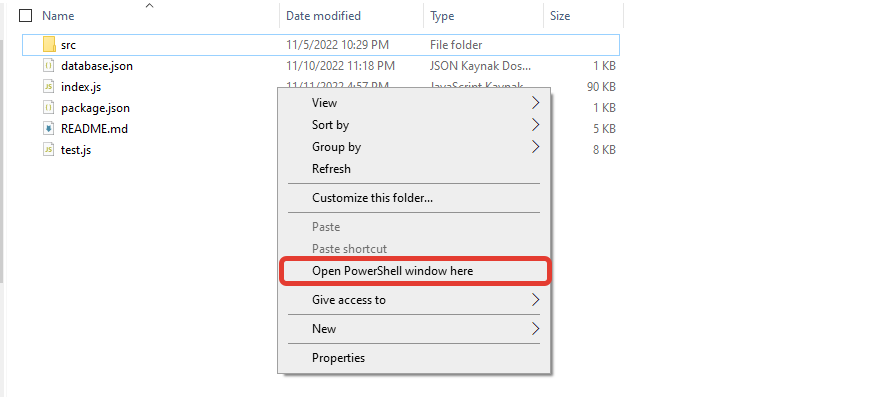
Then we write npm i alisa.cache and press enter.
Download the alisa.cache module
And now we have downloaded the alisa.cache module, congratulations 🎉🎉
What is this module?
This module is a high-performance and flexible JavaScript caching system designed to be modular and extendable
Supports TTL, LRU/FIFO/MFU, tagging, namespacing, event emitters, auto pruning, and more
Easily usable and thoroughly tested with assert-based and Jest-style tests
Features
- ✅ LRU / FIFO / MFU / CUSTOM strategy support
- 🔁 TTL with auto cleanup support
- 🔖 Tag system (getByTag, deleteByTag, etc.)
- 📂 Namespaces for isolated sub-caches
- 🧠 Smart methods:
filter,map,groupBy,partition,reduce - 🔍 Utility methods:
rename,search,expire,ttl - 📦 Full snapshot + restore system
- 📡
on()andemit()support (custom event listeners) - 🧪 Manual and automated testing support (
test.js)
How to use?
const AlisaCache = require("alisa.cache");
const cache = new AlisaCache({ limit: 100, ttl: 6000 });

cache.set("user:1", { name: "Alice" }, { ttl: 5000, tags: ["admin"] });
console.log(cache.get("user:1")); // { name: "Alice" }

cache.set("owner", { name: "Tom", role: "owner" }, { tags: ["owner"] })

cache.protect("owner");
cache.delete("owner"); // false, owner is still there

await cache.saveToFile("./cache.json");
await cache.loadFromFile("./cache.json");
Real-world example: Discord bot prefix per guild
const cache = new AlisaCache({ limit: 500 });

function onMessage(msg) {
  const guildId = msg.guild?.id;
  if (!guildId) return;

  const guildCache = cache.namespace(guildId);
  const prefix = guildCache.get("prefix") || "!";

  if (msg.content.startsWith(prefix)) {
    const command = msg.content.slice(prefix.length).split(" ")[0];
    console.log(`Command received: ${command}`);
  }
}

// Setup example
cache.namespace("1234").set("prefix", ".");
How to test?
node test.jsIf all goes well, you'll see:
[✓] All tests passedAPI Table
| Method | Description |
|------------------------|-----------------------------------------|
| set(key, value, opts)| Add item to cache |
| get(key) | Retrieve value |
| has(key) | Check existence |
| delete(key) | Remove key |
| ttl(key) | Remaining TTL in ms |
| expire(key) | Instantly expire a key |
| rename(old, new) | Rename a key |
| filter(fn) | Return matching entries |
| groupBy(fn) | Group entries |
| partition(fn) | Separate matching & non-matching |
| search(q, where?) | Find keys/values with RegExp support |
| namespace(name) | Get isolated cache segment |
| snapshot() | Export cache state |
| loadSnapshot(obj) | Restore from snapshot |
| on(event, cb) | Register listener |
| protect(key) | Prevent a key from being removed |
| unprotect(key) | Remove protection from a key |
| saveToFile(path) | Save cache as JSON file |
| loadFromFile(path) | Load cache from JSON file |
Please do not forget to use it in the latest version for more stable and performance of the module!
And finally
If you want to support this module, if you request me on github, I will be happy to help you.
Thank you for reading this far, i love you 💗
See you in my next modules!