
allpages
v0.3.3
Published
Every page of a website in one image. Phone, tablet and desktop, light and dark.

Maintainers
 zeel1508
Readme
allpages
Every page of a website in one image. Phone, tablet and desktop, light and dark.
npx allpages https://yoursite.com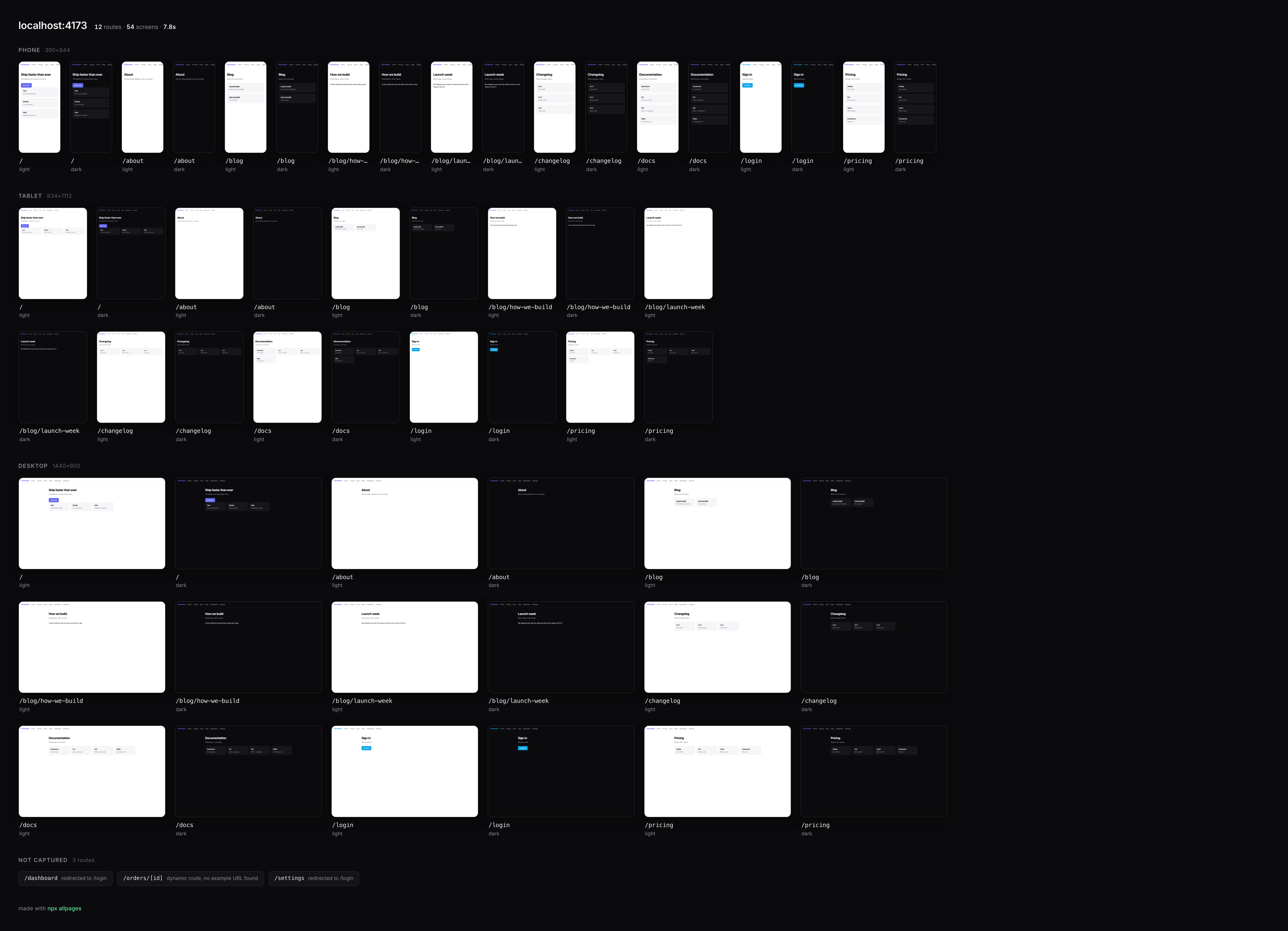
The bundled demo app: 12 routes, 54 screens, 7.8s, including two pages behind a login. Run it yourself with node demo-app/server.js.
You don't give it a list of URLs or write a config file. It works out which pages the site has and shoots all of them.
Why
If you've built a dozen pages over a few weeks, you've probably never seen them side by side, and there's a good chance you haven't opened half of them on a phone at all.
Your agent hasn't either. When Claude or Cursor wants to look at your app it screenshots one page at a time, spending a tool call and a thousand or so vision tokens on each screen.
allpages shoots them all in one go and gives you a single image. Look at it yourself, then drag it into your agent and say "make these consistent".
Install
You don't have to install anything to try it:
npx allpages https://yoursite.comIt looks for a browser in the order that costs you least: Playwright's Chromium if it's already on your machine, then the Chrome or Edge you almost certainly have. Only if it finds neither does it download Chromium (~120 MB), and it tells you before it starts. There's no config file, no account and no API key.
npm i -g allpages        # or keep it around
npm i allpages           # or use it as a library
A real site, start to finish
Here it is against astro.build, which is a fairly typical public site: 184 pages, a client-rendered docs section, a cookie banner and lazy images.
npx allpages https://astro.build found 184 by crawling links
184 pages, 23 layouts, shooting the 20 biggest (--max 23 for every layout)
20 routes × 3 sizes × 2 themes = 120 screens
✓ 120 screens in 40.0s → allpages/astro.build/allpages.png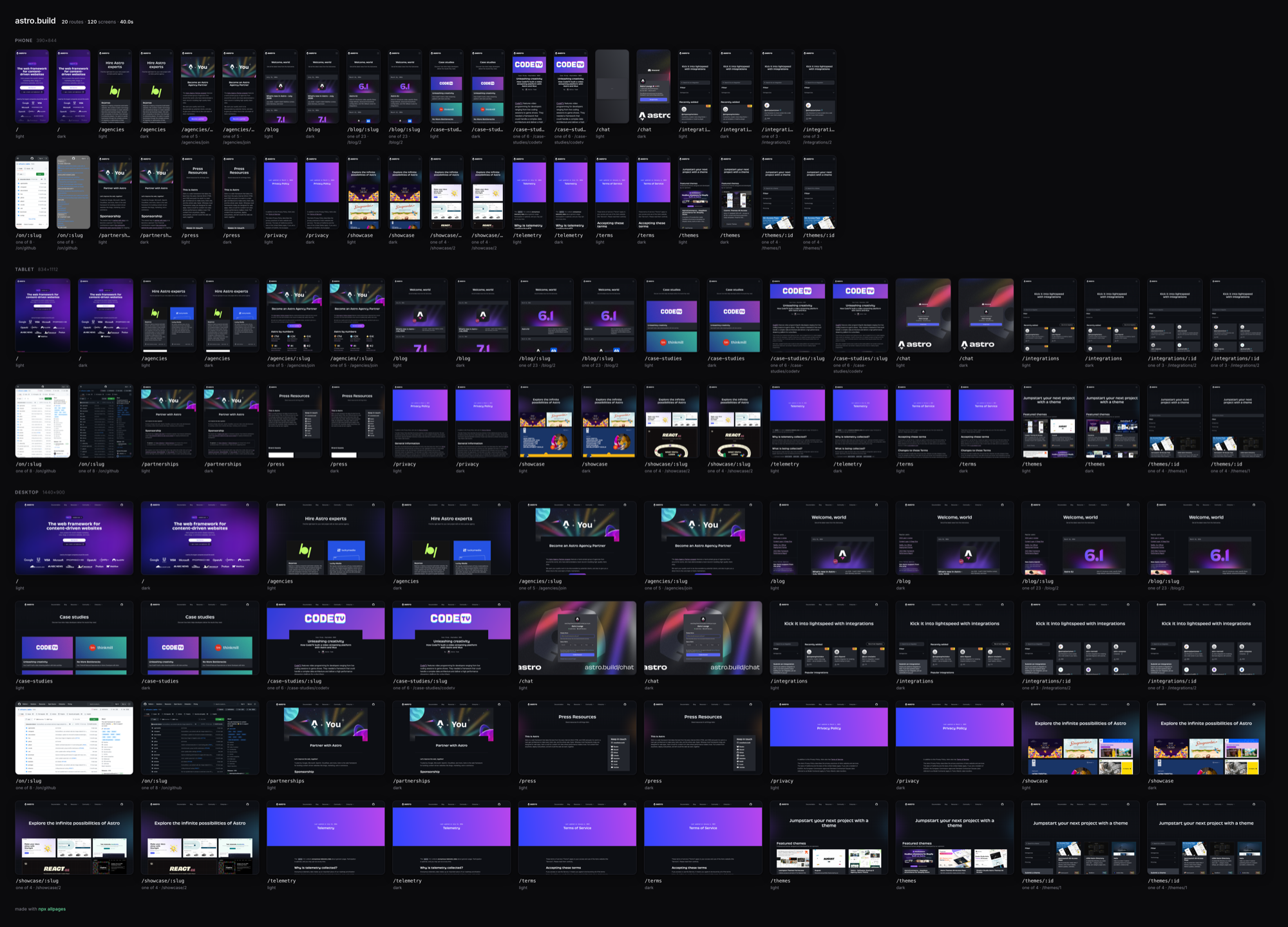
Those 184 pages are really 23 distinct layouts, so that's what you get a tile for. Where a tile represents a whole family of pages it says so underneath (one of 23 · /blog/2), and the full list of 184 URLs is written to allpages/astro.build/routes.txt if you want to check what was left out.
Results are filed per site, so you can try a few in a row and still have all of them:
allpages/
  astro.build/     allpages.png  shots/  routes.txt
  linear.app/      allpages.png  shots/  routes.txt
  localhost-3000/  allpages.png  shots/  routes.txt
It works on anything with a URL
npx allpages https://stripe.com          # a public site
npx allpages localhost:3000              # your dev server
npx allpages https://staging.acme.dev    # a preview deploy
Pages come from whatever the site happens to offer, and all four sources are merged:
| Source | What it catches |
|---|---|
| Your route files | app/**/page.tsx, pages/**, src/routes/**/+page.svelte, including pages nothing links to yet |
| sitemap.xml | the canonical list, when the site publishes one |
| Crawling links | anything reachable from the homepage |
| Crawling in a browser | links that only exist after JavaScript runs |
That last row is what makes this work on client-rendered apps. With Vite, CRA or React Router the served HTML is an empty <div id="root"> and the links only exist once the framework boots, so allpages notices it got nothing useful and crawls again in a real browser.
A big site is not a big design
A 267-page marketing site is usually nine layouts and a few hundred blog posts. Twenty arbitrary pages off the top of that isn't much use, so above 25 pages allpages groups URLs by shape and shoots one page from each layout instead. The grouping happens before any browser opens, so it costs nothing.
$ npx allpages https://acme.com

  267 pages, 9 layouts, shooting one page from each
  ✓ 54 screens in 7.3s → allpages/acme.com/allpages.png
  /blog/:slug 186 pages · /customers/:slug 74 pages
  --only '/blog/*' to open one up · --all for every page
Each tile says what it represents:
/blog/:slug
one of 186 · /blog/post-1
If a site has more layouts than there are tiles to show them in, the ones covering the most pages get priority, so a layout standing for 186 blog posts is kept ahead of a one-off legal page.
Either way you can see what was left out. Every URL is written to routes.txt, with a * marking the ones that made the sheet:
# acme.com · 267 pages, 9 shot · 2026-08-03
# * = in the sheet
* /
* /blog
  /blog/post-2
  /blog/post-3
allpages never stops to ask you a question. Partly that's because you can't sensibly pick which of 267 pages matter until you've seen them, which is the reason you ran the command. Mostly it's practical: an interactive prompt would hang in CI and inside an agent's subshell. So the choice is offered afterwards, printed as a line you can copy.
Under 25 pages none of this kicks in and every page gets its own tile.
What real websites throw at you
None of this matters against a localhost demo. It matters a lot against a live site, where the naive version of this tool gives you forty tiles of a cookie banner over a grey box.
- Bot checks. Playwright's Chromium introduces itself as
HeadlessChrome, and a default Cloudflare rule answers that with a challenge page instead of your site. allpages identifies itself as the Chrome it actually is, which is enough for the sites that were only ever filtering on that string. It doesn't go further: if a site genuinely challenges it, you get told it was blocked and pointed at--auth. - Cookie and consent dialogs are clicked away, covering OneTrust, Cookiebot, Didomi, Usercentrics, Osano, TrustArc and HubSpot, plus a text-matched fallback that only ever clicks short, button-shaped elements. Clicking works better than hiding here, since consent walls often freeze scrolling until you answer them.
- Chat widgets and floating overlays like Intercom, Drift, Crisp and reCAPTCHA badges are hidden, so they don't turn up in every tile.
- Lazy images get loaded by scrolling the page before the shot.
robots.txtis respected. Use--no-robotson your own sites if you'd rather it wasn't.- Anything else is up to you:
--hide '.promo-bar, #newsletter',--wait '.chart-loaded',--delay 500.
Pages behind a login
Without a session half your app redirects and you end up with a sheet of identical login screens. allpages spots the redirect, tells you which routes hit it, and will take a session if you give it one:
✓ 54 screens in 5.4s
  2 pages redirected to a login (/dashboard, /settings)
  re-run with --auth <storageState.json> to shoot them as you
npx playwright codegen --save-storage=session.json # log in once
npx allpages localhost:3000 --auth session.json # → 66 screensThe same flag is the answer to a site that challenges automated browsers. You log in once yourself and allpages reuses the session, rather than trying to talk its way past anything.
Dynamic routes
/orders/[id] isn't a URL, and screenshotting it literally would just put a 404 in your sheet. So allpages matches the template against real links it found while crawling and shoots /orders/42 instead. When it can't find a real example, the route shows up in a not captured strip along with the reason:
NOT CAPTURED  3 routes
/dashboard  redirected to /login    /orders/[id]  dynamic route, no example URL found
The point is that a gap in the sheet is always labelled, so you're never left assuming a page was fine when it simply never loaded.
Options
--devices phone,tablet,desktop  which sizes (default: all three)
--themes light,dark         which color schemes
--routes /a,/b              shoot exactly these, skip discovery
--auth <state.json>         Playwright storageState, shoot private pages as you
--max <n>                   cap pages shot (default: 20)
--all                       shoot every page, not one per layout
--only <glob,glob>          only pages matching these (e.g. '/blog/*')
--exclude <glob,glob>       skip pages matching these
--no-group                  don't collapse pages that share a layout
--depth <n>                 link levels to follow (default: 2)
--project <dir>             where your code lives, for route files (default: cwd)
--out <dir>                 output directory (default: ./allpages)
--full-page                 whole scroll height into shots/
--hide <sel,sel>            CSS selectors to hide
--wait <selector>           wait for this element before shooting
--delay <ms>                extra settle time per page
--timeout <seconds>         per-page load budget (default: 15)
--columns <n>               tiles per row on the sheet
--concurrency <n>           parallel browser contexts (default: cpu count)
--user-agent <ua>           override the browser user agent
--no-lazy                   skip the scroll that loads lazy images
--no-banners                don't dismiss cookie dialogs
--no-robots                 crawl paths robots.txt disallows
--insecure                  accept self-signed certs (local https)
--force                     write into a directory that has other files
--no-open                   don't open the sheet when it's done
A run leaves you with allpages/<site>/allpages.png (the sheet) and allpages/<site>/shots/ (each screenshot, named route--device--theme.png). Pass --out if you want to put them somewhere specific.
All three sizes are on by default because layouts tend to break at whichever width nobody thought to open, and that's usually the tablet. Use --devices phone,desktop if you want runs to be quicker.
Export to Figma
npx allpages figma https://yoursite.comSame discovery, vector output instead of pixels. You get allpages.svg with every page side by side as a group, plus pages/*.svg if you'd rather import them one at a time. Drag either into Figma. It writes into the same per-site folder as the sheet, so you can run both.
  ✓ 11 pages · 1,240 editable layers in 6.2s
    allpages/yoursite.com/allpages.svg  ← drag into Figma
    allpages/yoursite.com/pages/ one SVG per page
What you get are real layers rather than a screenshot in a wrapper. Text comes through as editable text with its own font, size, weight and colour; boxes come through as rects with their actual corner radii and borders; inline SVG icons stay vector, so a logo is still a logo. Only things that were genuinely raster to begin with, like photos and <img> tags, stay raster.
A few things are deliberately left out because they'd only get in your way: screen-reader-only text, anything display:none, off-screen elements, and CSS-mask icons that would otherwise land in Figma as black squares. Font stacks are resolved down to the first real family, since Figma has no idea what ui-sans-serif means.
npx allpages figma localhost:3000 --devices phone   # mobile canvas
npx allpages figma https://site.com --only '/blog/*' --max 5
Fidelity is good but not perfect: gradients, shadows, transforms and pseudo-elements don't survive the trip. This is meant for pulling a real site into Figma to redesign it, not for archiving one exactly. The PNG sheet is better for that.
Film a flythrough
npx allpages film https://yoursite.comSame discovery again, but the output is one animated SVG: a camera that glides through your pages in order, holds on each one long enough to read, and loops without a visible seam.
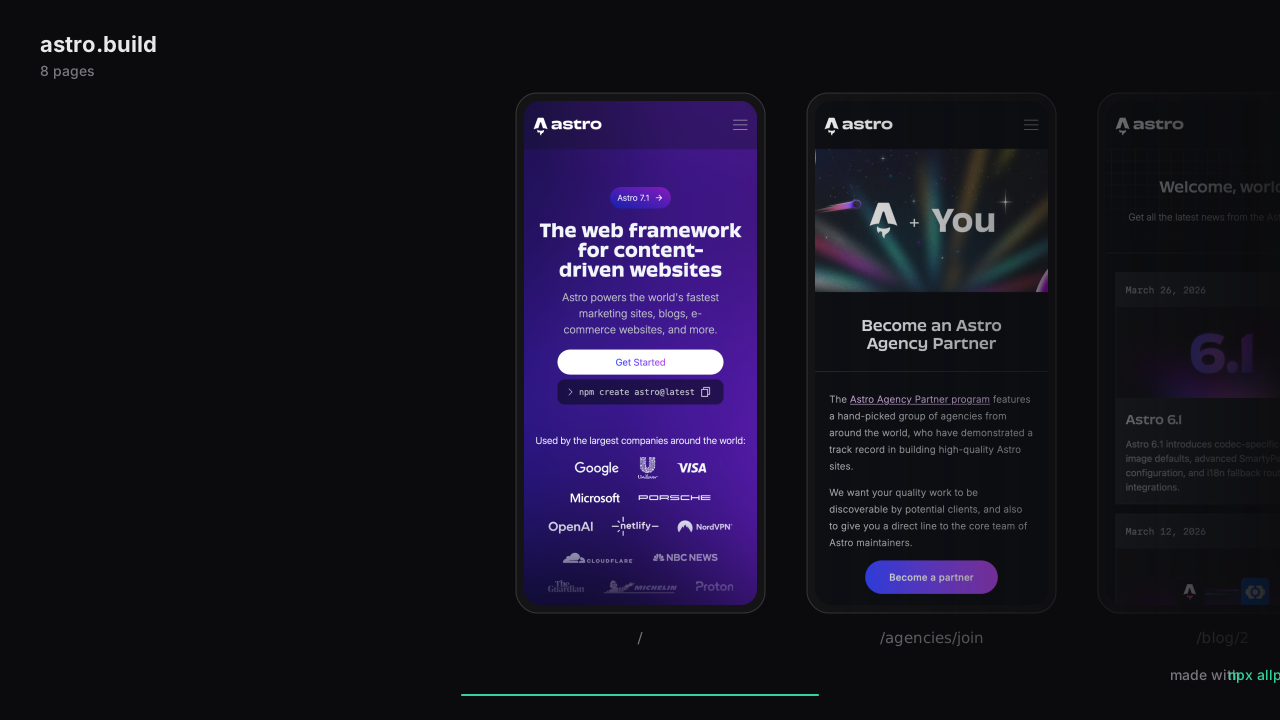
This is a live SVG animating in your browser right now, not a gif. astro.build, 8 pages, one 18-second loop, made in 12.2s.
It's for launch day. Screen-record it for the video, drop the file into a README where it animates as an ordinary image, or open it full-screen behind you in a demo. There's no video toolchain behind it and nothing to install: the whole film is screenshots and a CSS animation riding in one file, which is also why it loops forever without stuttering.
  ✓ 9 pages → a 20s loop in 2.4s
    allpages/yoursite.com/film.svg  plays in any browser, loops without a seam
Phone frames come wearing a drawn device body, desktop frames a browser window, both vector, so they stay crisp at any scale. Phone is the default because a row of phones reads instantly at video sizes.
The pacing and the look are yours to set:
--devices desktop     film in browser windows instead of phones
--themes dark         film the dark side
--max 8               a tighter loop
--hold 2000           linger longer on each page (ms)
--slide 400           snappier cuts between pages (ms)
--bg '#0a1628'        film on your brand color
--accent '#f472b6'    progress bar to match
--title 'Acme v2'     heading, instead of the hostname
Three of those, filmed on real sites. All of these are animating as you read:
Desktop windows. stripe.com filmed in browser frames, with its chat widget hidden the same way you'd hide anything:
npx allpages film https://stripe.com --devices desktop --hide '.UniversalChatInitializer' --max 5
Dark. linear.app in dark theme, where the phones almost disappear into the background and the pages float:
npx allpages film https://linear.app --themes dark --max 5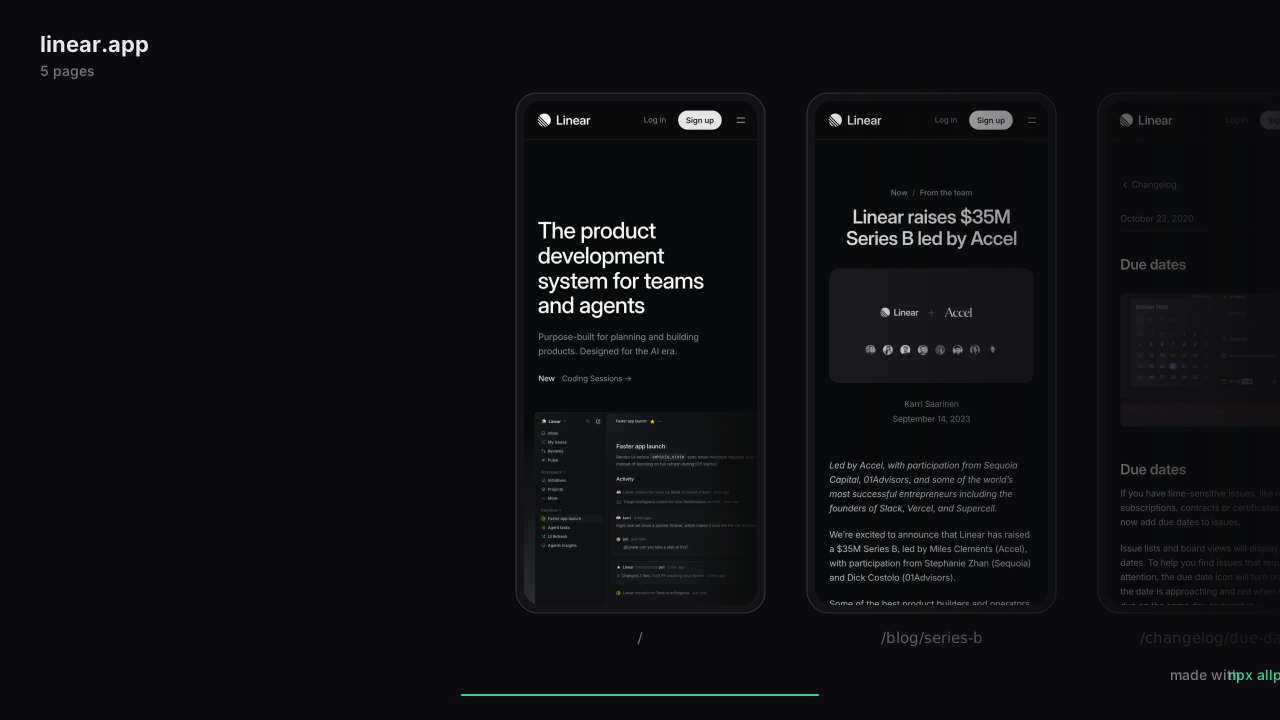
On brand. astro.build filmed on its own purple, with the accent and title to match:
npx allpages film https://astro.build --bg '#160b2e' --accent '#c084fc' --title 'astro.build, on brand' --max 5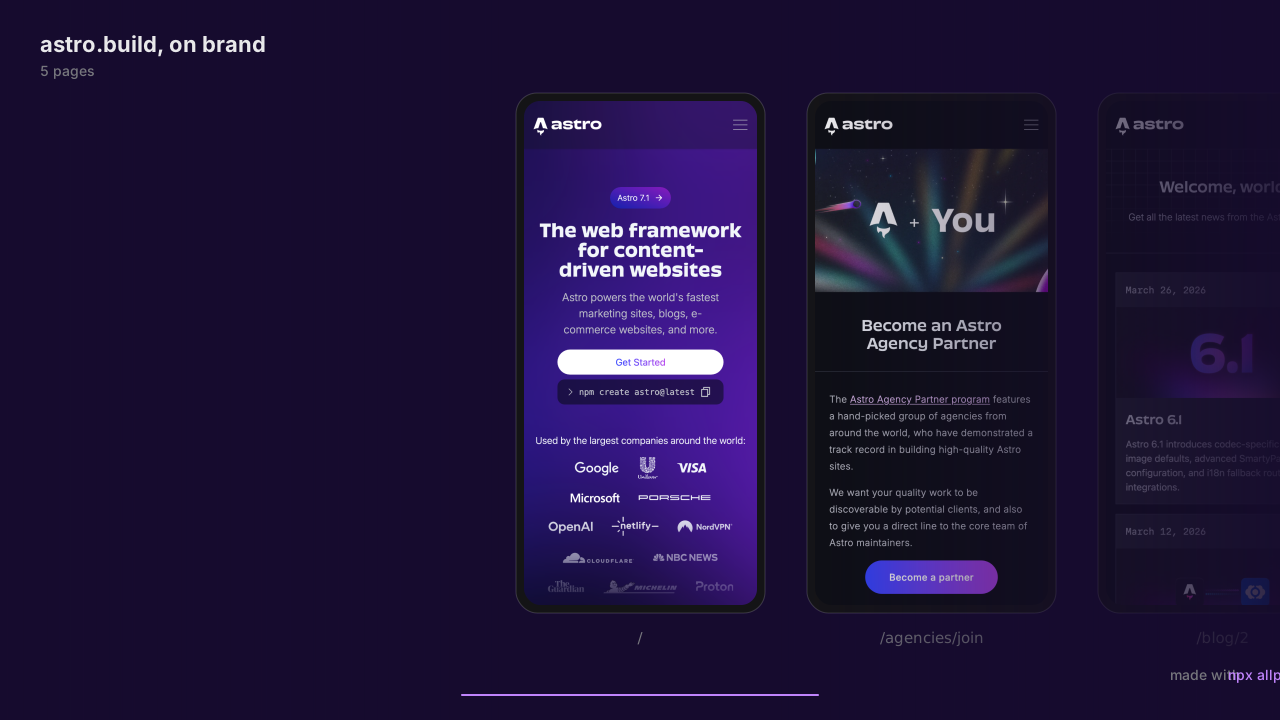
Use it as a library
npm i allpagesimport { allpages } from 'allpages';
const { sheet, shots, routes, authWalled, botChecked } = await allpages({
url: 'https://yoursite.com',
devices: ['phone', 'tablet', 'desktop'],
themes: ['light', 'dark'],
outDir: './snapshots', // defaults to allpages/<site>
max: 20,
only: ['/blog/*'], // optional: same globs as the CLI
group: true, // one page per layout above 24 pages
onProgress: (done, total) => console.log(`${done}/${total}`),
});
console.log(sheet); // → /abs/path/snapshots/allpages.png
console.log(shots.filter((s) => s.file)); // every captured screenshot
console.log(routes.map((r) => r.path)); // what it decided to shoot
console.log(routes.filter((r) => r.standsFor)); // tiles standing for a familyPass an existing browser to reuse one you've already launched, or skipSheet: true if you only want the individual shots. discoverRoutes(), selectRoutes() and outDirFor() are exported separately, for when you want the list of pages, the decision about which of them matter, or just the default folder name.
In CI
Point it at a preview deploy and upload the sheet as an artifact, so every PR gets a picture of the whole site:
- uses: kapersky1337/allpages@main
  id: shots
  with:
    url: ${{ steps.deploy.outputs.preview-url }}
    max: 20
- uses: actions/upload-artifact@v4
  with:
    name: allpages
    path: allpages/
For agents
The sheet is a single image and the shots are ordinary files, so instead of 54 screenshot tool calls you get one attachment:
> drag allpages.png into Claude Code
"three of these have the wrong header, and /pricing is broken on mobile. fix them."
Limits
- Chromium only, so Safari and Firefox rendering differences won't show up here.
- Pages you can only reach by doing something are invisible to it. If a route is only reachable by submitting a form or clicking a JS handler, no crawler will find it, and
--routesis your way in. - Client-rendered pages get a settle window: network-idle, then a short pause. Apps that stream indefinitely still get shot but may catch a spinner, which
--waitand--delayusually solve. - Tiles show the top of each page.
--full-pagecaptures the whole scroll height intoshots/, but the sheet keeps tiles uniform, because a grid where one tile is ten times taller than its neighbour is hard to read. - If a site has no dark mode, and every dark shot comes out byte-identical to its light one, the dark tiles are dropped and the sheet tells you why.
- A site that really wants to keep scripts out can. You'll be told that's what happened instead of getting a sheet of error pages.
- Routes behind a login, or that couldn't be reached, are listed rather than quietly dropped.
- Inside an output folder allpages only writes
allpages.png,shots/,routes.txt,allpages.svg,pages/andfilm.svg. If it finds anything else there it stops instead of deleting your files. - On sites you don't own it tries to behave:
robots.txtis respected by default, and the crawl is limited by both depth and count.
Using this responsibly
allpages drives a real browser against whatever URL you hand it. Against your own sites that's just tooling. Against sites you don't own there are a few things worth knowing, and the defaults are chosen so you mostly don't have to think about them:
robots.txtis respected by default.--no-robotsis there for your own sites; using it elsewhere is your call to justify.- The crawl is bounded to the same origin, two levels of links and 500 pages of discovery, so it behaves more like someone browsing than a scraper.
- Nothing is uploaded anywhere. Every file stays on your machine. There's no account, no telemetry and no server involved.
- Cookie dialogs get clicked so pages render normally. Use
--no-bannersif you'd rather not interact with the site at all. Sessions last only for the run. - Bot checks are reported rather than defeated. allpages identifies itself as the Chrome it is and leaves it there. It won't solve CAPTCHAs, forge fingerprints or rotate identities. If a site says no, either ask its owner or use
--authwith a session you opened yourself. - Whatever you capture still belongs to the site's owner. Screenshots and SVG exports contain someone else's design, content and trademarks, and allpages gives you no rights to any of it. Check you have permission before you capture, republish, or ship a design derived from a site you don't own.
- Plenty of sites restrict automated access in their terms. That agreement is between you and them.
Licensing
MIT, see LICENSE. One runtime dependency, playwright-core (Apache-2.0, © Microsoft). Full attribution in NOTICE.
Build
npm install && npm run build
npm test                                    # 59 tests
node demo-app/server.js &                   # a small app with a login wall
node dist/cli.js localhost:4173 --project demo-app
License
MIT © kapersky1337