
angular-render-scan
v0.1.14
Published
Visual Angular change-detection scanner for debugging component renders.

Maintainers
 edisonaugusthy
Readme
Angular Render Scan
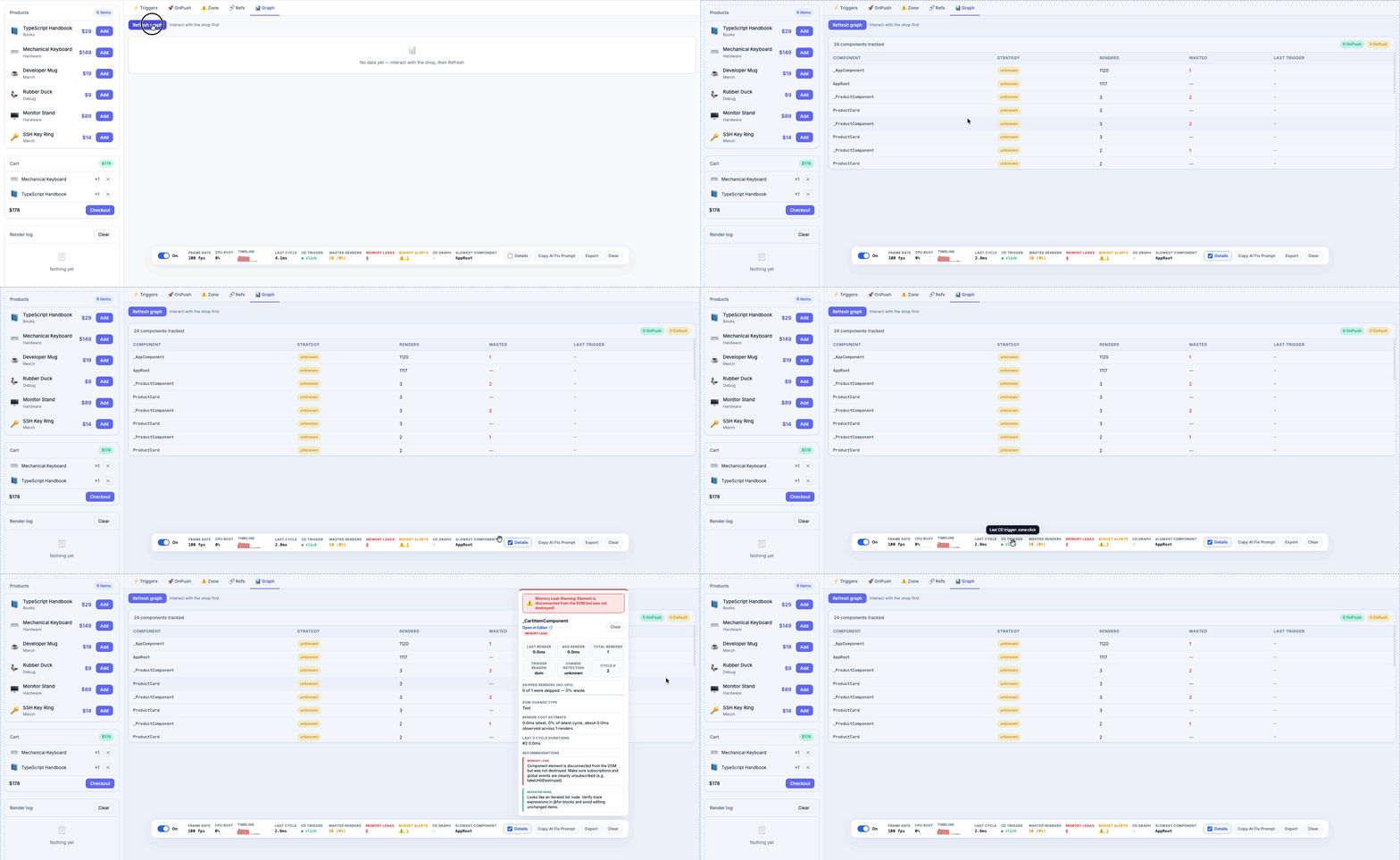
Angular Render Scan turns a named user interaction into ranked Angular change-detection findings, a before/after comparison, and portable reports.
Compatibility
| Package | Version |
|---|---|
| Angular provider mode | 17+ |
| Script-tag overlay | 9+ |
| angular-render-scan | 0.1.13 |
| angular-render-scan-cli | 0.1.13 |
What it shows
- Component render outlines and heatmap colors.
- Slow render and budget violation alerts.
- Change detection trigger labels such as
zone:click,signal:write, androuter:navigation. - OnPush candidates, referentially unstable inputs, and suspected Zone pollution.
- A copyable AI performance prompt for slow/error components.
- Session export JSON for deeper debugging.
Install
npm install -D angular-render-scanProvider mode supports Angular 17+ (including signals and zoneless applications). For Angular 9–16, use the framework-independent script-tag build; automatic component instrumentation requires provider mode.
Setup with the CLI
npx angular-render-scan-cli initThe CLI supports Angular CLI and Nx workspaces. It looks for angular.json, workspace.json, nx.json, or project.json, finds your main.ts or app.config.ts, and adds provideAngularRenderScan().
npx angular-render-scan-cli init --dry-run
npx angular-render-scan-cli init --script-tag
npx angular-render-scan-cli --help
Manual Setup
Add the provider to your Angular bootstrap config.
import { bootstrapApplication } from '@angular/platform-browser';
import { provideAngularRenderScan } from 'angular-render-scan';
import { AppComponent } from './app/app.component';

bootstrapApplication(AppComponent, {
  providers: [
    provideAngularRenderScan({
      enabled: true,
      animationSpeed: 'fast'
    })
  ]
});
For script-tag usage:
<script src="https://unpkg.com/angular-render-scan/dist/auto.global.js"></script>Provider mode is recommended for Angular component-level instrumentation.
Common Options
provideAngularRenderScan({
  enabled: true,
  showToolbar: true,
  showFPS: true,
  animationSpeed: 'fast',
  maxLabelCount: 20,
  maxRecordedCycles: 30,
  showCopyPrompt: true,
  promptContext: 'Angular app using signals and OnPush components',
  log: false
});
Useful options:
enabled: turns scanning on or off.showToolbar: shows the floating toolbar.animationSpeed:'fast','slow', or'off'.showFPS: shows FPS in the toolbar.log: prints cycle summaries to the console.include/exclude: limits which components are tracked.minDurationMs/minRenderCount: filters low-signal entries.maxRecordedCycles: controls how much history is included in copied prompts.promptContext: adds app-specific context to copied prompts.dangerouslyForceRunInProduction: allows scanner runtime outside Angular dev mode.
Runtime API
import {
  copyAIPrompt,
  getAIPrompt,
  getCdGraph,
  getOnPushCandidates,
  getOptions,
  getReferentialInstability,
  getZonePollutionEvents,
  beginInteraction,
  endInteraction,
  compareInteractionReports,
  formatInteractionReportMarkdown,
  scan,
  setOptions,
  stop
} from 'angular-render-scan';

scan();
beginInteraction('Add product to cart');
// Perform the interaction.
const baseline = endInteraction();

beginInteraction('Add product to cart');
// Perform the interaction after a candidate fix.
const candidate = endInteraction();
console.log(compareInteractionReports(baseline, candidate));
console.log(formatInteractionReportMarkdown(candidate));
setOptions({ enabled: false });
setOptions({ enabled: true, log: true });

console.log(getOptions());
console.log(getAIPrompt());
await copyAIPrompt();

console.log(getOnPushCandidates(40));
console.log(getReferentialInstability(1));
console.log(getZonePollutionEvents());
console.log(getCdGraph());

stop();
Interaction workflow
Click Capture, name and perform an interaction, then click Finish. Save it as the baseline, apply a fix, and capture the same interaction again. The panel ranks findings and exports Markdown or standalone HTML.
FPS is context only. Disconnected hosts are not proof of memory leaks, OnPush opportunity share is not a predicted saving, and Zone pollution guidance applies only to Zone.js applications. CD Graph and Waterfall are advanced APIs, not headline diagnosis.
Useful shortcuts:
| Shortcut | Action |
|---|---|
| Alt+Shift+S | Toggle scanner |
| Alt+Shift+D | Toggle Details Mode |
| Alt+Shift+C | Copy AI performance prompt |
| Alt+Shift+X | Clear stats |
| Alt+Shift+T | Toggle toolbar |
| Escape | Close open panels |
Details and developer handoff
Enable Details in the toolbar, hover a captured component, then click it to pin a recommendation panel. The panel shows timing, render count, reason, selector, changed inputs, recent cycles, and local Angular recommendations.
The ranked interaction report is the primary output. For a secondary AI handoff, call copyAIPrompt() or use Alt+Shift+C; it copies recent telemetry evidence without DOM nodes, component instances, or source code.
Playwright Audit
import { test, expect } from '@playwright/test';
import { startRenderAudit } from 'angular-render-scan';

test('no render regression', async ({ page }) => {
  await page.goto('/');

  const audit = await startRenderAudit(page, 'Add product to cart');
  await page.click('button.expensive-operation');
  const report = await audit.stop();

  expect(await report.maxDurationFor('ProductCardComponent')).toBeLessThan(16.7);
  expect(await report.wastedRenderPercentage()).toBeLessThan(20);
  expect(await report.budgetViolations()).toHaveLength(0);
});
Write await report.interactionReport() to JSON, then compare it in CI:
npx angular-render-scan-cli report --input candidate.json --baseline baseline.json --github-summary --fail-on-regressionProduction Behavior
Angular Render Scan is intended for development and demo debugging. Provider mode checks Angular isDevMode() and does not run in production unless explicitly enabled.
provideAngularRenderScan({
  dangerouslyForceRunInProduction: true
});
Use that option carefully. The scanner adds runtime instrumentation, DOM reads, canvas work, and debug behavior.
Demo
Hosted demo:
https://edisonaugusthy.github.io/angular-render-scan/Local demo:
npm install
npm run dev
Open http://127.0.0.1:4200/.
Development
npm run test
npm run build
npm run test:e2e
Release
Release runs automatically on pushes to main. The workflow bumps the package version, publishes angular-render-scan and angular-render-scan-cli to npm, and creates a GitHub release.
Configure NPM_TOKEN or npm trusted publishing for both packages before publishing.