
angular-stringcontains
v0.0.1
Published
Angular filter for easy JSON Array filtering

Maintainers
 enzosv
Readme
String Contains Filter for Angular
Angular filter for easy JSON Array filtering
View live demo
Installation
Bower
To install using Bower:
bower install angular-stringcontainsManual
Download angular-stringcontains.min.js and add to your project
Setup
In your document include this script:
<script src="/path/to/file/angular-stringcontains.min.js"></script>In your AngularJS app, you'll need to import the angular-stringcontains module:
angular.module('myModule', ['angular-stringcontains']);Usage
This module defines the filters 'searchKeyContainsAllOf' and 'searchKeyContainsAnyOf'
<any ng-repeat="object in JSONArray | stringContainsAllOf:searchTerm:'propertyStringToCheck'"></any>

<any ng-repeat="object in JSONArray | stringContainsAnyOf:searchTerm:'propertyStringToCheck'"></any>
This filter makes use of a string property you define which you must often generate from your object like so:
object.propertyStringToCheck = (object.name + " " + object.searchableProperty1 + " " + object.searchableProperty2).toLowerCase();Example
View [live demo] (http://enzosv.github.io/angular-stringcontains/)
View example source code
###Comparison
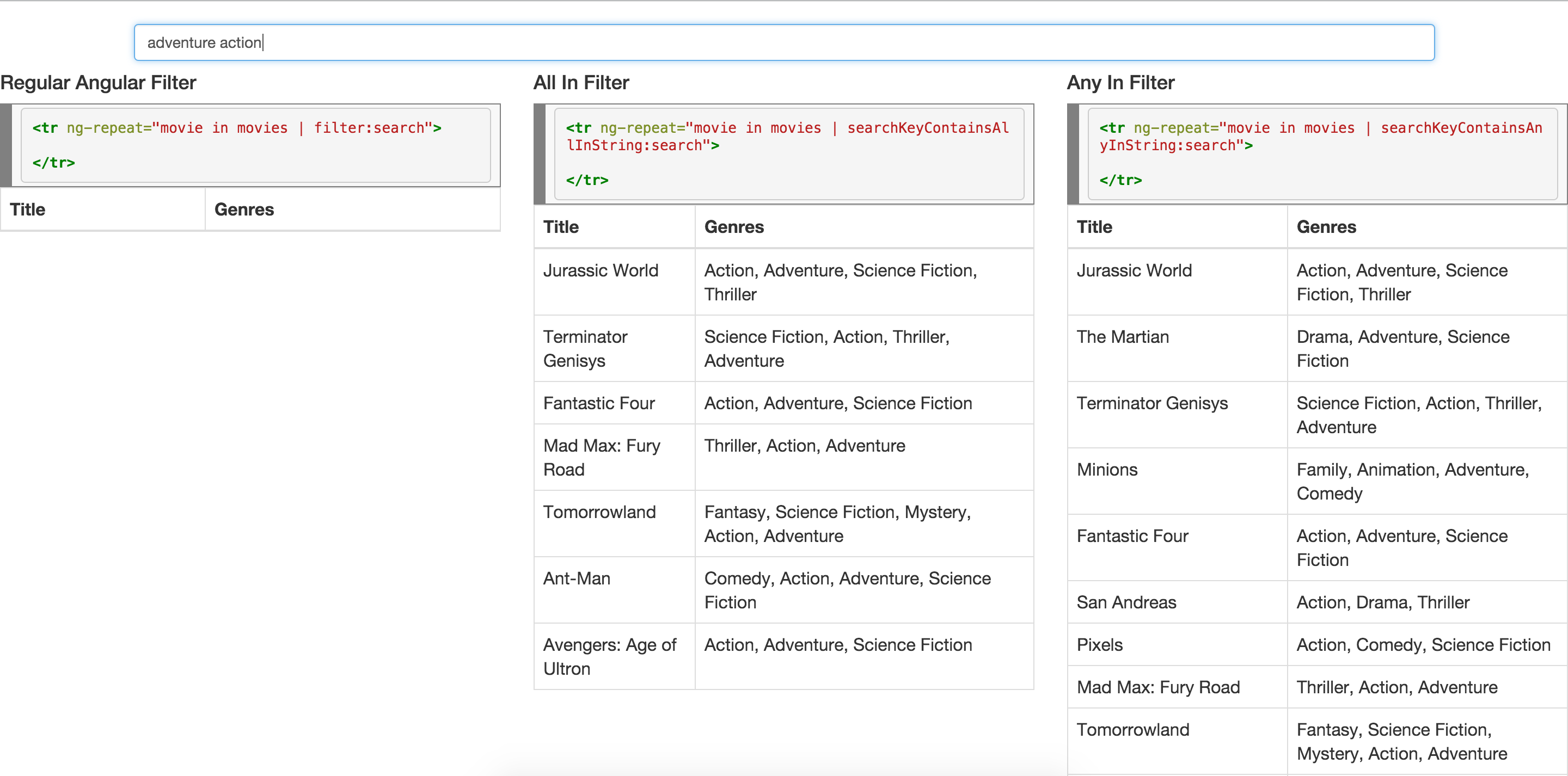
We get more accurate results from the all in filter because while the regular angular filter will search for the entire term "adventure action", the all in filter will check for the inclusion of each word in the term "adventure action" thus producing results which will include both movies with "Action, Adventure" and "Adventure, Action" as their genres.
Featured Projects
This project is used by endo, a Todoist and Google Calendar new tab page and encal, a simpler and cleaner Google Calendar new tab page.
License
MIT