
angular-transfer-box
v1.4.0
Published
Angular Directive for Component Tranfer in antd


Readme
#Angular Transfer Box
Angular Transfer Box was created to address a common demand that choose some data from a list-like collection. Aspired by famous React-ANTD which contains a transfer box also, angular-transfer-box was written with angular to achieve the similar effect.
Requirement: AngularJS 1.3+
File Size: v1.4.0
- js: raw 14.1kb, minfied 7.28kb
- css: 5.18kb
#Installation
npm install angular-transfer-box --save-dev
#Demo
change your current workspace to
node_modules/angular-transfer-boxopen the
demo/index.html
#Principle
angular-transfer-box composed by two transfer-list components and a transfer-operation component. Each transfer-list can display its data and transfer-operation can move data between these two list.
angular-transfer-box can only handle array-collection data source. Each item in this data source should contains a property key that would be used to keep its unique. Thus, a regular data source that angular-transfer-box will success render should conform to the following format:
var dataSource = [{
	key : '1' or 1 // string or number,
	otherProperty : ...
}];
#Usage
npm install angular-transfer-box
include angular-transfer-box as a dependency for your app
angular.module('yourApp',['angular-transfer-box'])include the supplied CSS file (or create your own).
Setup the directive and reference an object on your scope
Javascript:
$scope.dataSource = [{key:'item1',key:'item2',key:'item3'}];
$scope.targetKeys = [];
HTML:
<transfer origin-source="dataSource"
			target-keys="targetKeys">
</transfer>
Then your will see the magic scene, like this:
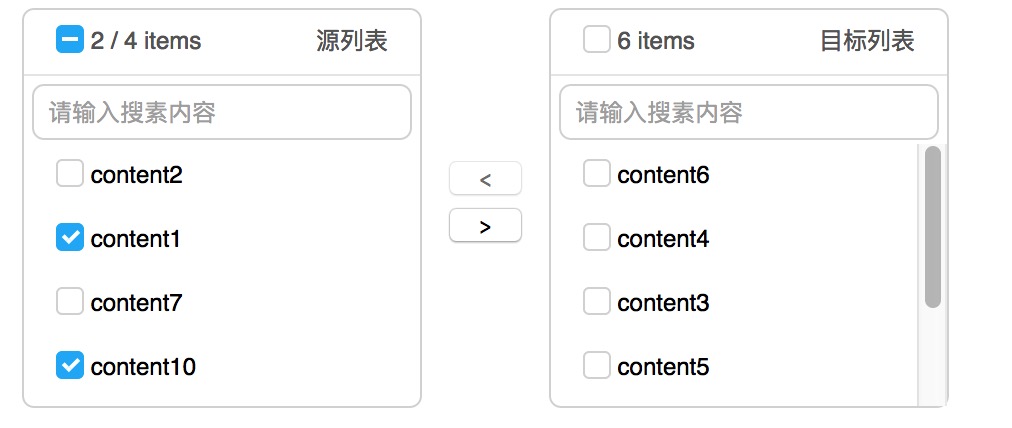
#Options
angular-transfer-box support several kinds of settings with specify an obj option.
// define an option in  your controller
var transferBoxOption = {
	showSearch : true
}
// in your template
<transfer origin-source="dataSource"
			target-keys="targetKeys"
			option="transferBoxOption">
</transfer>
angular-transfer-box supports the following options:
orientation(String): the orientation between the transfer list, can be specified with"horizontal(default)"or"vertical"render(Function): if you pass a complicated business-logic object into angular-tranfer-box, you may need this option to render what's you want. For example,var dataSource = [{ key : '1', topic : { name : 'sport', id : '1' } },{ key : '2', topic : { name : 'music', id : '2' } }] //we can use render to show topic.name in each transfer-list var option = { render : function(obj){ return obj.topic.name; } }default
render = functon(obj){ return obj.key; }titles(Object): specified thetitlein each list, defaulttitles : { origin : 'Source List', target : 'Target List' }showSearch(Boolean): toggle the search component in angular-transfer-box, default:truesearchPlaceholder(String): set the placeholder content of search input, default:"Please enter your content"notFoundContent(String): set the empty list content, default:"Not Found"classes(String): you can set this option to customize your styles, default:""
#License
Licensed under the GNU.