
animate-compress-fills
v1.0.3
Published
Compresses strings that is inside the js file published from Adobe Animate
Downloads
14


Readme
Animate. Compress Fills
Compresses strings that is inside the js file published from Adobe Animate
When publishing a project, Adobe Animate creates a js file with a bunch of different information. The module searches for the same strings inside this js file and replaces them with variables.
Keep in mind that compression algorithm is not yet 100% optimized.
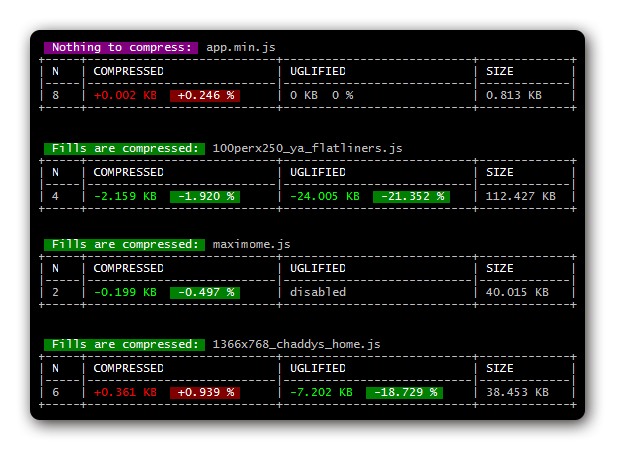
Installation
npm install animate-compress-fillsOutput example (part of...)
// ------------------
// Input
// ------------------
var mask_graphics_0 = new cjs.Graphics().p("EgEAA52MAAAhzrIIBAAMAAABzrg");
var mask_graphics_1 = new cjs.Graphics().p("EgEAA52MAAAhzrIIBAAMAAABzrg");
this.shape.graphics.f("#FFFFFF").s().p("ABNCMIAAh3IhFAAIgYAAIgPADIgKA");
this.shape_1.graphics.f("#FFFFFF").s().p("ABNCMIAAh3IhFAAIgYAAIgPADIgKA");

// ------------------
// Output
// ------------------
var _1 = "EgEAA52MAAAhzrIIBAAMAAABzrg", _2 = "#FFFFFF", _3 = "ABNCMIAAh3IhFAAIgYAAIgPADIgKA";
var mask_graphics_0 = new cjs.Graphics().p(_1);
var mask_graphics_1 = new cjs.Graphics().p(_1);
this.shape.graphics.f(_2).s().p(_3);
this.shape_1.graphics.f(_2).s().p(_3);
Usage
const path = require('path');
const glob = require('glob');
const chalk = require('chalk');
const lodash = require('lodash');
const {table, getBorderCharacters} = require('table');
const AnimateCompressFills = require('animate-compress-fills');

glob('test/**/!(*.cmp).js', (err, files) => {
   for(let i = 0, len = files.length; i < len; i++){

      let js_file = path.join(__dirname, files[i]);

      new AnimateCompressFills(js_file, js_file.replace(/\.js$/i, '.cmp.js'), random(0, 1))
      .then(data => {
         let table_data = [[chalk.white.bold('N'), chalk.white.bold('COMPRESSED'), chalk.white.bold('UGLIFIED'), chalk.white.bold('SIZE')]];

         let size = toKB(data.size.source);
         let size_compressed = toKB(data.size.compressed);
         let size_uglified = toKB(data.size.uglified);

         let diff = (size_compressed - size).toFixed(3) || 0;
         let percent = (diff / size * 100).toFixed(3);
         let compressed_str = numSign(diff);
         let compressed_perc = numPerc(percent);

         let diff2 = (size_uglified - size).toFixed(3) || 0;
         let percent2 = (diff2 / size * 100).toFixed(3);
         let uglified_str = size_uglified == 0 ? 'disabled' : numSign(diff2);
         let uglified_perc = size_uglified == 0 ? '' : numPerc(percent2);

         table_data.push([i + 1, compressed_str + '  ' + compressed_perc, uglified_str + '  ' + uglified_perc, (size).toFixed(3) + ' KB']);

         console.log('');
         if(data.status == 'skip'){
            console.log(' ' + chalk.white.bgMagenta.bold(' ' + data.message + ': '), path.basename(data.input_file));
         }else{
            console.log(' ' + chalk.white.bgGreen.bold(' ' + data.message + ': '), path.basename(data.input_file));
         }
         console.log(table(table_data, {columns: {0: {width: 3}, 1: {width: 25}, 2: {width: 25}, 3: {width: 11}}, border: getBorderCharacters('ramac')}));
      })
      .catch(err => {
         console.log(err);
      })
   }
});

function random(min, max) {
    return Math.floor(Math.random() * (max - min + 1)) + min;
}

function toKB(n){
   return n / 1024 || 0;
}

function numSign(n){
   if(n > 0){
      return chalk.red.bold('+' + n + ' KB');
   }else if(n < 0){
      return chalk.green.bold(n + ' KB');
   }else{
      return '0 KB';
   }
}

function numPerc(p){
   if(p > 0){
      return chalk.white.bgRed.bold(' +' + p + ' % ');
   }else if(p < 0){
      return chalk.white.bgGreen.bold(' ' + p + ' % ');
   }else{
      return '0 %';
   }
}
Callback data structure:
{
   status         -> {String} 'ok', 'fail' or 'skip' if it's pointless to compress
   message        -> {String} Any text describing status
   input_file     -> {String} Source js file path
   output_file    -> {String} Output js file path
   js_content     -> {String} Modified js content
   size: {
      source       -> {Number} Original size
      compressed   -> {Number} When fills are compressed
      uglified     -> {Number} And when all uglified
   }
}
Additionally you can compress the whole file using UglifyJS:
new AnimateCompressFills(input_file, output_file, true);