
animated-stepper
v0.1.4
Published
Animated stepper component for React applications


Readme
animated-stepper
A small controlled React stepper with animated connector transitions, typed props, and theme tokens.
- Live demo: https://stepper.mayerattila.site/
- npm: https://www.npmjs.com/package/animated-stepper
- React: 18 or 19
- TypeScript types: included
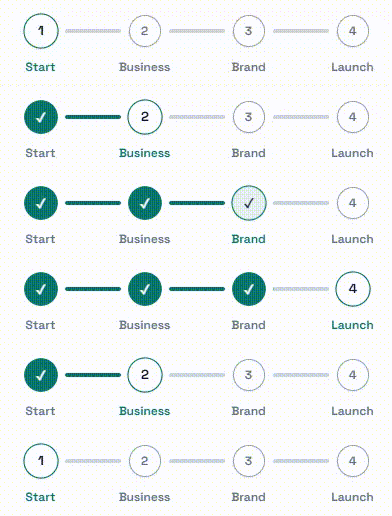
The demo site is a playground for the package. It is intentionally simple: preview the component, change steps and theme values, then copy the props shape into your app.
Preview
Install
npm install animated-stepperImport the component and stylesheet:
import Stepper from "animated-stepper";
import "animated-stepper/style.css";
Quick Start
import { useState } from "react";
import Stepper, { type Step } from "animated-stepper";
import "animated-stepper/style.css";

const steps: Step[] = [
  { key: "account", label: "Account" },
  { key: "details", label: "Details" },
  { key: "confirm", label: "Confirm" },
];

export function CheckoutStepper() {
  const [activeStep, setActiveStep] = useState(0);
  const [pendingStep, setPendingStep] = useState<number | null>(null);

  const requestStep = (nextStep: number) => {
    if (pendingStep !== null) return;
    if (nextStep < 0 || nextStep >= steps.length) return;
    if (nextStep === activeStep) return;

    setPendingStep(nextStep);
  };

  return (
    <>
      <Stepper
        steps={steps}
        activeStep={activeStep}
        pendingStep={pendingStep}
        onCommitStep={(step) => {
          setActiveStep(step);
          setPendingStep(null);
        }}
      />

      <button onClick={() => requestStep(activeStep - 1)}>Previous</button>
      <button onClick={() => requestStep(activeStep + 1)}>Next</button>
    </>
  );
}
How It Works
animated-stepper is controlled by your app.
activeStep: committed/current step index.pendingStep: target step while the connector animation runs.onCommitStep: called when the active connector finishes animating.
Keep pendingStep as null when idle. Set it to the target index to start a transition. In onCommitStep, commit the new activeStep and clear pendingStep.
API
Stepper
<Stepper
  steps={steps}
  activeStep={activeStep}
  pendingStep={pendingStep}
  theme={theme}
  onCommitStep={(step) => {
    setActiveStep(step);
    setPendingStep(null);
  }}
/>
| Prop | Type | Required | Description |
| --- | --- | --- | --- |
| steps | Step[] | Yes | Steps in display order. |
| activeStep | number | Yes | Current committed step index. |
| pendingStep | number \| null | Yes | Target step during animation, or null when idle. |
| theme | Partial<StepperTheme> | No | Visual token overrides. |
| onCommitStep | (step: number) => void | Yes | Fires after the moving connector transition ends. |
Step
| Field | Type | Required | Description |
| --- | --- | --- | --- |
| key | string | Yes | Stable unique step key. |
| label | string | Yes | Label rendered below the dot. |
| description | string | No | Optional app metadata. Not rendered by the component. |
Exports
import Stepper, {
  Stepper as NamedStepper,
  defaultStepperTheme,
  type Step,
  type StepperProps,
  type StepperTheme,
} from "animated-stepper";
Theme
Pass any subset of StepperTheme through the theme prop.
<Stepper
  steps={steps}
  activeStep={activeStep}
  pendingStep={pendingStep}
  theme={{
    brand: "#0f766e",
    connectorWidthPx: 56,
    connectorDurationMs: 360,
  }}
  onCommitStep={(step) => {
    setActiveStep(step);
    setPendingStep(null);
  }}
/>
Default tokens:
| Token | Default |
| --- | --- |
| connectorWidthPx | 48 |
| connectorGapPx | 8 |
| connectorDurationMs | 320 |
| dotDurationMs | 220 |
| brand | #2563eb |
| track | #d1d5db |
| dotBg | #ffffff |
| inactiveBorder | #9ca3af |
| inactiveText | #6b7280 |
| activeText | #1f2937 |
| completeText | #ffffff |
| labelInactive | #6b7280 |
Styling
Import once in your app entry:
import "animated-stepper/style.css";The package stylesheet defines the layout and animation classes. Theme values are applied as CSS variables from the theme prop.
Notes
- Step indexes are zero-based.
- The component does not manage form state or routing.
- Jumping forward or backward is supported by setting
pendingStepto any valid step index. - Duplicate or empty step keys should be normalized by your app before rendering.