
animation-list
v3.0.3
Published
Animation rendering based on Vue3 list elements (supports animation callbacks)

Maintainers
 tmm-tommy
Readme
animation-list
🔥 特性
- 💪 基于 Vue 3 Composition API 开发
- 🔥 使用 TypeScript 编写,提供完整的类型定义
- 📦 开箱即用的高质量动画效果
- 🌈 支持多种内置动画类型和自定义动画
- 👓 提供完整的动画生命周期钩子函数
- ⚡ 高性能设计,针对列表渲染进行优化
📋 更新日志
- 优化源码文件结构
- 新增多种动画类型
- 添加动画生命周期监听
- 完全支持 Vue3 + TypeScript
🎬 效果展示
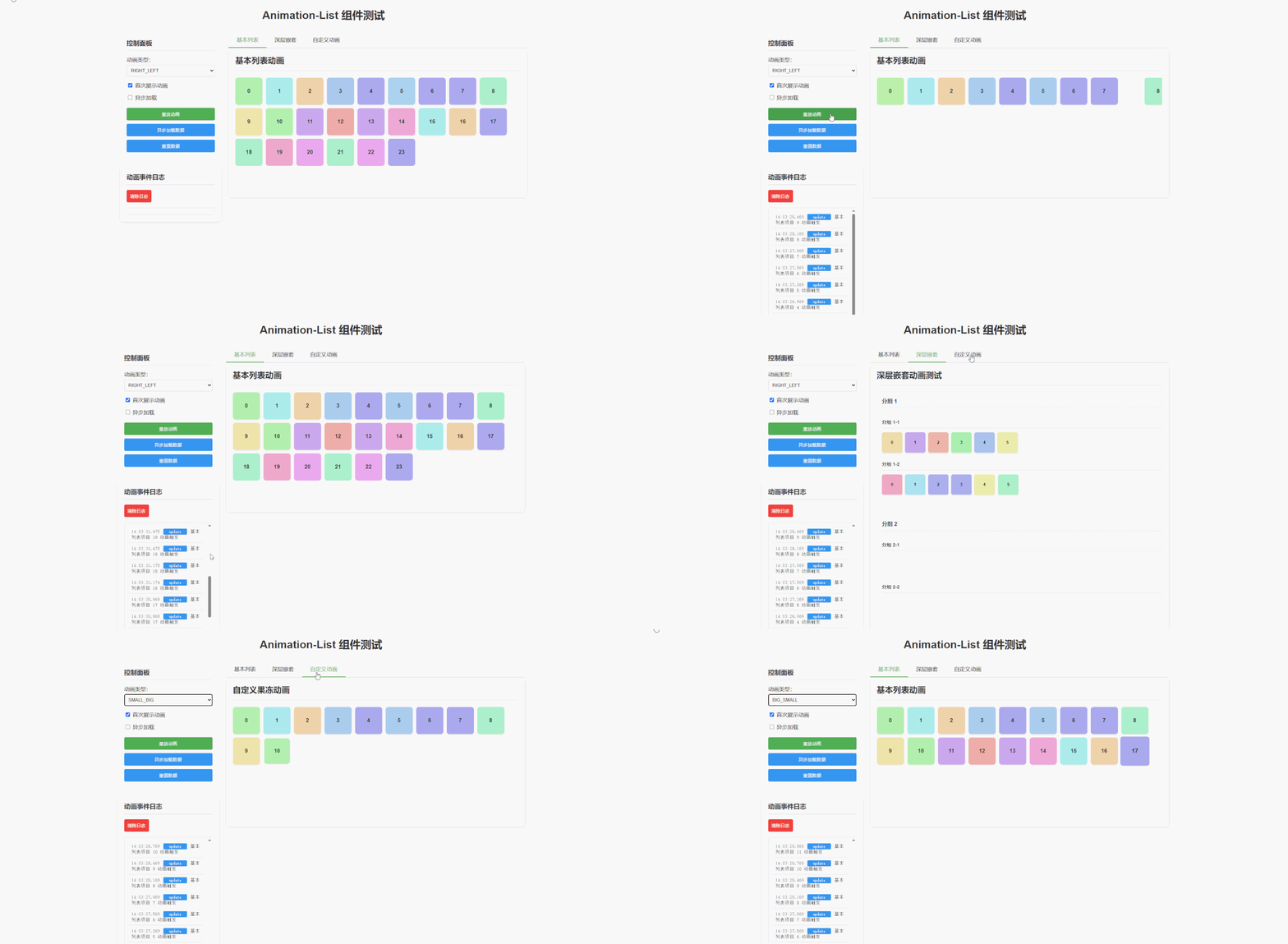
- animation-list 是一个基于 Vue 的高性能列表动画组件,支持 Vue3
- 核心特性是支持每个元素的动画生命周期监听(start, update, end),可自定义动画流程
安装
npm i animation-list- 基本使用
<template>
  <animation-list ref="animationListRef">
    <div class="item" v-for="item in 8" :key="item">{{ item }}</div>
  </animation-list>
</template>

<script lang="ts" setup>
import { onMounted, ref } from "vue";
import AnimationList from "animation-list";

const animationListRef = ref<InstanceType<typeof AnimationList>>();
onMounted(() => {
  animationListRef.value?.initHooks({
    end: () => {
      console.log("动画结束");
      animationListRef.value?.animationCall(); // 重新触发动画
    },
  });
});
</script>

<style scoped>
.animation-list {
  overflow: hidden;
}
</style>
参数
属性
| 参数 | 默认值 | 备注 | | ------------- | ------------------------- | -------------------- | | firstShow | true | 默认是否渲染动画 | | deep | false | 是否深层查找 | | animationType | ANIMATION_TYPE.RIGHT_LEFT | 默认从右到左动画 | | isAsync | true | 是否在数据异步时触发 | | excludeTags | [] | 排除动画的标签数组 |
排除标签用法
<template>
  <animation-list :exclude-tags="['header', 'footer']">
    <!-- header标签的元素不会有动画 -->
    <div tag="header" class="header">标题</div>

    <!-- 这些元素会有动画 -->
    <div class="item" v-for="item in items" :key="item.id">{{ item.text }}</div>

    <!-- footer标签的元素不会有动画 -->
    <div tag="footer" class="footer">页脚</div>
  </animation-list>
</template>
ANIMATION_TYPE 默认动画
| key | 动画 | 效果 | 备注 | | ---------- | ---------- | ---------- | ------------------ | | BOTTOM_TOP | bottom-top | 从下向上 | | | TOP_BOTTOM | top-bottom | 从上向下 | | | RIGHT_LEFT | right-left | 从右到左 | 默认 | | LEFT_RIGHT | left-right | 从左到右 | | | SMALL_BIG | small-big | 从小到大 | | | BIG_SMALL | big-small | 从大到小 | | | CUSTOM | custom | 自定义动画 | 根据例子自定义动画 |
异步渲染流程
// 1.设置属性取消默认渲染动画 firstShow
// 2.获取数据后重新触发
import { onMounted, ref, nextTick } from "vue";
setTimeout(() => {
  // 获取数据
  nextTick(() => {
    animationListRef.value?.animationCall();
  });
}, 1500);
自定义动画
<template>
  <animation-list ref="animationListRef" :animation-type="ANIMATION_TYPE.CUSTOM" class="animation-container">
    <div class="custom-item" v-for="item in items" :key="item.id">{{ item.id }}</div>
  </animation-list>
</template>
<script lang="ts" setup>
import AnimationList, { ANIMATION_TYPE } from "animation-list";
</script>

<style scoped>
.animation-container {
  display: flex;
  flex-wrap: wrap;
  gap: 10px;
}

.custom-item {
  width: 80px;
  height: 80px;
  display: flex;
  justify-content: center;
  align-items: center;
  border-radius: 8px;
  font-weight: bold;
  box-shadow: 0 2px 5px rgba(0, 0, 0, 0.1);
}

/* 自定义果冻动画 */
:deep(.__ls-custom) {
  animation: __ls-jelly ease 0.8s !important;
}

@keyframes __ls-jelly {
  0% {
    opacity: 0;
    transform: scale(0.3);
  }
  25% {
    opacity: 0.6;
    transform: scale(1.1);
  }
  50% {
    opacity: 0.8;
    transform: scale(0.9);
  }
  70% {
    opacity: 0.9;
    transform: scale(1.05);
  }
  85% {
    opacity: 1;
    transform: scale(0.97);
  }
  100% {
    opacity: 1;
    transform: scale(1);
  }
}
</style>
注意:
- 自定义动画需要通过
:deep(.__ls-custom)选择器定义动画样式- 关键帧动画命名建议使用
__ls-前缀避免冲突- 确保设置
animation-fill-mode: forwards保持动画结束状态
hooks 生命周期
animationListRef.value?.initHooks({
  start: () => {},
  update: (params: { index: number, el: HTMLElement | Element }) => {},
  end: () => {},
});
性能优化
动画组件已进行以下优化,确保动画流畅无闪烁:
- 使用
requestAnimationFrame优化动画队列执行 - 添加
will-change、backface-visibility和transform-style属性提升渲染性能 - 使用
animation-fill-mode: forwards确保动画结束状态稳定 - 实现了自动降级备份机制,确保动画在任何情况下都能完成
附
- 1.x.x - vue2 相关文档,请以该版本的 README 为准
- 2.x.x - vue3
- 3.x.x - vue3 重构了文件结构,新增了测试用例