antv-orgtree
v2.0.1
Published
基于antV封装tree


Readme
antv-orgtree
安装
$ npm i antv-orgtree
引用
说明,以vue项目为主
import orgTree from 'antv-orgtree'
export default {
  data () {
    return {
      treeData: {
        id: 'root',
        label: 'root',
        labelDes: '说明:根节点,最顶层元素, 最高级',
        value: '1576211',
        color: 'red',
        children: [
          {
            id: 'c1',
            label: 'c1',
            color: 'yellow',
            children: [
              {
                id: 'c1-1',
                label: 'c1-1'
              },
              {
                id: 'c1-2',
                label: 'c1-2',
                children: [
                  {
                    id: 'c1-2-1',
                    label: 'c1-2-1'
                  },
                  {
                    id: 'c1-2-2',
                    label: 'c1-2-2'
                  }
                ]
              }
            ]
          },
          {
            id: 'c2',
            label: 'c2'
          }
        ]
      }
    }
  },
  mounted () {
    let T = new orgTree({
      id: 'tree',
      data: this.treeData
    })
    T.initTree()
  }
效果
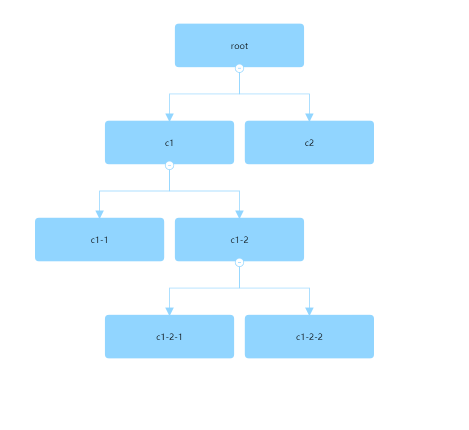
配置项
参数属性
| 属性 | 类型 | 默认值 | 是否必填 | 描述 | | -------------- | ------------- | --------- | -------- | ----------------------------------------------------------------------------------------------------------------------- | | id | string | '' | 是 | 容器 id,要定义容器的高宽 | | data | object | {} | 是 | 数据,属性结构的数据结构(参考 G6) | | direction | string | 'TB' | 否 | 'TB、LR、RL'树的方向,TB 指上到下,LR 从左到右,RL 从右到左 | | level | number string | '' | 否 | 设置展开的层级,从 1 开始,默认展开所有 | | nodeStyle | object | {} | 否 | 节点样式配置,具体查看下面nodeStyle属性 | | lineStyle | object | {} | 否 | 边样式配置,具体查看下面lineStyle属性 | | textStyle | object | {} | 否 | 文本样式配置,具体查看下面textStyle属性 | | eventType | string | 'click' | 否 | 事件的类型,还可以设置为 mouseEnter,针对树节点的展开搜索事件 | | treeType | string number | 1 | 否 | 具体有 1,2,3 可选分别对应不同节点数据配置。当类型为 2 时,配置 data 属性 labelDes;当类型为 3 时 data 属性配置 value 值 | | rootTreeType | string number | 1 | 否 | 设置根节点的 treeType ,只作用于根节点,未定义时默认是 treeType | | quotaName | string | '' | 否 | 指标名称,treeType=3 有效 | | quotaUnit | string | '' | 否 | 指标单位,treeType=3 有效 | | minimap | boolean | false | 否 | 配置 minimap 插件 | | minimapId | string | '' | 否 | minimap 插件的对应容器,minimap:true 时有效 | | defindNode | boolean | false | 否 | 开启自定义节点功能,渲染机制将会设置为 svg,上面所有节点 fill 等样式属性配置失效,且不支持箭头 | | nodeHtml | string | '' | 否 | defindNode 为 true 有效, 自定义节点 html,要求必须只包含一个根节点,数据参数配置格式规定为 %{data数据属性字段}% ,data属性字段不限制 | | isDragCanvas | boolean | true | 否 | 是否可拖拽画布 | | isZoomCanvas | boolean | true | 否 | 是否可缩放画布 | | subMultiple | number | 1 | 否 | 副节点的宽是主节点的倍数, treeType是2或者3有效 |
nodeStyle属性
| 属性 | 类型 | 默认值 | 是否必填 | 描述 | | -------------- | ------------- | --------- | -------- | ----------------------------------------------------------------------------------------------------------------------- | | size | array | [180, 60] | 否 | 节点的大小,配置高和宽 | | fill | string | '#91d5ff' | 否 | 节点的颜色。如果只配置 fill,节点边框、market、线以及箭头都会继承 fill 颜色 | | subFill | string | '#fff' | 否 | 副节点的颜色。treeType是2或者3有效 | | stroke | string | '#91d5ff' | 否 | 节点边框颜色。如果设置了 stroke,没有设置 edgeColor,那么线以及箭头会继承 stroke 颜色,不管 fill 是否配置了 | | radius | string | 5 | 否 | 节点的半径 | | lineWidth | string | 1 | 否 | 节点边框大小 | | levelColorList | Array | [] | 否 | 层级颜色自定义,将会作用于节点、边、combo、箭头。不会作用域treeType是2或者3时的副节点 | | highLightColor | string | '#91d5ff' | 否 | 高亮颜色,针对搜索功能(事件)开启有效 |
lineStyle属性
| 属性 | 类型 | 默认值 | 是否必填 | 描述 | | -------------- | ------------- | --------- | -------- | ----------------------------------------------------------------------------------------------------------------------- | | lineWidth | string number | 1 | 否 | 边的宽度 | | stroke | string | '#91d5ff' | 否 | 边的颜色 |
textStyle属性
| 属性 | 类型 | 默认值 | 是否必填 | 描述 | | -------------- | ------------- | --------- | -------- | ----------------------------------------------------------------------------------------------------------------------- | | textColor | string | '#000' | 否 | label 属性对应的文本颜色 | | fontSize | number | 12 | 否 | 字体大小 | | subTextColor | string | '#000' | 否 | 副节点label属性对应的文本颜色,treeType是2或者3有效 | | subFontSize | number | 12 | 否 | 副节点字体大小,treeType是2或者3有效 | | labelName | string | label | 否 | 文本字段属性,跟data对应绑定,渲染到主节点 | | labelDesName | string | labelDes | 否 | 文本字段属性,跟data对应绑定,渲染到副节点,treeType是2有效 |
事件方法
| 方法名 | 说明 | 参数 | | --------- | ------ | -------------------- | | initTree | 初始化树实例 | 无参数 | | getNodeName | 节点被点击时的回调 | Function(data) 参数data返回节点的名称 | | EventSetLevel | 设置树的层级 | 参数level,表示展开的层级,从1开始算起 | | EventSearchTree | 搜索树 | 参数key,设置关键字,为模糊查询 | | setDirection | 方向树切换 | 参数data ,只能为TB,RL,LR |
实例
创建
新建对象let T = new orgTree(config),T就是树的实例
初始化 T.initTree()
config是配置实例的属性
参数属性配置
new orgTree({
  id: 'treeID',
  data: treeData,
  direction: 'RL',
  treeType: 3,
  quotaName: '总资产',
  quotaUnit: '万元'
})
事件绑定
获取点击节点事件返回内容 T.getNodeName(callBaclk(data))
动态设置层级 T.EventSetLevel(level)
搜索树 T.EventSearchTree(key)
方向树 T.setDirection(data)
data的数据格式
默认类型
treeData: {
  id: 'root',
  label: 'root',
  children: [{
    id: 'c1',
    label: 'c1'
  }]
}
treeType =2 类型
treeData: {
  id: 'root',
  label: 'root',
  labelDes: '这是根节点', // 描述文字
  children: [{
    id: 'c1',
    label: 'c1',
    labelDes: '这是节点C1',
  }]
}
treeType =3 类型
treeData: {
  id: 'root',
  label: 'root',
  value: '1576211',, // 指标值
  children: [{
    id: 'c1',
    label: 'c1',
    value: '618391',
  }]
}
具体案例
(1) typeTree =1 方向树,默认TB,可以自己动态配置,调用 T.setDirection(data)
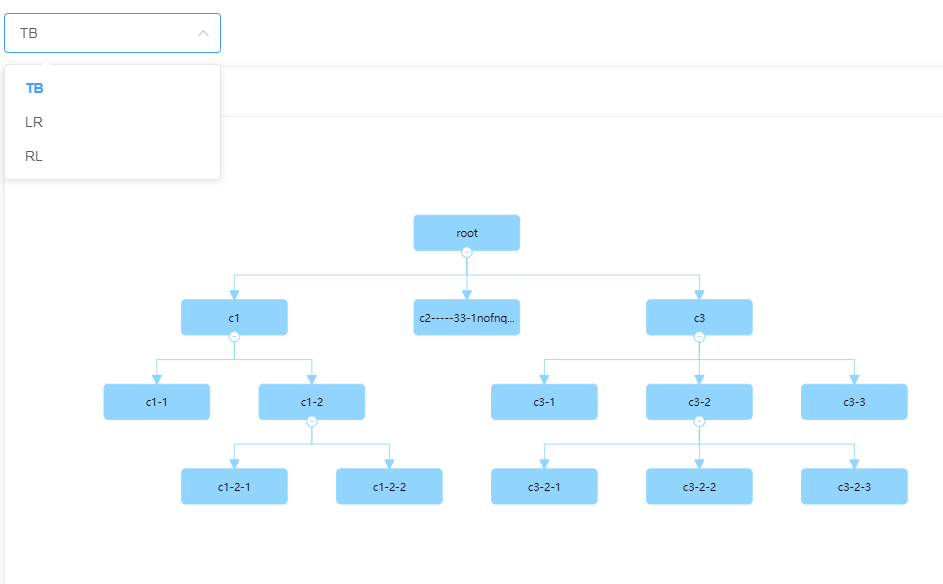
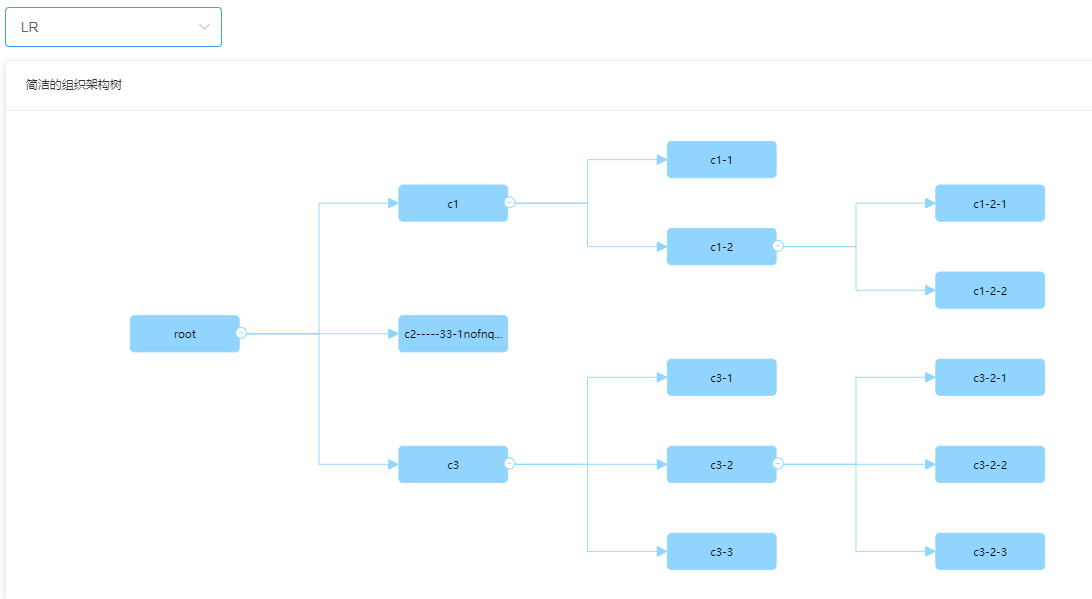
(2)typeTree =2
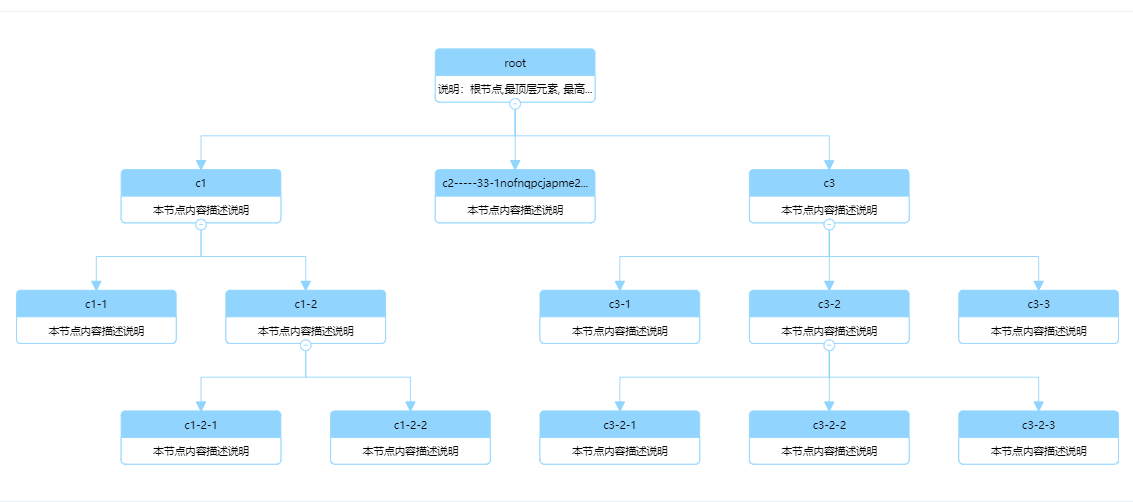
typeTree =3
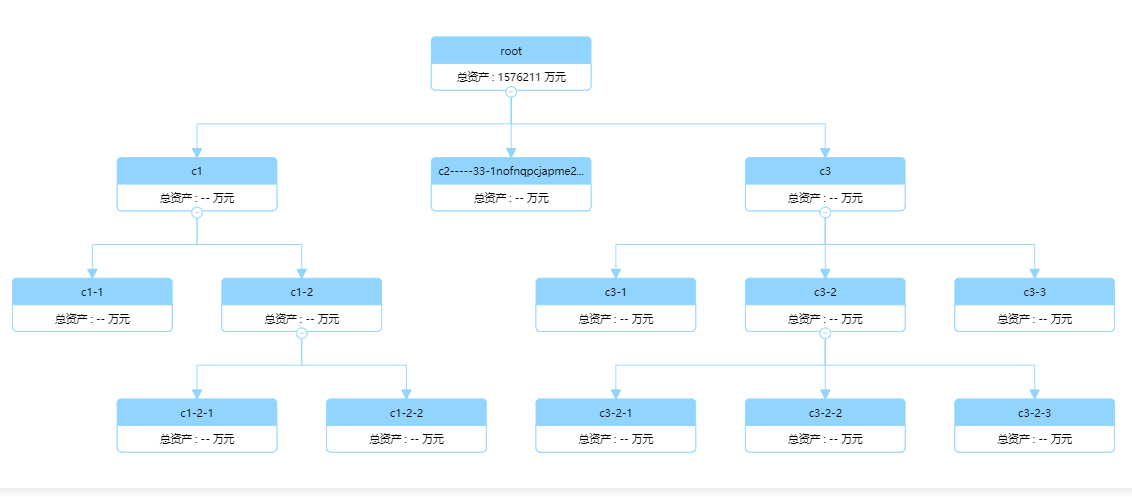
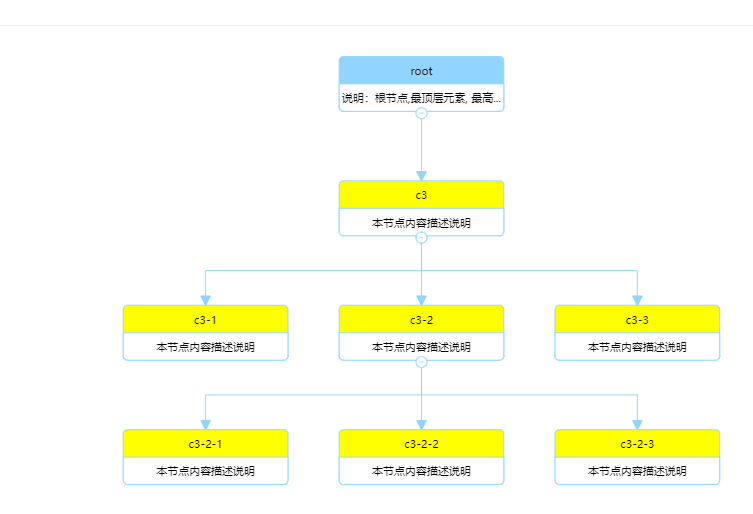
(3)树展开的层级设置,可以设置默认或者调用方法动态设置
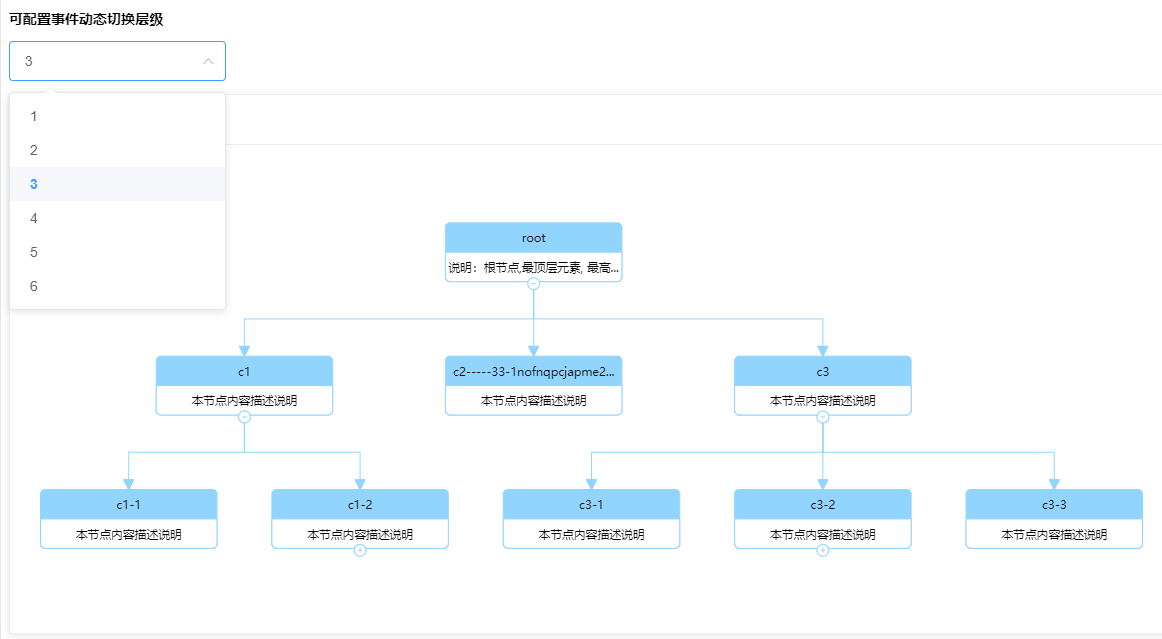
(4)搜索树,设置T.EventSearchTree(key)
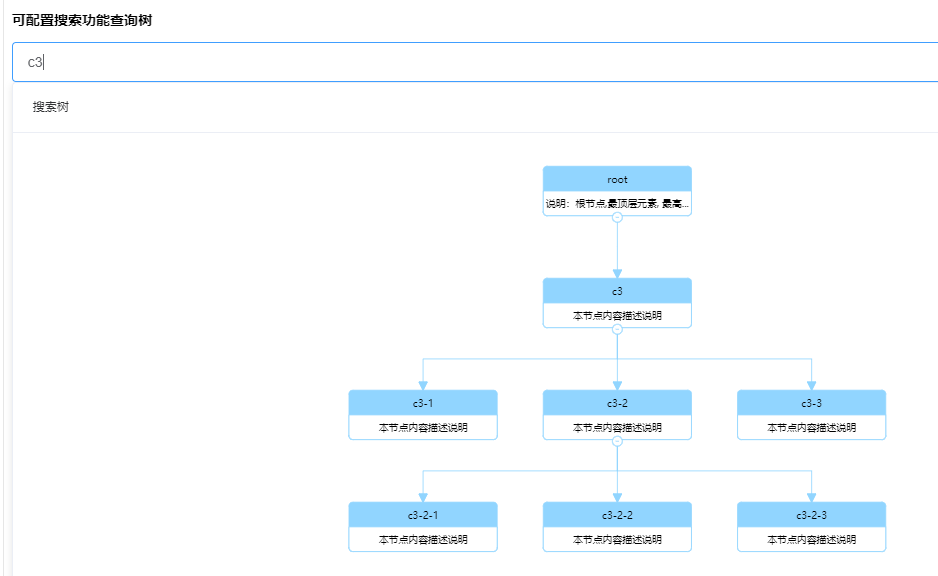
设置highLightColor属性,配置高亮的颜色
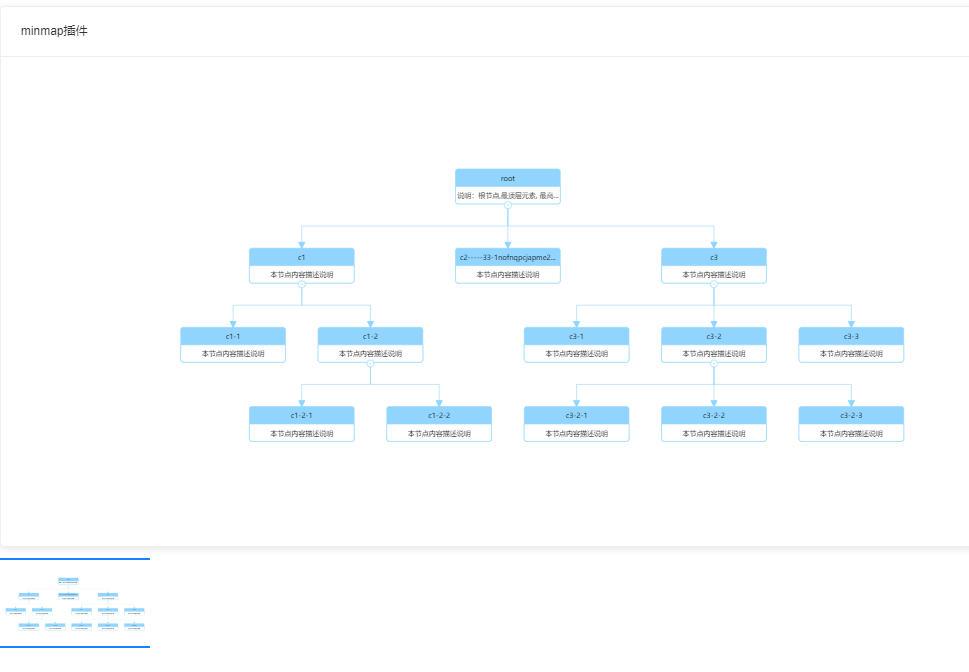
(5)插件minimap: true, minimapId: 'miniMapDomId'
(6)属性
	levelColorList: ['#91d5ff', '#99CCCC', '#FFCCCC', '#0099CC', '#99CC66'],
     edgeColor: '#ccc'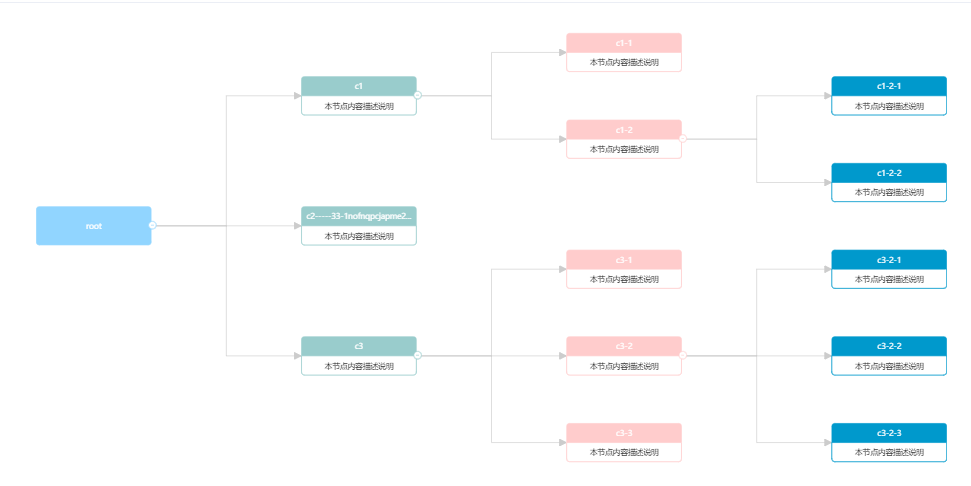
(7)自定义dom 案例1
defindNode: true, nodeHtml:
        <div class="aaa" style="background-color: #fff; border: 2px solid #5B8FF9; border-radius: 5px; width: 120px; height: 40px; display: flex;">
          <div style="height: 100%; width: 33%; background-color: #CDDDFD;display: flex;
            align-items: center;justify-content: center;">
            <img alt="img" src="https://gw.alipayobjects.com/mdn/rms_8fd2eb/afts/img/A*sxK0RJ1UhNkAAAAAAAAAAABkARQnAQ" />
          </div>
          <span style="margin: auto; color: #5B8FF9"> %{id}%  </span>
        </div>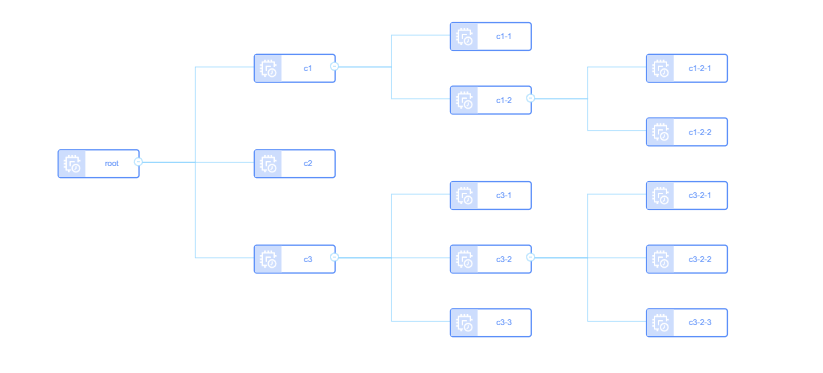
案例2
defindNode: true,
      nodeHtml: `
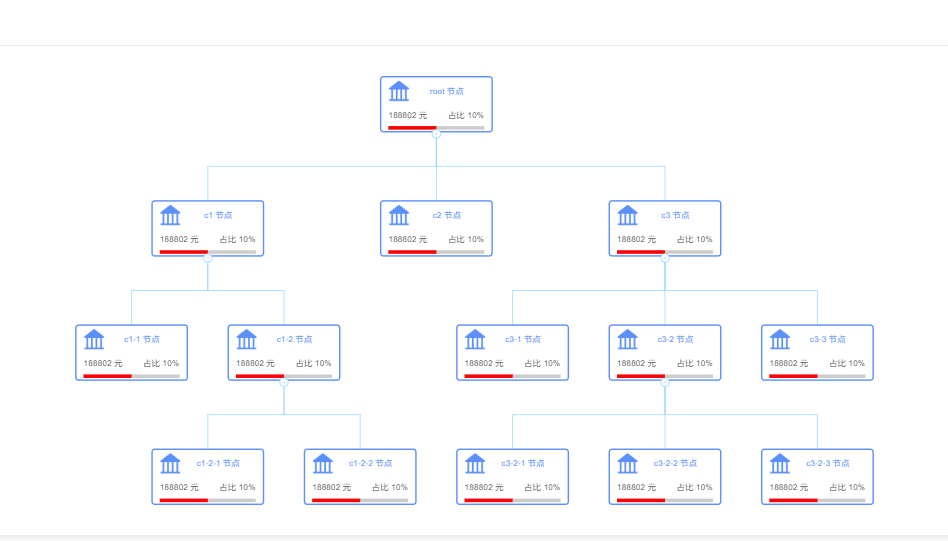
      <div class="aaa" style="padding: 0 10px; box-sizing:border-box;background-color: #fff; border: 2px solid #5B8FF9; border-radius: 5px; width: 160px; height: 80px; display: flex;flex-direction: column;">
        <div style="height: 50%; display: flex;align-items: center;">
          <img alt="img" src="https://gw.alipayobjects.com/mdn/rms_f8c6a0/afts/img/A*Q_FQT6nwEC8AAAAAAAAAAABkARQnAQ" style="width: 30px;height: 30px;" />
          <span style="margin: auto; color: #5B8FF9"> %{id}% 节点 </span>
        </div>
        <div style="flex: 1;display: flex;align-items: center;justify-content: space-between; ">
          <span> 188802 元</span>
          <span>占比 10%</span>
        </div>
        <div style="background-color: #ccc; width: 100%; height: 5px;margin-bottom: 2px">
          <div style="background-color: red; width: 50%; height: 5px;"></div>
        </div>
      </div>`