
aoifetch
v0.4.1
Published
A simple Neofetch style system info tool in Node.js, written entirely by gundalf-cli.


Readme
aoifetch








A simple, colorful, and dependency-light Neofetch-style CLI system information tool written in Node.js. Prints your system specs and hardware details in an eye-catching, minimal format.
Features
- User@host info
- OS type, release, platform, and kernel version
- Host/device model (supports Linux, Termux/Android, macOS, Windows)
- Robust Termux support: device model, brand, and battery via
termux-battery-status - Shell path and version
- Window manager/desktop (Linux:
$XDG_CURRENT_DESKTOP, Windows: Desktop Window Manager) - Multi-manager package/app/module count (supports dpkg, rpm, pacman, apk, Termux pkg, Homebrew, MacPorts, Chocolatey, Windows StartApps, and node modules)
- Node.js version
- CPU model, including ARM/Android info for Termux devices
- Memory usage (used/total, color-coded)
- Disk usage for (/, device-specific mounts, color-coded)
- Local IPv4 addresses (all adapters, with network mask)
- Public IP address display
- Battery percentage and charge (colorized); with graceful fallbacks and guidance
- Locale with encoding (e.g.,
en_US.UTF-8) - Two rows of ANSI color bars
Installation
npm install -g aoifetchUsage
After installation, simply run:
aoifetchOr, if not installed globally:
npx aoifetchYou’ll see a formatted output with your system stats and color bars.
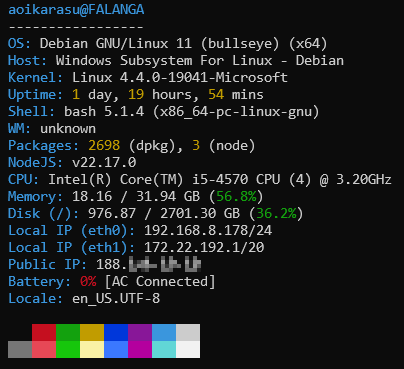
Example output
johndoe@myHost
----------------
OS:       Distro Linux 6 (foobar) (x64)
Host:     ThinkPad X1 Carbon 7th
Kernel:   Linux 6.2.0-26-generic
Uptime:   4 days, 13 hours, 18 mins
Shell:    bash 5.0.17 (x86_64-pc-linux-gnu)
WM:       GNOME
Packages: 152 (dpkg), 13 (node)
NodeJS:   v18.17.1
CPU:      Intel(R) Core(TM) i7-8665U CPU (8) @ 1.90GHz
Memory:   2.01 / 7.50 GB (26.8%)
Disk (/): 24.41 / 60.00 GB (40.7%)
Local IP (wlan0): 192.168.0.100/24
Public IP: 8.8.8.8
Battery:  84% [Charging]
Locale:   en_US.UTF-8

<color bars>
Requirements
- Node.js v16+
- For full functionality (e.g., battery status, system package detection), works best with standard utilities installed. (upower, termux-api, pmset, PowerShell CIM, WMIC, etc)
Platform Notes
- Linux/WSL: Detects distro/model, desktop (if available), battery via
upower, multi-manager package detection - macOS: Detects Apple/Mac, battery via
pmset, Homebrew and MacPorts packages, and .app bundles - Windows: Host/model and OS info via CIM (modern PowerShell); package detection for Chocolatey and StartApps; battery via CIM (PowerShell, modern) or WMIC (legacy)
- Termux (Android): Robust platform detection, device/brand name, package detection, battery via termux-battery-status, user-guidance if termux-api is missing
FAQ
- Why doesn’t battery info work?
- On Termux, install and permit the
termux-api(pkg install termux-api). - On Linux, you may need
upower(sudo apt install upower). - On macOS/Windows, only available if system battery supports reporting.
- On Termux, install and permit the
- How do I extend output?
- Add a new module to the
lib/folder (see code; all logic is modular).
- Add a new module to the
License
MIT
Made entirely with
gundalf-cli.
