
apex-test-class-failure-helper
v1.0.2
Published
Apex Test Class Failure Helper - analyze and fix Salesforce test failures with AI

Maintainers
 mohanchinnappan
Readme
Apex Test Class Failure Helper
This app helps you diagnose and fix Salesforce Apex test class failures using AI. Load a CSV of failed tests from your Salesforce CI run, run tests directly from a live org, click any failure, and get streaming AI-powered root-cause analysis and step-by-step fix instructions.
Features
| Feature | Details |
|---------|---------|
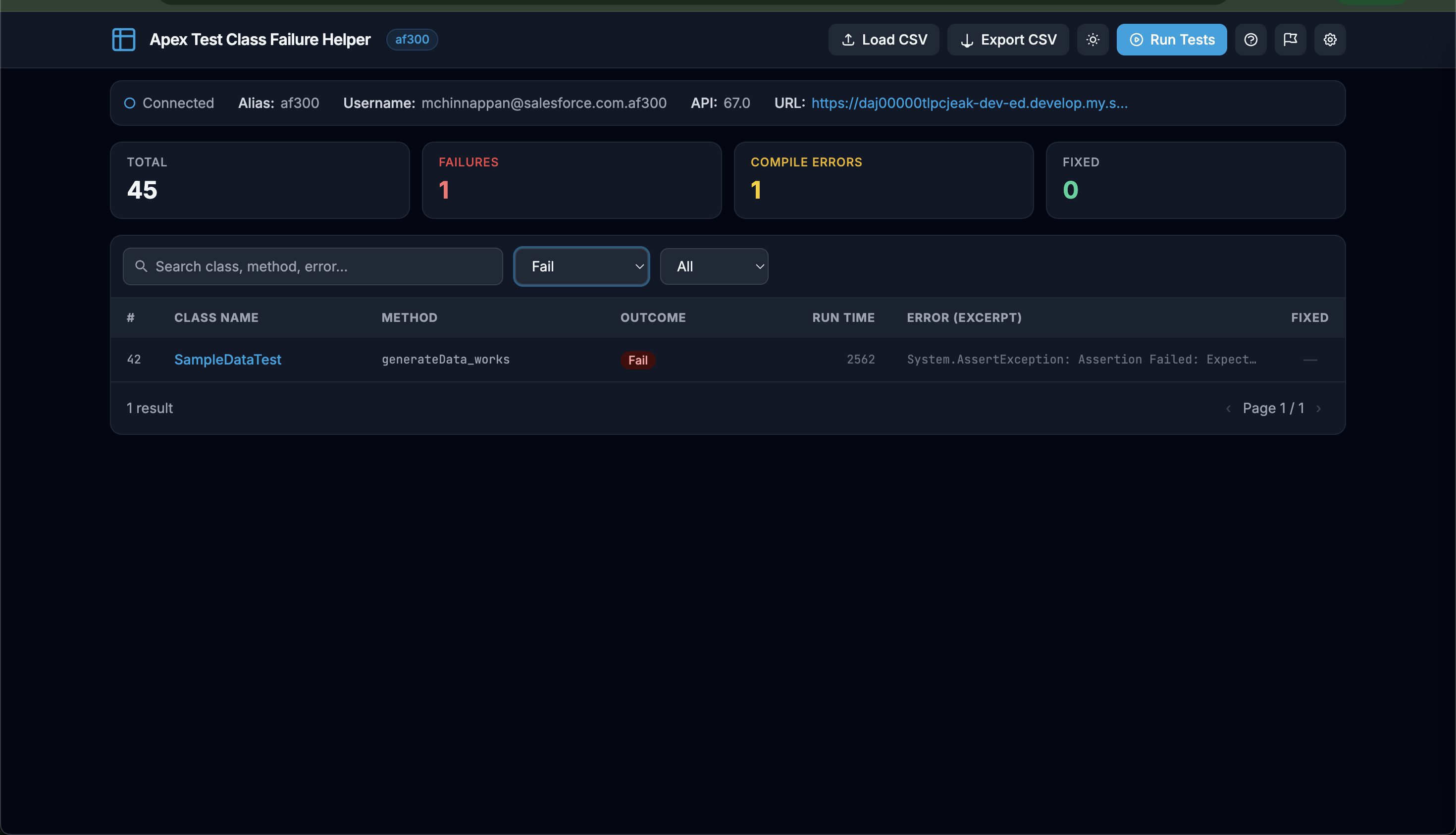
| Data table | Sortable, searchable, paginated view of all test failures |
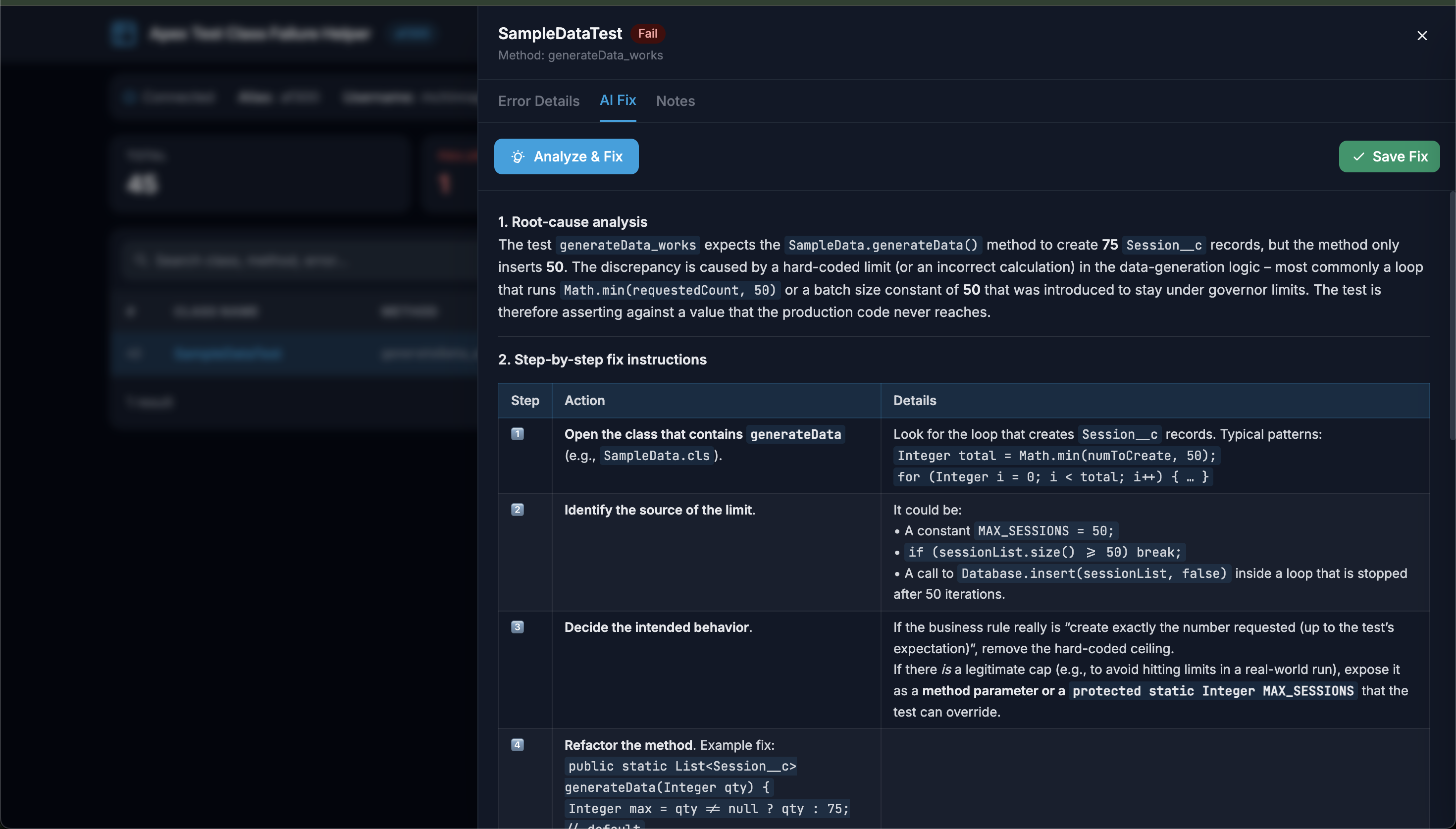
| AI-powered analysis | Streams fix suggestions in real-time via WebSocket |
| Multiple LLM providers | Ollama (local), Claude, OpenAI, xAI (Grok), Google Gemini |
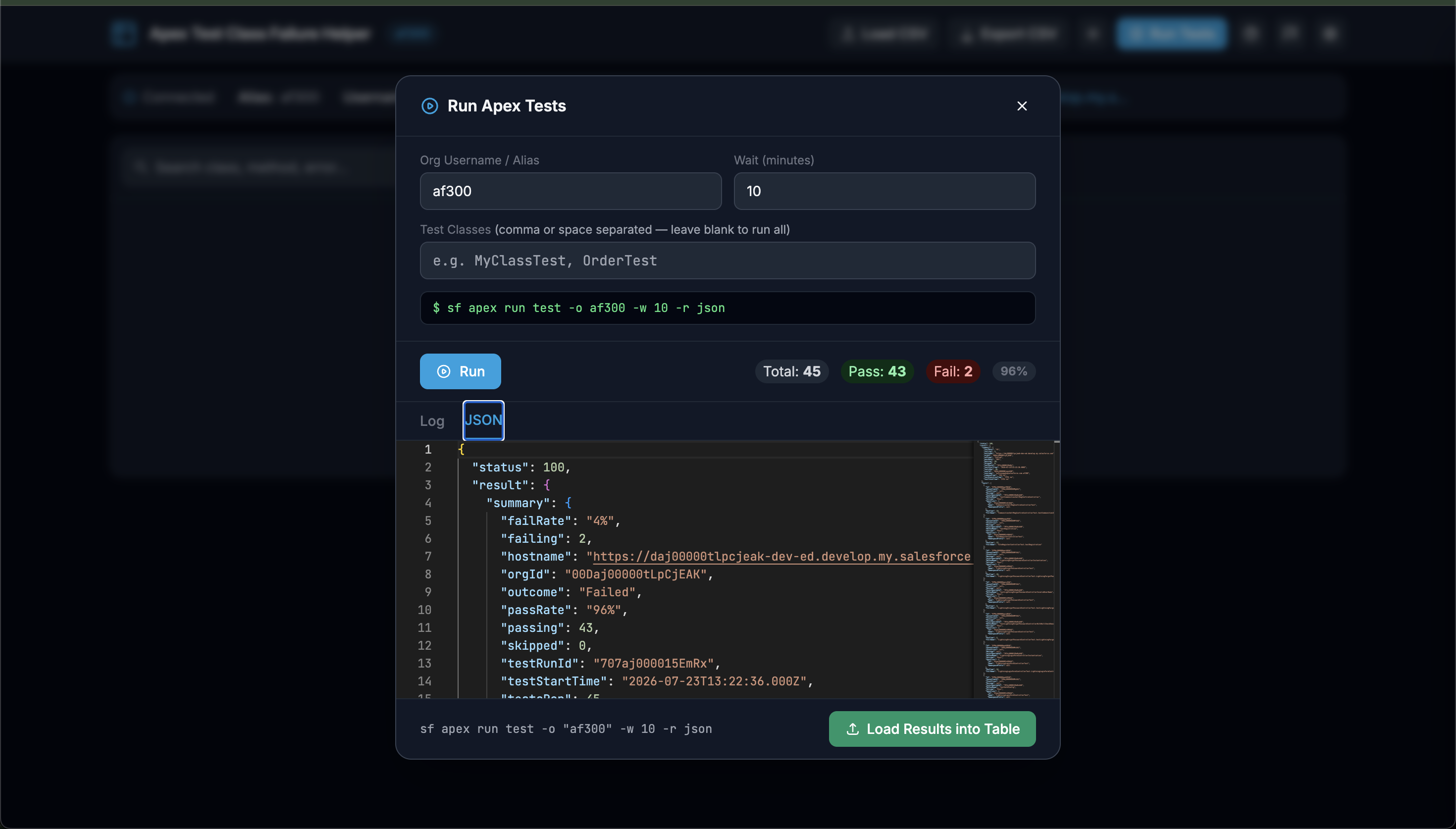
| Run Tests | Execute sf apex run test against a live org from the UI |
| Monaco editor | Full JSON output viewer with syntax highlighting, folding & search |
| Salesforce org info | Pulls live org details via sf org display |
| FIX column | Save AI or manual fix notes per row; export augmented CSV |
| Splash screen | Animated loading screen on first visit |
| Context-sensitive help | Hover any button/control for a plain-English tooltip |
| Guided tour | 8-step interactive walkthrough of the full workflow |
| Keyboard shortcuts | Esc, T, /, ? — see Keyboard Shortcuts |
| Dark / light theme | Toggle in nav bar, persisted across sessions |
| Settings panel | Slide-in panel; API keys stored in browser localStorage only |
Requirements
- Node.js 18+
- Salesforce CLI (
sf) — required for Run Tests and org info
Salesforce CLI compatibility: This tool works with both old and new
sfCLI versions.
- Older versions —
sf org display -o <org> --jsonreturns the access token directly in its output.- Newer versions — the access token is redacted from
sf org display. The tool automatically makes a second call tosf org auth show-access-token -o <org> --no-prompt --jsonto retrieve it. If that command is unavailable, org info is still displayed without the token field.
Installation
npm install -g apex-test-class-failure-helperScreenshots
Usage
apex-fix
Usage: apex-fix [options]

Apex Test Class Failure Helper — analyze and fix Salesforce test failures with AI

Options:
  -V, --version             output the version number
  -o, --org <org-username>  Salesforce org username or alias
  -t, --test-csv <path>     Path to test class failure CSV file
  --run-test-classes        Open the Run Tests panel automatically on launch
  -p, --port <number>       Port to listen on (default: "3000")
  --no-open                 Do not open browser automatically
  -h, --help                display help for command
| Option | Description |
|--------|-------------|
| -o, --org <alias> | Salesforce org username or alias (e.g. af300) |
| -t, --test-csv <path> | Path to a test failure CSV file to pre-load |
| --run-test-classes | Open the Run Tests panel automatically on launch |
| -p, --port <number> | Port to listen on (default: 3000) |
| --no-open | Do not auto-open the browser |
Examples
# Open with no data — upload CSV or run tests via the UI
apex-fix

# Pre-load org and CSV
apex-fix  -o af300 -t ~/Downloads/uat-tcf.csv

# Open straight into the Run Tests panel
apex-fix  -o af300 --run-test-classes

# Custom port, skip browser auto-open
apex-fix  -o af300 -t ~/Downloads/uat-tcf.csv -p 8080 --no-open
Workflow
Option A — Load a CSV file
- Click Load CSV in the nav bar (or pass
-t <path>on the CLI). - The table populates with all test rows.
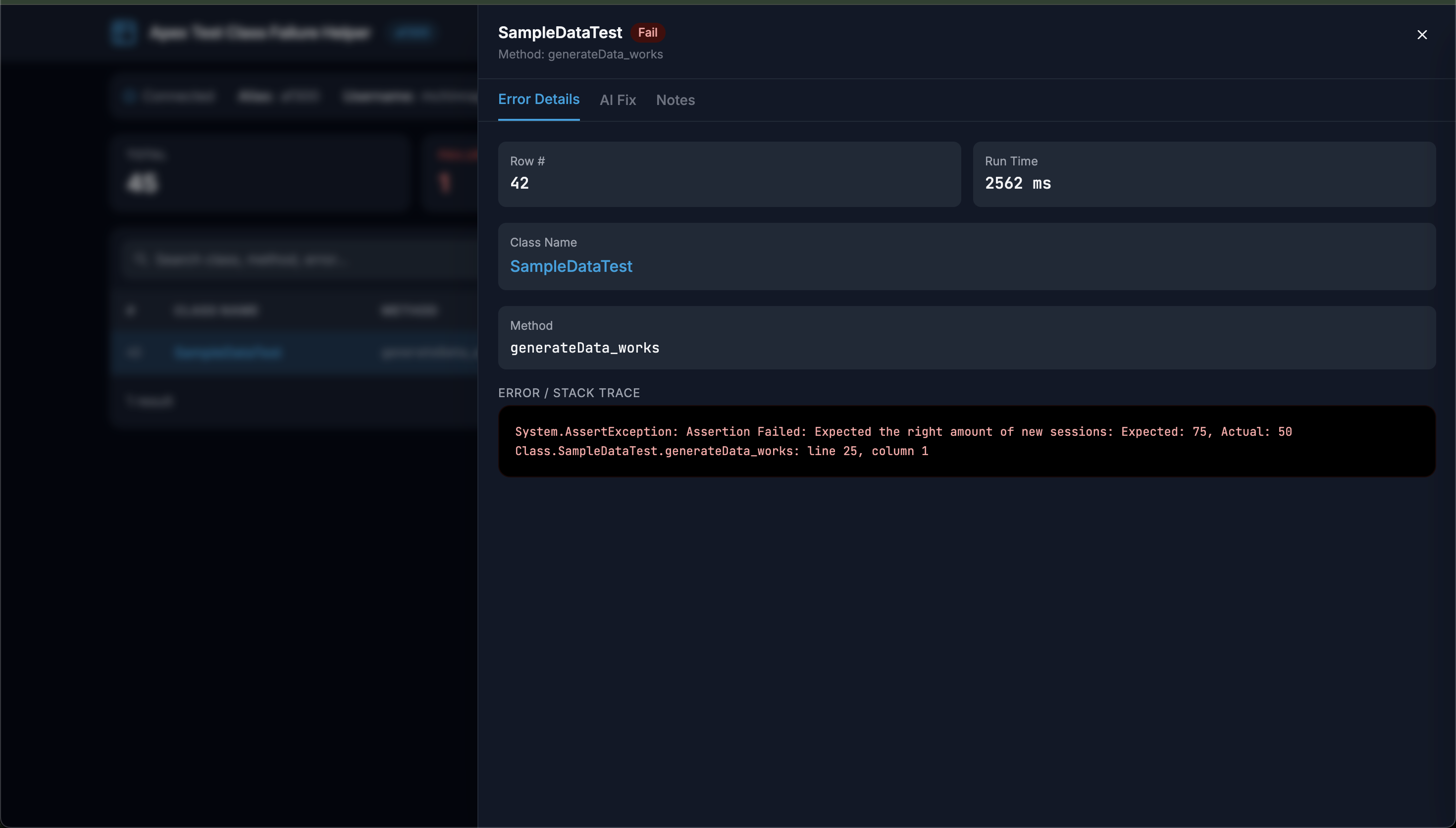
- Click a row → detail drawer slides in.
- Switch to the AI Fix tab → click Analyze & Fix.
- Review the streaming output, click Save Fix.
- Click Export CSV to download the enriched file with all
FIXnotes.
Option B — Run Tests live from an org
- Click Run Tests in the nav bar (or pass
--run-test-classes). - Enter your org alias, wait time (minutes), and optional class names.
- Click Run — the CLI command is shown in the preview bar, and log output streams live into a Monaco editor.
- When the run finishes, the JSON tab shows the full
sfoutput with syntax highlighting. - Click Load Results into Table — failures appear in the main table.
- Analyse and fix as per Option A above.
CSV Format
#,Class Name,Method,Outcome,Run Time (ms),Message / StackTrace
809,OrderAndOrderProductStatusCheckWSTest,testMissingConfigUsesFallbackDefaults,Fail,11506,"System.DmlException: ..."
1280,FulfillmentStepSourceHandlerTest,,CompileFail,0,"line 846, column 46: ..."
A FIX column is appended automatically when you save fix notes. Exporting the CSV preserves this column alongside the original data.
LLM Providers
Configure in the Settings panel (⚙ icon, top-right). API keys are stored in browser localStorage only — never sent to this server except when proxied to the LLM for an active analysis request.
| Provider | Key required | Recommended model |
|----------|-------------|-------------------|
| Ollama (local, default) | No | Any locally pulled model |
| Claude (Anthropic) | sk-ant-… | claude-sonnet-4-6 |
| OpenAI | sk-… | gpt-4o |
| xAI (Grok) | xai-… | grok-beta |
| Google Gemini | AIza… | gemini-1.5-flash |
UI Features
Splash Screen
An animated loading screen appears on first visit per browser session. It auto-dismisses after ~2.4 seconds with a fade-out.
Context-Sensitive Help
Hover over any button or input to see a plain-English tooltip explaining what it does. Click the ? icon in the nav bar to open the full Help & Reference panel, which includes:
- Quick Start checklist
- CSV column reference
- AI provider setup guide
- Run Tests documentation
- Keyboard shortcuts
Guided Tour
Click the flag icon in the nav bar or press ? to start the 8-step guided tour:
- Welcome
- Load CSV
- Run Tests
- Stats bar
- Search & Filter
- Test Failures table
- Detail drawer & AI Fix
- Save & Export
Each step highlights the relevant UI element with a spotlight and positions a tooltip above or below it.
Keyboard Shortcuts
| Key | Action |
|-----|--------|
| Esc | Close any open panel, drawer, modal, or tour |
| T | Toggle dark / light theme |
| / | Focus the search box |
| ? | Start the guided tour |
Security Notes
- API keys are stored in browser
localStorageonly and are never written to disk. - The server binds to
localhostand is intended for local development use. - The
.gitignoreexcludes*.csvfiles to avoid committing org data.
Keywords
salesforce apex test unit-test test-failure ci ai llm claude openai ollama gemini grok debugging developer-tools cli nodejs monaco-editor csv dx
Author
Mohan Chinnappan
License
MIT
Support this work
If this tool has helped you, please consider donating to one of Mohan's suggested charities:
St. Jude Children's Research Hospital — fighting childhood cancer and other life-threatening diseases Donate to St. Jude
Any charity supporting Developing Countries — organisations providing food, clean water, education, or healthcare to communities in need
Your generosity makes a real difference. Thank you.