
apm-studio
v0.3.5
Published
APM Studio edits and runs Studio Agents, then manages APM target sync for coding assistants.
Downloads
864

Maintainers
 monarchjuno
Readme
APM Studio
A local GUI for Agent Package Manager packages: import agents, skills, prompts, hooks, and MCP configs, then sync them to Codex, Claude, Cursor, Gemini, OpenCode, and more.



Quick Start | APM Studio Flow | Microsoft APM | CLI | Development | Deployment
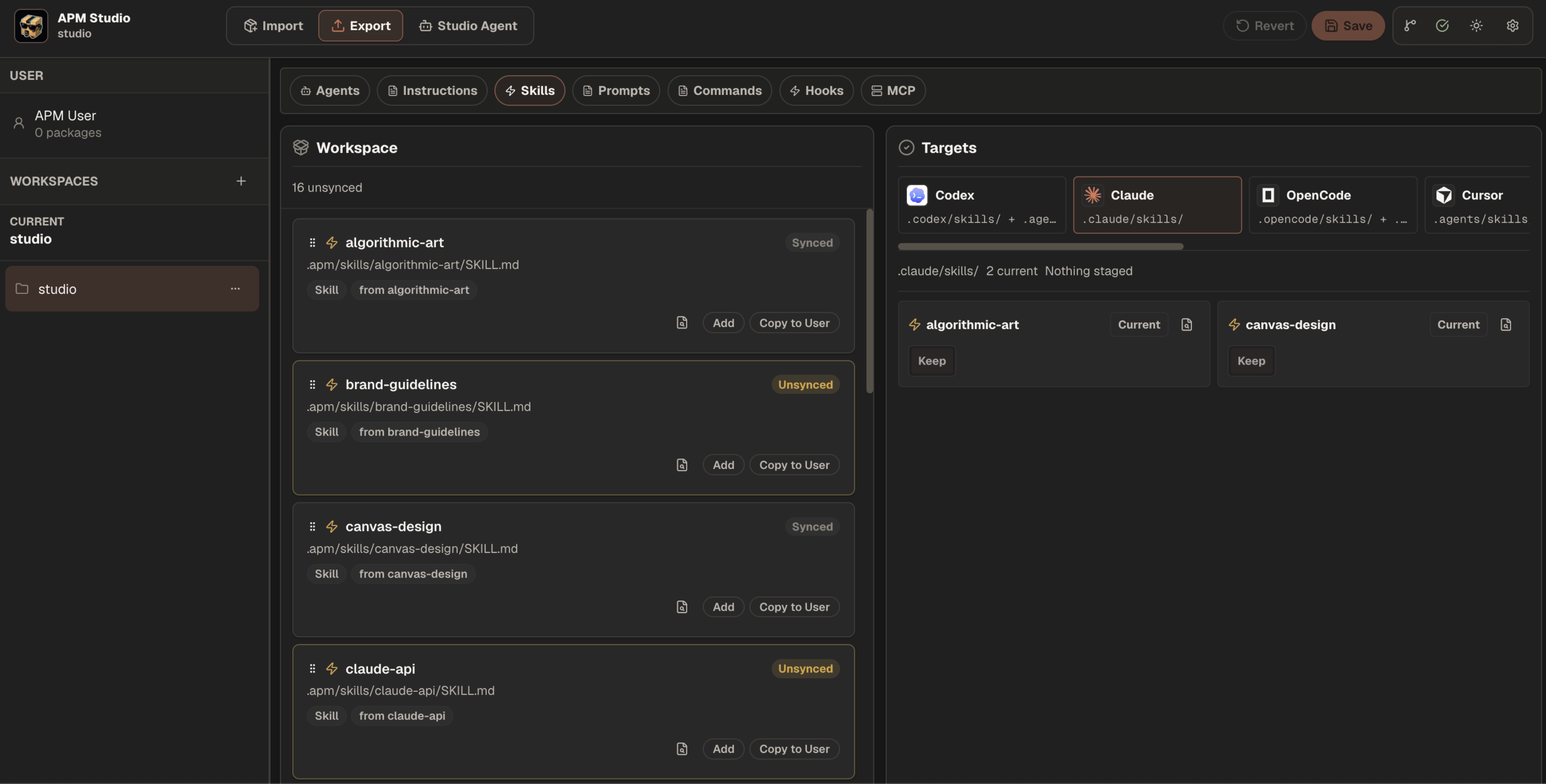
APM Studio is the visual layer for the APM ecosystem. It imports source references from GitHub, manages local packages in packages/*, runs Studio Agents with local runtime settings, and exports selected APM primitives into assistant target files when you choose to sync.
The npm package is apm-studio.
Quick Start
Requirements:
- Node.js
>=20.19.0 - macOS, Linux, Windows, or WSL
- OpenCode for local Studio Agent runtime
- Microsoft APM CLI for full target sync coverage
Install:
curl -fsSL https://raw.githubusercontent.com/apm-studio/apm-studio/main/public/install.sh | shStart immediately after install:
curl -fsSL https://raw.githubusercontent.com/apm-studio/apm-studio/main/public/install.sh | sh -s -- --startWindows:
irm https://raw.githubusercontent.com/apm-studio/apm-studio/main/public/install.ps1 | iexStart immediately on Windows:
iex "& { $(irm https://raw.githubusercontent.com/apm-studio/apm-studio/main/public/install.ps1) } -Start"Manual npm install:
npm install -g apm-studio
apm-studio
The installer installs or updates apm-studio, checks for the upstream Microsoft APM CLI, delegates missing APM CLI setup to Microsoft APM, and runs apm install when the current workspace already has an apm.yml. It prints the concrete apm-studio start command when installation finishes. Use --start on Unix or -Start on Windows to launch Studio immediately from the installer.
APM Studio Flow
| Step | What happens |
| --- | --- |
| Import | Search source references or paste a GitHub repo, preview detected primitives, then install selected packages locally. |
| Manage | Edit local APM package metadata and Studio Agent composition while keeping canonical package content under packages/<packageId>/. |
| Run | Test Studio Agents locally with Studio-only model settings that are not emitted to target assistant files. |
| Export | Sync selected APM agents, instructions, skills, prompts, commands, hooks, or MCP config into supported assistant targets. |
APM Studio keeps source and output separate:
GitHub source -> packages/<packageId>/apm.yml -> Studio Agent runtime
                                             -> Export target sync -> assistant files
Studio-only workspace state lives in .apm-studio/. Generated OpenCode runtime projection lives in .opencode/. Assistant target files are written only through Export.
Microsoft APM
APM Studio is the visual layer for the upstream Microsoft APM package format and CLI:
- GitHub: microsoft/apm
- Docs: microsoft.github.io/apm
APM Studio keeps package authoring, local Studio Agent runs, and assistant target sync in one UI while delegating package validation and broad target installs to Microsoft APM. Target sync is CLI-first: Studio tries APM_STUDIO_APM_CLI, then apm, then uvx --from git+https://github.com/microsoft/apm.git apm. Studio-native fallback is limited to supported agent and skill sync when no CLI runner is available.
CLI
apm-studio [path] [options]
apm-studio open [path] [options]
apm-studio doctor [path] [options]
apm-studio --help
apm-studio --version
Examples:
apm-studio
apm-studio ~/projects/my-app
apm-studio open . --no-open
apm-studio open . --port 43111
apm-studio doctor
Default local ports:
| Runtime piece | Port |
| --- | ---: |
| Published CLI app and API | 43100 |
| Published CLI managed OpenCode sidecar | 43102 |
| Dev client | 43200 |
| Dev API | 43201 |
| Dev managed OpenCode sidecar | 43202 |
Development
npm install
npm run dev
npm run type-check
npm test
Release check:
npm run type-check
npm test
npm run pack:check
npm publish --dry-run
Publishing a fix requires a new npm version so npm install -g apm-studio and the installers' default latest tag can receive it. See Deployment Guide for the release gates, installer flow, npm latest verification, and deployed install smoke test.
Important directories:
src/: browser UI and workspace state.shared/: client/server contracts for packages, runtime, workspace state, and target sync.server/: API routes, Import behavior, target sync, runtime preparation, and projections.packages/: canonical local APM package source..opencode/: generated runtime artifacts.doc/: behavior and boundary guides.