
apple-health-analyst
v1.2.0
Published
Privacy-first Apple Health export analyzer. Parses HealthKit data locally, produces both a cross-metric health report and a training report (ATL/CTL/TSB, 12-month calendar heatmap, PMC chart, sport-specific trends). Bilingual HTML/Markdown output. Designe

Maintainers
 kshift
Readme
apple-health-analyst



本地分析 Apple Health 导出数据,可生成健康报告或运动训练报告,强调跨指标推理、长期趋势和离线 HTML 输出。
不是数据仪表盘——手机就能看数据。这个工具的价值是像健康顾问一样解读你的数据:睡眠和恢复之间有什么关联?作息规律性如何影响 HRV?训练负荷和恢复能力是否匹配?
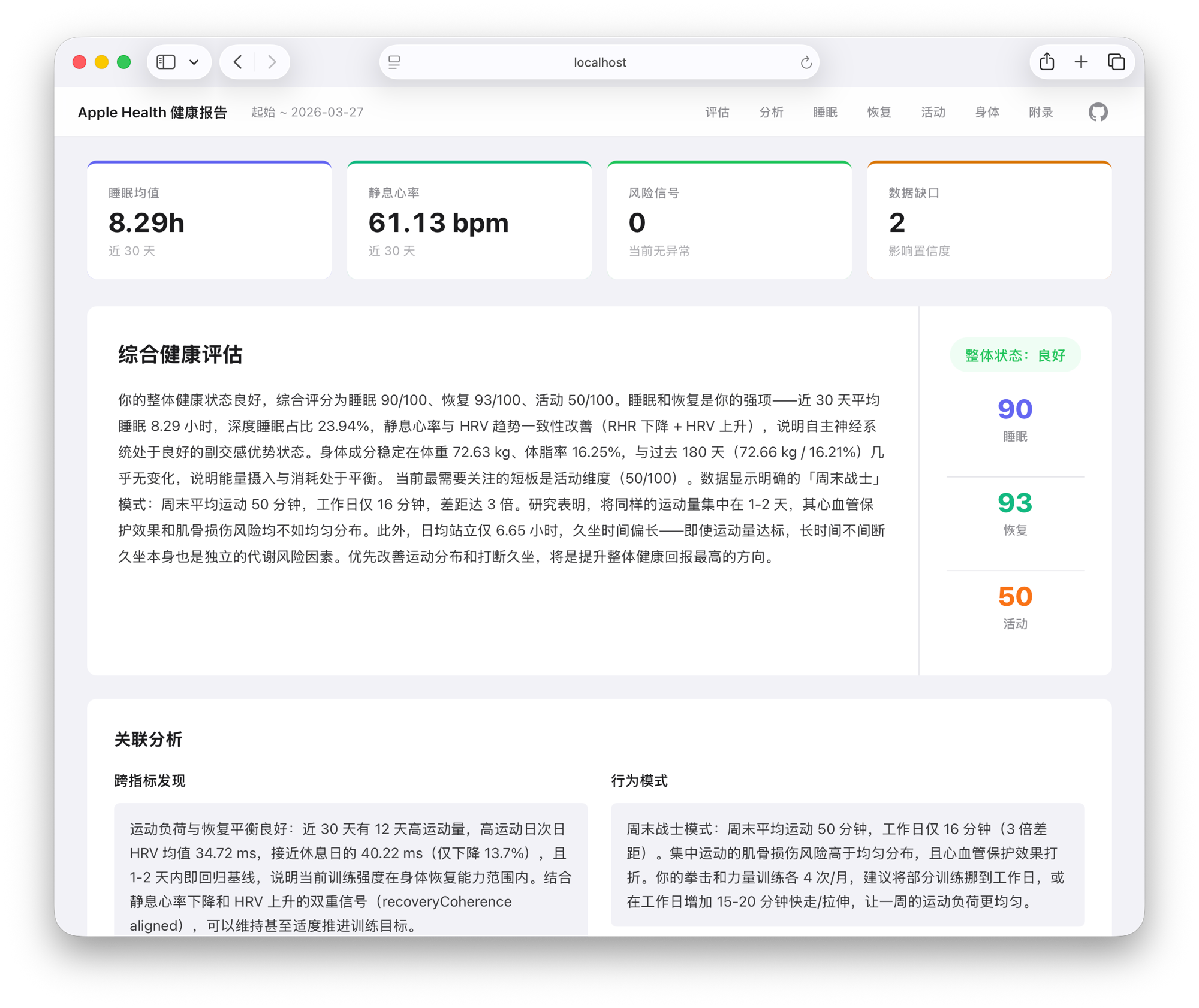
示例报告: 健康报告 · 运动报告 · Health (EN) · Training (EN)
特性
- 跨指标关联分析 — 睡眠-HRV 联动、训练-恢复平衡、作息规律性评估
- 专项运动趋势分析 — 可单独拆出拳击、力量训练、骑行等训练类型的长期趋势
- 独立运动报告 — 判断训练状态、恢复准备度、负荷与恢复匹配度、专项趋势,核心指标升级为 ATL / CTL / TSB(日常训练量 / 累积疲劳 / 新鲜度),覆盖近 12 个月而非 30 天切片
- 行为模式识别 — 周末战士、夜猫子漂移、睡眠补偿、恢复不足
- 综合评分 — 睡眠/恢复/活动三维度 0-100 分,算法透明可解释
- 中英双语 — 根据用户语言自动生成中文或英文报告
- 隐私优先 — 完全本地运行,不调用外部 API,不上传任何数据
- 离线 HTML 报告 — 单文件,内联 CSS + SVG 图表,双击即开
导出 Apple Health 数据
- 打开 iPhone 上的健康 App
- 点击右上角头像
- 滑到底部,点击导出所有健康数据
- 等待导出完成(数据量大时可能需要几分钟),选择 保存到"文件" 或通过 AirDrop 传到电脑
- 得到的
导出.zip就是本工具的输入文件
官方导出里可能同时有多个 XML。主分析输入应是根节点为 HealthData 的那个 XML;export_cda.xml / ClinicalDocument 只是辅助文件。主 XML 文件名不固定,中文系统里可能叫 导出.xml,部分 ZIP 工具也可能把它显示成乱码文件名。
快速开始
一行命令安装 skill(支持 Claude Code、Codex、Cursor 等 40+ agents):
npx skills add RuochenLyu/apple-health-analyst然后和 agent 对话:
帮我分析一下 Apple Health 导出数据 /path/to/导出.zip默认会同时生成健康报告和运动报告,两份输出到同一个 output/ 目录,顶栏和页脚有互相跳转链接。如果只想要其中一份,明确说出来即可:
只要健康报告
只要运动报告
重点分析拳击训练状态   (仅运动报告)
Skill 会在你提到 Apple Health 分析时自动激活。也可以显式调用——Claude Code 中用 /apple-health-analyst,Codex 中用 $apple-health-analyst。
Agent 会自动完成 prepare → LLM 写 narrative → render 全流程。两份 HTML(report.html 和 training.report.html)在顶栏有跨报告跳转按钮,可以随时来回切换。
注意: 这是一个 agent skill,不是独立 CLI 工具。
prepare和render在本地运行,但 narrative 步骤需要 LLM 能力——因此完整流程必须在 AI 编程 agent 中执行。
Skill 配置在 .agents/skills/apple-health-analyst/,包含角色定义、分析框架和 narrative schema。
覆盖指标
| 模块 | 指标 | |------|------| | 睡眠 | 时长、深睡/REM/核心占比、入睡/起床时间、规律性 | | 恢复 | 静息心率、HRV、血氧、呼吸频率、最大摄氧量 | | 活动 | 活动能量、锻炼分钟、站立小时、训练记录、分训练类型趋势 | | 身体成分 | 体重、体脂率 |
CLI
Codex Skill 底层调用的命令。一般不需要手动执行,了解即可。
# 1. prepare:解析 ZIP,生成结构化数据(--lang zh 生成中文,--lang en 生成英文)
#    可选:--top-sports N 控制运动报告里主专项数量(默认 5)
npx apple-health-analyst prepare /path/to/导出.zip --lang zh --out ./output
# 产出 summary.json + insights.json

# 2. (Codex 读取 insights.json,生成对应 narrative JSON)

# 3a. render:渲染健康报告(默认)
#    如果同时会把运动报告渲染到同一个 --out 目录,加 --with-cross-link 让顶栏/页脚
#    的跨报告跳转链接生效。只渲一份报告时**不要**加这个 flag,否则会指向一个
#    永远不会生成的文件。
npx apple-health-analyst render \
  --insights ./output/insights.json \
  --narrative ./output/report.llm.json \
  --with-cross-link \
  --out ./output
# 产出 report.html + report.md + report.llm.json

# 3b. render:渲染运动报告
npx apple-health-analyst render \
  --type training \
  --insights ./output/insights.json \
  --narrative ./output/training.report.llm.json \
  --with-cross-link \
  --out ./output
# 产出 training.report.html + training.report.md + training.report.llm.json
限制
- 不提供医学诊断或治疗建议
- 不分析 ECG 波形或 GPS 路线(仅计数)
- 步数和距离不跨设备合并
开发
npm run dev -- prepare /path/to/导出.zip --lang zh --out ./output  # 开发模式
npm run build   # 编译
npm test        # 测试