
apple-intelligence-glow-react
v1.0.5
Published
Apple Intelligence style animated glow border as a reusable React component.

Maintainers
 oliverrr2424
Readme
apple-intelligence-glow-react
Apple Intelligence–inspired animated glow border as a reusable React component.
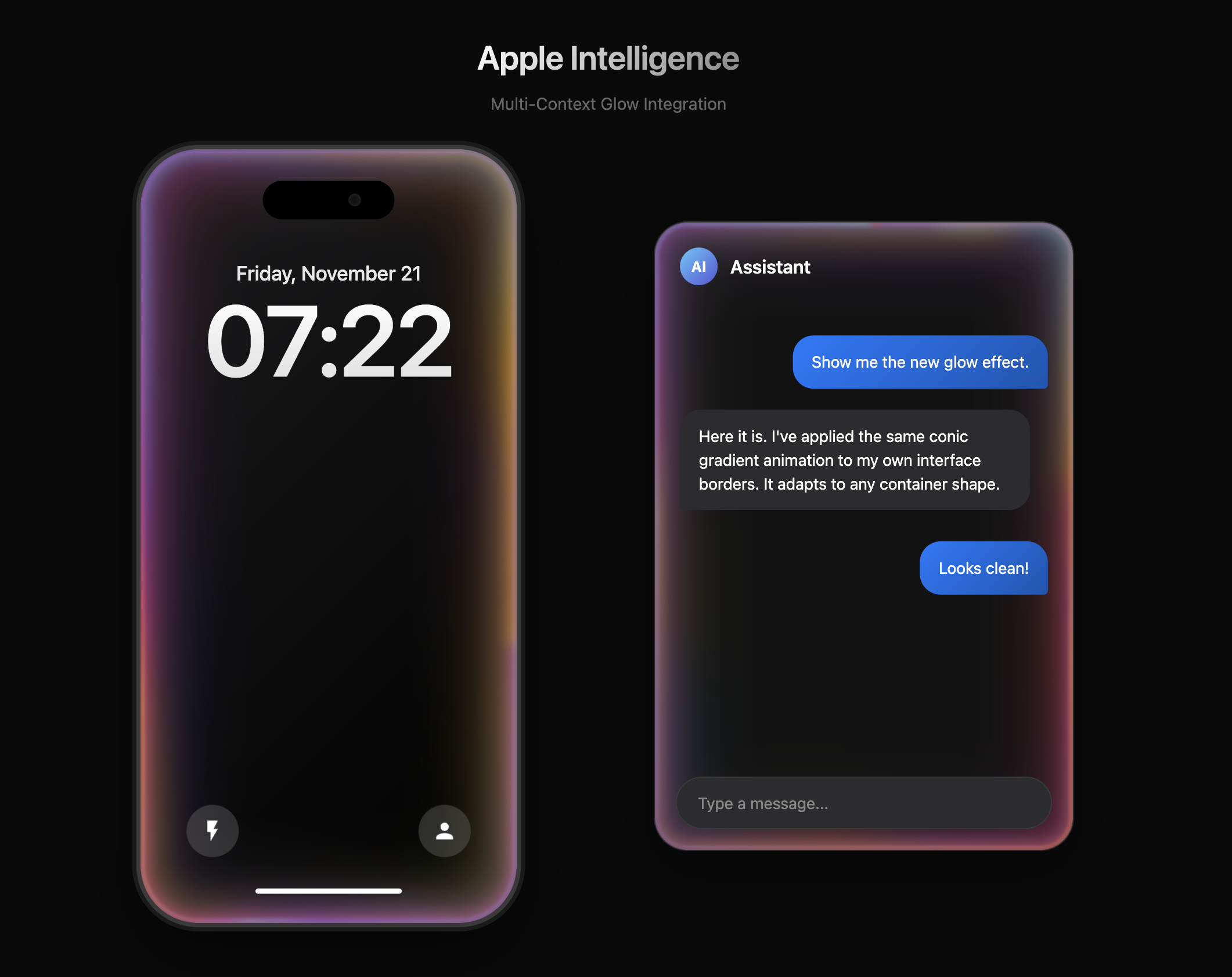
This package exposes:
AppleIntelligenceGlow– the core, reusable glow container. It only renders the animated border and lets you provide any content inside.AppleIntelligenceLockScreen– example lock screen UI built on top of the same glow logic, intended as a demo/showcase.
Installation
npm install apple-intelligence-glow-reactor with yarn / pnpm:
yarn add apple-intelligence-glow-react
# or
pnpm add apple-intelligence-glow-react
Quick Start (Glow Only)
The core idea is: wrap your own UI with AppleIntelligenceGlow and let the component handle the animated border.
import React from "react";
import { AppleIntelligenceGlow } from "apple-intelligence-glow-react";

export default function Demo() {
  return (
    <div
      style={{
        minHeight: "100vh",
        background: "#fff",
        display: "flex",
        justifyContent: "center",
        alignItems: "center",
      }}
    >
      <AppleIntelligenceGlow
        radius={50}
        style={{
          width: 360,
          height: 720,
          background: "#000",
          display: "flex",
          alignItems: "center",
          justifyContent: "center",
          color: "#fff",
          padding: 40,
        }}
      >
        {/* Your own UI goes here: lock screen, card, panel, etc. */}
        <div style={{ textAlign: "center" }}>
          <div style={{ fontSize: "3rem", fontWeight: 600, marginBottom: 8 }}>
            My Custom
          </div>
          <div style={{ fontSize: "1.2rem", opacity: 0.8 }}>
            Lock Screen or Card
          </div>
        </div>
      </AppleIntelligenceGlow>
    </div>
  );
}
The component:
- Injects the required CSS once at runtime.
- Uses multiple blurred conic gradients to create the Apple Intelligence–style animated border.
- Keeps your content fully under your control.
Example Lock Screen Component
If you want a ready‑made demo that looks like an Apple‑style lock screen, you can also import AppleIntelligenceLockScreen:
import React from "react";
import {
  AppleIntelligenceGlow,
  AppleIntelligenceLockScreen,
} from "apple-intelligence-glow-react";

export default function Demo() {
  return (
    <div
      style={{
        minHeight: "100vh",
        background: "#fff",
        display: "flex",
        flexDirection: "column",
        justifyContent: "center",
        alignItems: "center",
        gap: 48,
        padding: 40,
      }}
    >
      {/* 1. Glow + custom content */}
      <AppleIntelligenceGlow
        radius={50}
        style={{
          width: 360,
          height: 720,
          background: "#000",
          display: "flex",
          alignItems: "center",
          justifyContent: "center",
          color: "#fff",
        }}
      >
        <div>My custom lock screen or card</div>
      </AppleIntelligenceGlow>

      {/* 2. Full lock screen demo */}
      <AppleIntelligenceLockScreen width={360} height={720} showHelperText />
    </div>
  );
}
AppleIntelligenceLockScreen is built using the same glow logic and is mainly intended for demos, docs, and inspiration.
API Reference
AppleIntelligenceGlow
Core container that renders the animated glow border around its children.
Props
radius?: number | string
Corner radius of the glow and clipping mask.- Default:
50(pixels) - You can also pass CSS values like
"3rem"or"32px".
- Default:
className?: string
Custom class name applied to the outer glow container.style?: React.CSSProperties
Inline style applied to the outer glow container.
Commonly used to define:- Width / height
- Background color
- Layout (flexbox, padding, etc.)
children: React.ReactNode
Any React content you want to render inside the glow.
AppleIntelligenceLockScreen
Example lock screen UI that uses the same glow effect, with:
- Dynamic Island‑style notch
- Live digital clock
- Date label
- Bottom home indicator bar
Props
width?: number | string
Width of the phone frame. Default:360(pixels).height?: number | string
Height of the phone frame. Default:720(pixels).showHelperText?: boolean
Whether to show the helper caption under the phone. Default:true.className?: string
Custom class name applied to the outermost container.style?: React.CSSProperties
Inline style merged onto the outermost container (in addition to internal CSS variables for width/height).
Publishing / Local Development
This repository is already configured to be published as an npm package:
mainandmoduleboth point tosrc/index.js.- Only
srcandREADME.mdare included in the published tarball via the"files"field.
If you want to publish under your own npm account:
Login to npm
npm loginAdjust the package name (optional)
Update the
"name"field inpackage.jsonif you want a different public name.Bump the version
npm version patch # or minor / majorPublish
npm publish --access public
Once published, consumers can install it with:
npm install apple-intelligence-glow-reactand use it as shown in the examples above.
License
MIT