
arasjs
v0.0.87
Published
A JavaScript Library for building Aras Innovator Client Extensions

Maintainers
 emilgramdk
Readme
ArasJS
ArasJS is a Library that make it easy to build Aras Innovator Client Extensions, by providing a lot of helper functions and types for the Aras Client-Side API directly to your editor.
Note: ArasJS is not affiliated with, endorsed by, or sponsored by Aras Corporation. It is an independent open-source library designed to assist developers in building applications that run inside Aras Innovator.
Pre-Setup
1️⃣ Configure Aras OAuth
To enable authentication, add localhost:3456 to the allowed redirect URIs in your Aras Innovator OAuth Configuration.
Add the following lines to OAuth.config located at:
C:\Program Files (x86)\Aras\Innovator\OAuthServer
<redirectUris>

  <!-- ArasJS Config -->
  <redirectUri value='https://localhost:3456/InnovatorServer/Client/OAuth/RedirectCallback' />
  <redirectUri value='https://localhost:3456/InnovatorServer/Client/OAuth/SilentCallback' />
  <redirectUri value='https://localhost:3456/InnovatorServer/Client/OAuth/PopupCallback' />
  <!-- ArasJS Config -->

...keep current urls
</redirectUris>

<postLogoutRedirectUris>

  <!-- ArasJS Config -->
  <redirectUri value='https://localhost:3456/InnovatorServer/Client/OAuth/PostLogoutCallback' />
  <!-- ArasJS Config -->

  ...keep current urls
</postLogoutRedirectUris>
2️⃣ Add to TOC
To add the application to the Table of Contents (TOC):
Open Aras Innovator.
Navigate to TOC → Administration → Configuration → TOC Editor.
Add a new page as shown below:
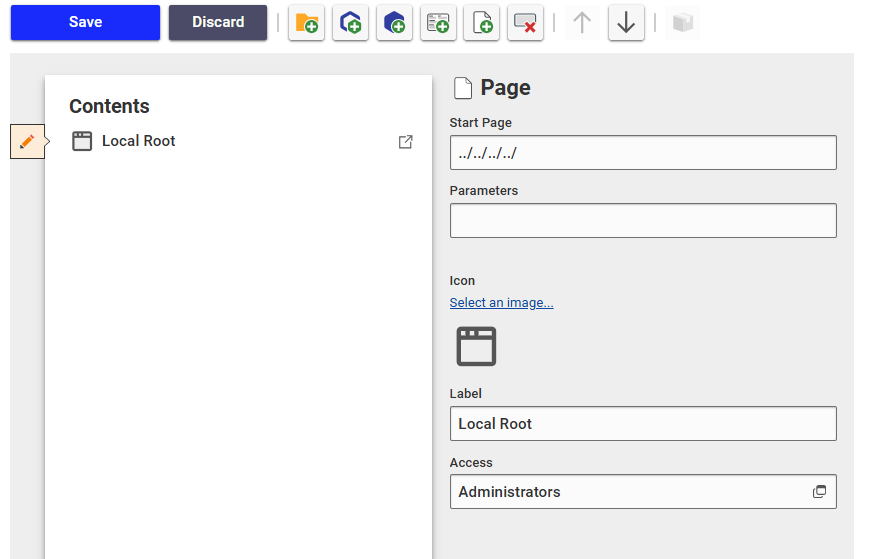
3️⃣ Setup Aras Proxy
Your Application needs to run inside Aras Innovator, therfore you have to setup a proxy to Aras Innovator.
// vite.config.ts

import mkcert from "vite-plugin-mkcert";

export default defineConfig({
  plugins: [mkcert()],
  server: {
    port: 3456,
    open: "/innovatorserver/client", // automatically open aras
    proxy: {
      "/innovatorserver": {
        target: "https://aras.example.com/innovatorserver", // link to your innovator server
        secure: false,
        changeOrigin: false,
        rewrite: (path) => path.replace(/^\/innovatorserver/, ""),
      },
    },
  },
});
// angular.json
"serve": {
// other settings
"options": {
"proxyConfig": "proxy.conf.json"
}
}
//proxy.conf.json
{
"/innovatorserver": {
"target": "https://aras.example.com/innovatorserver", // link to your innovator server
"secure": false,
"pathRewrite": {
"^/innovatorserver": ""
}
}
}Get Started
To get started, run the following command:
npm i arasjsInitialize ArasJS in your main file in your project:
/// <reference types="arasjs/dist/globals" />
import { useArasProvider } from 'arasjs';

useArasProvider().then(() => {
    <App />
});
Example Usage
// main.tsx
/// <reference types="vite/client" />
/// <reference types="arasjs/dist/globals" />

import "./app.css";
import { StrictMode } from "react";
import { createRoot } from "react-dom/client";
import { useArasProvider } from "arasjs";
import { App } from "./app";

const options = {
  injectCSS: true,
  injectJS: true,
}

useArasProvider(options).then(() => {
  createRoot(document.getElementById("root")!).render(
    <StrictMode>
      <App />
    </StrictMode>
  );
});
import { bootstrapApplication } from "@angular/platform-browser";
import { appConfig } from "./app/app.config";
import { AppComponent } from "./app/app.component";
import { useArasProvider } from "arasjs";
const options = {
injectCSS: true,
injectJS: true,
};
useArasProvider(options).then(() => {
bootstrapApplication(AppComponent, appConfig);
});License
This project is licensed under the MIT License.