
arda
v0.16.0
Published
Flux with application transition


Readme
Arda
Meta-Flux framework for real world.
$ npm install arda --saveChangelog
- v0.16: Drop React < v15
Concept
Today's Flux is weak at scene transitions. Arda make it simple by router and context(chunk of flux).
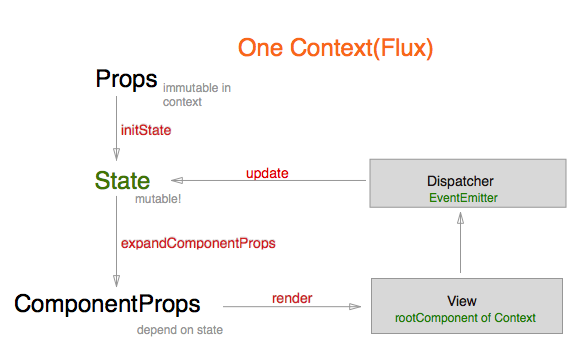
Context has Flux features and its stack is very simple.
- Dispatcher is just EventEmitter
- View is just React.Component (with mixin)
- Store should be covered by typesafe steps with promise
I need to develop to make my company's react project simple. Arda is started from extraction of my works and well dogfooded. Thx Increments Inc.
Goals
- Transition with Promise
- Loose coupling and testable
- TypeScript, CoffeeScript, and ES6 friendly
- Protect mutable state and make it atomic.
Intro
Context, it extends way of react, is just one flux loop and has data flow, Props => State => ComponentProps
simple example
window.React = require('react');
var Arda = require('arda');
var Clicker = React.createClass({
  mixins: [Arda.mixin],
  render() {
    return React.createElement('button', {onClick: this.onClick.bind(this)}, this.props.cnt);
  },
  onClick() {
    this.dispatch('hello:++');
  }
});

class ClickerContext extends Arda.Context {
  get component() {
    return Clicker;
  }

  initState() {
    return {cnt: 0};
  }

  expandComponentProps(props, state) {
    return {cnt: state.cnt};
  }

  delegate(subscribe) {
    super.delegate();
    subscribe('context:created', () => console.log('created'));
    subscribe('hello:++', () =>
      this.update((s) => { return {cnt: s.cnt+1}; })
    );
  }
};

window.addEventListener('DOMContentLoaded', () => {
  var router = new Arda.Router(Arda.DefaultLayout, document.body);
  router.pushContext(ClickerContext, {});
});
Transition
Arda.Router has pushContext, popContext and replaceContext and return promise object.
(coffeescript)
router = new Arda.Router(Arda.DefaultLayout, document.body)
router.pushContext(MainContext, {})             # Main
.then => router.pushContext(SubContext, {})     # Main, Sub
.then => router.pushContext(MainContext, {})    # Main, Sub, Main
.then => router.popContext()                    # Main, Sub
.then => router.replaceContext(MainContext, {}) # Main, Main
.then => console.log router.history
pushContext and replaceContext's second argument is to be context.props as immutable object.
LifeCycle
(coffeescript)
subscriber = (context, subscribe) ->
  subscribe 'context:created', -> console.log 'created'
  subscribe 'context:started', -> console.log 'started'
  subscribe 'context:paused', -> console.log 'paused'
  subscribe 'context:resumed', -> console.log 'resumed'
  subscribe 'context:disposed', -> console.log 'disposed'

class MyContext extends Arda.Context
  component: MyComponent
  subscribers: [subscriber]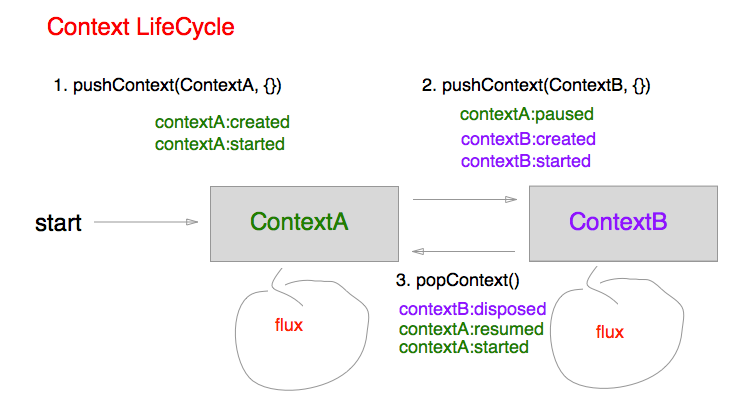
static subscribers is automatic delegator on instantiate.
DispatcherButton
This is just utility ReactElement.
(coffeescript)
{DispatcherButton} = arda
React.createClass
  mixins: [Arda.mixin]
  render: ->
    React.createElement 'div', {}, [
      React.createElement DispatcherButton, {
        event: 'foo-event'
        args: ['foo-id-12345']
      }, 'foo' # => button foo
      React.createElement DispatcherButton, {
        event: 'foo-event'
        args: ['foo-id-**']
        className: 'custome-button'
      }, [
        React.createElement 'span', {}, 'text'
      ] # => span.custome-button > span text
    ]
with TypeScript
To achive purpose to make mutable state typesafe, Arda with TypeScript is better than other AltJS.
interface Props {firstName: string; lastName: string;}
interface State {age: number;}
interface ComponentProps {greeting: string;}

class MyContext extends Arda.Context<Props, State, ComponentProps> {
  get component() {
    return React.createClass({
      mixins: [Arda.mixin],
      render: function(){return React.createElement('h1', {}, this.props.greeting);}
    });
  }

  initState(props){
    // Can use promise  (State | Promise<State>)
    return new Promise<State>(done => {
      setTimeout(done({age:10}), 1000)
    })
  }
  expandComponentProps(props, state) {
    // Can use promise  (ComponentProps | Promise<ComponentProps>)
    return {greeting: 'Hello, '+props.firstName+', '+state.age+' years old'}
  }
}

var router = new Arda.Router(Arda.DefaultLayout, document.body);
// Unfortunately, initial props by router are not validated yet
// If you want, you can create your original router wrapper
router.pushContext(MyContext, {firstName: 'Jonh', lastName: 'Doe'})
.then(context => {
  setInterval(() => {
    context.state(state => {age: state.age+1}) // this is validated
  }, 1000 * 60 * 60 * 24 * 360) // fire once by each year haha:)
});
See typescript working example
Or see mizchi's starter projectmizchi-sandbox/arda-starter-project
Custom Layout (Advanced)
Arda provide default layout to use. It can resolve most cases.
But occasionally you need custom layout.
example.
const Layout = React.createClass({
  childContextTypes: {
    shared: React.PropTypes.object
  },
  contextTypes: {
    ctx: React.PropTypes.object
  },

  getChildContext() {
    return {shared: this.getContext()};
  },

  getContext() {
    return this.state.activeContext || this.context.shared;
  },

  getInitialState() {
    return {
      activeContext: null,
      templateProps: {}
    };
  },

  render() {
    if (this.state.activeContext != null) {
      this.state.templateProps.ref = 'root';
      return React.createElement(
        this.state.activeContext.component,
        this.state.templateProps
      );
    } else {
      return <div/>
    }
  }
})

// use it!
const router = new Arda.Router(Layout, document.body);
Custom layout is required some implementations.
- implement contextTypes.shared
- implement childContextTypes.ctx
- implement getChildContext() to return contextTypes.shared
- implement getInitialState() to fill contextTypes.
- optional: render initial case and use context propeties
This implement resolve dispatch mixin behaviour.
Perhaps you can resolve by Copy and Paste and edit manually.
Custom Renderer (Advanced)
Initialize in node.js to use custom renderer.
const React = require('react')
const Arda = require('arda/node')(React);
const {render} from '@mizchi/react-blessed';

// you should prepare custom layout for its environment
// and function to get root component
// (el: ReactElement) => ReactComponent
const router = new Arda.Router(Layout, layout => {
  const screen = render(layout, {
    autoPadding: true,
    smartCSR: true,
    title: 'react-blessed hello world'
  });
  screen.key(['escape'], () => process.exit(0));
  return screen._component;
});
custom layout hs to fill contextTypes specs. See example with react-blessed
Dependencies
- React v0.14.0-beta3 >=
- Promise or its poryfill
API
See detail at index.d.ts
LICENSE
MIT