
argueview-js
v0.5.0
Published
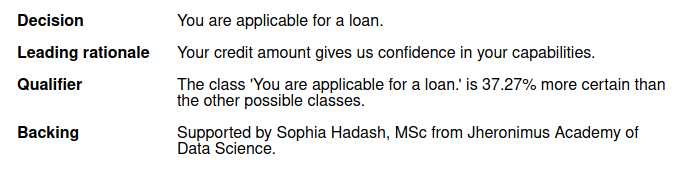
ArgueView is a tool for generating text-based presentations for machine-learning predictions and feature-importance based explanation tools. The tool makes use of Toulmin's model of argumentation for structuring the text-based explanations. This javascrip

Maintainers
 shadash
Readme

ArgueView is a tool for generating text-based presentations for machine-learning predictions and feature-importance based explanation tools. The tool makes use of Toulmin's model of argumentation for structuring the text-based explanations.
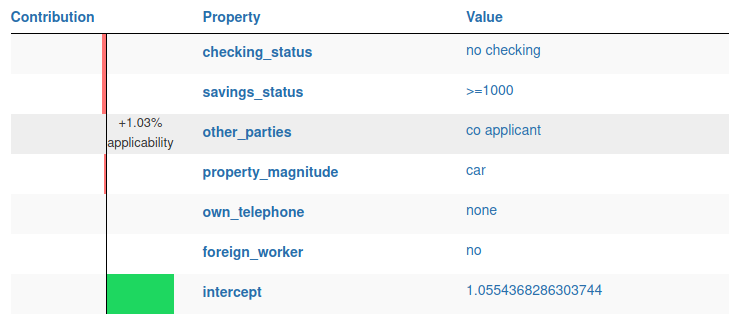
This repo hosts the JavaScript component of ArgueView. This component is responsible for the visualizations. These visualizations are available as React components on npm or by importing this repo directly. Furthermore, these visualizations are used by several functions of the Python counterpart of ArgueView. These visualizations are therefore directly available in Jupyther Notebooks.
Example output:
Installation
argueview-js is available as a npm package. Add to your project:
npm install argueview-js --saveOr install globally:
npm install argueview-js -gUsage
The component can be used as part of a React component. To render an explanation you will need an explanation json file as generated by the Python framework.
import React from 'react';
import { ToulminVisualizer } from "argueview";
import explanation from "./explanation.json";

class MyComponent extends React.Component {
  render() {
    return <ToulminVisualizer explanation={explanation} />;
  }
}
TypeScript
The component includes type definitions for TypeScript.
import React from 'react';
import { ToulminVisualizer } from "argueview";
import { ExplanationObject } from "argueview/dist/typings/explanation";
import explanation from "./explanation.json";

export default class MyComponent extends React.Component<{}, {}> {
    public render() {
        return <ToulminVisualizer explanation={explanation as ExplanationObject} />;
    }
}
Jupyter Notebooks
The visualizations are available in Jupyter Notebooks. Refer to the Python framework for documentation.
Building
Follow these steps to build argueview-js from source.
- make sure you install the dependencies. ArgueView requires the following dependencies:
nodejs,npm. - build using npm
npm run build