
ariadne-ts
v0.3.1
Published
[](https://www.npmjs.com/package/ariadne-ts) [](https://github.


Readme
ariadne-ts



A TypeScript library for generating beautiful, Rust-style compiler diagnostics.
ariadne-ts helps you create elegant, informative, and context-aware error reports for compilers, linters, static analyzers, or any other tool that needs to report errors in source code.
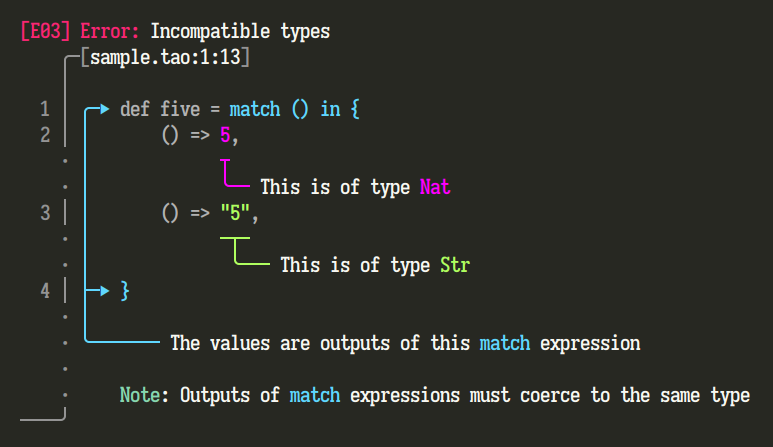
The screenshot above is from the original Rust library, but ariadne-ts produces identically-styled text-based output.
About
This library is a direct port of the excellent Rust crate ariadne. Ariadne is a powerful tool for generating diagnostics that are easy to read and understand, heavily inspired by the error reporting style of the Rust compiler, rustc.
Note: While
ariadne's output is designed to look and feel likerustc's, it is a separate, third-party library and not used by the Rust compiler itself. Its goal is to bring that same high-quality developer experience to other language tools.
Features
- Multi-Label Diagnostics: Attach multiple labels to a single report to highlight related code locations.
- Custom Colors & Themes: Full control over the colors used in your reports to match your tool's branding or user preferences.
- Complex Pointer Support: Create clear, non-overlapping annotations for even the most complex and nested code structures.
- Informative Notes & Help Text: Add extra notes and hints to your reports to guide users toward a solution.
- Framework-Agnostic: Pure TypeScript with minimal dependencies, easy to integrate into any project.
Installation
npm install ariadne-tsor
yarn add ariadne-tsUsage
Here's how to generate a detailed error report. First, imagine you have a source file named sample.tao:
def five = match () in {
    () => 5,
    () => "5",
}

def six =
    five
    + 1
Now, you can use ariadne-ts to build a report that pinpoints an incompatibility between the Nat and Str types within the match expression's arms.
import { Label, Range, Report, ReportKind, Source, include_str } from "@ariadne-ts"

Report.build(ReportKind.Error, "sample.tao", 34)
  .with_code(3)
  .with_message("Incompatible types")
  .with_label(Label.from(["sample.tao", Range.new(32, 33)]).with_message("This is of type Nat"))
  .with_label(Label.from(["sample.tao", Range.new(42, 45)]).with_message("This is of type Str"))
  .with_label(Label.from(["sample.tao", Range.new(11, 49)]).with_message("The values are outputs of this match expression."))
  .with_note("Outputs of match expressions must coerce to the same type")
  .finish()
  .print(["sample.tao", Source.from(include_str("sample.tao"))])
Resulting Output
This code produces a beautiful, easy-to-understand diagnostic in the terminal:
[E03] : Incompatible types
   ╭─[sample.tao:2:8]
   │
 1 │ ╭─▶ def five = match () in {
 2 │ │       () => 5,
   · │             ┬
   · │             ╰── This is of type Nat
 3 │ │       () => "5",
   · │             ─┬─
   · │              ╰─── This is of type Str
 4 │ ├─▶ }
   · │
   · ╰─────── The values are outputs of this match expression.
   ·
   ·     Note: Outputs of match expressions must coerce to the same type
───╯
Contributing
Contributions are welcome! Please feel free to open an issue or submit a pull request.
License
This project is licensed under the MIT License. See the LICENSE file for details.
Acknowledgements
- A huge thank you to zesterer and all the contributors to the original
ariadnefor creating such a fantastic library.
Support
Your crypto donations are greatly appreciated!
Bitcoin (BTC): 3CjmTh15TJiH83bxGKWaRzuHSUqQVEvoHd | Ethereum (ETH): 0xC7cf910c6993187149CCe1816332d19832Ca2ABB