
artifact-size-analyzer
v1.2.6
Published
Zero-opinion tool to analyze and compare artifact sizes across branches and CI runs

Maintainers
 ext
extReadme
Artifact size analyzer
A small, zero-opinion tool to analyze and compare the sizes of build artifacts across branches and CI runs. Ideal for pull requests — it highlights size regressions and tracks compressed and uncompressed artifact sizes.
- ✅ Configurable: include/exclude files and compression algorithms
- ✅ Agnostic: works with any language or toolchain
- ✅ Multi-artifact: measure multiple artifacts in one pass
- ✅ Outputs: JSON, Markdown, and plain text (for Actions, CLI, and API)
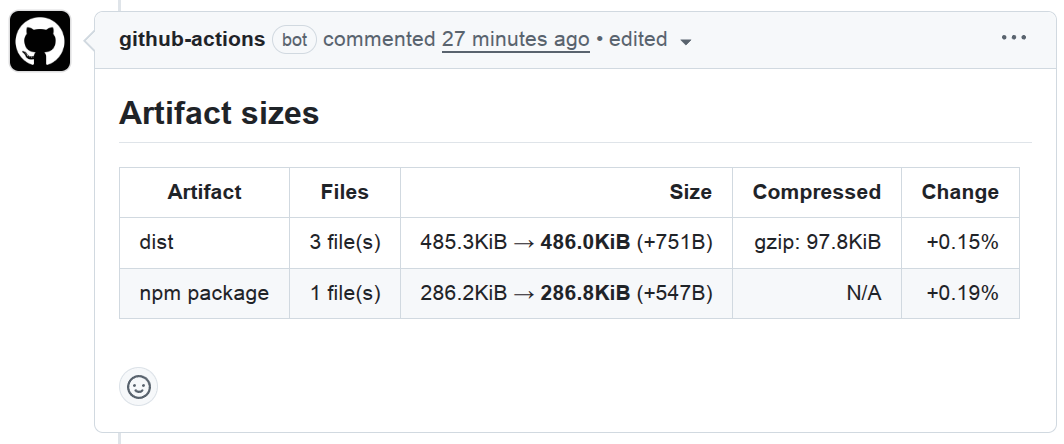
Table of Contents
Installation
Install as a dev dependency (recommended):
npm install --save-dev artifact-size-analyzerConfiguration file
The config file describes artifacts to analyze.
{
  "artifacts": [
    {
      "id": "app",
      "name": "app",
      "include": "dist/**/*.js"
    }
  ]
}
Options
artifacts[].id
Type: string
Required: yes
Unique identifier for this artifact.
artifacts[].name
Type: string
Required: yes
Display name for this artifact.
artifacts[].include
Type: string | string[]
Required: no
Default: []
Files to include for this artifact (globs supported).
artifacts[].exclude
Type: string | string[]
Required: no
Default: []
Files to exclude for this artifact (globs supported).
artifacts[].compression
Type: string | string[] | false
Required: no
Default: ["gzip", "brotli"]
Compression algorithm(s) to enable for this artifact or false to disable compression.
Supported compression algorithms:
gzipbrotli
Using with GitHub Actions
The recommended pattern is three jobs:
- Analyze (base): on the pull request target branch run the
analyzeaction to produce a baseline. - Analyze (current): on the PR head ref, run the
analyzeaction to produce artifact data for the current commit. - Compare: run the
compareaction to compare the two artifacts.
[!IMPORTANT] Both the
analyzeandcompareactions assume you perform thecheckoutandsetup-nodesteps in the workflow (see example workflow below).
On target branch:
- name: Run analyzer
  uses: ext/artifact-size-analyzer/analyze@v1
  with:
    config-file: ./example-config.json
    artifact-name: base-size
On head branch:
- name: Run analyzer
  uses: ext/artifact-size-analyzer/analyze@v1
  with:
    config-file: ./example-config.json
    artifact-name: current-size
To compare:
- name: Compare results
  id: compare
  uses: ext/artifact-size-analyzer/compare@v1
  with:
    base-artifact: base-size
    current-artifact: current-size
Example workflow:
name: Artifact size

on:
  pull_request:
    types: [opened, synchronize, reopened]

jobs:
  analyze-base:
    name: Analyze (base)
    runs-on: ubuntu-latest
    steps:
      - name: Checkout target branch
        uses: actions/checkout@v6
        with:
          ref: ${{ github.event.pull_request.base.ref }}

      - name: Setup Node.js
        uses: actions/setup-node@v6

      - name: Install & build
        run: |
          npm ci
          npm run build

      - name: Run analyzer
        uses: ext/artifact-size-analyzer/analyze@v1
        with:
          config-file: ./example-config.json
          artifact-name: base-size

  analyze-current:
    name: Analyze (current)
    runs-on: ubuntu-latest
    steps:
      - name: Checkout head ref
        uses: actions/checkout@v6
        with:
          ref: ${{ github.event.pull_request.head.ref }}

      - name: Setup Node.js
        uses: actions/setup-node@v6

      - name: Install & build
        run: |
          npm ci
          npm run build

      - name: Run analyzer (current)
        uses: ext/artifact-size-analyzer/analyze@v1
        with:
          config-file: ./example-config.json
          artifact-name: current-size

  compare:
    name: Compare
    runs-on: ubuntu-latest
    needs: [analyze-base, analyze-current]
    steps:
      - name: Checkout repository
        uses: actions/checkout@v6

      - name: Setup Node.js
        uses: actions/setup-node@v6

      - name: Compare results
        id: compare
        uses: ext/artifact-size-analyzer/compare@v1
        with:
          base-artifact: base-size
          current-artifact: current-size

      - name: Print markdown
        run: |
          echo "Compare markdown output:"
          echo "========================"
          echo "${{ steps.compare.outputs.markdown }}"
The output from the compare action can be used in a pull request comment, this example uses marocchino/sticky-pull-request-comment but you can use any you like.
- name: Post sticky PR comment
  uses: marocchino/sticky-pull-request-comment@v2
  with:
    header: artifact-size-analyzer
    message: |
      ${{ steps.compare.outputs.markdown }}

      <details><summary>Raw JSON</summary>

      ```json
      ${{ steps.compare.outputs.json }}
      ```

      </details>
Analyze inputs
artifact-name
Type: string
Required: yes
Name of the GitHub artifact to upload.
config-file
Type: string
Required: yes
Path to the artifact configuration.
output-file
Type: string
Required: no
Default: temp/artifact-size.json
Path to the output file to be produced by the analyzer.
Can optionally specify the format as a prefix format:filename, where format is json, markdown, or text.
To use the compare action the format must be json.
no-header
Type: boolean
Required: no
Default: false
When set to true, disables the header in output for formats with headers such as Markdown.
Use this when you want to prepend your own heading or other content before the size table.
version
Type: string
Required: no
Optional npm package version (e.g. 1.2.3).
When provided, the action runs npx artifact-size-analyzer@<version>.
By default it uses the installed version.
config-from
Type: string
Required: no
Default: head
Which branch to use for the configuration file:
head: Uses the PR head branch (default)target: Uses the PR target branchlocal: Uses the currently checked out branch
Compare inputs
base-artifact
Type: string
Required: yes
GitHub artifact name for the base run (uploaded by analyze).
current-artifact
Type: string
Required: yes
GitHub artifact name for the current run (uploaded by analyze).
base-name
Type: string
Required: no
Default: artifact-size.json
File name inside the base artifact that contains the analyzer output.
This should match the filename from the output-file input of the analyzer action.
Note: base-name and current-name refer to the path of the analyzer file inside the uploaded artifact; they must match the path passed to analyze's --output-file.
current-name
Type: string
Required: no
Default: artifact-size.json
File name inside the current artifact that contains the analyzer output.
This should match the filename from the output-file input of the analyzer action.
version
Type: string
Required: no
Optional npm package version (e.g. 1.2.3).
When provided, the action runs npx artifact-size-analyzer@<version>.
By default it uses the installed version.
no-header
Type: boolean
Required: no
Default: false
When set to true, disables the header in output for formats with headers such as Markdown.
Use this when you want to prepend your own heading or other content before the size table.
unchanged
Type: string
Required: no
Default: collapse
Controls how artifacts with unchanged sizes are handled:
show: Display all artifactshide: Hide unchanged artifacts from outputcollapse: Show unchanged artifacts in a collapsible<details>section (default)
Use collapse for pull request comments to keep the main table focused while still showing all artifacts in an expandable section.
Compare outputs
json
Type: string
The comparison result formatted as JSON.
markdown
Type: string
The comparison result formatted as Markdown.
text
Type: string
The comparison result formatted as plain text.
Using with CLI
Create a baseline (on the default branch):
npx artifact-size-analyzer analyze -c example-config.json -f json -o temp/base.jsonAnalyze current artifact(s) (on the feature branch):
npx artifact-size-analyzer analyze -c example-config.json -f json -o temp/current.jsonCompare the results:
npx artifact-size-analyzer compare --base temp/base.json --current temp/current.jsonUsage
npx artifact-size-analyzer <command> [options]where command is one of:
analyze: Analyze artifacts defined in a config file.compare: Compare two previously saved analysis outputs.
Analyze
Analyze artifacts from a config file and print results or write to a file.
npx artifact-size-analyzer analyze -c example-config.json
npx artifact-size-analyzer analyze -c example-config.json -f json -o temp/base.json
Options:
-c, --config-file <path>: Path to the config file (required)-f, --format <text|json|markdown>: Output format (default:text)-o, --output-file <format:filename|filename>: Write output to file instead of stdout. Can be specified multiple times. Ifformatis omitted the value from--formatis used.
Compare
Compare two saved results and print the diff.
The files should be the JSON outputs produced by analyze -f json.
npx artifact-size-analyzer compare --base base.json --current current.json -f textOptions:
--base <path>: Baseline JSON file produced byanalyze(required)--current <path>: Current JSON file produced byanalyze(required)-f, --format <text|json|markdown>: Output format (default:text)--unchanged <show|hide|collapse>: Control how artifacts with unchanged sizes are handled (default:show)show: Display all artifactshide: Hide unchanged artifacts from outputcollapse: Show unchanged artifacts in a collapsible<details>section
-o, --output-file <path>: Write output to file instead of stdout
Using with API
Programmatic usage is supported via the library exports.
To analyze an artifact:
import { analyzeArtifact } from "artifact-size-analyzer";

/* compression algorithm options */
const compression = {
  gzip: false,
  brotli: false,
};

/* artifact configuration (similar to the configuration file) */
const artifact = {
  id: "dist",
  name: "dist",
  include: ["dist/**/*.js"],
  exclude: [],
};

/* analyzes the configured artifact */
const result = await analyzeArtifact(artifact, { cwd: process.cwd(), compression });

console.log("Result:", result);
To compare two artifacts:
import fs from "node:fs/promises";
import { type ArtifactSize, compareArtifact } from "artifact-size-analyzer";

/* previously saved output from `analyzeArtifact()` */
const base = JSON.parse(await fs.readFile("base.json", "utf8")) as ArtifactSize;
const current = JSON.parse(await fs.readFile("current.json", "utf8")) as ArtifactSize;

/* compares the two artifacts */
const result = compareArtifact(base, current);

console.log("Result:", result);
You can format the output of analyzeArtifact and compareArtifact() using formatArtifact() and formatDiff():
import { formatDiff } from "artifact-size-analyzer";

const output = formatDiff([result], "markdown");
console.log(output);
Other noteworthy functions:
readConfigFile()reads, validates and normalizes a configuration file.compareArtifacts()takes two arrays of base and current artifacts and runscompareArtifact()on each pair (based onid).
Development
Build the project locally:
npm install
npm run build
Run tests and linting during development:
npm test
npm run eslint
npm run prettier:check