
async-idb-orm
v7.4.1
Published
Promise-based IndexedDB wrapper with an ORM-like API and support for Active Records, relations and migrations


Readme
async-idb-orm
Promise-based IndexedDB wrapper with an ORM-like API and support for Active Records, relations and migrations
Contents:
Getting Started
// db.ts
import { idb, Collection, Selector } from "async-idb-orm"

type User = {
  id: string
  name: string
  age: number
  createdAt: number
  updatedAt?: number
}
type UserDTO = {
  name: string
  age: number
}

const users = Collection.create<User, UserDTO>()
  .withKeyPath("id") // keyPath is optional - if not set, defaults to "id". Must be specified if there is no "id" field in the record.
  .withIndexes([
    { key: "age", name: "idx_age" },
    { key: ["name", "age"], name: "idx_name_id" },
  ])
  .withTransformers({
    create: (dto) => ({
      ...dto,
      id: crypto.randomUUID(),
      createdAt: Date.now(),
    }),
    update: (updatedRecord) => ({
      ...updatedRecord,
      updatedAt: Date.now(),
    }),
  })

/**
 * for numeric keyPaths, you can also specify `autoIncrement: true` to get
 * an auto-incrementing key. The key becomes optional in the expected
 * return type of a `create` transformer.
 */
type Post = { id: number; text: string; userId: string }
const posts = Collection.create<Post>().withKeyPath("id", { autoIncrement: true })

// Define selectors for derived/computed data
const schema = { users, posts }
const relations = {} // your relations here

const userSummary = Selector.create<typeof schema, typeof relations>().as(async (ctx) => {
  const allUsers = await ctx.users.all()
  return {
    totalUsers: allUsers.length,
    averageAge: allUsers.reduce((sum, user) => sum + user.age, 0) / allUsers.length || 0,
    userNames: allUsers.map((user) => user.name),
  }
})

export const db = idb("users", {
  schema,
  relations,
  selectors: { userSummary },
  version: 1,
})
// app.ts
import { db } from "$/db"
const user = await db.collections.users.create({ name: "Bob Smith", age: 69 })
// ^? User
await db.collections.users.update({ ...user, age: 42 })
await db.collections.users.find(user.id)
await db.collections.users.find((user) => user.name === "Bob Smith")
await db.collections.users.delete(user.id)
await db.collections.users.deleteMany((user) => user.age < 25)
await db.collections.users.all()
await db.collections.users.findMany((user) => user.age > 25)
await db.collections.users.count()
await db.collections.users.latest()
const oldestUser = await db.collections.users.max("idx_age")
// ^? User, or null if there are no records
const youngestUser = await db.collections.users.min("idx_age")
// ^? User, or null if there are no records
// min() and max() also support FindOptions for loading relations
const oldestUserWithPosts = await db.collections.users.max("idx_age", {
with: { userPosts: true },
})
import { range } from "async-idb-orm"
const usersYoungerThan30 = await db.collections.users.getIndexRange("idx_age", range`< ${30}`)
// Using selectors for computed data
const summary = await db.selectors.userSummary.get()
// ^? { totalUsers: number; averageAge: number; userNames: string[] }
// Subscribe to reactive selector updates
const unsubscribe = db.selectors.userSummary.subscribe((summary) => {
console.log(`Total users: ${summary.totalUsers}, Average age: ${summary.averageAge}`)
})Key Ranges
The range tagged template literal provides a convenient DSL for creating IDBKeyRange objects used in index queries and iteration.
import { range } from "async-idb-orm"

// Inclusive range: values >= 20 && values <= 30
const inclusiveRange = range`>= ${20} & <= ${30}`

// Exclusive range: values > 20 && values < 30
const exclusiveRange = range`> ${20} & < ${30}`

// Mixed bounds: values >= 20 && values < 30
const mixedRange = range`>= ${20} & < ${30}`

// Single bound (lower): values >= 25
const lowerBound = range`>= ${25}`

// Single bound (upper): values < 100
const upperBound = range`< ${100}`

// Equality: values === 42
const exactMatch = range`= ${42}`

// Use with getIndexRange()
const usersInRange = await db.collections.users.getIndexRange("idx_age", range`>= ${20} & <= ${40}`)

// Use with iteration
for await (const user of db.collections.users.iterate({
  index: "idx_age",
  keyRange: range`>= ${30} & < ${40}`,
})) {
  console.log(user)
}
Supported operators:
>=- Greater than or equal (inclusive lower bound)>- Greater than (exclusive lower bound)<=- Less than or equal (inclusive upper bound)<- Less than (exclusive upper bound)=- Equality (creates an exact match range)
Notes:
- Multiple conditions are combined with
&or&& - The equality operator (
=) cannot be combined with other range operators - All interpolated values must be used in the expression
- Invalid ranges (e.g., lower > upper) will throw errors when used with IndexedDB
Events
async-idb-orm supports the following events:
write- triggered when a record is created or updateddelete- triggered when a record is deletedwrite|delete- triggered when a record is created, updated, or deletedclear- triggered when all records are deleted viadb.<collection>.clear
const onUserDeleted = (user: User) => {
  console.log("User deleted:", user)
}

db.collections.users.addEventListener("delete", onUserDeleted)
db.collections.users.delete(user.id)
// User deleted: {...}
db.collections.users.removeEventListener("delete", onUserDeleted)
By default, async-idb-orm automatically relays events to other tabs/windows that are using the same database.
To disable this, set the relayEvents option to false:
export const db = idb("users", {
  schema,
  version: 1,
  relayEvents: false,
})
Active Records
create, find, findMany, and all each have an Active equivalent that returns an ActiveRecord<T> which includes save and delete methods.
async function setUserAge(userId: string, age: number) {
  const user = await db.collections.users.findActive(userId)
  if (!user) throw new Error("User not found")
  user.age = 42
  await user.save()
}
We can also 'upgrade' a record to an active record via the wrap method:
async function setUserAge(userId: string, age: number) {
  const user = await db.collections.users.find(userId)
  if (!user) throw new Error("User not found")
  const activeUser = db.collections.users.wrap(user)
  activeUser.age = 42
  await activeUser.save()

  // and we can 'downgrade' the active record back to a regular record via the `unwrap` method
  return db.collections.users.unwrap(activeUser)
}
Transactions
async function transferFunds(
  senderId: string,
  recipientId: string,
  transferAmount: number
): TransferResult {
  try {
    return await db.transaction(async (ctx, tx) => {
      // Fetch sender and recipient accounts
      const sender = await ctx.accounts.findActive({ id: senderId })
      const recipient = await ctx.accounts.findActive({ id: recipientId })

      if (!sender || !recipient) {
        // On throw, the transaction will be automatically aborted. The thrown value will be re-thrown outside the transaction.
        throw TransferResult.InvalidAccount
      }

      // Check if sender has sufficient balance
      if (sender.balance < transferAmount) {
        tx.abort()
        return TransferResult.InsufficientFunds
      }

      // Update balances
      sender.balance -= transferAmount
      recipient.balance += transferAmount

      await sender.save()
      await recipient.save()

      // Commit transaction (not mandatory, a transaction will automatically commit when all outstanding requests have been satisfied and no new requests have been made)
      tx.commit()

      // Return success
      return TransferResult.Success
    })
  } catch (error) {
    console.error(error)
    return isTransferResult(error) ? error : TransferResult.Error
  }
}
Relations
Relations allow you to define and load related data across collections with a powerful, type-safe interface. It supports one-to-one and one-to-many relationships with filtering, limiting, and nested relation loading.
Defining Relations
Relations are defined separately from collections using the Relations.create() method:
import { idb, Relations, Collection } from "async-idb-orm"

// Collections
type User = { id: number; name: string; age: number }
type Post = { id: string; content: string; userId: number }
type Comment = { id: string; content: string; postId: string; userId: number }

const users = Collection.create<User>().withKeyPath("id", { autoIncrement: true })
const posts = Collection.create<Post>()
const comments = Collection.create<Comment>()

// Define relations
const userPostRelations = Relations.create(users, posts).as({
  userPosts: (userFields, postFields) => ({
    type: "one-to-many",
    from: userFields.id,
    to: postFields.userId,
  }),
})

const postUserRelations = Relations.create(posts, users).as({
  author: (postFields, userFields) => ({
    type: "one-to-one",
    from: postFields.userId,
    to: userFields.id,
  }),
})

const postCommentRelations = Relations.create(posts, comments).as({
  postComments: (postFields, commentFields) => ({
    type: "one-to-many",
    from: postFields.id,
    to: commentFields.postId,
  }),
})

// Setup database with relations
const db = idb("my-app", {
  schema: { users, posts, comments },
  relations: {
    userPostRelations,
    postUserRelations,
    postCommentRelations,
  },
  version: 1,
})
Loading Relations
Use the with option in query methods to load related data:
// Load user with all their posts
const userWithPosts = await db.collections.users.find(1, {
  with: {
    userPosts: true,
  },
})
// userWithPosts.userPosts: Post[]

// Load posts with their authors
const postsWithAuthors = await db.collections.posts.all({
  with: {
    author: true,
  },
})
// Each post now has an `author` property: User

// Load multiple relations
const userWithPostsAndComments = await db.collections.users.find(1, {
  with: {
    userPosts: true,
    userComments: true,
  },
})
Filtering Relations
Apply filters to loaded relations using the where option:
// Load user with only important posts
const userWithImportantPosts = await db.collections.users.find(1, {
  with: {
    userPosts: {
      where: (post) => post.content.includes("Important"),
    },
  },
})

// Load posts with comments by specific user
const postsWithSpecificComments = await db.collections.posts.all({
  with: {
    postComments: {
      where: (comment) => comment.userId === specificUserId,
    },
  },
})
Limiting Relations
Control the number of related records loaded using the limit option:
// Load user with only their 5 most recent posts
const userWithRecentPosts = await db.collections.users.find(1, {
  with: {
    userPosts: {
      limit: 5,
    },
  },
})

// Combine filtering and limiting
const userWithRecentImportantPosts = await db.collections.users.find(1, {
  with: {
    userPosts: {
      where: (post) => post.content.includes("Important"),
      limit: 3,
    },
  },
})
Nested Relations
Load relations of relations for deep data fetching:
// Load user with posts and their comments
const userWithPostsAndComments = await db.collections.users.find(1, {
  with: {
    userPosts: {
      limit: 10,
      with: {
        postComments: true,
      },
    },
  },
})
// userWithPostsAndComments.userPosts[0].postComments: Comment[]

// Complex nested example with filtering
const userWithFilteredNestedData = await db.collections.users.find(1, {
  with: {
    userPosts: {
      where: (post) => post.content.includes("Tutorial"),
      limit: 5,
      with: {
        postComments: {
          where: (comment) => comment.content.length > 10,
          limit: 3,
        },
      },
    },
  },
})
Working with Multiple Query Methods
The Relations API works with all collection query methods:
// find()
const user = await db.collections.users.find(1, { with: { userPosts: true } })

// findMany()
const activeUsers = await db.collections.users.findMany((user) => user.age > 18, {
  with: { userPosts: { limit: 5 } },
})

// all()
const allUsersWithPosts = await db.collections.users.all({
  with: { userPosts: true },
})

// getIndexRange()
const usersInRange = await db.collections.users.getIndexRange(
  "idx_age",
  range`>= ${20} && <= ${40}`,
  { with: { userPosts: true } }
)

// min() and max()
const youngestUserWithPosts = await db.collections.users.min("idx_age", {
  with: { userPosts: true },
})
const oldestUserWithPosts = await db.collections.users.max("idx_age", {
  with: { userPosts: true },
})

// Note: Relations are read-only, you cannot upgrade relational records to active records
Type Safety
The Relations API is fully type-safe. TypeScript will enforce:
- Only defined relation names can be used in
withclauses - Relation types match the expected data structure
- Nested relations are properly typed
- Filter functions receive correctly typed parameters
// ✅ Valid - userPosts is defined in relations
const user = await db.collections.users.find(1, {
  with: { userPosts: true },
})

// ❌ TypeScript error - invalidRelation doesn't exist
const user = await db.collections.users.find(1, {
  with: { invalidRelation: true },
})

// ✅ Fully typed filter function
const user = await db.collections.users.find(1, {
  with: {
    userPosts: {
      where: (post) => post.content.includes("test"), // post is typed as Post
    },
  },
})
Selectors
Selectors provide a powerful way to create computed, reactive data derived from your collections. They automatically track dependencies and update when the underlying data changes, making them perfect for derived state management.
Defining Selectors
Selectors are defined separately from collections and relations using the Selector.create() method or by using db.select():
// schema.ts
import { Collection } from "async-idb-orm"

type User = { id: string; name: string; age: number; isActive: boolean }
type Post = { id: string; title: string; content: string; userId: string }

const users = Collection.create<User>()
const posts = Collection.create<Post>()

// selectors.ts
import { Selector } from "async-idb-orm"
import type * as schema from "./collections"
import type * as relations from "./relations"

export const allUserNames = Selector.create<typeof schema, typeof relations>().as(async (ctx) => {
  return (await ctx.users.all()).map((user) => user.name)
})

// db.ts
import * as schema from "./collections"
import * as relations from "./relations"
import * as selectors from "./selectors"

export const db = idb("my-app", {
  schema,
  relations,
  selectors,
  version: 1,
})

export const userPostCounts = db.select(async (ctx) => {
  const [users, posts] = await Promise.all([ctx.users.all(), ctx.posts.all()])

  return users.map((user) => ({
    userId: user.id,
    name: user.name,
    postCount: posts.filter((post) => post.userId === user.id).length,
  }))
})
Using Selectors
Selectors provide two main methods for accessing data:
Reactive Subscriptions:
// Subscribe to selector updates - callback is called whenever dependent data changes
const unsubscribe = db.selectors.allUserNames.subscribe((names) => {
  console.log("User names updated:", names)
})

// Don't forget to unsubscribe when done
unsubscribe()
Promise-based Access:
// Get current selector data as a promise
const userNames = await db.selectors.allUserNames.get()
const postCounts = await userPostCounts.get()
Automatic Dependency Tracking
Selectors automatically track which collections they access during execution. When any of those collections are modified (create, update, delete, or clear operations), the selector will automatically refresh and notify all subscribers:
// This selector will automatically track that it depends on the 'users' collection
const youngUsers = db.select((ctx) => {
  return ctx.users.findMany((user) => user.age < 30) // Accesses 'users' collection
})

// When you modify users, the selector automatically updates if there are subscribers
await db.collections.users.create({ name: "Alice", age: 25, isActive: true })
// ↑ This will trigger the youngUsers selector to refresh
Integration with UI Frameworks
Selectors work seamlessly with reactive UI frameworks. Here's an example with a React-like framework:
function useUserNames() {
  const [userNames, setUserNames] = useState<string[]>([])

  useEffect(() => {
    // Subscribe to selector updates
    const unsubscribe = db.selectors.allUserNames.subscribe(setUserNames)
    return unsubscribe // Cleanup subscription
  }, [])

  return userNames
}

function UserNamesList() {
  const userNames = useUserNames()

  return (
    <ul>
      {userNames.map((name) => (
        <li key={name}>{name}</li>
      ))}
    </ul>
  )
}
Performance Considerations
- Selectors are lazy - they only compute data when first accessed or when dependencies change
- Selectors are cached - subsequent
get()calls return cached data until dependencies change - Selectors use efficient change detection - they only refresh when collections they actually accessed are modified
- Microtask batching - multiple rapid changes are batched into a single selector refresh
Type Safety
Selectors are fully type-safe with TypeScript:
// The selector's return type is automatically inferred
const typedSelector = Selector.create<typeof schema, typeof relations>().as(async (ctx) => {
  const users = await ctx.users.all()
  return {
    userCount: users.length,
    avgAge: users.reduce((sum, u) => sum + u.age, 0) / users.length,
  }
})
// TypeScript knows this returns: { userCount: number; avgAge: number }

// Subscribers receive correctly typed data
db.selectors.typedSelector.subscribe((data) => {
  console.log(data.userCount) // ✅ TypeScript knows this is a number
  console.log(data.avgAge) // ✅ TypeScript knows this is a number
})
Foreign Keys
IndexedDB does not implement foreign key constraints. async-idb-orm allows you to define pseudo-foreign-keys on collections that are simulated during query execution.
Adding a foreign key to a collection enables two useful features:
When inserting/updating a record that refers to another, the parent record's existence is checked. If it does not exist, the transaction is aborted and an error is thrown.
When deleting a parent record, all children are acted on according to the
onDeleteoption:cascade: deletes all children.restrict: aborts the transaction & throws an error.no action: does nothing immediately, but fails the operation if it would break a constraint at the end of the transaction.set null: sets thereffield value tonull. Insert and update operations bypass the parent check if the value isnull.
To keep this example brief, we'll omit setting up DTOs and transformers for our collections - pretend it's been done in the same way as previous examples.
import { idb, Collection } from "async-idb-orm"

type User = { userId: string; name: string }
const users = Collection.create<User>()

type Post = { id: string; text: string; userId: string }
const posts = Collection.create<Post>().withForeignKeys((posts) => [
  { ref: posts.userId, collection: users, onDelete: "cascade" },
])

type PostComment = { id: string; content: string; postId: string; userId: string }
const postComments = Collection.create<PostComment>().withForeignKeys((comments) => [
  { ref: comments.postId, collection: posts, onDelete: "cascade" },
  { ref: comments.userId, collection: users, onDelete: "cascade" },
])

const db = idb("my-app-db", {
  schema: { users, posts, postComments },
  version: 1,
})

// throws, because user with id "123" does not exist
await db.collections.posts.create({ text: "Hello world", userId: "123" })

const bob = await db.collections.users.create({ name: "Bob Smith" })
const alice = await db.collections.users.create({ name: "Alice Johnson" })

const post = await db.collections.posts.create({ text: "Hello world", userId: bob.id })
await db.collections.postComments.create({
  content: "Great post!",
  postId: post.id,
  userId: alice.id,
})

// deletes bob, his post and alice's comment
await db.collections.users.delete(bob.id)
Async Iteration
Collections implement extensive async iteration support:
for await (const user of db.collections.users) {
  console.log(user)
}

const ageKeyRange = range`< ${30}`
for await (const user of db.collections.users.iterate({
  index: "idx_age", // iterate over index
  keyRange: ageKeyRange, // iterate over index with key range
  direction: "next", // or "prev" to iterate in reverse order
})) {
  console.log(user)
}
Iterators also support loading relations using FindOptions:
// Iterate with relations
for await (const user of db.collections.users.iterate({
  with: { userPosts: true },
})) {
  console.log(user.userPosts) // Posts are loaded for each user
}

// Iterate reversed with relations
for await (const user of db.collections.users.iterate({
  direction: "prev",
  with: { userPosts: { limit: 5 } },
})) {
  console.log(user.userPosts) // Limited to 5 posts per user
}

// Iterate over index with relations
const ageKeyRange = range`>= ${30} & < ${40}`
for await (const user of db.collections.users.iterate({
  index: "idx_age",
  keyRange: ageKeyRange,
  with: { userPosts: true },
})) {
  console.log(user.userPosts) // Posts loaded for users in age range
}
Serialization
async-idb-orm provides a simple way to serialize and deserialize collection records. This is useful for storing values that would not otherwise be supported by IndexedDB.
class TimeStamp {
  date: Date
  constructor(initialValue?: string) {
    this.date = initialValue ? new Date(initialValue) : new Date()
  }

  toJSON() {
    return this.date.toISOString()
  }
}

type User = { id: string; name: string; createdAt: TimeStamp }
type UserDTO = { name: string }

export const users = Collection.create<User, UserDTO>()
  .withTransformers({
    create: (dto) => ({
      ...dto,
      id: crypto.randomUUID(),
      createdAt: new TimeStamp(),
    }),
  })
  .withSerialization({
    write: (user) => ({
      ...user,
      createdAt: user.createdAt.toJSON(),
    }),
    read: (serializedUser) => ({
      ...serializedUser,
      createdAt: new TimeStamp(serializedUser.createdAt),
    }),
  })
Migrations
async-idb-orm supports database migrations. This is useful for upgrading your database schema over time.
Collections that were not previously created will be created automatically during the migration process.
// in this scenario, we decided to add a new key to our Post collection.

const VERSION = 2
export const db = idb("users", {
  schema,
  version: VERSION,
  onUpgrade: async (ctx, event: IDBVersionChangeEvent) => {
    if (event.oldVersion === 0) return // skip initial db setup

    if (event.oldVersion === 1) {
      // migrate from v1 -> v2
      const oldPosts = (await ctx.collections.posts.all()) as Omit<Post, "someNewKey">[]
      ctx.deleteStore("posts")
      ctx.createStore("posts")
      const newPosts = oldPosts.map((post) => ({ ...post, someNewKey: 42 }))
      await ctx.collections.posts.upsert(...newPosts)
      console.log("successfully migrated from v1 -> v2")
    }
  },
})
Automatic Block resolution
async-idb-orm implements automatic block resolution. This is useful for resolving version conflicts between multiple concurrent instances in separate tabs or windows.
How it works:
Consider the following scenario:
- A user loads your app for the first time and initializes the database with version 1.
- Some time passes, and the app is now redeployed with a new version 2.
- The user opens your app in a new tab, keeping the previous tab open, and attempts to open the database with version 2.
- This causes a blocked event to be fired. The new tab's
openrequest remains in a pending state until all other transactions are complete and connections are closed.
As you can see, using IndexedDB is inevitably complex and error-prone.
How do you close the other connections if they're from different windows or tabs? How do you make sure every tab is using the most up-to-date version of the database?
async-idb-orm automatically solves this for you.
Under the hood, we make use of a BroadcastChannel. This is a feature that's natively supported by all major browsers and allows us to send messages between tabs.
- When a
blockedevent is fired during theopenrequest, the new tab sends a message to the old tab, indicating that it should close the connection.- Once the all transactions are complete and the old connection is closed, the new tab's
openrequest continues and initializes the database with version 2.- Once the new tab has initialized the database, it sends a message back to the old tab to indicate that it should reinitialize the database with version 2.
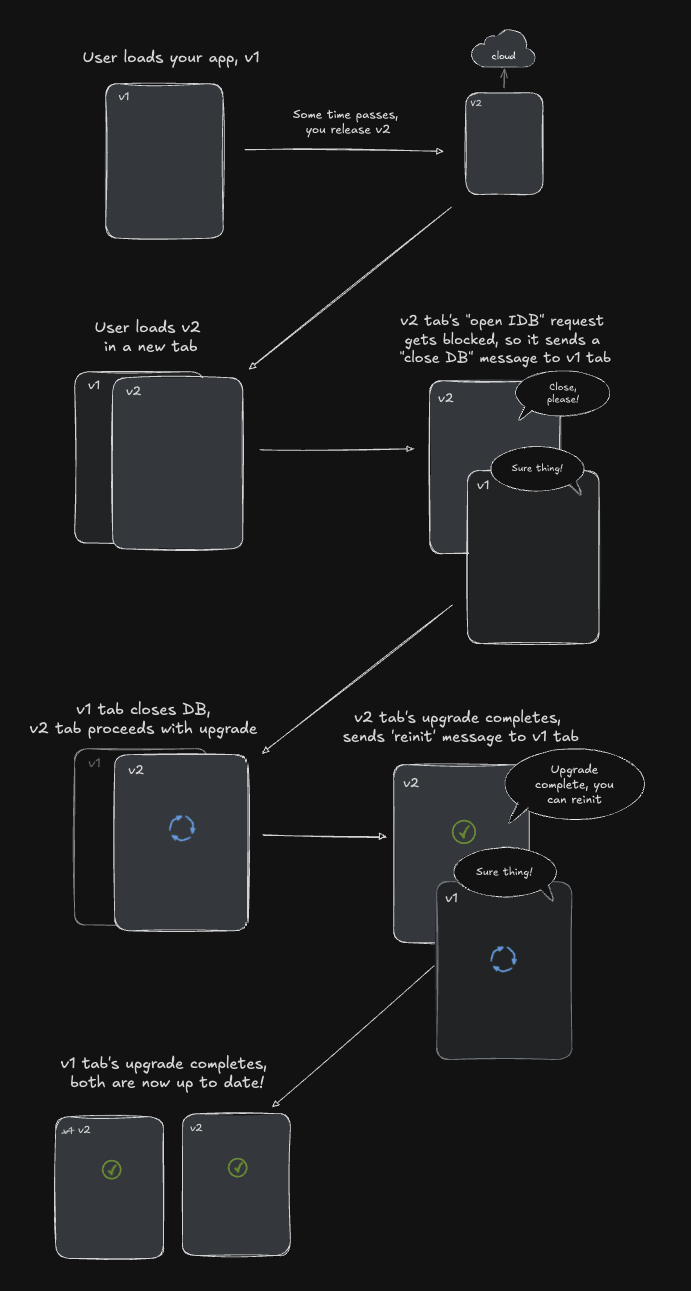
This all happens automatically behind the scenes, so you don't need to worry about it.
In the config object, you can provide an onBeforeReinit callback that will be called before the database is reinitialized. This is a useful time to perform any necessary cleanup steps, or to reload the page in the case it is too old.
const VERSION = 1
export const db = idb("users", {
  schema,
  version: VERSION,
  onUpgrade: async (ctx, event) => {
    // handle migrations
  },
  onBeforeReinit: (oldVersion, newVersion) => {
    // let's imagine the latest tab has set a "breakingChangesVersion" value, which indicates that any old tabs using a version less than this should reload.

    const breakingChangesVersion = parseInt(localStorage.getItem("breakingChangesVersion") ?? "0")

    if (oldVersion < breakingChangesVersion) {
      window.location.reload()
    }
  },
})