
atom-merge-conflicts
v1.4.4
Published
Resolve git conflicts within Atom


Readme
Merge Conflicts

Resolve your git merge conflicts in Atom!

This package detects the conflict markers left by git merge and overlays a set of controls for resolving each and navigating among them. Additionally, it displays your progress through a merge.
Features
- Conflict resolution controls are provided for each detected conflict.
- Choose your version, their version, combinations thereof, or arbitrary changes edited in place as a resolution.
- Navigate to the next and previous conflicts in each file.
- Track your progress through a merge with per-file progress bars and a file list.
- Save and stage your resolved version of each file as it's completed.
Using
When git merge tells you that it couldn't resolve all of your conflicts automatically:
$ git merge branch
Auto-merging two
CONFLICT (content): Merge conflict in two
Auto-merging one
CONFLICT (content): Merge conflict in one
Automatic merge failed; fix conflicts and then commit the result.
Open Atom on your project and run the command Merge Conflicts: Detect (default hotkey: alt-m d). You'll see a panel at the bottom of the window describing your progress through the merge:

Click each filename to visit it and step through the identified conflicts. For each conflict area, click "Use me" on either side of the change to accept that side as-is:

Use the right-click menu to choose more advanced resolutions, like "ours then theirs", or edit any chunk by hand then click "use me" to accept your manual modifications. Once you've addressed all of the conflicts within a file, you'll be prompted to save and stage the changes you've made:
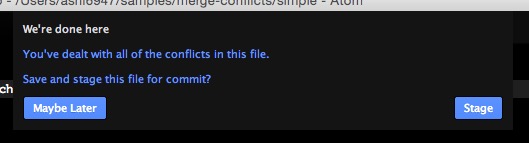
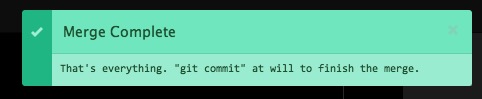
Finally, when all of the conflicts throughout the project have been dealt with, a message will appear to prompt you how to commit the resolution and continue on your way. :tada:
Key bindings
To customize your key bindings, choose "Keymap..." from your Atom menu and add CSON to bind whatever keys you wish to merge-conflicts events. To get started, you can copy and paste this snippet and change the bindings to whatever you prefer:
'atom-text-editor.conflicted':
  'alt-m down': 'merge-conflicts:next-unresolved'
  'alt-m up': 'merge-conflicts:previous-unresolved'
  'alt-m enter': 'merge-conflicts:accept-current'
  'alt-m r': 'merge-conflicts:revert-current'
  'alt-m 1': 'merge-conflicts:accept-ours'
  'alt-m 2': 'merge-conflicts:accept-theirs'

'atom-workspace':
  'alt-m d': 'merge-conflicts:detect'
For more detail, the Atom docs include both basic and advanced guidelines describing the syntax.
Events
The merge-conflicts plugin emits a number of events that other packages can subscribe to, if they wish. If you want your plugin to consume one, use code like the following:
{CompositeDisposable} = require 'atom'

pkg = atom.packages.getActivePackage('merge-conflicts')?.mainModule
subs = new CompositeDisposable

subs.add pkg.onDidResolveConflict (event) ->

# ...

subs.dispose()onDidResolveConflict: broadcast whenever a conflict is resolved.event.file: the absolute path of the file in which the conflict was found;event.total: the total number of conflicts in that file;event.resolved: the number of conflicts that are resolved, including this one.onDidResolveFile: broadcast whenever a file has been completed and staged for commit.event.file: the absolute path of the file that was staged.onDidQuitConflictResolution: broadcast when you stop merging conflicts by clicking the quit button.onDidCompleteConflictResolution: broadcast when all conflicts in all files have successfully been resolved.
Contributions
Pull requests are welcome, big and small! Check out the contributing guide for details.