
austack-node
v2.0.3
Published
Austack SDK for Node.js
Downloads
117

Maintainers
 hain
hainReadme
Austack
Node.js client for Austack.
Secure APIs with tokens.
Welcome
npm install austack-nodeUsage
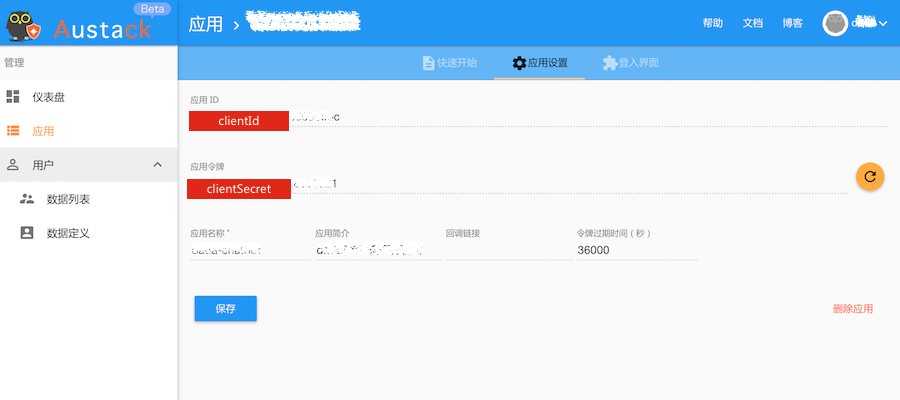
var austack = require('austack-node')(CLIENT_ID, CLIENT_SECRET);Get CLIENT_ID, CLIENT_SECRET from Austack.
Login > Application > New Application > Settings
austack#getToken()
生成一个新的token
返回值:
- Promise<String> token
示例:
austack.getToken()
    .then(function(token){
        console.log('token: ' + token)
    })
austack#decode(token)
对token解码
参数:
- token <String>
返回值:
- Object token对应的Object: header, payload 和 signature。
| 关键字 | 描述 | | --- | --- | | header | 类型和签名算法 | | payload | token包含的有效信息: clientId(应用的clientId), role(token的角色), ownerId, (exp)过期时间, iss(签名发布者),jti(token的唯一标识) | | signature | 签名 |
示例:
austack.decode(token)
    .then(function(decoded){
        console.log('decoded: ' + JSON.stringify(decoded))
    })
austack#verify(token)
对token进行验证
参数:
- token <String>
返回值:
- Promise<Object> token的payload
如果验证通过,Promise被resolve。验证没有被通过,Promise被reject。
示例:
austack.verify(token)
    .then(function(verifed){
        console.log('verifed: ' + verifed)
    })
austack#auth(req)
验证http request header包含的authorization信息
参数:
- req <Object>
返回值:
- Promise<>
如果验证通过,Promise被resolve, 否则被reject.
示例:
var ctx = {
    req: {
        headers: {
            authorization: 'Bearer ' + token
        }
    }
}
adminAustack.auth(ctx)
    .then(function(result){
        // 验证通过
    }, function(err){
        // 验证失败,token失效、信息缺失等原因
    });
Express Austack中间件, Koa Austack中间件
austack#getApplication(token)
获得应用信息
参数:
- token <String>
返回值:
- Promise<Object> 获得CLIENT_ID所属的应用的信息,包含:
| 关键字 | 描述 | | --- | --- | | name | 所属者的Id | | ownerId | 所属者的唯一标识 | | role | 所属者角色 | | clientId | 应用的clientId | | repos | 数据集标识 |
示例:
austack.getApplication(token)
    .then(function(appInfo){
        console.log('appInfo: ' + appInfo)
    })
austack#getRepo(token)
获取数据集名称, 数据集是Austack提供的数据存储服务。在控制台上,提供数据集表结构的定义。数据集可以用来存储数据,每个用户拥有一个数据集,用户可以创建多个应用,数据集在这些应用中是共享的。
参数:
- token <String>
返回值:
- Promise<String> 数据集名称
示例:
austack.getRepo(token)
    .then(function(repoName){
        console.log('repoName: ' + repoName)
    })
austack#getShape(token, repoName)
获取数据集元数据
参数:
- token <String>
- repoName <String> 数据集名称,通过 getRepo 或者 getApplication 获得。
返回值:
- Promise<Object>
元数据包含:mSchema(数据集表结构定义)、type(类型)、name(名称)、created(创建时间)和modified(最后更新时间)。
示例:
austack.getShape(token, repoName)
    .then(function(shapeInfo){
        console.log('shapeInfo: ' + shapeInfo)
    })
austack#getRepoData(token, repoName, [options])
获取数据集数据
参数:
- token <String>
- repoName <String> 数据集名称,通过 getRepo 或者 getApplication 获得。
- [可选] options <Object> 过滤条件 {q, limit, page, fields, sortby}, options 可以用来做多条件查询。
| 字段 | 类型 | 描述 | 示例 | | --- | --- | --- | --- | | q | Object | 查询条件,参考Model.find-conditions | { "textMessage": "bar" } | | sortby | String | 排序条件,参考 Query-sort | '-createAt' | | limit | Number | 最多返回多少记录,在返回值中,页数,当前页都是使用limit进行计算 | 10 | | page | Number | 返回第几页,limit * page就代表着skip多少数据 | 1 | | fields | String | 只获得并按顺序返回指定字段的数据,不同字段用空格分开 | 'uid direction textMessage' |
返回值:
- Promise<Object>
标准返回值
{
  "total": 12, // 所有数据条数
  "total_page": 12, // 所有的页数
  "current_page": 1, // 当前页数
  "rc": 1, // 返回代码, 1是正常返回,其他值代表返回异常
  "data": [ // 数据
    {
      "_id": "xxx",
      "createAt": "2017-05-30T02:58:17.470Z",
      "textMessage": "bar",
      "uid": "foo",
      "direction": "inbound"
    }
  ]
}
示例:
austack.getRepoData(token, repoName, {
        limit: 1,
        fields: 'uid textMessage direction createAt',
        page: 1,
        sortby: '-createAt' // 默认按照字段名升序,如果前面添加'-'则使用降序
    })
    .then(function(repoData){
        console.log('repoData: ' + repoData)
    })
austack#saveRepoData(token, repoName, data)
更新或者创建新数据
参数:
- token <String>
- repoName <String> 数据集名称,通过 getRepo 或者 getApplication 获得。
- data <Object>
返回值:
- Promise<Object> 已创建或更新的数据记录。
data必须包含的字段: uid, textMessage, direction.
| 字段 | 类型 | 必须 | 描述 | | --- | --- | --- | --- | | uid | String | 是 | 对应使用Application的用户的唯一标识 | | textMessage | String | 是 | 消息 | | direction | 'inbound'或者'outbound' | 是 | uid用户的消息方向, inbound 代表 uid用户发送的消息, outbound 代表 uid用户接收的消息 | | _id | String | 否 | _id是该记录对应的数据唯一标识,如果存在,则代表是更新数据,否则新建数据 |
示例:
austack.saveRepoData(token, repoName, {
        "_id": "xxxx", // 可选
        "textMessage": "barbar",
        "uid": "foo",
        "direction": "inbound",
    })
    .then(function(result){
        console.log('result: ' + result)
    })
austack#getRepoDataById(token, repoName, objectId)
获取指定Id的数据记录
参数:
- token <String>
- repoName <String> 数据集名称,通过 getRepo 或者 getApplication 获得。
- objectId <String> 数据记录的唯一标识
返回值:
- Promise<Object> 如果该记录存在,Promise被resolve并返回该数据,否则Promise被reject。
示例:
austack.getRepoDataById(token, repoName, _id)
    .then(function(doc){
        console.log('docInfo: ' + doc)
    })