
auto-api-observe
v1.4.1
Published
Zero-config observability for Node.js APIs — Express, Fastify, Koa, Hono, NestJS, Next.js, Hapi, Elysia, Apollo, Lambda, tRPC, Restify. Request tracing, DB profiling, slow-request detection, and real-time metrics.

Maintainers
 hiredev
Keywords
Readme
🔭 Free cloud dashboard → apilens.rest — real-time request logs, DB profiling, N+1 detection, error tracking. No credit card. Setup in 60 seconds.
The Problem
You ship a Node.js API. Then you need to know: which routes are slow? What's your error rate? How many DB queries per request? Which third-party API is adding latency?
Datadog costs $23/host/month. New Relic wants your credit card. Grafana takes an afternoon to configure.
The Solution
app.use(require('auto-api-observe')({ apiKey: 'sk_live_...' }));One line. Every request is tracked with latency, trace IDs, DB profiling, outbound HTTP calls, process metrics, and sensitive field masking — shipped to your dashboard at apilens.rest.
Framework Support
| Framework | Import | Style |
|-----------|--------|-------|
| Express | require('auto-api-observe') | app.use(observe(...)) |
| Fastify | { fastifyObservability } | fastify.register(...) |
| Koa | { koaObservability } | app.use(...) |
| Hono | { honoObservability } | app.use(...) |
| NestJS | { createNestObservabilityInterceptor } | Global interceptor |
| Next.js | { withObservability } | API route wrapper |
| Hapi | { hapiObservabilityPlugin } | server.register(...) |
| Elysia | { elysiaObservability } | Plugin |
| Apollo Server | { apolloObservabilityPlugin } | Plugin |
| AWS Lambda | { withLambdaObservability } | Handler wrapper |
| tRPC | { createTrpcObservabilityMiddleware } | t.middleware() |
| Restify | { createRestifyMiddleware } | server.use(...) |
Install
npm install auto-api-observeNo extra dependencies. Pure Node.js.
Quick Start
Express
const express = require('express');
const observe = require('auto-api-observe');

const app = express();
app.use(observe({ apiKey: process.env.APILENS_KEY }));

app.get('/users', (req, res) => res.json({ users: [] }));
app.listen(3000);
Fastify
const fastify = require('fastify')();
const { fastifyObservability } = require('auto-api-observe');

await fastify.register(fastifyObservability, { apiKey: process.env.APILENS_KEY });

fastify.get('/users', async () => ({ users: [] }));
await fastify.listen({ port: 3000 });
Koa
const Koa = require('koa');
const { koaObservability } = require('auto-api-observe');

const app = new Koa();
app.use(koaObservability({ apiKey: process.env.APILENS_KEY }));
Hono
import { Hono } from 'hono';
import { honoObservability } from 'auto-api-observe';

const app = new Hono();
app.use('*', honoObservability({ apiKey: process.env.APILENS_KEY }));
NestJS
// main.ts
import { createNestObservabilityInterceptor } from 'auto-api-observe';

const Interceptor = createNestObservabilityInterceptor({ apiKey: process.env.APILENS_KEY });
app.useGlobalInterceptors(new Interceptor());
Next.js (API Routes)
import { withObservability } from 'auto-api-observe';
import type { NextApiRequest, NextApiResponse } from 'next';

const handler = async (req: NextApiRequest, res: NextApiResponse) => {
  res.json({ ok: true });
};

export default withObservability(handler, { apiKey: process.env.APILENS_KEY });
Hapi
const { hapiObservabilityPlugin } = require('auto-api-observe');

await server.register({ plugin: hapiObservabilityPlugin, options: { apiKey: process.env.APILENS_KEY } });
AWS Lambda
const { withLambdaObservability } = require('auto-api-observe');

const handler = async (event) => ({ statusCode: 200, body: 'ok' });
module.exports.handler = withLambdaObservability(handler, { apiKey: process.env.APILENS_KEY });
tRPC
import { createTrpcObservabilityMiddleware } from 'auto-api-observe';

const observability = createTrpcObservabilityMiddleware({ apiKey: process.env.APILENS_KEY });

export const observedProcedure = t.procedure.use(observability);
What's Logged
Every request emits a structured JSON entry:
{
  "timestamp": "2026-04-28T12:00:00.000Z",
  "traceId": "a1b2c3d4-e5f6-7890-abcd-ef1234567890",
  "method": "GET",
  "route": "/api/users/:id",
  "path": "/api/users/42",
  "status": 200,
  "latency": 85,
  "latencyMs": "85ms",
  "slow": false,
  "ip": "127.0.0.1",
  "userAgent": "Mozilla/5.0",
  "requestSize": 512,
  "responseSize": 1024,
  "tags": { "service": "user-api", "env": "production" },
  "dbCalls": {
    "calls": 2,
    "totalTime": 45,
    "slowestQuery": 30,
    "queries": [
      { "query": "SELECT * FROM users WHERE id = ?", "source": "pg", "queryTime": 30 },
      { "query": "SELECT COUNT(*) FROM sessions WHERE user_id = ?", "source": "pg", "queryTime": 15 }
    ]
  },
  "outboundCalls": [
    { "method": "POST", "url": "https://api.stripe.com/v1/charges", "status": 200, "latency": 340 }
  ]
}
Auto DB Instrumentation
No code changes. The middleware patches these libraries at startup:
| Library | What's tracked | |---------|---------------| | pg (node-postgres) | SQL query, masked params, execution time | | mysql2 | Same | | mongoose | Operation, collection, execution time | | @prisma/client | Model, action, execution time | | knex | SQL query, execution time | | sequelize | SQL query, execution time | | ioredis | Command, execution time | | better-sqlite3 | SQL query, execution time | | node-redis | Command, execution time |
For each query: masked SQL (values replaced with ?), execution time in ms, source library name, per-request aggregates.
app.get('/orders', async (req, res) => {
  const orders = await db.query('SELECT * FROM orders WHERE user_id = $1', [req.user.id]);
  res.json(orders);
  // log shows: dbCalls: { calls: 1, totalTime: 12, queries: [...] }
});
Outbound HTTP Tracking
Automatically tracks all outbound HTTP calls your server makes — fetch, axios, and undici:
observe({
  apiKey: 'sk_live_...',
  autoInstrumentOutbound: true,  // default: true
});
Each outbound call is captured per-request:
"outboundCalls": [
  { "method": "GET",  "url": "https://api.github.com/user", "status": 200, "latency": 120 },
  { "method": "POST", "url": "https://api.stripe.com/v1/charges", "status": 201, "latency": 340 }
]
Sensitive query parameters (token, api_key, password, secret, etc.) are automatically stripped from URLs.
Sensitive Field Masking
Any field you attach via addField() with a sensitive name is automatically redacted before shipping:
addField('userId', 'u_123');          // shipped as-is
addField('authorization', 'Bearer x'); // shipped as "[REDACTED]"
Masked keys (case-insensitive): authorization, password, token, api_key, cookie, secret, credit_card, ssn, private_key, and more.
Global Tags
Attach metadata to every log entry for filtering in the dashboard:
observe({
  apiKey: 'sk_live_...',
  tags: {
    service: 'user-api',
    env: process.env.NODE_ENV,
    region: 'us-east-1',
    version: '2.4.1',
  },
});
Process Metrics
Ship memory, CPU, and uptime metrics on an interval (default: every 30s):
observe({
  apiKey: 'sk_live_...',
  processMetrics: 30000,  // ms interval, or false to disable
});
Each interval reports: rss, heapUsed, heapTotal, external, CPU usage, load average, free memory.
Unhandled Error Capture
Catch and ship uncaughtException and unhandledRejection events:
observe({
  apiKey: 'sk_live_...',
  captureUnhandledErrors: true,
});
Cloud Dashboard
Sign up free at apilens.rest — no credit card required.
What you see:
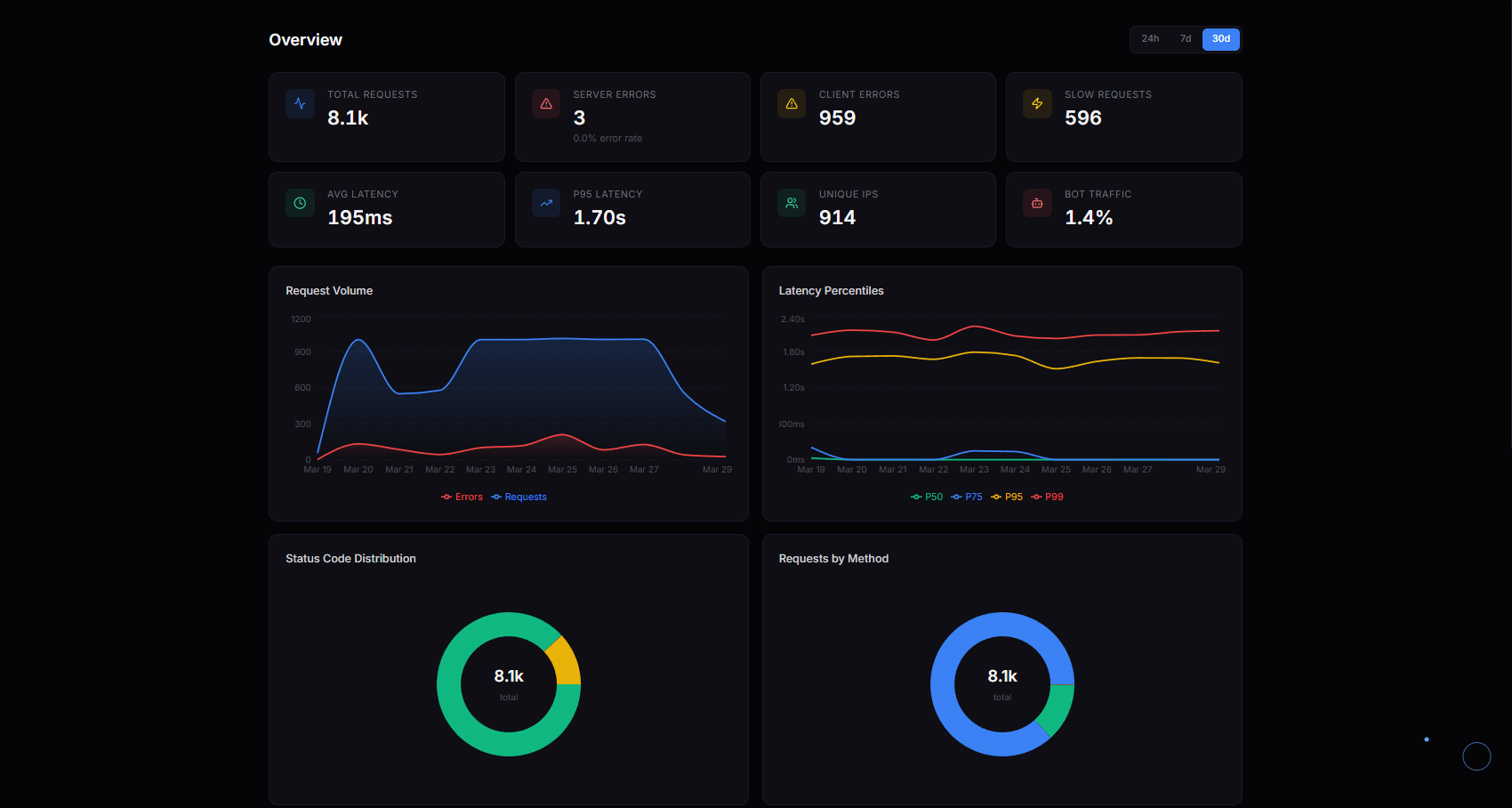
- Overview — total requests, error rate, P95 latency, 6 interactive charts
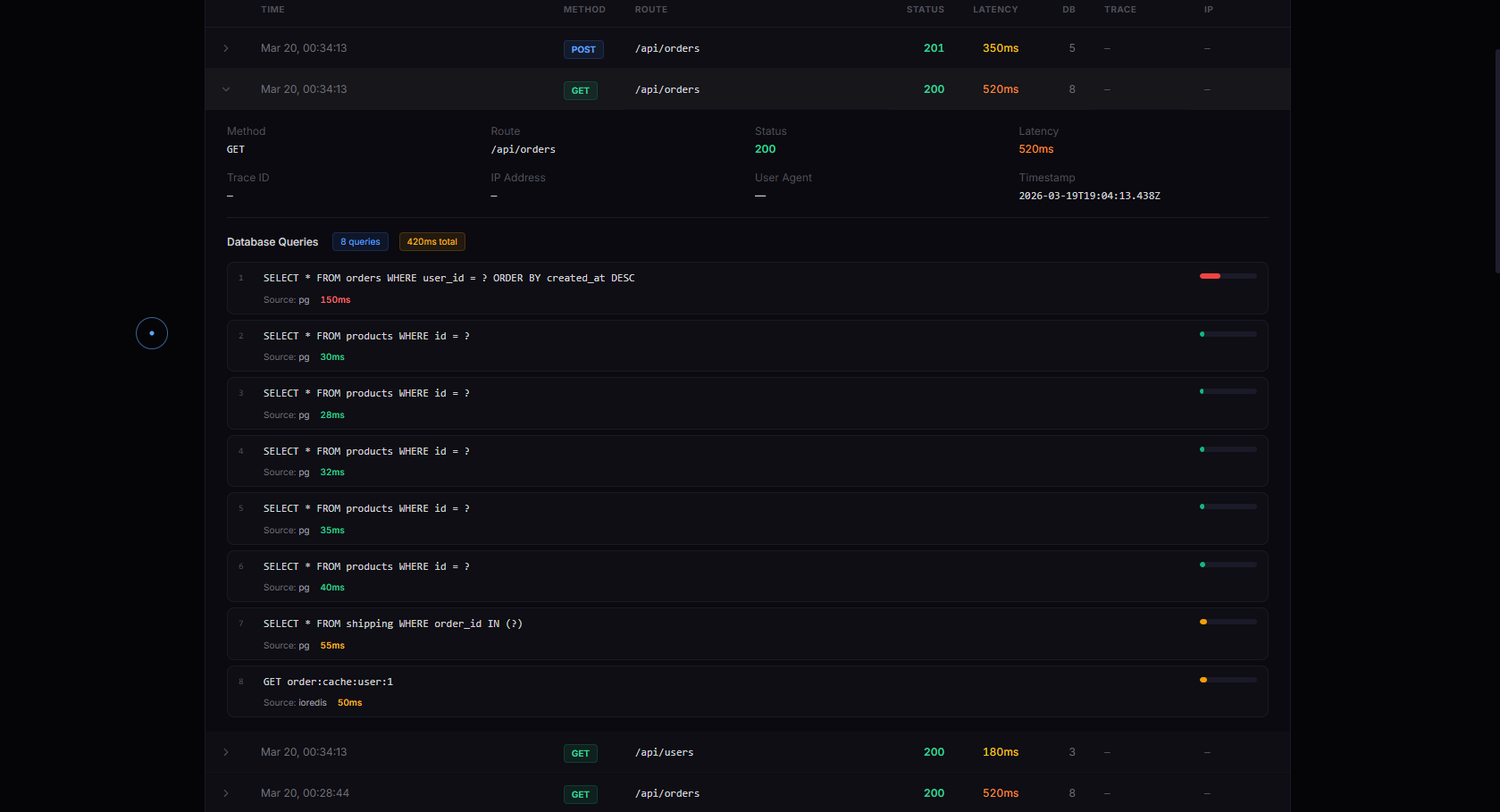
- All Requests — every request with full DB query details, trace IDs, filters
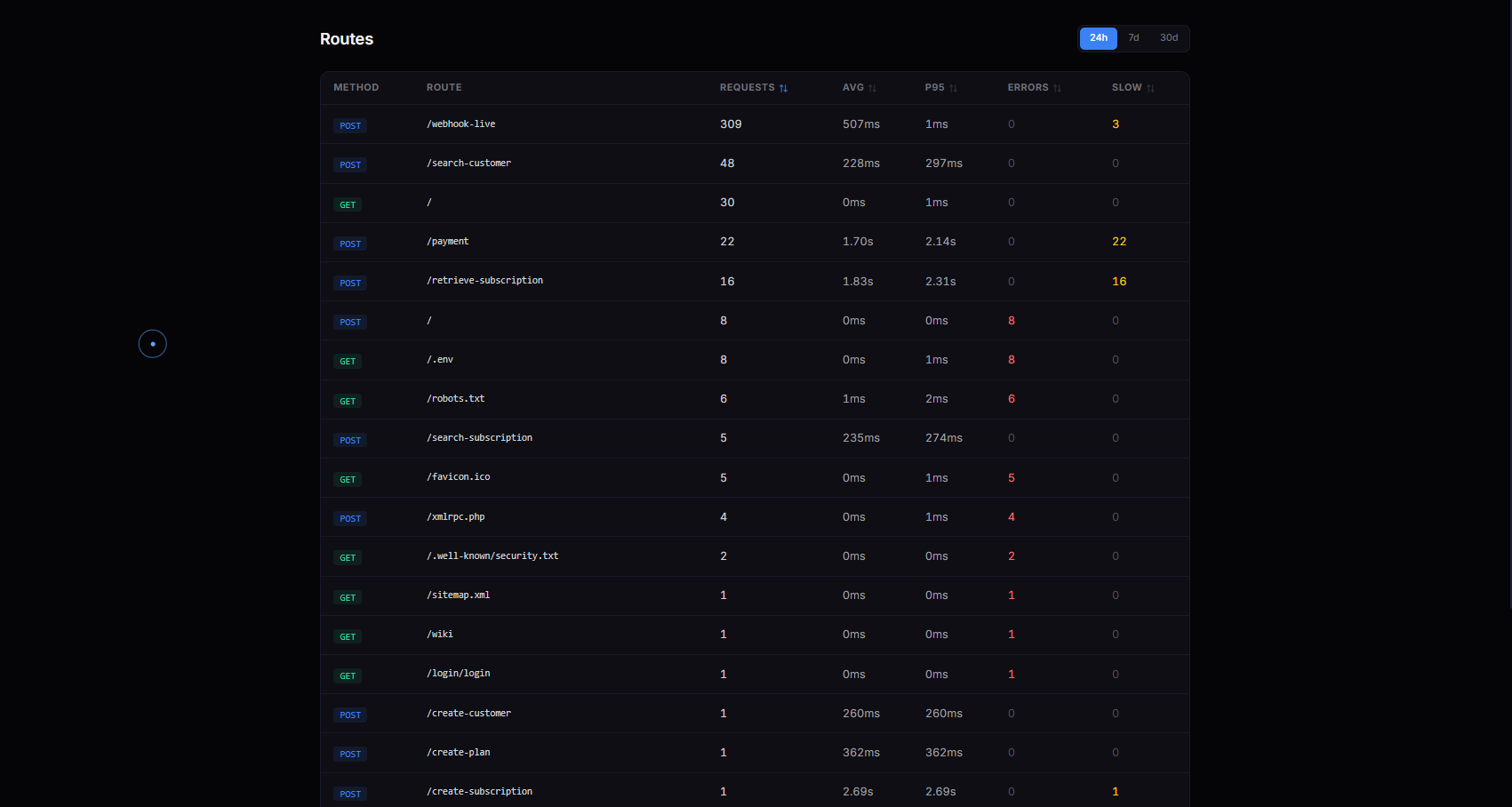
- Routes — per-route breakdown (calls, avg latency, P95, errors, slow count)
- Errors — paginated 4xx/5xx log with error timeline and top error routes
- Slow Requests — latency distribution histogram and worst offenders
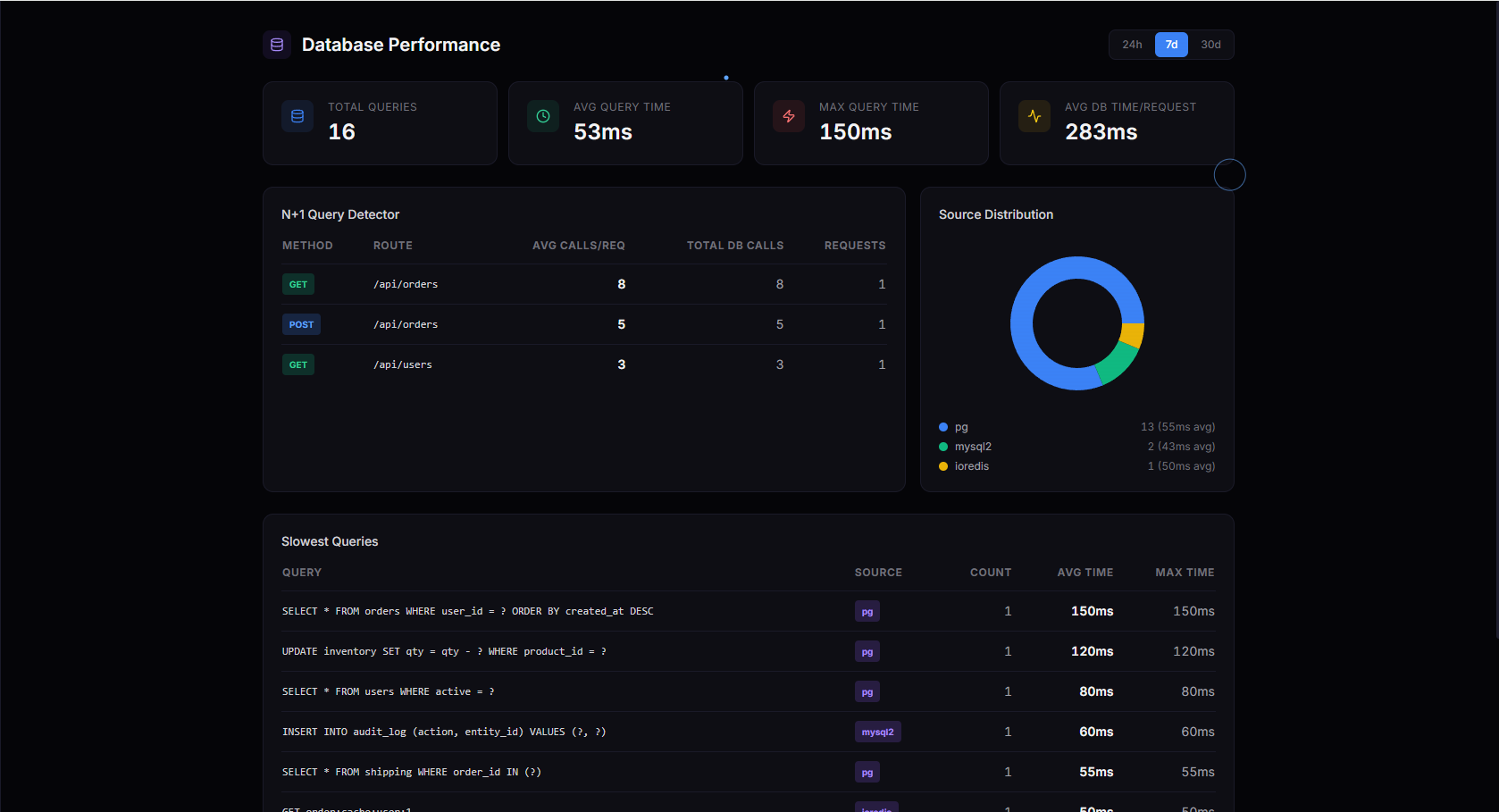
- Database — query profiling, N+1 detection, slow queries, source distribution
- Outbound — third-party API latency, error rates, call frequency
- Traces — distributed trace waterfall visualization
- Live Tail — real-time SSE stream with method/status/route filters
- Usage — daily quota tracking
- Alerts — email or Slack when error rate or latency spikes
Screenshots
Overview — real-time KPIs, request volume, latency percentiles, status distribution
Request Log — every request with full DB query details, trace IDs, filters
Database Profiling — N+1 detection, slow queries, source distribution
Routes — per-route breakdown with latency, errors, slow count
All Options
observe({
  // Required
  apiKey: 'sk_live_...',          // get one free at apilens.rest

  // Request tracking
  slowThreshold: 1000,            // ms — flag requests above this (default: 1000)
  skipRoutes: ['/health'],        // skip routes — string prefix or RegExp
  traceHeader: 'x-trace-id',     // header for trace ID propagation
  sampleRate: 1.0,                // 0.0–1.0, fraction to log (default: 1.0)
  maxRoutes: 1000,                // cap on distinct routes in metrics (default: 1000)

  // Callbacks
  onRequest: (ctx) => {},         // called at request start with context
  onResponse: (entry) => {},      // called after response with log entry

  // Logging
  logger: console.log,            // custom log fn, or false to silence
  tags: { service: 'api' },       // global tags on every entry

  // DB instrumentation
  autoInstrument: true,           // auto-patch DB libraries (default: true)

  // Outbound HTTP
  autoInstrumentOutbound: true,   // track fetch/axios/undici calls (default: true)

  // Process monitoring
  processMetrics: 30000,          // interval ms, or false to disable (default: 30000)
  captureUnhandledErrors: false,  // capture uncaughtException/unhandledRejection

  // Cloud shipper
  endpoint: 'https://...',        // override for self-hosted (default: api.apilens.rest)
  flushInterval: 5000,            // ms between batch flushes (default: 5000)
  flushSize: 100,                 // flush when queue hits this size (default: 100)
});
Custom Fields
const { addField } = require('auto-api-observe');

app.get('/orders', async (req, res) => {
  addField('userId', req.user.id);
  addField('plan', req.user.plan);
  const orders = await Order.findAll({ where: { userId: req.user.id } });
  res.json(orders);
});
In-Memory Metrics
Access per-route aggregates without sending anything to the cloud:
const { getMetrics } = require('auto-api-observe');

app.get('/internal/metrics', (req, res) => res.json(getMetrics()));
Returns: count, avg/min/max latency, error count, slow count, status code distribution — per route.
Distributed Tracing
Trace IDs propagate automatically across services via the x-trace-id header:
Service A (generates traceId: abc-123)
  → calls Service B (reads x-trace-id, reuses abc-123)
    → calls Service C (same ID — full chain visible in logs)
Access in your handler:
- Express/Fastify:
req.traceId - All frameworks:
getContext()?.traceId
TypeScript
import observe, {
  fastifyObservability,
  koaObservability,
  honoObservability,
  withLambdaObservability,
  createTrpcObservabilityMiddleware,
  ObservabilityOptions,
  LogEntry,
  RequestContext,
  OutboundCall,
  addField,
  getContext,
  getMetrics,
  autoInstrument,
  recordOutboundCall,
} from 'auto-api-observe';
Comparison
| Feature | auto-api-observe | Datadog | New Relic | Sentry | |---------|:---:|:---:|:---:|:---:| | Setup time | 10 seconds | 30+ min | 30+ min | 15+ min | | Lines of code | 1 | 20+ | 15+ | 10+ | | Runtime dependencies | 0 | 50+ | 40+ | 30+ | | Frameworks supported | 12 | agent-based | agent-based | SDK per framework | | Auto DB tracking | 9 libraries | custom setup | custom setup | limited | | Outbound HTTP tracking | auto | auto | auto | manual | | Process metrics | built-in | agent | agent | no | | Free tier | free during beta | 14-day trial | 100 GB/mo | 5k events |
Contributing
git clone https://github.com/rahhuul/auto-api-observe.git
cd auto-api-observe
npm install
npm test       # 158 tests across 25 files
npm run build  # TypeScript compile check
Open an issue before submitting large changes.
License
MIT