
avatarly
v1.0.0
Published
SVG avatars from any name, email or ID. Five styles, initials with readable contrast, palettes and a CLI. Works in any framework or none. ESM and CommonJS, zero dependencies.

Maintainers
 ckgiri
Readme
avatarly
Make an SVG avatar from any name, email or ID. Works with any framework, or with none.



avatarly turns a name, an email address or a user ID into an avatar picture.
The result is an SVG string. SVG is an image format written as text, so it stays sharp at any size. You can use it in React, Vue, Svelte, plain HTML, on a server or in a terminal.
The input is called the seed. The same seed always gives the same picture. There are five styles and eight colour palettes. Initials get a text colour that is easy to read. A small command-line tool (CLI) is included.
Examples
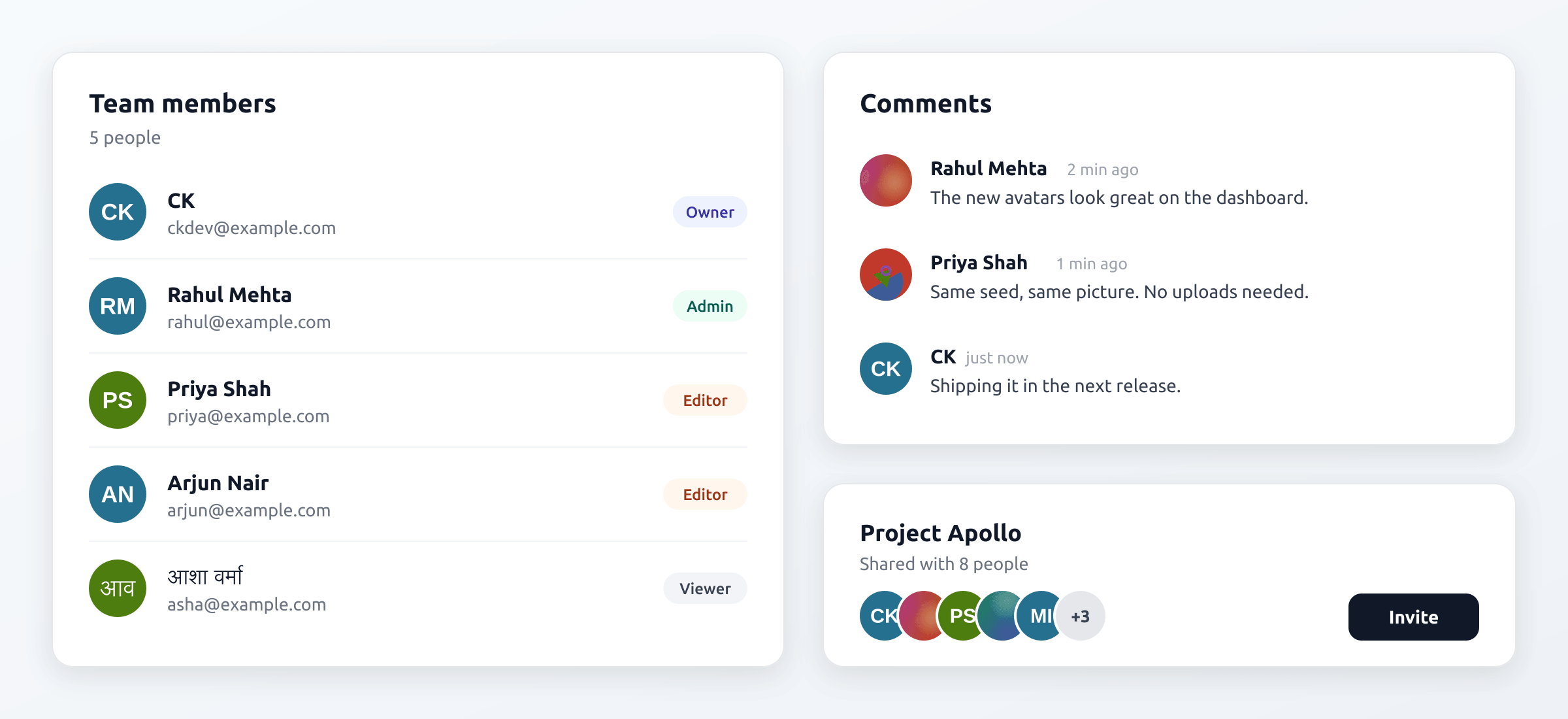
avatarly in a real app: a team list, comments and a group of avatars. No image uploads needed.
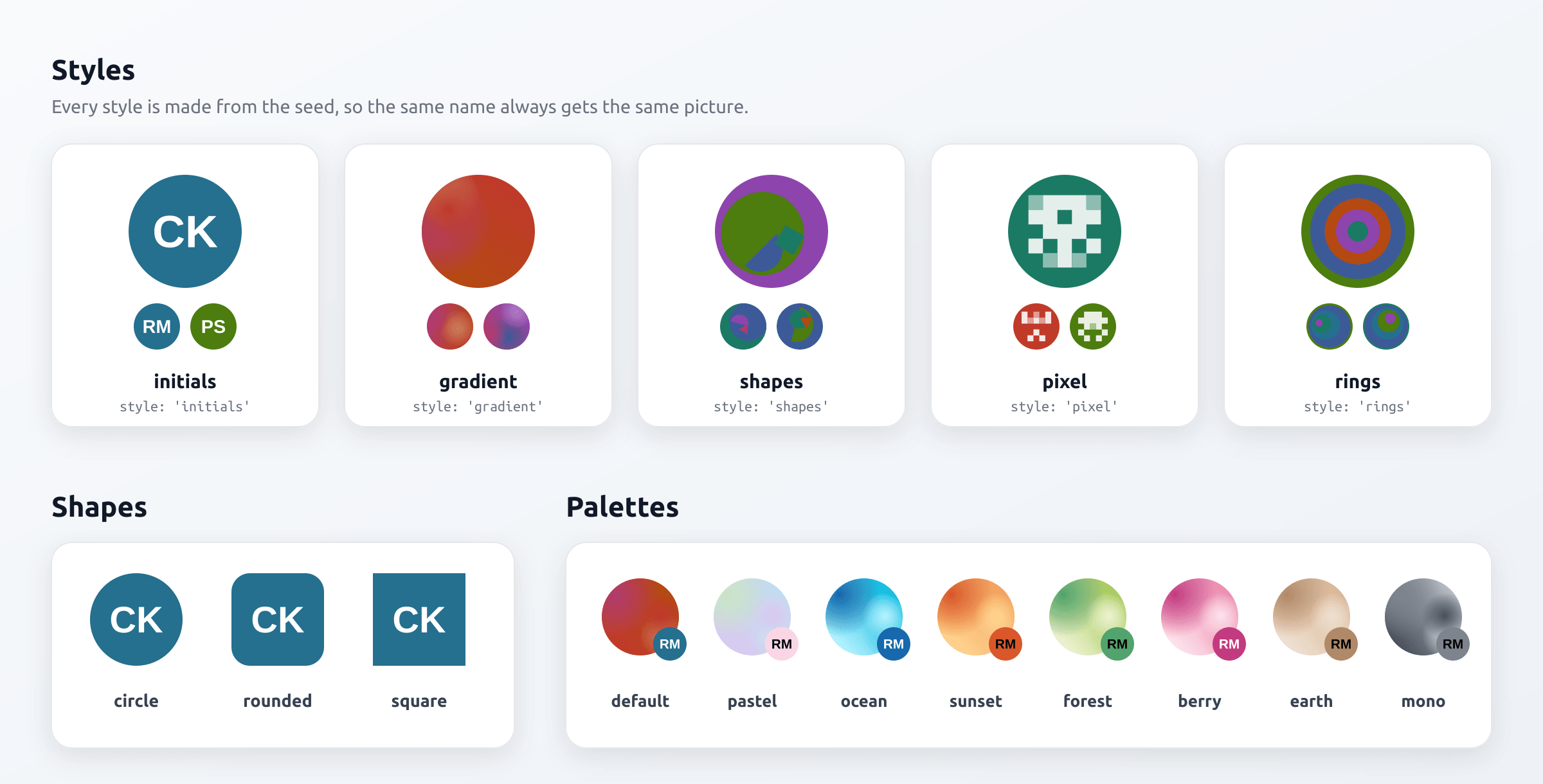
The five styles, three shapes and eight colour palettes:
Features
- Any framework, or none. It returns an SVG string, a
data:URI or an<img>tag. A data URI is the whole image packed into one text link. - Five styles. Initials, soft gradients, geometric shapes, a 5 x 5 pixel grid, and rings.
- Same input, same picture. The output is deterministic: it never changes for the same input. No random parts, no network requests, no saved state.
- Readable initials. The text colour is black or white. It is picked to give a WCAG contrast ratio of at least 4.5. (WCAG is the main web accessibility standard. The contrast ratio measures how much text stands out from its background.)
- Initials in any language. Works with emails, extra spaces, Devanagari, Chinese, Arabic, accents and emoji.
- Accessible. Every SVG has
role="img", anaria-labeland a<title>, so screen readers can read its name. - Safe with user input. All text in the SVG is escaped. IDs never clash when many avatars are on one page.
- Your own colours. Eight built-in palettes (sets of colours), or any list of hex colours.
- A CLI. For example:
npx avatarly "CK" -o avatar.svg. - Small. Zero dependencies, about 5.4 KB gzipped. Works with ESM (
import) and CommonJS (require). TypeScript types included.
Installation
If your project uses npm:
npm install avatarlyOr with another package manager:
pnpm add avatarly
yarn add avatarly
bun add avatarly
Quick start
Get started in 3 steps
Step 1. Install the package. Run npm install avatarly.
Step 2. Import a function and give it a seed. The seed is a name, an email or an ID.
import { avatar, avatarDataUri, getInitials } from 'avatarly'

// An SVG string
avatar('CK')
// => '<svg xmlns="http://www.w3.org/2000/svg" viewBox="0 0 100 100" width="64" height="64" role="img" aria-label="Avatar for CK">...'

// Another style and size
avatar('[email protected]', { style: 'gradient', size: 128 })

// A data URI for <img src> or CSS
avatarDataUri('CK')
// => 'data:image/svg+xml;charset=utf-8,%3Csvg%20xmlns...'

// Just the initials
getInitials('[email protected]')   // => 'CK'
Step 3. Show the result. Put the SVG string into your page, or use the data URI as the src of an <img>. See Usage for React, Vue, Svelte and more.
With CommonJS (the older require() style), use const { avatar } = require('avatarly').
Table of contents
Usage
Choose a style
Set the style option. The default is 'initials'.
| style | What it draws |
|---|---|
| 'initials' (default) | One or two letters on a coloured background. |
| 'gradient' | Soft, blurred colour blobs over a smooth gradient. |
| 'shapes' | Three overlapping shapes: circles, squares, triangles, half circles and rings. |
| 'pixel' | A symmetric 5 x 5 grid of squares, like an identicon. |
| 'rings' | Rings that share a centre, or rings that lean to one side. |
import { avatar, STYLES } from 'avatarly'

STYLES   // => ['initials', 'gradient', 'shapes', 'pixel', 'rings']

avatar('CK', { style: 'initials' })
avatar('CK', { style: 'gradient' })
avatar('CK', { style: 'shapes' })
avatar('CK', { style: 'pixel' })
avatar('CK', { style: 'rings' })
Only the 'initials' style shows text. The other styles are pictures made from the seed.
Choose a shape and size
avatar('CK', { size: 128 })                      // 128 x 128 pixels
avatar('CK', { shape: 'circle' })                // default
avatar('CK', { shape: 'rounded' })               // square with rounded corners
avatar('CK', { shape: 'square' })
The SVG has a viewBox. This means you can also resize it with CSS, and it stays sharp.
Use your own colours
A palette is a set of colours. Pick a built-in palette with palette, or pass your own hex colours with colors:
import { avatar, PALETTES } from 'avatarly'

Object.keys(PALETTES)
// => ['default', 'pastel', 'ocean', 'sunset', 'forest', 'berry', 'earth', 'mono']

PALETTES.ocean   // => ['#03256c', '#2541b2', '#1768ac', '#06bee1', '#b8f3ff']

avatar('CK', { palette: 'pastel' })
avatar('CK', { colors: ['#264653', '#2a9d8f', '#e9c46a', '#f4a261'] })
| Palette | Colours |
|---|---|
| default | Eight strong, medium-dark colours. White text is easy to read on all of them. |
| pastel | Six soft, light colours. Black text is easy to read on all of them. |
| ocean, sunset, forest, berry, earth | Five shades each, from dark to light. |
| mono | Five greys. |
Other colour options:
avatar('CK', { background: '#f4f4f5' })          // a fixed background
avatar('CK', { background: 'transparent' })      // no background
avatar('CK', { textColor: '#1f2328' })           // your own text colour
By default, the text colour is black or white. avatarly picks the one that stands out more from the background. The contrast ratio is always at least 4.5. This passes WCAG AA (the common accessibility level) for normal text.
If you set textColor, avatarly uses it as it is. It does not check the contrast.
With a transparent background, the initials are drawn in the palette colour picked for the seed.
Get initials
getInitials() returns the same initials that the 'initials' style shows:
import { getInitials } from 'avatarly'

getInitials('Asha Verma')                  // => 'AV'
getInitials('asha verma')                  // => 'AV'
getInitials('  Asha   Kumar  Verma ')      // => 'AV'
getInitials('[email protected]')      // => 'AV'
getInitials('Asha Verma <[email protected]>') // => 'AV'
getInitials('Madonna')                       // => 'MA'
getInitials('Madonna', { max: 1 })           // => 'M'
getInitials('Ada King Lovelace', { max: 3 }) // => 'AKL'
getInitials('आशा वर्मा')                       // => 'आव'
getInitials('王小明')                         // => '王'
getInitials('😀 Party')                      // => '😀P'
getInitials('')                              // => '?'
The rules:
- For an email address, only the part before
@is used. For'Name <address>', only the name is used. - Words are split at spaces and at
.,_,-,+and,. - If there are more words than
max, avatarly uses the firstmax - 1words and the last word. With the defaultmaxof 2, that means the first and the last word. - A single word gives its first
maxcharacters if it starts with a digit, or if its script has upper and lower case (Latin, Greek, Cyrillic and others). For example,'Madonna'gives'MA'. - A single word in another script (Devanagari, Chinese, Japanese, Korean, Arabic and others) gives only its first character. So does an emoji. In these scripts, two characters from one word are often not meaningful.
- Letters are made upper case.
- Each character is a whole grapheme. A grapheme is one character as a reader sees it, even when it is built from several parts. So accents, Indic vowel signs and conjuncts, and multi-part emoji stay together. avatarly uses
Intl.Segmenterwhen it is available, and a simpler built-in rule when it is not. - Empty input, or input with no letters, digits or emoji, gives
'?'.
To show your own text, use the initials option: avatar('CK', { initials: 'Me' }). To take fewer or more initials from the seed, use maxInitials.
Match your UI to the avatar colour
getColor() returns the background colour that the 'initials' style uses for a seed. Use it to colour a name, a border or a chat bubble so that it matches the avatar:
import { getColor, contrastRatio, readableTextColor } from 'avatarly'

getColor('CK')                            // => '#256f8f'
getColor('CK', 'ocean')                   // => '#b8f3ff'
getColor('CK', ['#264653', '#2a9d8f', '#e9c46a'])   // => '#2a9d8f'

readableTextColor('#256f8f')                        // => '#ffffff'
contrastRatio('#000000', '#ffffff')                 // => 21
contrastRatio('#3d5a98', '#ffffff').toFixed(2)      // => '6.74'
Use it in React
Use the data URI as the src of an <img>:
import { avatarDataUri } from 'avatarly'

function UserAvatar({ name }) {
  return <img src={avatarDataUri(name, { size: 40 })} width={40} height={40} alt="" />
}
Or put the SVG inline (directly in the page). The SVG is escaped, so this is safe with user input:
import { avatar } from 'avatarly'

function UserAvatar({ name }) {
  return <span dangerouslySetInnerHTML={{ __html: avatar(name, { size: 40 }) }} />
}
Use it in Vue
<script setup>
import { avatar, avatarDataUri } from 'avatarly'
defineProps({ name: String })
</script>

<template>
  <img :src="avatarDataUri(name, { size: 40 })" width="40" height="40" alt="" />
  <!-- or inline -->
  <span v-html="avatar(name, { size: 40 })" />
</template>
Use it in Svelte
<script>
  import { avatar } from 'avatarly'
  export let name
</script>

{@html avatar(name, { size: 40 })}
Use it in plain HTML
You need a bundler, or another tool that serves npm packages as ES modules:
import { avatar, avatarImgTag } from 'avatarly'

document.querySelector('#me').innerHTML = avatar('CK', { size: 48 })
document.querySelector('#list').insertAdjacentHTML('beforeend', avatarImgTag('Ada Lovelace'))
avatarImgTag() returns a full <img> element, with width, height and alt:
avatarImgTag('CK', { size: 48 })
// => '<img src="data:image/svg+xml;charset=utf-8,%3Csvg...'
Use it in an email
Many email apps, including Gmail and Outlook, do not show SVG images. For emails:
- Convert the SVG to PNG on your server. For example, with sharp:
import sharp from 'sharp'
import { avatar } from 'avatarly'

const png = await sharp(Buffer.from(avatar('CK', { size: 128 }))).png().toBuffer()- Attach the PNG to the email, or host it and link to it.
The initials are drawn with the fonts installed on the server. For scripts such as Devanagari, install a font that covers them, for example a Noto font.
Use it on the server
avatar() uses no browser APIs. So it works in Node.js, Bun, Deno and edge runtimes. Here is a small avatar server built with node:http:
import { createServer } from 'node:http'
import { avatar, STYLES } from 'avatarly'

createServer((req, res) => {
  const url = new URL(req.url, 'http://localhost')
  const name = url.searchParams.get('name') ?? ''
  const style = STYLES.includes(url.searchParams.get('style')) ? url.searchParams.get('style') : 'initials'
  res.writeHead(200, {
    'Content-Type': 'image/svg+xml',
    'Cache-Control': 'public, max-age=86400',
  })
  res.end(avatar(name, { style, size: 128 }))
}).listen(3000)

// http://localhost:3000/?name=CK&style=rings
An invalid option value throws a TypeError. So check any values that come from users, the way style is checked above.
Use the CLI
npx avatarly "CK"                                         # print the SVG
npx avatarly "CK" --style gradient --size 128 -o avatar.svg
npx avatarly user-42 --style pixel --palette ocean --shape rounded -o user-42.svg
npx avatarly "CK" --format uri                            # print a data URI
npx avatarly "CK" --format img                            # print an <img> tag
| Option | What it does |
|---|---|
| -s, --style <name> | initials, gradient, shapes, pixel or rings. Default initials. |
| --size <px> | Width and height in pixels. Default 64. |
| --shape <name> | circle, square or rounded. Default circle. |
| -p, --palette <name> | A built-in palette. Default default. |
| -c, --colors <list> | Your own colours, separated by commas: "#264653,#2a9d8f,#e9c46a". |
| -b, --background <hex> | Background colour, or transparent. |
| --text-color <css> | Colour of the initials. |
| --initials <text> | Text to show instead of the initials from the seed. |
| --max-initials <n> | Most initials to take from the seed. Default 2. |
| --title <text> | Accessible name. Default Avatar for <seed>. |
| --font-family <css>, --font-weight <css> | Font of the initials. |
| -f, --format <name> | svg, uri (data URI) or img (HTML <img> tag). Default svg. |
| -o, --out <file> | Write to a file instead of standard output. |
| -h, --help, -v, --version | Show help or the version. |
If the seed starts with a dash, put -- before it: npx avatarly -- -seed. On an error, the message goes to standard error and the exit code is 1.
API
avatar(seed, options?)
function avatar(seed: string | number, options?: AvatarOptions): stringReturns the avatar as an SVG string. The same seed and options always give the same SVG. Throws a TypeError if an option is invalid.
| Option | Type | Default | What it does |
|---|---|---|---|
| style | 'initials' \| 'gradient' \| 'shapes' \| 'pixel' \| 'rings' | 'initials' | The look of the avatar. See Choose a style. |
| size | number | 64 | Width and height in pixels. |
| shape | 'circle' \| 'square' \| 'rounded' | 'circle' | The outline. 'rounded' is a square with rounded corners. |
| palette | PaletteName | 'default' | A built-in palette from PALETTES. Ignored if colors is set. |
| colors | string[] | none | Your own hex colours, like ['#264653', '#2a9d8f']. Both #abc and #aabbcc work. |
| background | string | from the colours | A fixed hex background, or 'transparent'. |
| title | string | 'Avatar for <seed>' | The accessible name. Used in <title> and aria-label. An empty seed gives 'Avatar'. |
| initials | string | from the seed | Text for the 'initials' style. Used as it is, not made upper case. |
| maxInitials | number | 2 | Most initials to take from the seed. See Get initials. |
| fontFamily | string | system UI fonts | CSS font for the initials. The default is in DEFAULT_FONT_FAMILY. |
| fontWeight | number \| string | 600 | CSS font weight (boldness) of the initials. |
| textColor | string | black or white | Colour of the initials. The default has a contrast ratio of at least 4.5 with the background. |
Every SVG uses a viewBox of 0 0 100 100. It has role="img", an aria-label and a <title>. Gradient and clip-path IDs start with a hash (a short code) made from the seed and options.
avatarDataUri(seed, options?)
function avatarDataUri(seed: string | number, options?: AvatarOptions): stringReturns the avatar as a data:image/svg+xml;charset=utf-8,... URI. The SVG is percent-encoded: special characters, including quotes and parentheses, become % codes. So the URI is safe in HTML attributes and in CSS url(). Takes the same options as avatar().
avatarImgTag(seed, options?)
function avatarImgTag(seed: string | number, options?: ImgTagOptions): stringReturns an HTML <img> element. Its src is the data URI, and it has width, height and alt. All attribute values are HTML-escaped. Takes the options of avatar(), plus these:
| Option | Type | Default | What it does |
|---|---|---|---|
| alt | string | the title | The alt text. Use '' when the name is already shown next to the avatar. |
| className | string | none | Value for the class attribute. |
getInitials(name, options?)
function getInitials(name: string, options?: { max?: number }): stringReturns the initials of a name, an email address or any text, in upper case. See Get initials for the rules.
| Option | Type | Default | What it does |
|---|---|---|---|
| max | number | 2 | Most characters to return. A whole number, 1 or more. |
getColor(seed, palette?)
function getColor(seed: string | number, palette?: PaletteName | string[]): stringPicks a colour from the palette using the seed. Returns it as a lowercase hex colour. The same seed always gives the same colour. The 'initials' style uses this colour as its background.
palette is a built-in palette name or a list of hex colours. The default is 'default'.
contrastRatio(a, b)
function contrastRatio(a: string, b: string): numberReturns the WCAG 2 contrast ratio between two hex colours. The result is from 1 (no contrast) to 21 (black on white). WCAG AA asks for at least 4.5 for normal text and 3 for large text. Throws a TypeError if a colour is not a hex colour.
readableTextColor(background)
function readableTextColor(background: string): stringReturns '#ffffff' (white) or '#000000' (black), whichever stands out more from the background. The contrast ratio is always at least 4.5.
Constants
| Name | Value |
|---|---|
| PALETTES | The built-in palettes, as { default: [...], pastel: [...], ... }. Frozen (cannot be changed). |
| STYLES | ['initials', 'gradient', 'shapes', 'pixel', 'rings'] |
| SHAPES | ['circle', 'square', 'rounded'] |
| DEFAULT_FONT_FAMILY | The default list of fonts for initials. |
Types
All TypeScript types are exported: AvatarOptions, AvatarStyle, AvatarShape, ImgTagOptions, PaletteName, InitialsOptions.
Comparison
Checked against the latest versions on npm in November 2026: boring-avatars 2.0.4, @dicebear/core 11.0.0 and jdenticon 3.3.0.
| | boring-avatars | @dicebear/core | jdenticon | avatarly |
|---|---|---|---|---|
| Works without React | No | Yes | Yes | Yes |
| Returns an SVG string | No | Yes | Yes | Yes |
| Has a data URI helper | No | Yes | No | Yes |
| Works with CommonJS require() | No | No | Yes | Yes |
| Needs no other packages (dependencies or peer dependencies) | No (React) | Yes | No | Yes |
| Avatar styles come in the same package | Yes | No (@dicebear/styles) | Yes | Yes |
| Initials avatars | No | Yes | No | Yes |
| Accessible name (<title>) added by default | No | No | No | Yes |
| CLI in the same package | No | No | Yes | Yes |
| Works on Node.js 20 | Yes | No (needs 22) | Yes | Yes |
Migrating from boring-avatars
boring-avatars is a React component. avatarly returns a string. So in React, you put it in an <img> or inline.
The two packages draw different designs. The same name gives a different picture.
Before:
import Avatar from 'boring-avatars'

<Avatar name="Maria Mitchell" variant="ring" size={40} square colors={['#264653', '#2a9d8f', '#e9c46a', '#f4a261']} />
After:
import { avatarDataUri } from 'avatarly'

<img
  src={avatarDataUri('Maria Mitchell', { style: 'rings', size: 40, shape: 'square', colors: ['#264653', '#2a9d8f', '#e9c46a', '#f4a261'] })}
  width={40}
  height={40}
  alt=""
/>
| boring-avatars | avatarly |
|---|---|
| name | The first argument (seed). |
| variant | style. Closest matches: marble to 'gradient', bauhaus and geometric to 'shapes', pixel to 'pixel', ring to 'rings'. |
| colors | colors. |
| size (default 40) | size in pixels (default 64). |
| square | shape: 'square', or shape: 'rounded' for rounded corners. |
| title (off by default) | title is always set. The default is 'Avatar for <seed>'. |
Notes and limitations
- The seed is used exactly as given.
'Asha'and'asha'give different avatars. So do'[email protected]'and'[email protected]'. To get the same avatar for both, trim and lower-case emails yourself. - Pictures may change in a new major version. Within one major version, the same seed and options give the same SVG.
- Only the
'initials'style shows text. It uses the fonts on the viewer's device. So letters can look a little different on each system. - Many email apps do not show SVG. Convert to PNG for emails. See Use it in an email.
- The automatic text colour needs a hex background.
colorsandbackgroundmust be hex colours (#abcor#aabbcc).textColoraccepts any CSS colour, and its contrast is not checked. - The same avatar twice on one page uses the same IDs. This is fine, because the content behind those IDs is also the same. Different seeds or options always use different IDs.
- Without
Intl.Segmenter, avatarly uses a simpler grapheme rule. It handles accents, Indic conjuncts, emoji sequences and flags. For rare text, it may differ from the full Unicode rules.
Requirements
- Node.js 20 or newer. Also works in Bun, Deno and browsers.
- Works with ESM (
import) and CommonJS (require). - TypeScript types included.
- Zero dependencies.
License
MIT