
awesome-floating-bubble-carousel
v0.1.3
Published
A floating bubble carousel React component with animated physics and multiple data loading modes.

Maintainers
 pravinrd
Keywords
Readme
Awesome Floating Bubble Carousel
A floating bubble carousel React component with animated physics, glow styling, and multiple data loading modes.
Install
npm install awesome-floating-bubble-carouselWatch the demo here
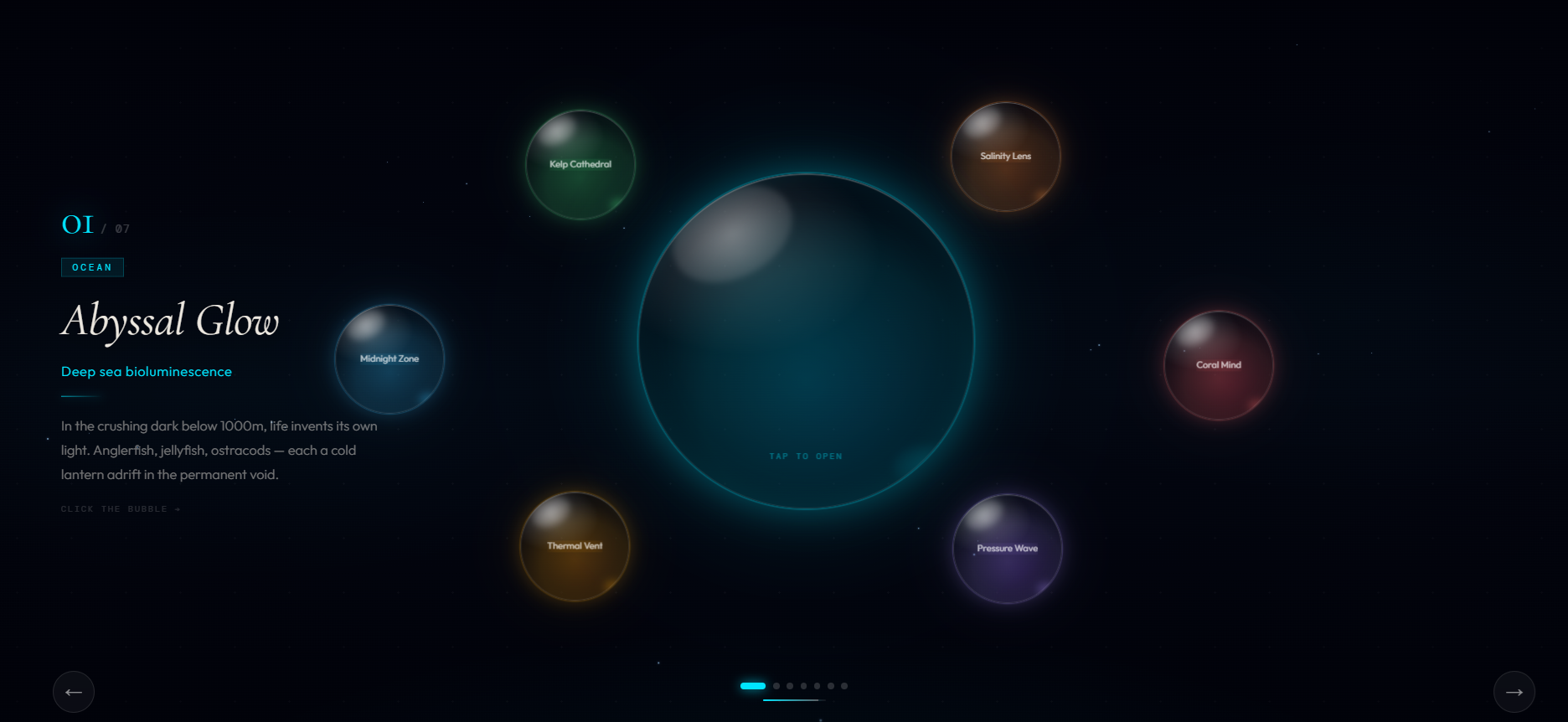
Quick Usage
import { AwesomeFloatingBubbleCarousel } from "awesome-floating-bubble-carousel";
import type { BubbleCard } from "awesome-floating-bubble-carousel";

const cards: BubbleCard[] = [
  {
    id: 1,
    title: "Abyssal Glow",
    subtitle: "Deep sea bioluminescence",
    tag: "OCEAN",
    body: "In the crushing dark below 1000m, life invents its own light.",
    accent: "#00e5ff",
    accentB: "#0077bb",
  },
  {
    id: 2,
    title: "Coral Mind",
    subtitle: "Reef intelligence",
    tag: "BIO",
    body: "A reef is a distributed mind sensing temperature and chemistry.",
    accent: "#ff6b6b",
    accentB: "#cc2244",
  },
];

export default function Example() {
  return (
    <AwesomeFloatingBubbleCarousel
      data={cards}
      heroSize={320}
      satSize={104}
      autoInterval={4400}
      floatIntensity={0.65}
      onCardChange={(i, c) => console.log("Active:", i, c.title)}
      onCardClick={(c) => console.log("Clicked:", c.title)}
    />
  );
}
Styles
The component includes required animations and font variables in its CSS. Most bundlers will pick this up automatically when you import the component. If your app does not, add an explicit CSS import:
import "awesome-floating-bubble-carousel/dist/awesome-floating-bubble-carousel.css";Props
| Prop | Type | Default | Description |
| ---------------- | ------------------------------------------- | ----------- | ------------------------------------------------------------ |
| data | BubbleCard[] | undefined | Static data array. If provided, no fetch happens. |
| apiEndpoint | string | undefined | URL to JSON data. Accepts an array or an object with data. |
| apiHeaders | Record<string, string> | undefined | Extra request headers for fetch. |
| apiTransform | (raw: unknown) => BubbleCard[] | undefined | Transform API response to BubbleCard[]. |
| heroSize | number | 320 | Hero bubble diameter in px. |
| satSize | number | 104 | Satellite bubble diameter in px. |
| autoInterval | number | 4400 | Auto-advance interval in ms. |
| floatIntensity | number | 0.65 | Float sway intensity, range 0 to 1. |
| onCardClick | (card: BubbleCard) => void | undefined | Click handler for the active (hero) bubble. |
| onCardChange | (index: number, card: BubbleCard) => void | undefined | Called when active card changes. |
BubbleCard Shape
| Field | Type | Required | Description |
| ---------- | ---------------------------- | -------- | ------------------------------------------- |
| id | number | Yes | Unique card id. |
| title | string | Yes | Card title. |
| subtitle | string | No | Optional subtitle. |
| tag | string | No | Small label above the title. |
| body | string | No | Description text for the info panel. |
| accent | string | Yes | Primary color used for glow and UI accents. |
| accentB | string | No | Secondary color used for inner bubble glow. |
| imageUrl | string | No | Optional image used inside the bubble. |
| onClick | (card: BubbleCard) => void | No | Optional per-card click handler. |
Data Examples
1) Static Data
const cards: BubbleCard[] = [
  {
    id: 1,
    title: 'Midnight Zone',
    subtitle: 'Mesopelagic migration',
    tag: 'DEPTH',
    body: 'Between 200m and 1000m lies the twilight zone.',
    accent: '#38bdf8',
    accentB: '#0c4a6e',
  },
  {
    id: 2,
    title: 'Kelp Cathedral',
    subtitle: 'Submarine forest ecology',
    tag: 'FLORA',
    body: 'Giant kelp builds vertical forests up to 40m tall.',
    accent: '#4ade80',
    accentB: '#14532d',
  },
]

<AwesomeFloatingBubbleCarousel data={cards} />
2) Local JSON File
Create a JSON file and serve it from your app. For Vite, place it in public/data/cards.json.
[
  {
    "id": 1,
    "title": "Thermal Vent",
    "subtitle": "Hydrothermal chemistry",
    "tag": "GEO",
    "body": "Superheated water erupts from the seafloor.",
    "accent": "#f59e0b",
    "accentB": "#92400e"
  },
  {
    "id": 2,
    "title": "Salinity Lens",
    "subtitle": "Halocline stratification",
    "tag": "FLOW",
    "body": "A sharp density boundary acts as a sonar mirror.",
    "accent": "#fb923c",
    "accentB": "#7c2d12"
  }
]
<AwesomeFloatingBubbleCarousel apiEndpoint="/data/cards.json" />3) Remote API Endpoint
If your API returns { data: [...] }, use apiTransform:
// Example response shape
{
  "data": [
    {
      "id": 1,
      "title": "Abyssal Glow",
      "accent": "#00e5ff"
    }
  ]
}
<AwesomeFloatingBubbleCarousel
apiEndpoint="https://api.example.com/v1/bubbles"
apiHeaders={{ Authorization: "Bearer YOUR_TOKEN" }}
apiTransform={(raw: any) => raw.data}
/>📊 Mock Data
If you need sample data to test your integration, you can use our pre-configured JSON mock file.
Direct Download
Click the button below to view or save the mock data file:
Note: If the file opens in your browser, just right-click and select "Save As..."