
awesome-rolodex-carousel
v0.1.3
Published
A beautifully animated rolodex carousel component for React with mechanical drum illusion

Maintainers
 pravinrd
Readme
Awesome Rolodex Carousel
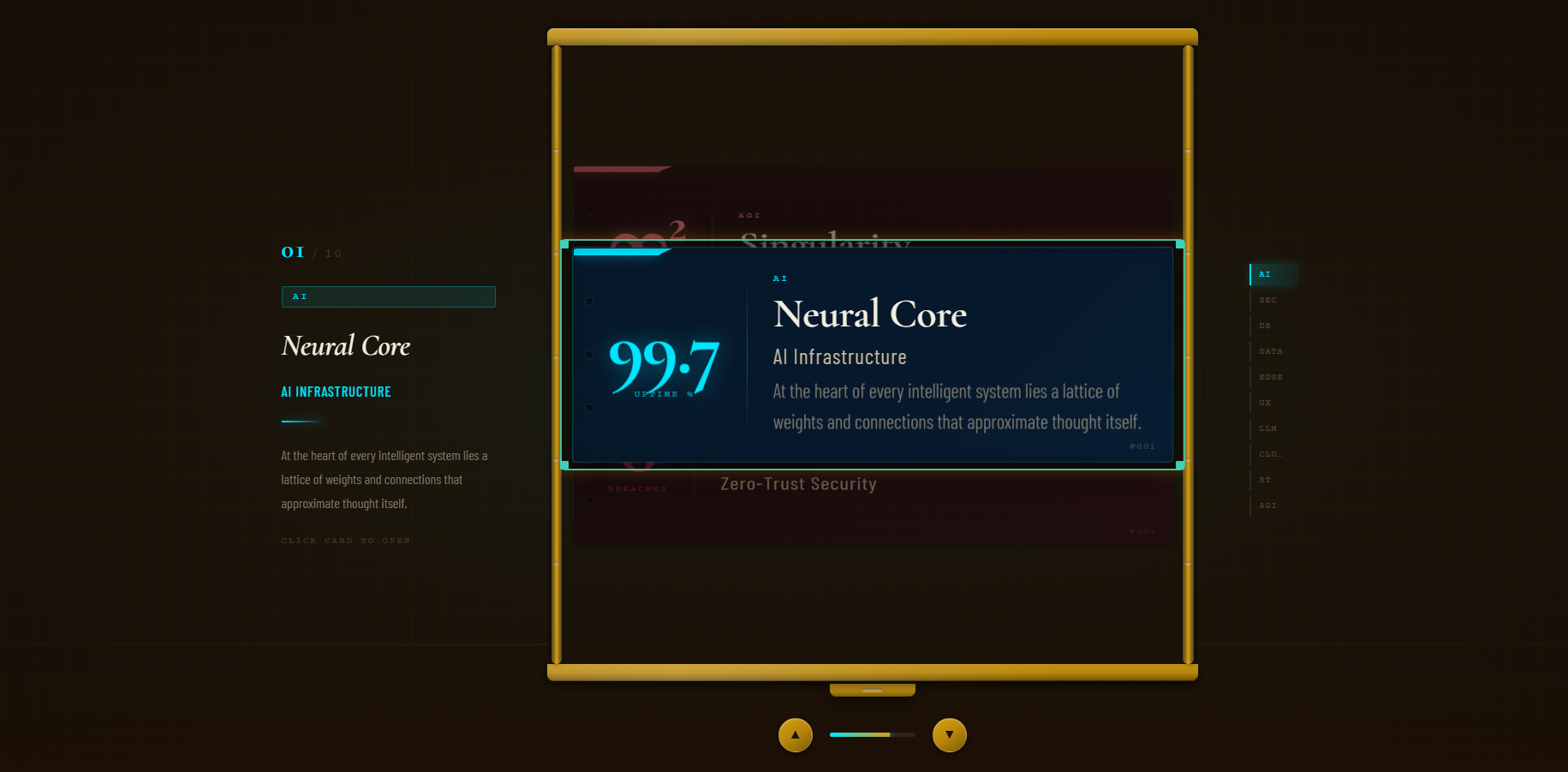
A beautifully animated rolodex carousel component for React with a mechanical drum illusion effect. Features smooth drag interaction, keyboard navigation, auto-scroll, and customizable cards with accent colors.
Features
- 🎯 Mechanical Drum Illusion — Authentic 3D cylinder rotation effect using pure 2D CSS
- 🎨 Customizable Cards — Full control over colors, metrics, content, and callbacks
- 🖱️ Smooth Interactions — Drag, scroll, keyboard arrows, and click navigation
- ⚡ Auto-Scroll — Automatic card advancement with pause on hover
- 📱 Responsive — Full-screen responsive design with touch support
- 🔄 Multiple Data Modes — Load from static data, local JSON, or REST API
- 🎭 Rich Styling — Brass frame, textured cards, glowing accents, and elegant typography
Watch the demo here
Installation
npm install awesome-rolodex-carouselOr with yarn:
yarn add awesome-rolodex-carouselQuick Start
Basic Usage
import React from 'react'
import { AwesomeRolodexCarousel } from 'awesome-rolodex-carousel'
import 'awesome-rolodex-carousel/styles'

const cards = [
  {
    id: 1,
    title: 'Neural Core',
    subtitle: 'AI Infrastructure',
    tag: 'AI',
    accent: '#00e5ff',
    bgFrom: '#020d1f',
    bgTo: '#041a30',
    metric: '99.7',
    metricLabel: 'Uptime %',
    body: 'At the heart of every intelligent system lies a lattice of weights and connections.',
    onClick: (card) => console.log('Clicked:', card.title)
  },
  {
    id: 2,
    title: 'Void Protocol',
    subtitle: 'Zero-Trust Security',
    tag: 'SEC',
    accent: '#ff2d6f',
    bgFrom: '#1a040a',
    bgTo: '#2e0812',
    metric: '0',
    metricLabel: 'Breaches',
    body: 'In an architecture of zero trust, every packet is a stranger.'
  },
  // ... more cards
]

export default function App() {
  return (
    <AwesomeRolodexCarousel
      data={cards}
      onCardChange={(index, card) => console.log(`Active: [${index + 1}] ${card.title}`)}
      onCardClick={(card) => console.log('Card clicked:', card.title)}
    />
  )
}
With Styling
To use the built-in styles, import them in your main file:
import 'awesome-rolodex-carousel/styles'Custom CSS variables can override defaults:
:root {
  --font-display: 'Georgia', serif;
  --font-mono: 'Courier New', monospace;
  --font-ui: 'Arial', sans-serif;
  --bg: #1a1208;
  --brass: #b8860b;
  --cream: #f5efe0;
}
Props Table
| Prop | Default | Description |
|------|---------|-------------|
| data | undefined | Array of card objects to display. Use one of: data, apiEndpoint |
| apiEndpoint | undefined | URL to fetch cards from (local JSON or REST API). Response format: array of card objects or { data: [...] } |
| apiHeaders | undefined | Custom HTTP headers for API requests (e.g., auth tokens) |
| apiTransform | undefined | Function to transform API response into a card array |
| cardWidth | 560 | Width of each card in pixels |
| cardHeight | 200 | Height of each card in pixels |
| slotGap | 54 | Vertical spacing between card slots in pixels |
| visibleRadius | 3 | Number of cards visible above/below active card |
| autoInterval | 3200 | Auto-advance interval in milliseconds. Pauses on hover. Set to 0 to disable |
| snapDuration | 420 | Snap animation duration in milliseconds when navigating |
| onCardClick | undefined | Callback when clicking the active card (fallback if card has no onClick) |
| onCardChange | undefined | Callback fired when active card changes |
Data Loading Modes
Mode 1: Static Data (Default)
Pass card data directly as a prop:
<AwesomeRolodexCarousel
  data={cards}
  onCardChange={(index, card) => console.log(index, card)}
/>
Mode 2: Local JSON File
<AwesomeRolodexCarousel
  apiEndpoint="/data/cards.json"
/>
File format: /public/data/cards.json
[
  {
    "id": 1,
    "title": "Card Title",
    "subtitle": "Subtitle",
    "tag": "TAG",
    "accent": "#00e5ff",
    "bgFrom": "#020d1f",
    "bgTo": "#041a30",
    "metric": "99.7",
    "metricLabel": "Uptime %",
    "body": "Description text"
  }
]
Mode 3: REST API
<AwesomeRolodexCarousel
  apiEndpoint="https://api.example.com/cards"
  apiHeaders={{ Authorization: 'Bearer TOKEN' }}
  apiTransform={(raw) => raw.data} // if response is { data: ... }
/>
Complete Example
import React, { useState } from 'react'
import { AwesomeRolodexCarousel } from 'awesome-rolodex-carousel'
import 'awesome-rolodex-carousel/styles'

const SAMPLE_CARDS = [
  {
    id: 1,
    title: 'Neural Core',
    subtitle: 'AI Infrastructure',
    tag: 'AI',
    accent: '#00e5ff',
    bgFrom: '#020d1f',
    bgTo: '#041a30',
    metric: '99.7',
    metricLabel: 'Uptime %',
    body: 'At the heart of every intelligent system lies a lattice of weights and connections that approximate thought itself.',
    onClick: (card) => alert(`Opened: ${card.title}`),
  },
  {
    id: 2,
    title: 'Void Protocol',
    subtitle: 'Zero-Trust Security',
    tag: 'SEC',
    accent: '#ff2d6f',
    bgFrom: '#1a040a',
    bgTo: '#2e0812',
    metric: '0',
    metricLabel: 'Breaches',
    body: 'In an architecture of zero trust, every packet is a stranger. Every handshake is a negotiation.',
  },
  {
    id: 3,
    title: 'Orbital DB',
    subtitle: 'Vector Storage Engine',
    tag: 'DB',
    accent: '#9d4dff',
    bgFrom: '#0b0518',
    bgTo: '#140a28',
    metric: '1.4B',
    metricLabel: 'Vectors',
    body: 'Meaning is distance. In high-dimensional space, concepts cluster by affinity forming constellations of semantics.',
  },
  {
    id: 4,
    title: 'Flux Stream',
    subtitle: 'Real-Time Pipeline',
    tag: 'DATA',
    accent: '#00ff9d',
    bgFrom: '#011a0c',
    bgTo: '#022e16',
    metric: '4.2M',
    metricLabel: 'Events/sec',
    body: 'Data is not a resource to be mined — it is a river to be navigated. The stream never stops.',
  },
  {
    id: 5,
    title: 'Halo Edge',
    subtitle: 'Global Edge Network',
    tag: 'EDGE',
    accent: '#ff9d00',
    bgFrom: '#1a0e02',
    bgTo: '#2a1603',
    metric: '312',
    metricLabel: 'PoPs',
    body: 'Deploy models to the periphery. Compute lives where your users live. Latency measured in microseconds.',
  },
]

export default function App() {
  const [activeCard, setActiveCard] = useState(null)

  return (
    <div>
      <AwesomeRolodexCarousel
        data={SAMPLE_CARDS}
        cardWidth={560}
        cardHeight={200}
        slotGap={54}
        visibleRadius={3}
        autoInterval={3200}
        snapDuration={420}
        onCardChange={(index, card) => {
          setActiveCard(card)
          console.log(`Active: [${index + 1}] ${card.title}`)
        }}
        onCardClick={(card) => {
          alert(`You clicked: ${card.title}`)
        }}
      />

      {activeCard && (
        <div style={{ position: 'fixed', bottom: 20, left: 20 }}>
          <p>Active: {activeCard.title}</p>
        </div>
      )}
    </div>
  )
}
Sample Data
Use this sample data to test the component:
[
  {
    "id": 1,
    "title": "Neural Core",
    "subtitle": "AI Infrastructure",
    "tag": "AI",
    "accent": "#00e5ff",
    "bgFrom": "#020d1f",
    "bgTo": "#041a30",
    "metric": "99.7",
    "metricLabel": "Uptime %",
    "body": "At the heart of every intelligent system lies a lattice of weights and connections that approximate thought itself."
  },
  {
    "id": 2,
    "title": "Void Protocol",
    "subtitle": "Zero-Trust Security",
    "tag": "SEC",
    "accent": "#ff2d6f",
    "bgFrom": "#1a040a",
    "bgTo": "#2e0812",
    "metric": "0",
    "metricLabel": "Breaches",
    "body": "In an architecture of zero trust, every packet is a stranger. Every handshake is a negotiation."
  },
  {
    "id": 3,
    "title": "Orbital DB",
    "subtitle": "Vector Storage Engine",
    "tag": "DB",
    "accent": "#9d4dff",
    "bgFrom": "#0b0518",
    "bgTo": "#140a28",
    "metric": "1.4B",
    "metricLabel": "Vectors",
    "body": "Meaning is distance. In high-dimensional space, concepts cluster by affinity forming constellations of semantics."
  },
  {
    "id": 4,
    "title": "Flux Stream",
    "subtitle": "Real-Time Pipeline",
    "tag": "DATA",
    "accent": "#00ff9d",
    "bgFrom": "#011a0c",
    "bgTo": "#022e16",
    "metric": "4.2M",
    "metricLabel": "Events/sec",
    "body": "Data is not a resource to be mined — it is a river to be navigated. The stream never stops."
  },
  {
    "id": 5,
    "title": "Halo Edge",
    "subtitle": "Global Edge Network",
    "tag": "EDGE",
    "accent": "#ff9d00",
    "bgFrom": "#1a0e02",
    "bgTo": "#2a1603",
    "metric": "312",
    "metricLabel": "PoPs",
    "body": "Deploy models to the periphery. Compute lives where your users live. Latency measured in microseconds."
  }
]
Styling
CSS Variables
The component uses CSS custom properties (CSS variables) for theming. Override them in your :root:
:root {
  /* Typography */
  --font-display: 'Cormorant Garamond', Georgia, serif;
  --font-mono: 'Courier Prime', 'Courier New', monospace;
  --font-ui: 'Barlow Condensed', sans-serif;

  /* Colors */
  --bg: #1a1208;
  --bg-mid: #211808;
  --brass: #b8860b;
  --brass-light: #d4a017;
  --brass-dim: #7a5a08;
  --amber: #f5a623;
  --cream: #f5efe0;
  --cream-dim: #c8b898;
  --mahogany: #4a1f0a;
  --linen: #e8dcc8;
  --shadow: rgba(0, 0, 0, 0.7);
}
Including Styles
// Option 1: Import CSS file
import 'awesome-rolodex-carousel/styles'

// Option 2: Use CSS variables in your own stylesheet
Interactions
- Mouse Drag: Drag the carousel vertically to rotate through cards
- Scroll Wheel: Scroll up/down to navigate
- Keyboard: Use ↑ and ↓ arrow keys to navigate
- Click: Click on the active card to trigger its onClick handler
- Auto-scroll: Carousel auto-advances every 3.2 seconds (configurable)
- Hover: Hovering pauses auto-scroll
Browser Support
- Chrome/Edge (latest)
- Firefox (latest)
- Safari (latest)
- Mobile browsers (iOS Safari, Chrome Mobile)
Performance
- Uses
requestAnimationFramefor smooth 60fps animations - CSS transforms for performant hardware acceleration
- Minimal re-renders with efficient state management
- Loads images lazily when data is provided via API