
awesome-scratch-carousel
v0.1.7
Published
A beautiful, interactive React scratch card carousel component with canvas-based reveal mechanics and auto-scroll animations
Downloads
65

Maintainers
 pravinrd
Readme
✦ Awesome Scratch Carousel
A beautiful, interactive React scratch card carousel component with canvas-based reveal mechanics, auto-scroll animations, and fully customizable styling. Perfect for gamified UX, loyalty programs, promotional campaigns, and reward systems.
Features
✨ Canvas-based Scratch Mechanics
- Real-time scratch detection with configurable reveal threshold
- Holographic shimmer effect and noise texture on foil surface
- Smooth cursor-following scratch circles
🎬 Advanced Animations
- Card fold-in/fold-out transitions on auto-advance
- Particle burst effect on reveal
- Glow and shadow effects synchronized with card state
- Progress bar with auto-scroll indicator
🔄 Flexible Data Sources
- Static data arrays
- Local JSON file loading
- RESTful API integration with optional transformation
- Custom headers support (Authorization, etc.)
🎮 Interactive Controls
- Auto-scroll with configurable interval
- Manual advance via dot navigation
- Pause on hover
- Click handlers for revealed cards
- Touch and pointer event support
⚙️ Fully Customizable
- Adjustable card dimensions and brush radius
- Configurable color gradients and accents
- Customizable transition timing
- Auto-complete threshold configuration
Installation
NPM
npm install awesome-scratch-carouselYarn
yarn add awesome-scratch-carouselPNPM
pnpm install awesome-scratch-carouselLive Example
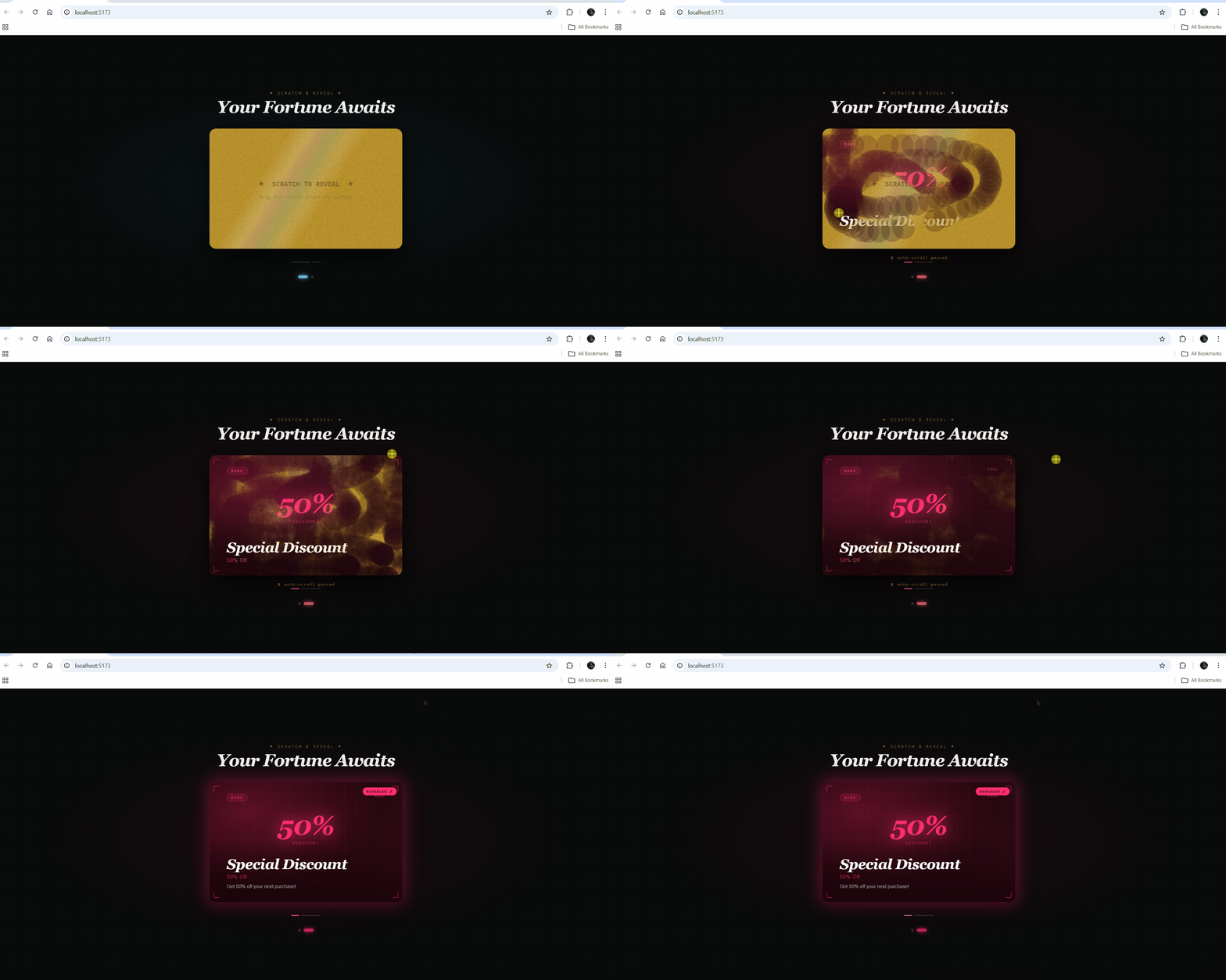
Quick Start
Basic Usage with Static Data
import React from "react";
import { AwesomeScratchCarousel } from "awesome-scratch-carousel";
import "awesome-scratch-carousel/style.css";

const cards = [
  {
    id: 1,
    title: "Premium Prize",
    subtitle: "Exclusive Offer",
    tag: "JACKPOT",
    reward: "$500",
    rewardLabel: "Prize Amount",
    body: "You won a premium prize! Click to claim.",
    accent: "#00e5ff",
    bgFrom: "#020d2e",
    bgTo: "#061a3a",
  },
  {
    id: 2,
    title: "Special Discount",
    subtitle: "50% Off",
    tag: "RARE",
    reward: "50%",
    rewardLabel: "Discount",
    body: "Get 50% off your next purchase!",
    accent: "#ff2d6f",
    bgFrom: "#1a040a",
    bgTo: "#2e0a14",
  },
];

export default function App() {
  return (
    <AwesomeScratchCarousel
      data={cards}
      cardWidth={480}
      cardHeight={300}
      autoInterval={4000}
      brushRadius={28}
      revealThreshold={65}
      onCardClick={(card) => {
        console.log("Card revealed:", card);
        // Handle click - navigate, show modal, etc.
      }}
    />
  );
}
TypeScript reference: import type { ScratchCard } from 'awesome-scratch-carousel';
Usage Examples
Example 1: Loading from API
import { AwesomeScratchCarousel } from "awesome-scratch-carousel";

export default function App() {
  return (
    <AwesomeScratchCarousel
      apiEndpoint="https://api.example.com/scratch-cards"
      apiHeaders={{
        Authorization: "Bearer YOUR_TOKEN",
        "Content-Type": "application/json",
      }}
      cardWidth={500}
      cardHeight={310}
      onCardClick={(card) => {
        // Navigate to offer or handle reward
        window.location.href = `/reward/${card.id}`;
      }}
    />
  );
}
Example 2: Local JSON File
// public/cards.json
[
  {
    id: 1,
    title: "Free Shipping",
    subtitle: "Order anywhere",
    tag: "BONUS",
    reward: "Free",
    rewardLabel: "Shipping",
    body: "Get free shipping on your next order!",
    accent: "#00ff9d",
    bgFrom: "#021a0e",
    bgTo: "#041f12",
  },
];

// App.jsx
import { AwesomeScratchCarousel } from "awesome-scratch-carousel";

export default function App() {
  return (
    <AwesomeScratchCarousel
      apiEndpoint="/cards.json"
      cardWidth={480}
      cardHeight={300}
    />
  );
}
Props Reference
Component Props
| Prop | Type | Default | Description |
| ---------------------- | --------------------------------- | ----------- | ------------------------------------------------------------------------------------------------------------------------------------------- |
| data | ScratchCard[] | undefined | Static array of scratch cards. Use EITHER data OR apiEndpoint, not both. |
| apiEndpoint | string | undefined | URL to fetch cards from (JSON file or REST endpoint). Response must be ScratchCard[] or { data: ScratchCard[] }. |
| apiHeaders | Record<string, string> | {} | Optional HTTP headers for API requests (e.g., Authorization). |
| apiTransform | (raw: unknown) => ScratchCard[] | undefined | Function to transform raw API response to ScratchCard[] format. |
| cardWidth | number | 480 | Width of each card in pixels. |
| cardHeight | number | 300 | Height of each card in pixels. |
| autoInterval | number | 4000 | Auto-advance interval in milliseconds. Set to 0 to disable auto-scroll. |
| brushRadius | number | 28 | Scratch cursor radius in pixels. Controls the size of the scratch circle. |
| revealThreshold | number | 65 | Percentage of card that must be scratched (0-100) to trigger auto-complete. |
| transitionDuration | number | 600 | Duration of card fold animation in milliseconds. |
| onCardClick | (card: ScratchCard) => void | undefined | Global callback when a card is clicked (after reveal or at ≥65% scratch). Cards can have their own onClick handler that takes precedence. |
ScratchCard Data Interface
| Property | Type | Required | Description |
| ---------------- | ----------------------------- | -------- | --------------------------------------------------------------------- |
| id | number | ✓ | Unique identifier for the card. |
| title | string | ✓ | Main headline revealed under the scratch. |
| subtitle | string | | Secondary text displayed under the title. |
| body | string | | Body text shown after the card is revealed. |
| tag | string | | Category/badge label (e.g., "JACKPOT", "RARE", "EPIC"). |
| reward | string | | Big highlight value (prize amount, discount percentage, stat, offer). |
| rewardLabel | string | | Label for the reward (e.g., "Savings", "Off", "Points"). |
| accent | string | ✓ | Accent color (hex) — drives glow, tag styling, and reward text color. |
| bgFrom | string | ✓ | Background gradient start color (hex). |
| bgTo | string | ✓ | Background gradient end color (hex). |
| scratchColor | string | | Scratch surface foil color. Default: gold (#b8902a). |
| onClick | (card: ScratchCard) => void | | Card-specific click handler. Overrides global onCardClick. |
Event Handling
Card-Level Click Handler
const card = {
  id: 1,
  title: "Prize",
  reward: "$100",
  rewardLabel: "Reward",
  accent: "#00e5ff",
  bgFrom: "#020d2e",
  bgTo: "#061a3a",
  // Card-specific handler (takes precedence)
  onClick: (card) => {
    console.log(`You won ${card.reward}!`);
    // Claim reward, navigate, etc.
  },
};
Global Click Handler
<AwesomeScratchCarousel
  data={cards}
  // Used for cards without their own onClick
  onCardClick={(card) => {
    if (card.reward) {
      console.log(`Processing ${card.reward} reward`);
    }
  }}
/>
API Data Format
Expected Response Formats
[
  {
    "id": 1,
    "title": "Prize",
    "reward": "$100",
    "accent": "#00e5ff",
    "bgFrom": "#020d2e",
    "bgTo": "#061a3a"
  }
]