
awesome-typewriter-carousel
v0.1.1
Published
A retro typewriter-inspired carousel component for React with customizable animations.

Maintainers
 pravinrd
Readme
awesome-typewriter-carousel
A cinematic, editorial-grade React 19 carousel with authentic typewriter animation, full-bleed imagery, animated film grain, live scrolling news ticker, per-slide accent colours, and zero UI dependencies.
Installation
npm install awesome-typewriter-carouselyarn add awesome-typewriter-carouselpnpm add awesome-typewriter-carouselSlide Of Typewriter
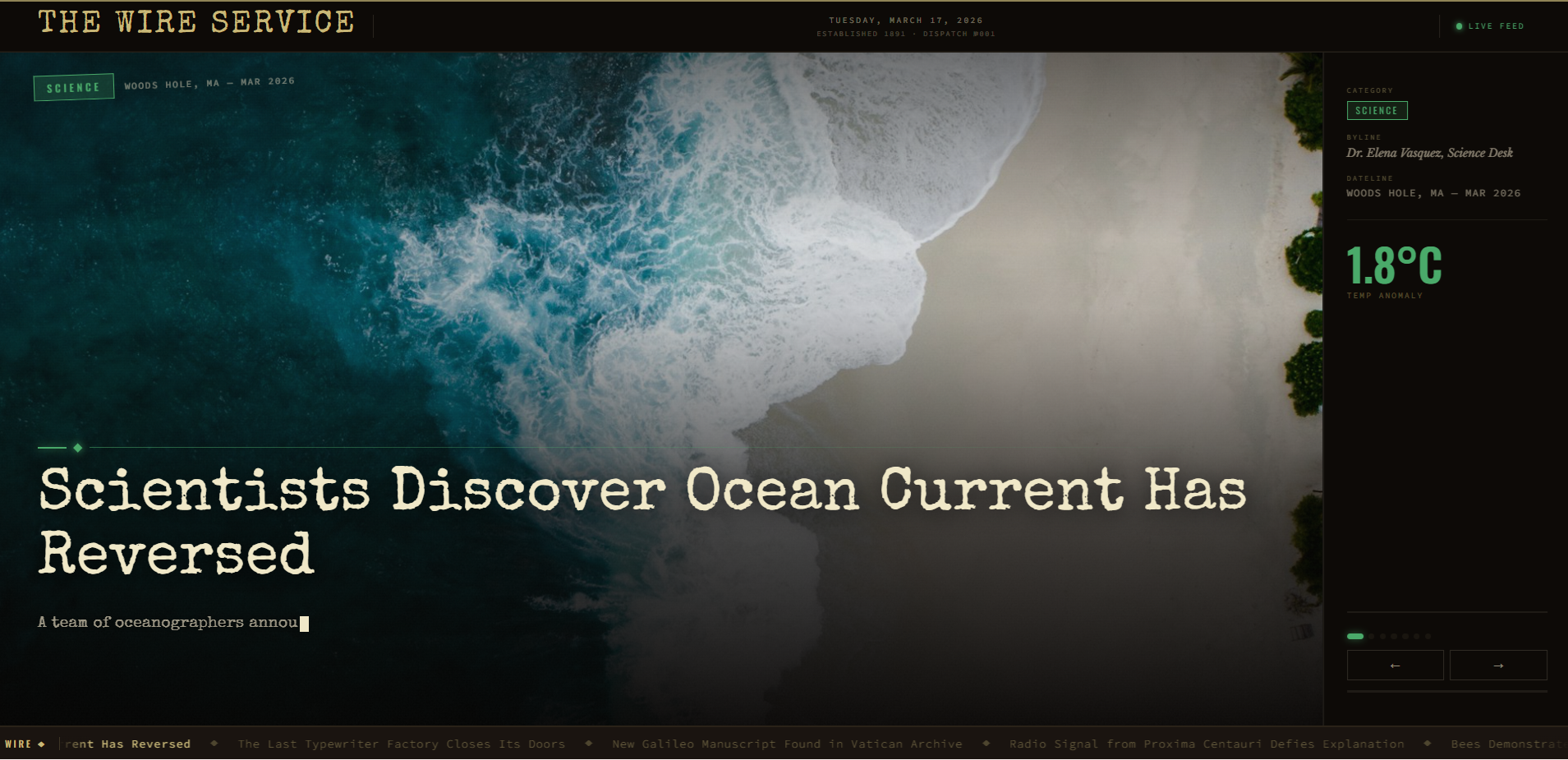
Quick Start
Always import the stylesheet alongside the component — it provides the keyframe animations and CSS custom properties that drive the entire visual layer.
import { AwesomeTypewriterCarousel } from 'awesome-typewriter-carousel'
import 'awesome-typewriter-carousel/style.css'

const SLIDES = [
  {
    id: 1,
    headline: 'Scientists Discover Ocean Current Has Reversed',
    byline: 'Dr. Elena Vasquez, Science Desk',
    category: 'SCIENCE',
    dateline: 'WOODS HOLE, MA — MAR 2026',
    lead: 'A team of oceanographers announced findings that challenge decades of climate modelling.',
    stat: '1.8°C',
    statLabel: 'TEMP ANOMALY',
    accent: '#4aaa6a',
    imageUrl: 'https://images.unsplash.com/photo-1505118380757-91f5f5632de0?w=1600&q=80',
  },
]

export default function App() {
  return <AwesomeTypewriterCarousel data={SLIDES} />
}
The carousel renders at
100vw × 100vhby default. Place it inside a sized container when embedding within a larger layout.
Examples
1. Minimal — Static Data
import { AwesomeTypewriterCarousel } from 'awesome-typewriter-carousel'
import 'awesome-typewriter-carousel/style.css'

const SLIDES = [
  {
    id: 1,
    headline: 'Breaking: Market Reaches All-Time High',
    category: 'FINANCE',
    accent: '#ccaa3a',
  },
  {
    id: 2,
    headline: 'New Exoplanet Found in Habitable Zone',
    category: 'SCIENCE',
    accent: '#4a8acc',
  },
]

export default function App() {
  return <AwesomeTypewriterCarousel data={SLIDES} />
}
2. Remote API Endpoint
The component fetches on mount. The response must be an array of slide objects, or an object containing a data array.
import { AwesomeTypewriterCarousel } from 'awesome-typewriter-carousel'
import 'awesome-typewriter-carousel/style.css'

export default function App() {
  return (
    <AwesomeTypewriterCarousel
      apiEndpoint="https://api.example.com/headlines"
      apiHeaders={{ Authorization: 'Bearer MY_TOKEN' }}
    />
  )
}
3. Remote API with Custom Transform
When your API shape does not match the slide contract, pass apiTransform to remap the raw payload before it reaches the component.
import { AwesomeTypewriterCarousel } from 'awesome-typewriter-carousel'
import 'awesome-typewriter-carousel/style.css'

function transformNews(raw) {
  return raw.articles.map((article, i) => ({
    id: i + 1,
    headline: article.title,
    lead: article.description,
    category: article.source.name.toUpperCase(),
    dateline: new Date(article.publishedAt).toDateString(),
    imageUrl: article.urlToImage,
    accent: '#c8844a',
  }))
}

export default function App() {
  return (
    <AwesomeTypewriterCarousel
      apiEndpoint="https://newsapi.org/v2/top-headlines?country=us"
      apiHeaders={{ 'X-Api-Key': 'YOUR_NEWSAPI_KEY' }}
      apiTransform={transformNews}
    />
  )
}
4. Custom Typing & Erasing Speed
import { AwesomeTypewriterCarousel } from 'awesome-typewriter-carousel'
import 'awesome-typewriter-carousel/style.css'

export default function App() {
  return (
    <AwesomeTypewriterCarousel
      data={SLIDES}
      typingSpeed={40}
      erasingSpeed={20}
    />
  )
}
5. Slow, Dramatic Mode
Each keystroke feels deliberate — ideal for cinematic or artistic presentations.
import { AwesomeTypewriterCarousel } from 'awesome-typewriter-carousel'
import 'awesome-typewriter-carousel/style.css'

export default function App() {
  return (
    <AwesomeTypewriterCarousel
      data={SLIDES}
      typingSpeed={80}
      erasingSpeed={35}
      readDuration={6000}
    />
  )
}
6. Fast News-Feed Mode
High-velocity mode suited to newsroom dashboards or live data walls.
import { AwesomeTypewriterCarousel } from 'awesome-typewriter-carousel'
import 'awesome-typewriter-carousel/style.css'

export default function App() {
  return (
    <AwesomeTypewriterCarousel
      data={SLIDES}
      typingSpeed={12}
      erasingSpeed={6}
      readDuration={1800}
      tickerSpeed={160}
    />
  )
}
7. Per-Slide onClick Handler
Click handlers fire only during the reading phase — when the headline and lead are fully typed and the user can actually read the content.
import { AwesomeTypewriterCarousel } from 'awesome-typewriter-carousel'
import 'awesome-typewriter-carousel/style.css'

const SLIDES = [
  {
    id: 1,
    headline: 'Scientists Discover Ocean Current Has Reversed',
    category: 'SCIENCE',
    accent: '#4aaa6a',
    onClick: (slide) => window.open(`https://example.com/article/${slide.id}`, '_blank'),
  },
  {
    id: 2,
    headline: 'The Last Typewriter Factory Closes Its Doors',
    category: 'CULTURE',
    accent: '#c8844a',
    onClick: (slide) => console.log('Read more:', slide.headline),
  },
]

export default function App() {
  return <AwesomeTypewriterCarousel data={SLIDES} />
}
8. Global Fallback Click Handler
onSlideClick is called when the active slide has no per-slide onClick defined.
import { AwesomeTypewriterCarousel } from 'awesome-typewriter-carousel'
import 'awesome-typewriter-carousel/style.css'

export default function App() {
  function handleSlideClick(slide) {
    console.log('Slide clicked:', slide.headline)
  }

  return (
    <AwesomeTypewriterCarousel
      data={SLIDES}
      onSlideClick={handleSlideClick}
    />
  )
}
9. onSlideChange Callback
Fires on every slide transition — automatic or manual — and receives the new index and the full slide object.
import { AwesomeTypewriterCarousel } from 'awesome-typewriter-carousel'
import 'awesome-typewriter-carousel/style.css'

export default function App() {
  function handleSlideChange(index, slide) {
    document.title = `[${index + 1}] ${slide.headline}`
    analytics.track('carousel_impression', { id: slide.id })
  }

  return (
    <AwesomeTypewriterCarousel
      data={SLIDES}
      onSlideChange={handleSlideChange}
    />
  )
}
10. Accent Colours per Slide
The accent hex drives the category badge, decorative rules, dot nav active state, progress bar glow, and pull-stat — all from a single value per slide.
import { AwesomeTypewriterCarousel } from 'awesome-typewriter-carousel'
import 'awesome-typewriter-carousel/style.css'

const SLIDES = [
  { id: 1, headline: 'Arctic Ice Sheet Reaches Record Low',   category: 'CLIMATE',  accent: '#4aaa6a' },
  { id: 2, headline: 'Mars Mission Confirms Water Ice',       category: 'SPACE',    accent: '#4a8acc' },
  { id: 3, headline: 'Renaissance Painting Found in Attic',  category: 'CULTURE',  accent: '#c8844a' },
  { id: 4, headline: 'Quantum CPU Breaks Encryption Record', category: 'TECH',     accent: '#9a7acc' },
  { id: 5, headline: 'Bee Population Rises for First Time',  category: 'BIOLOGY',  accent: '#ccaa3a' },
]

export default function App() {
  return <AwesomeTypewriterCarousel data={SLIDES} />
}
11. Slides without Lead Paragraphs
When lead is omitted the carousel moves directly from the typed headline into the reading phase.
import { AwesomeTypewriterCarousel } from 'awesome-typewriter-carousel'
import 'awesome-typewriter-carousel/style.css'

const SLIDES = [
  { id: 1, headline: 'GDP Growth Beats Forecasts for Third Quarter', category: 'ECONOMY', accent: '#4aaa6a' },
  { id: 2, headline: 'New Species of Deep-Sea Jellyfish Catalogued',  category: 'SCIENCE', accent: '#4a8acc' },
  { id: 3, headline: 'City Unveils Zero-Emission Transit Blueprint',  category: 'URBAN',   accent: '#ccaa3a' },
]

export default function App() {
  return <AwesomeTypewriterCarousel data={SLIDES} readDuration={2500} />
}
12. Slides without Background Images
When imageUrl is omitted the image stage renders against a deep dark background. Film grain and cinematic scrim overlays still apply.
import { AwesomeTypewriterCarousel } from 'awesome-typewriter-carousel'
import 'awesome-typewriter-carousel/style.css'

const SLIDES = [
  {
    id: 1,
    headline: 'Server Migration Complete — Zero Downtime Achieved',
    category: 'OPS',
    byline: 'Platform Engineering Team',
    dateline: 'INTERNAL — Q1 2026',
    lead: 'The full migration to the new cluster finished ahead of schedule with no service interruptions.',
    stat: '0ms',
    statLabel: 'DOWNTIME',
    accent: '#4aaa6a',
  },
]

export default function App() {
  return <AwesomeTypewriterCarousel data={SLIDES} />
}
13. Pull-Stats Showcase
Use stat and statLabel to spotlight a large metric in the sidebar — ideal for data journalism and KPI dashboards.
import { AwesomeTypewriterCarousel } from 'awesome-typewriter-carousel'
import 'awesome-typewriter-carousel/style.css'

const SLIDES = [
  {
    id: 1,
    headline: 'Global EV Sales Surge Past 20 Million Units',
    category: 'TRANSPORT',
    stat: '20M',
    statLabel: 'UNITS SOLD',
    accent: '#4aaa6a',
    imageUrl: 'https://images.unsplash.com/photo-1593941707882-a5bba14938c7?w=1600&q=80',
  },
  {
    id: 2,
    headline: 'Internet Now Reaches 5.4 Billion Users Worldwide',
    category: 'TECHNOLOGY',
    stat: '5.4B',
    statLabel: 'USERS ONLINE',
    accent: '#4a8acc',
    imageUrl: 'https://images.unsplash.com/photo-1451187580459-43490279c0fa?w=1600&q=80',
  },
]

export default function App() {
  return <AwesomeTypewriterCarousel data={SLIDES} />
}
14. Kiosk / Waiting-Room Mode
Extend readDuration and slow the ticker for self-running public displays.
import { AwesomeTypewriterCarousel } from 'awesome-typewriter-carousel'
import 'awesome-typewriter-carousel/style.css'

export default function App() {
  return (
    <AwesomeTypewriterCarousel
      data={SLIDES}
      typingSpeed={22}
      erasingSpeed={10}
      readDuration={12000}
      tickerSpeed={45}
    />
  )
}
15. Full Production Setup
Remote API, custom transform, all timing tuned, both event callbacks wired, and per-slide click handlers.
import { AwesomeTypewriterCarousel } from 'awesome-typewriter-carousel'
import 'awesome-typewriter-carousel/style.css'

const ACCENT_MAP = {
  technology: '#4a8acc',
  science:    '#4aaa6a',
  world:      '#c8844a',
  culture:    '#9a7acc',
  business:   '#ccaa3a',
}

function transformNewsApiResponse(raw) {
  return raw.articles.slice(0, 8).map((article, i) => ({
    id: i + 1,
    headline: article.title,
    byline: article.author ?? article.source.name,
    category: (article.section ?? 'WORLD').toUpperCase(),
    dateline: `${article.source.name.toUpperCase()} — ${new Date(article.publishedAt)
      .toLocaleDateString('en-GB', { month: 'short', year: 'numeric' })
      .toUpperCase()}`,
    lead: article.description,
    imageUrl: article.urlToImage,
    accent: ACCENT_MAP[(article.section ?? 'world').toLowerCase()] ?? '#4aaa6a',
    onClick: () => window.open(article.url, '_blank'),
  }))
}

export default function App() {
  function handleSlideChange(index, slide) {
    console.info(`[Carousel] Slide ${index + 1}:`, slide.headline)
  }

  return (
    <AwesomeTypewriterCarousel
      apiEndpoint="https://newsapi.org/v2/top-headlines?language=en&pageSize=8"
      apiHeaders={{ 'X-Api-Key': process.env.REACT_APP_NEWS_API_KEY }}
      apiTransform={transformNewsApiResponse}
      typingSpeed={28}
      erasingSpeed={14}
      readDuration={4000}
      tickerSpeed={90}
      onSlideChange={handleSlideChange}
      onSlideClick={(slide) => console.warn('Fallback click:', slide.headline)}
    />
  )
}
Slide Props
| Prop | Type | Required | Default | Description |
|-------------|-------------------|:--------:|:---------:|-------------|
| id | number | ✅ | — | Unique identifier used as the React key. |
| headline | string | ✅ | — | Main headline typed out character by character. |
| byline | string | — | — | Author or correspondent credit shown in the sidebar metadata panel. |
| category | string | — | — | Desk tag displayed in the accent-coloured badge (e.g. "SCIENCE", "BREAKING"). |
| dateline | string | — | — | Location and date string beside the badge (e.g. "LONDON — MAR 2026"). |
| lead | string | — | — | Opening paragraph typed after the headline. Omit to skip straight to the reading phase. |
| stat | string | — | — | Large pull-stat in the sidebar (e.g. "94%", "1.8°C"). |
| statLabel | string | — | — | Small uppercase label beneath the stat (e.g. "TEMP ANOMALY"). |
| accent | string | — | #1a4a2a | Hex colour applied to the badge, rules, dot nav active state, progress bar, and stat. |
| imageUrl | string | — | — | Full-bleed background image URL. Falls back to a dark background when absent. |
| onClick | (slide) => void | — | — | Per-slide click handler. Fires during the reading phase only. Takes priority over the component-level onSlideClick. |
Component Props
| Prop | Type | Default | Description |
|-----------------|---------------------------------------------------|:-------:|-------------|
| data | TypewriterSlide[] | — | Static array of slide objects. Use either data or apiEndpoint, not both. |
| apiEndpoint | string | — | URL to GET slide data from. Response must be an array or { data: [] }. |
| apiHeaders | Record<string, string> | — | Additional HTTP headers merged into the fetch request (e.g. auth tokens, API keys). |
| apiTransform | (raw: unknown) => TypewriterSlide[] | — | Maps an arbitrary API response to the TypewriterSlide[] shape before rendering. |
| typingSpeed | number | 28 | Base delay in ms per character when typing. Character-class multipliers are applied on top. |
| erasingSpeed | number | 14 | Flat delay in ms per character when erasing. A ±3 ms jitter is added automatically for realism. |
| readDuration | number | 3200 | Duration in ms to hold the completed slide before erasing begins. Paused automatically while the user hovers. |
| tickerSpeed | number | 80 | Scrolling speed of the bottom news ticker in px per second. |
| onSlideClick | (slide: TypewriterSlide) => void | — | Fallback click handler for slides that do not define their own onClick. Fires during the reading phase only. |
| onSlideChange | (index: number, slide: TypewriterSlide) => void | — | Called on every slide transition — automatic or via manual navigation — with the zero-based index and full slide object. |
Keyboard Navigation
| Key | Action |
|--------------|------------------------|
| ArrowRight | Jump to next slide |
| ArrowLeft | Jump to previous slide |
Hover Pause
While the cursor is inside the component the read timer suspends and the progress bar pauses visually. Both resume from the exact point of interruption when the cursor leaves — giving users enough time to finish reading longer leads without the content disappearing mid-sentence.
License
MIT © 2026