
b-captcha-vue
v0.2.4
Published
一个基于 Vue 3 的行为验证码组件库,支持多种验证方式,轻量、易用、可定制。

Maintainers
 carmeltop
Readme
b-captcha-vue
一个基于 Vue 3 的行为验证码组件库,支持多种验证方式,轻量、易用、可定制。
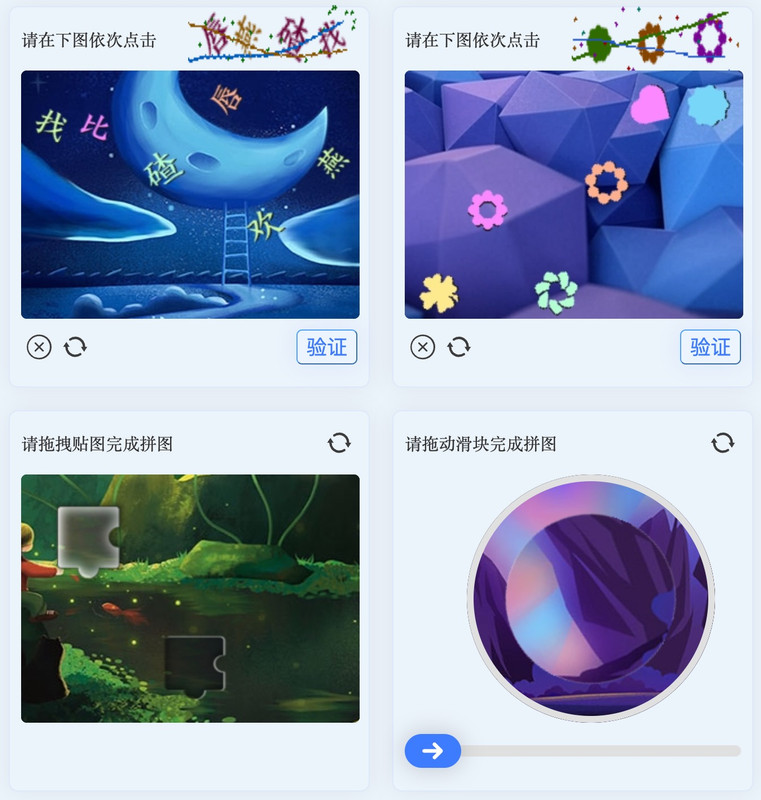
特性
- 🎯 三种验证码类型:点选、旋转、拼图
- 🎨 支持主题定制(CSS 变量)
- 📱 支持移动端触摸事件
- 🔧 灵活的配置项和事件回调
- 💡 基于 Vue 3 Composition API
安装
npm install b-captcha-vue
# 或
pnpm add b-captcha-vue
快速开始
<script setup>
import { ClickCaptcha, RotateCaptcha, SlideCaptcha } from 'b-captcha-vue'
import 'b-captcha-vue/style'
</script>
组件
1. ClickCaptcha 点选验证码
用户按顺序点击图片中指定的文字或图标。
<template>
  <ClickCaptcha
    :data="data"
    :events="events"
    :config="config"
    ref="captchaRef"
  />
</template>

<script setup>
import { reactive, ref } from 'vue'

const captchaRef = ref(null)

const data = reactive({
  image: 'base64或图片URL', // 主图
  thumb: 'base64或图片URL', // 提示缩略图
})

const config = {
  width: 400, // 图片宽度
  height: 340, // 图片高度
  thumbWidth: 150, // 缩略图宽度
  thumbHeight: 60, // 缩略图高度
  title: '请在下图依次点击',
  buttonText: '验证',
  iconSize: 22,
  dotSize: 24, // 点击标记大小
}

const events = {
  click: (x, y) => {
    console.log('点击坐标:', x, y)
  },
  confirm: (dots, reset) => {
    // dots: [{ key, index, x, y }, ...]
    console.log('提交验证:', dots)
    // 验证失败时调用 reset() 重置
  },
  refresh: () => {
    console.log('刷新验证码')
    // 重新获取验证码数据
  },
}
</script>
2. RotateCaptcha 旋转验证码
用户拖动滑块旋转图片至正确角度。
<template>
  <RotateCaptcha
    :data="data"
    :events="events"
    :config="config"
    ref="captchaRef"
  />
</template>

<script setup>
import { reactive, ref } from 'vue'

const captchaRef = ref(null)

const data = reactive({
  image: 'base64或图片URL', // 背景图
  thumb: 'base64或图片URL', // 需要旋转的图片
  thumbSize: 100, // 旋转图片尺寸
})

const config = {
  width: 400,
  height: 340,
  size: 220, // 圆形区域尺寸
  title: '请拖动滑块完成拼图',
  iconSize: 22,
}

const events = {
  rotate: (angle) => {
    console.log('当前角度:', angle)
  },
  confirm: (angle, reset) => {
    console.log('提交角度:', angle)
    // 验证失败时调用 reset() 重置
  },
  refresh: () => {
    console.log('刷新验证码')
  },
}
</script>
3. SlideCaptcha 拖拽拼图验证码
用户直接拖拽拼图块到正确位置(支持任意方向拖动)。
<template>
  <SlideCaptcha
    :data="data"
    :events="events"
    :config="config"
    ref="captchaRef"
  />
</template>

<script setup>
import { reactive, ref } from 'vue'

const captchaRef = ref(null)

const data = reactive({
  image: 'base64或图片URL',
  thumb: 'base64或图片URL',
  thumbX: 10,
  thumbY: 80,
  thumbWidth: 50,
  thumbHeight: 50,
})

const config = {
  width: 400,
  height: 340,
  title: '请拖拽贴图完成拼图',
  iconSize: 22,
  scope: true,
}

const events = {
  move: (x, y) => {
    console.log('拖拽位置:', x, y)
  },
  confirm: (point, reset) => {
    console.log('提交位置:', point)
  },
  refresh: () => {
    console.log('刷新验证码')
  },
}
</script>
主题定制
通过 CSS 变量自定义样式:
:root {
  --b-captcha-theme-text-color: #333333;
  --b-captcha-theme-bg-color: #ffffff;
  --b-captcha-theme-active-color: #3e7cff;
  --b-captcha-theme-icon-color: #3c3c3c;
  --b-captcha-theme-drag-bar-color: #e0e0e0;
  --b-captcha-theme-drag-bg-color: #3e7cff;
  --b-captcha-theme-drag-icon-color: #ffffff;
  --b-captcha-theme-loading-icon-color: #3e7cff;
  --b-captcha-theme-body-bg-color: #34383e;
  --b-captcha-theme-dot-color-color: #cedffe;
  --b-captcha-theme-dot-bg-color: #4e87ff;
  --b-captcha-theme-round-color: #e0e0e0;
}
组件方法
所有组件都暴露了 refresh 方法,可通过 ref 调用:
captchaRef.value.refresh()开发
# 安装依赖
pnpm install

# 启动开发服务器
pnpm dev

# 构建
pnpm build
发布
npm run build
# 更新 package.json 中的版本号
npm adduser --registry=https://registry.npmjs.org
npm publish --registry=https://registry.npmjs.org
致谢
本项目的开发灵感来自于 go-captcha-vue,感谢原作者的开源贡献。
License
MIT