
npm package discovery and stats viewer.

Discover Tips

  • General search

    [free text search, go nuts!]

  • Package details

    pkg:[package-name]

  • User packages

    @[username]

Sponsor

Optimize Toolset

I’ve always been into building performant and accessible sites, but lately I’ve been taking it extremely seriously. So much so that I’ve been building a tool to help me optimize and monitor the sites that I build to make sure that I’m making an attempt to offer the best experience to those who visit them. If you’re into performant, accessible and SEO friendly sites, you might like it too! You can check it out at Optimize Toolset.

About

Hi, 👋, I’m Ryan Hefner  and I built this site for me, and you! The goal of this site was to provide an easy way for me to check the stats on my npm packages, both for prioritizing issues and updates, and to give me a little kick in the pants to keep up on stuff.

As I was building it, I realized that I was actually using the tool to build the tool, and figured I might as well put this out there and hopefully others will find it to be a fast and useful way to search and browse npm packages as I have.

If you’re interested in other things I’m working on, follow me on Twitter or check out the open source projects I’ve been publishing on GitHub.

I am also working on a Twitter bot for this site to tweet the most popular, newest, random packages from npm. Please follow that account now and it will start sending out packages soon–ish.

Open Software & Tools

This site wouldn’t be possible without the immense generosity and tireless efforts from the people who make contributions to the world and share their work via open source initiatives. Thank you 🙏

© 2026 – Pkg Stats / Ryan Hefner

babel-plugin-tracker

v0.0.3

Published

一个用于统计埋点的babel插件

Readme

一个用于统计埋点的babel插件

开发过程已发布到掘金:https://juejin.cn/post/7103694235970306055

安装

npm i babel-plugin-tracker
yarn add babel-plugin-tracker

使用

配置

const path = require("path");

module.exports = {
	...
	module: {
		rules: [
			{
				test: /\.js$/,
				exclude: /node_modules/,
				loader: "babel-loader",
				options: {
					presets: [
						"@babel/preset-env"
					],
					plugins: [
						[
							path.resolve(__dirname, "../src/index.js"),
							{
								xlsxPath: path.resolve(__dirname, "../buried.xlsx"),
								func: `
							function(category, action) {
								console.log(category,action);
								window._hmt && window._hmt.push(["_trackEvent", category, action]);
							};
							`,
								script: "https://test.js"
							}
						]
					]
				}
			}
		]
	}
};

参数说明

| 参数 | 值 | | :------: | :----------------------: | | xlsxPath | Excel的绝对路径 | | func | 一个字符串形式的匿名函数 | | script | 需要加入的script的src |

如何注释

注释应遵守如下规范

// buried-[id]

buried开头的注释就可以被此插件捕获到,id与Excel表上id字段对应

Excel表

Excel表应遵守如下格式
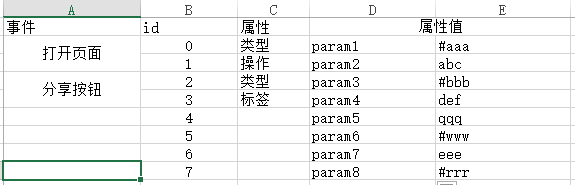
img

| 事件 | id | 属性 | 属性值 | | :--: | :------: | :--------: | :----------------------------------------------------------: | | xxx | 唯一标识 | 对应的操作 | 这里暂时可放两个参数,参数中前面为#即为变量,若不带#即为字符串 |

功能性

在使用类似“百度统计”这样的统计网站时,需要在引入对应的script文件,此插件已经自动引入,只需要配置script参数即可

此插件会将func挂载到window 上,随时可以在项目中调用

以往我们埋点时,往往需要手动操作,点位很多时非常浪费时间,现在只需使用注释,在每次编译时该插件会自动将funcid对应的参数结合起来,在项目中对应的位置执行func,且传入注释id对应的参数
