
backend-doctor-cli
v1.1.1
Published
Deterministic Node.js/NestJS analyzer with an interactive CLI, runtime probes, and GitHub PR checks.

Maintainers
 yamkin_a
Readme
backend-doctor




A deterministic static analyzer for TypeScript backends built with Node.js and NestJS. It finds floating promises, event-loop blocking calls, unsafe code, broken dependency wiring and architecture issues in controllers, services, Prisma queries and configuration.
Review findings in an interactive console, copy repair tasks into your coding assistant, or check changed lines automatically in GitHub pull requests. An optional runtime probe adds evidence collected while your application runs.
- Deterministic — the same tree produces byte-identical findings, every time, so ids can be referenced in code review and CI conversations.
- Precision over recall — every rule is gated on an eval corpus whose clean application produces zero findings; a rule that cries wolf gets fixed or demoted before it ships.
- Local analysis — static scans do not modify application files or run your application. Analysis runs offline, with no telemetry or source-code uploads. GitHub reporting and the optional runtime probe are described below.
Quick start
Requires Node.js 20 or newer. Run this from your backend project's directory; no configuration is required to start:
npx backend-doctor-cli@latest scanThat scans the current directory and opens the console in a supported terminal; pipes and CI receive a regular text report.
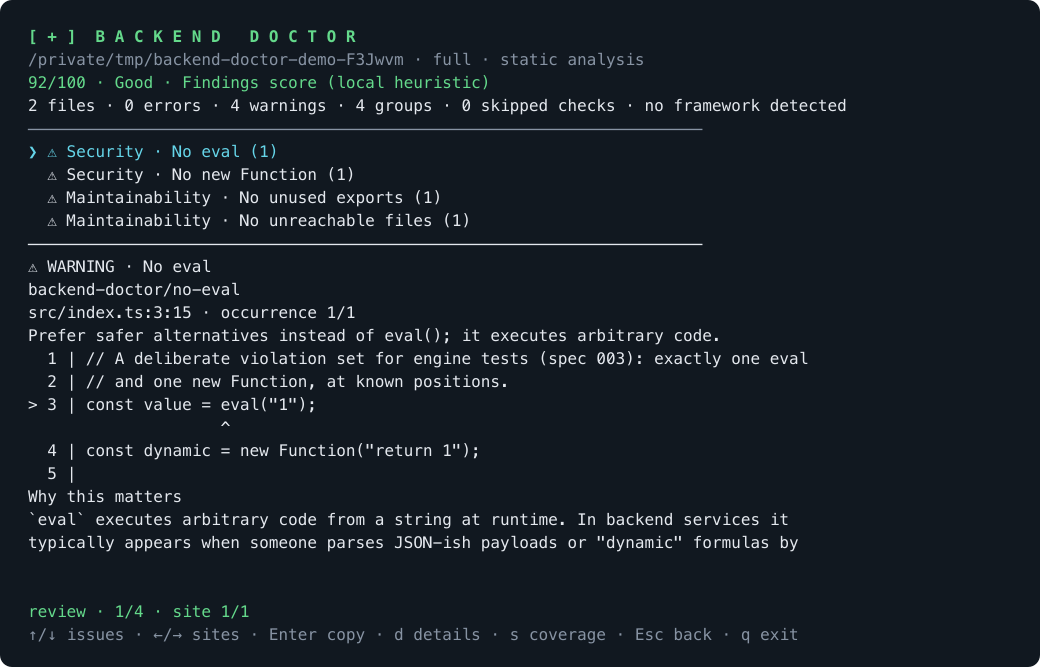
Console output from an intentionally unsafe sample project. Select an issue, inspect its documentation, or copy a repair task for your coding assistant.
Exit code 0 means no error-severity findings; warnings and skipped checks can
still exist.
1 means findings at error severity, 2 means a usage or
configuration problem (bad flag, unreadable backend-doctor config) — not a crash.
Static scanning supports .ts, .tsx, .mts and .cts; .js, .cjs and
.mjs are not analyzed. The report shows the analyzed file count and skipped
checks, including a clear notice when no supported source files were analyzed.
Syntax/read failures do not abort healthy-file checks. Incomplete import graphs
visibly skip unused-code conclusions. Re-exports and supported TypeScript
baseUrl/paths aliases (including inherited config origins) participate in
graph analysis; tsconfig include/exclude do not replace scan file selection.
For machine-readable output:
npx backend-doctor-cli@latest scan --format json    # one schemaVersion-1 document
npx backend-doctor-cli@latest scan --format jsonl   # one JSON object per finding
Use JSON when coverage matters: inspect projects[].analyzedFileCount and
projects[].skippedChecks. complete: true means full scan scope, not that every
check succeeded. JSONL contains only diagnostics, so empty JSONL does not prove
complete coverage or clean code. Partial scans skip project rules explicitly;
an empty changed-file scope is a successful empty scan.
Useful scan flags:
--scope changed        # only files changed in git (vs --base <ref>, default HEAD)
--scope lines          # only diagnostics inside changed hunks
--scope files --file <path> [--file <path> …]
--ignore "<glob>"      # exclude files, repeatable
--config <path>        # load exactly this config, skip discovery
--trace <dir>          # merge runtime findings from a probe session
--interactive          # require the console; incompatible with CI/JSON/dump-config
--no-interactive       # print the regular report, including in a terminal
Interactive console
The console shows scan stages, severity counts, grouped findings and a local findings score. Choose Review issues with Enter, then use these keys:
| Key | Action |
|-----|--------|
| ↑ / ↓ | Select a problem group; scroll in details/coverage/manual copy |
| ← / → | Visit every occurrence of the selected problem |
| Enter | Copy a repair task for all occurrences of the selected group |
| d | Open full details, source excerpt, explanation, fix and documentation |
| s | Inspect scope, frameworks, analyzed files and every skipped check |
| Esc | Return to the previous view |
| q | Exit with the scan's normal verdict |
| Ctrl+C | Interrupt and restore the terminal |
The result menu can also copy a task for the whole report or set up GitHub Actions.
Workflow setup displays the destination in the scanned package and requires y
confirmation; existing workflows are protected. Scanning and copying do not edit
application files or launch an AI assistant. Paste the copied task into your
assistant; it includes locations, guidance, coverage and a command to verify fixes.
Rule documentation ships locally and links to this repository on GitHub. Runtime
findings link to the runtime section below. There is no separate website yet.
Long details remain scrollable in narrow or short terminals. NO_COLOR disables
styling while keeping severity symbols and text.
The Findings score (local heuristic) is max(0, 100 - 10 × E - 2 × W), where
E and W count error and warning groups, not repeated occurrences. Labels are
Good (90–100), Needs attention (70–89), and Critical (0–69). It makes no network
requests and is unavailable for partial scans, skipped checks or zero analyzed
files. A high score is not a claim that the application is healthy.
Clipboard tools: macOS pbcopy, Windows clip, Linux wl-copy, xclip or xsel.
Missing tools, unavailable clipboard sessions and failed copies open a scrollable
manual-copy view. Copy failures and workflow errors do not change the scan verdict.
The console needs TTY input/output, raw input and a usable TERM; explicit
--interactive rejects unsupported environments with exit 2. Use
--no-interactive, --format json or --format jsonl for automation.
Configuration
backend-doctor.config.ts (or .json, or a backendDoctor key in
package.json) is discovered by walking up to the nearest .git:
/** Severities: "error" | "warn" | "off". */
export default {
	rules: {
		"backend-doctor/no-floating-promises": "error",
		"backend-doctor/unused-file": "off",
	},
	categories: {
		Security: "error",
	},
	ignore: {
		files: ["**/*.spec.ts"],
		rules: [],
	},
};
Create a starter file with npx backend-doctor-cli@latest init. CLI flags
override config. Inspect what actually resolved with
npx backend-doctor-cli@latest scan --dump-config.
Rules
Rules cover eight categories — Bugs, Correctness, Performance, Security, Architecture, Maintainability, Configuration, Runtime — across async correctness, event-loop blocking, Node security, Nest DI and layering, DTO shape, Prisma usage, project-graph hygiene and config/env handling.
npx backend-doctor-cli@latest rules list          # every registered rule
npx backend-doctor-cli@latest rules explain backend-doctor/no-eval
Every rule has a markdown doc under docs/rules/backend-doctor/<rule>.md —
the problem it flags, a bad and a good example, and its config key. The docs
ship inside the npm package, so the path printed by rules explain resolves
from the installed package as well as from the repository. Nest- and
Prisma-specific rules activate automatically when those frameworks are
detected in the scanned project.
CI (GitHub Actions)
GitHub Actions runs checks automatically when a pull request is opened or
updated. This action reports findings on changed lines (--scope lines), posts
or updates a PR summary, adds inline review comments and reports a commit status.
It helps reviewers catch issues before merging.
Changed-line scans skip project-wide rules that need a full import graph; the
report lists those skipped checks. Run a full local scan for those checks.
Findings are advisory by default (blocking: none). Add this workflow as
.github/workflows/backend-doctor.yml:
name: Backend Doctor

on:
  pull_request:
    types: [opened, synchronize, reopened]

permissions:
  contents: read
  issues: write
  pull-requests: write
  statuses: write

jobs:
  backend-doctor:
    runs-on: ubuntu-latest
    steps:
      - uses: actions/checkout@v5
        with:
          fetch-depth: 0
      - uses: yamkin29/backend-doctor@v1
Listed in the GitHub Marketplace. To fail the check on error-severity findings, configure the action step:
      - uses: yamkin29/backend-doctor@v1
        with:
          blocking: error
Use blocking: warn to fail on warnings as well. To prevent merging when the
check fails, make it a required check in your repository's branch rules.
When GitHub reporting is enabled, finding summaries, file locations and inline comments are sent to GitHub using the workflow token. Static analysis itself does not upload your source files.
Prefer a generated file? ci install creates a workflow with this setup and
cancels superseded runs for the same pull request:
npx backend-doctor-cli@latest ci installRuntime probe
Prisma collection has a specific version/generator/loading boundary. See the verified compatibility matrix before interpreting query counts; the Prisma 7 standard generator requires a separate loader feature.
Static analysis misses what only shows up while the process runs. The probe starts your app with runtime instrumentation, without editing its source files, and records event-loop lags, blocking calls with file:line attribution, HTTP endpoint latencies, database query counts and memory/GC signals:
npx backend-doctor-cli@latest probe -- npm start
npx backend-doctor-cli@latest probe --duration 60 -- node dist/main.js
Sessions land in ./.backend-doctor/probe/. Merge them into a static scan:
npx backend-doctor-cli@latest scan --trace .backend-doctor/probe/<session>The probe stores traces locally and does not upload them. Traces contain URLs and filesystem paths; review them before sharing. Your application still runs normally, including its own network requests and database connections.
For coding agents
The package ships an agent skill — a small instruction file that teaches coding agents supporting the Agent Skills format to run a scoped scan after backend edits and read the findings correctly. Choose the agent to install it for, then run the corresponding command from your project:
# Codex → .codex/skills/backend-doctor/
npx backend-doctor-cli@latest install --agent codex --scope project

# Claude Code → .claude/skills/backend-doctor/
npx backend-doctor-cli@latest install --agent claude-code --scope project
--scope project is the default; use --scope global to install into your home
directory for use across projects. Running install without flags only prints
an installation-status report and writes nothing. Identical installed content
reports "Up to date"; different content is protected unless you pass --force
to overwrite it.
Prefer to wire the skill by hand? It ships in the package:
npm install --no-save backend-doctor-cli
mkdir -p ~/.claude/skills
cp -r node_modules/backend-doctor-cli/skills/backend-doctor ~/.claude/skills/
Or run an ad-hoc scan without installing the skill:
npx backend-doctor-cli@latest scan --scope changed --format jsonlEach jsonl line is one finding with a deterministic id (stable across runs),
filePath/line/column, the rule id, category, severity, message
and tags — empty output means no reported diagnostics; inspect JSON coverage
before calling the scan complete. Agents can read the offending rule's
doc from docs/rules/backend-doctor/ in the installed package.
Development
pnpm install
pnpm test        # vitest; builds the CLI first
pnpm test:prisma # real-client suite after tests/compat/README.md preparation
pnpm lint        # biome
pnpm build       # tsup → dist/
pnpm docs:rules  # rule-docs ↔ registry drift check
Contributions are welcome — see CONTRIBUTING.md for the setup, the rule-authoring guide and the project's working rules. Every shipped feature has its design history in docs/specs/.