
barnacles-postgres
v1.1.1
Published
Write ambient IoT data to a PostgreSQL database. We believe in an open Internet of Things.

Maintainers
 reelyactive
Readme
barnacles-postgres
barnacles-postgres writes ambient IoT data to a PostgreSQL database.
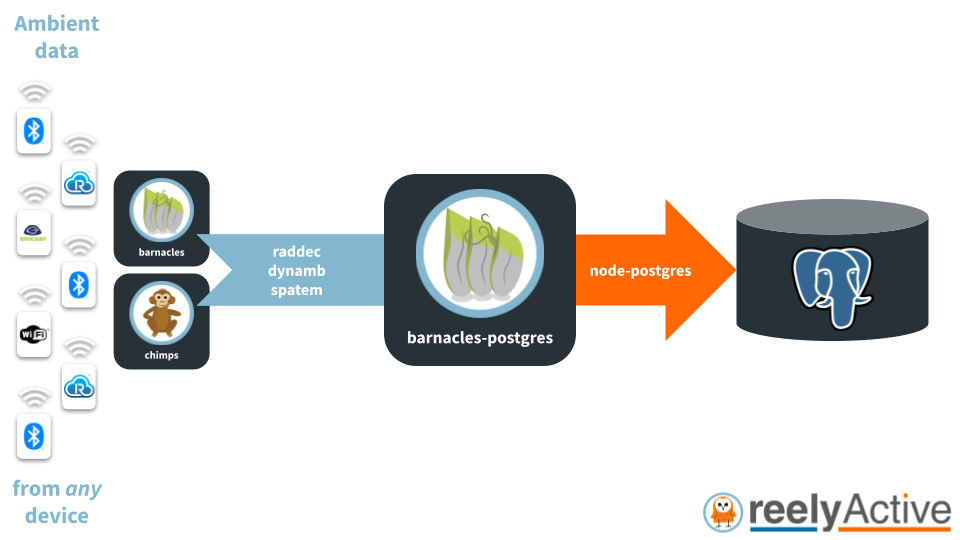
barnacles-postgres ingests a real-time stream of raddec & dynamb objects from barnacles, and spatem objects from chimps, which it writes to a given PostgreSQL database. It couples seamlessly with reelyActive's Pareto Anywhere open source IoT middleware.
barnacles-postgres is a lightweight Node.js package that can run on resource-constrained edge devices as well as on powerful cloud servers and anything in between.
Pareto Anywhere integration
A common application of barnacles-postgres is to write IoT data from pareto-anywhere to a PostgreSQL database. Simply follow our Create a Pareto Anywhere startup script tutorial using the script below:
#!/usr/bin/env node

const ParetoAnywhere = require('../lib/paretoanywhere.js');

// Edit the options to specify the PostgreSQL instance
const BARNACLES_POSTGRES_OPTIONS = {};

// ----- Exit gracefully if the optional dependency is not found -----
let BarnaclesPostgres;
try {
  BarnaclesPostgres = require('barnacles-postgres');
}
catch(err) {
  console.log('This script requires barnacles-postgres.  Install with:');
  console.log('\r\n    "npm install barnacles-postgres"\r\n');
  return console.log('and then run this script again.');
}
// -------------------------------------------------------------------

let pa = new ParetoAnywhere();
pa.barnacles.addInterface(BarnaclesPostgres, BARNACLES_POSTGRES_OPTIONS);
Options
barnacles-postgres supports the following options:
| Property | Default | Environment variable | |:--------------|:---------------------------|:-------------------------------| | user | "reelyactive" | PGUSER | | password | "paretoanywhere" | PGPASSWORD | | host | "localhost" | PGHOST | | port | 5432 | PGPORT | | database | "pareto_anywhere" | PGDATABASE | | eventsToStore | { raddec: {}, dynamb: {}, spatem: {} } | n/a | | pool | null | n/a | | printErrors | false | n/a |
Environment variables, when used, take precedence over the default values.
eventsToStore
The eventsToStore option determines which events (raddec, dynamb and/or spatem) are to be stored in the database, and any event-specific options such as filter parameters. For instance, to store only dynamb objects with a given deviceId:
{
  dynamb: {
    filterParameters: { acceptedDeviceIds: [ 'bada55beac04' ] }
  }
}
Each event supports filterParameters. Consult the raddec-filter, dynamb-filter and spatem-filter documentation for their respective parameters.
PostgreSQL Installation
Follow our Install PostgreSQL and PostGIS tutorial to install and prepare the database, as well as install the PostGIS extension for geospatial queries on the spatem data. barnacles-postgres will automatically connect to a locally-installed PostgreSQL database which observes the default options above.
Creating Tables
Data is stored in three tables: raddec, dynamb and spatem. These tables must be explicitly created after the database is created. On Linux systems, run the following script to create these tables:
npm run create-tablesAlternatively, each table can be manually created with the following SQL commands:
CREATE TABLE raddec (
    _storeid bigint GENERATED ALWAYS AS IDENTITY,
    transmittersignature varchar(36) NOT NULL,
    timestamp timestamptz DEFAULT current_timestamp,
    raddec JSONB NOT NULL
);

CREATE TABLE dynamb (
    _storeId bigint GENERATED ALWAYS AS IDENTITY,
    devicesignature varchar(36) NOT NULL,
    timestamp timestamptz DEFAULT current_timestamp,
    dynamb JSONB NOT NULL
);

CREATE TABLE spatem (
    _storeId bigint GENERATED ALWAYS AS IDENTITY,
    devicesignature varchar(36) NOT NULL,
    timestamp timestamptz DEFAULT current_timestamp,
    spatem JSONB NOT NULL
);

SELECT AddGeometryColumn ('spatem','geom',4326,'POINT',3);
Creating Indexes
To facilitate efficient queries at scale, the transmitterid/deviceid and timestamp columns may be indexed. On Linux systems, run the following script to create these indexes:
npm run create-indexesAlternatively, each index can be manually created with the following SQL commands:
CREATE INDEX raddec_transmitter_idx ON raddec (transmittersignature);
CREATE INDEX raddec_timestamp_idx ON raddec USING BRIN(timestamp);

CREATE INDEX dynamb_device_idx ON dynamb (devicesignature);
CREATE INDEX dynamb_timestamp_idx ON dynamb USING BRIN(timestamp);

CREATE INDEX spatem_device_idx ON spatem (devicesignature);
CREATE INDEX spatem_timestamp_idx ON spatem USING BRIN(timestamp);
Useful Command-Line PostgreSQL Queries
Count the number of rows (entries) in the raddec table:
psql -h localhost -U reelyactive -d pareto_anywhere -c "\timing on" -c "SELECT count(*) FROM raddec;"Delete ( :heavy_exclamation_mark: ) the raddec table and all its entries:
psql -h localhost -U reelyactive -d pareto_anywhere -c "DROP TABLE raddec;"Should the above command be used (with caution!), the deleted database table(s) will need to be created anew (see Creating Tables above).
Importing data from CSV files
To import raddec data from a CSV file into a local PostgreSQL database, run the following script:
npm run import-raddec-csv filename.csvChange filename.csv to the name/path of the source file. The CSV file must use the comma as a separator and the first row must specify the property names, which include the following:
- transmitterId
- transmitterIdType (optional)
- receiverId
- receiverIdType (optional)
- rssi
- timestamp
To import spatem data from a CSV file into a local PostgreSQL database, run the following script:
npm run import-spatem-csv filename.csvChange filename.csv to the name/path of the source file. The CSV file must use the comma as a separator and the first row must specify the property names, which include the following:
- deviceId
- deviceIdType (optional)
- x
- y
- z (optional)
- timestamp
Contributing
Discover how to contribute to this open source project which upholds a standard code of conduct.
Security
Consult our security policy for best practices using this open source software and to report vulnerabilities.
License
MIT License
Copyright (c) 2025 reelyActive
Permission is hereby granted, free of charge, to any person obtaining a copy of this software and associated documentation files (the "Software"), to deal in the Software without restriction, including without limitation the rights to use, copy, modify, merge, publish, distribute, sublicense, and/or sell copies of the Software, and to permit persons to whom the Software is furnished to do so, subject to the following conditions:
The above copyright notice and this permission notice shall be included in all copies or substantial portions of the Software.
THE SOFTWARE IS PROVIDED "AS IS", WITHOUT WARRANTY OF ANY KIND, EXPRESS OR IMPLIED, INCLUDING BUT NOT LIMITED TO THE WARRANTIES OF MERCHANTABILITY, FITNESS FOR A PARTICULAR PURPOSE AND NONINFRINGEMENT. IN NO EVENT SHALL THE AUTHORS OR COPYRIGHT HOLDERS BE LIABLE FOR ANY CLAIM, DAMAGES OR OTHER LIABILITY, WHETHER IN AN ACTION OF CONTRACT, TORT OR OTHERWISE, ARISING FROM, OUT OF OR IN CONNECTION WITH THE SOFTWARE OR THE USE OR OTHER DEALINGS IN THE SOFTWARE.