
barnowl-zebra
v1.0.1
Published
Collect ambient RAIN RFID data from Zebra readers. We believe in an open Internet of Things.

Maintainers
 reelyactive
Readme
barnowl-zebra
barnowl-zebra converts the decodings of any ambient RAIN RFID tags by Zebra readers supporting the Zebra IoT Connector (ex: FX9600) into standard developer-friendly JSON that is vendor/technology/application-agnostic.
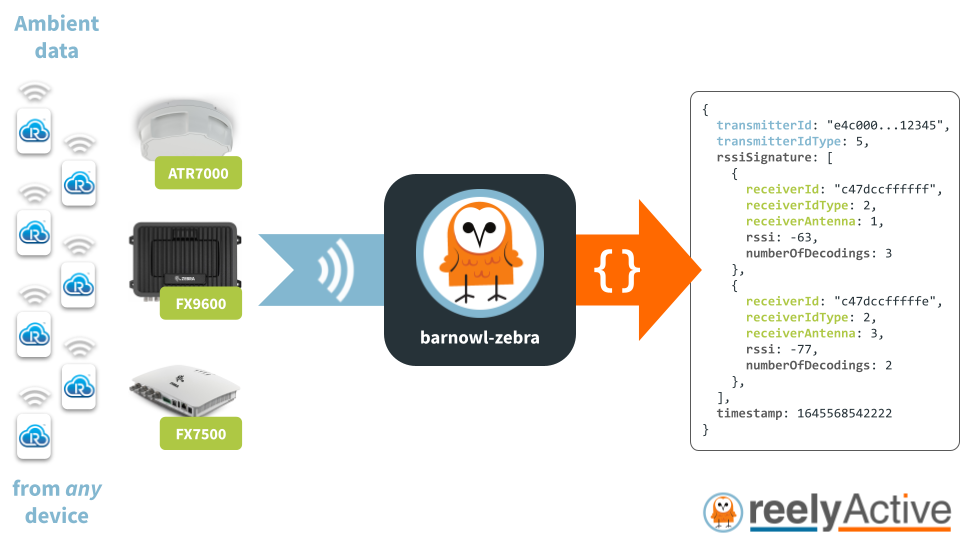
barnowl-zebra is a lightweight Node.js package that can run on resource-constrained edge devices as well as on powerful cloud servers and anything in between. It is included in reelyActive's Pareto Anywhere open source middleware suite, and can just as easily be run standalone behind a barnowl instance, as detailed in the code examples below.
Getting Started
Follow our step-by-step tutorial to get started with barnowl-zebra or Pareto Anywhere using a FX9600 reader:
Learn "owl" about the raddec JSON data output:
Quick Start
Clone this repository, install package dependencies with npm install, and then from the root folder, at any time, run either:
npm startfor barnowl-zebra to attempt to connect to a local MQTT server (mqtt://localhost) and subscribe to the ziotc topic.
npm run websocket FX9600123456for barnowl-zebra to attempt to connect to the Web Socket endpoint of the reader on the given hostname or IP address.
In either case (flattened) raddec JSON will be printed to the console.
Hello barnowl-zebra!
Developing an application directly from barnowl-zebra? Start by pasting the code below into a file called server.js:
const Barnowl = require('barnowl');
const BarnowlZebra = require('barnowl-zebra');

let barnowl = new Barnowl({ enableMixing: true });

barnowl.addListener(BarnowlZebra, {}, BarnowlZebra.WsListener,
                    { url: "ws://12.34.56.78/ws" }); // Use reader's IP address

barnowl.on('raddec', (raddec) => {
  console.log(raddec);
  // Trigger your application logic here
});
From the same folder as the server.js file, install package dependencies with the commands npm install barnowl-zebra and npm install barnowl. Then run the code with the command node server.js and observe the stream of radio decodings (raddec objects) output to the console:
{
  transmitterId: "a00000000000000000001234",
  transmitterIdType: 5,
  rssiSignature: [
    {
      receiverId: "c47dccffffff",
      receiverIdType: 2,
      receiverAntenna: 3,
      rssi: -42,
      numberOfDecodings: 1
    }
  ],
  timestamp: 1645568542222
}
See the Supported Listener Interfaces below to adapt the code to listen for your reader(s).
Supported Listener Interfaces
The following listener interfaces are supported by barnowl-zebra. Extend the Hello barnowl-zebra! example above by pasting in any of the code snippets below.
MQTT
Connect to a MQTT server and subscribe to the ziotc topic to receive messages:
let options = { url: "mqtt://localhost", topic: "ziotc/#",
                clientOptions: { username: "user", password: "pass" } };
barnowl.addListener(BarnowlZebra, {}, BarnowlZebra.MqttListener, options);
The clientOptions are defined in the MQTT.js Client constructor documentation.
Web Socket
Connect, as a client, to the Web Socket server running on the reader:
let options = { url: "ws://12.34.56.78/ws" };
barnowl.addListener(BarnowlZebra, {}, BarnowlZebra.WsListener, options);
The client will automatically attempt to reconnect should the connection be closed. Note the two possible url formats:
- "ws://12.34.56.78/ws" for regular Web Sockets
- "wss://12.34.56.78/ws" for secure Web Sockets
Change 12.34.56.78 to the IP address of the reader on the local network.
Test
Provides a steady stream of simulated Zebra IoT Connector messages for testing purposes.
barnowl.addListener(BarnowlZebra, {}, BarnowlZebra.TestListener, {});Required Zebra IoT Connector fields
In order to populate the raddec data structure, the following fields must be selected in the reader's Operating Mode Configuration:
| Field | Corresponding raddec property | |:----------------|:----------------------------------| | MAC | receiverId & receiverIdType | | (EPC) or TID | transmitterId & transmitterIdType | | ANTENNA | receiverAntenna | | (Timestamp) | timestamp | | RSSI | rssi | | SEEN_COUNT | numberOfDecodings |
Is that owl you can do?
While barnowl-zebra may suffice standalone for simple real-time applications, its functionality can be greatly extended with the following software packages:
- advlib-epc to decode the Electronic Product Code (EPC) into JSON
- barnowl to combine parallel streams of RF decoding data in a technology-and-vendor-agnostic way
These packages and more are bundled together as the Pareto Anywhere open source middleware suite, which includes a variety of barnowl-x listeners, APIs and interactive web apps.
Contributing
Discover how to contribute to this open source project which upholds a standard code of conduct.
Security
Consult our security policy for best practices using this open source software and to report vulnerabilities.
License
MIT License
Copyright (c) 2025 reelyActive
Permission is hereby granted, free of charge, to any person obtaining a copy of this software and associated documentation files (the "Software"), to deal in the Software without restriction, including without limitation the rights to use, copy, modify, merge, publish, distribute, sublicense, and/or sell copies of the Software, and to permit persons to whom the Software is furnished to do so, subject to the following conditions:
The above copyright notice and this permission notice shall be included in all copies or substantial portions of the Software.
THE SOFTWARE IS PROVIDED "AS IS", WITHOUT WARRANTY OF ANY KIND, EXPRESS OR IMPLIED, INCLUDING BUT NOT LIMITED TO THE WARRANTIES OF MERCHANTABILITY, FITNESS FOR A PARTICULAR PURPOSE AND NONINFRINGEMENT. IN NO EVENT SHALL THE AUTHORS OR COPYRIGHT HOLDERS BE LIABLE FOR ANY CLAIM, DAMAGES OR OTHER LIABILITY, WHETHER IN AN ACTION OF CONTRACT, TORT OR OTHERWISE, ARISING FROM, OUT OF OR IN CONNECTION WITH THE SOFTWARE OR THE USE OR OTHER DEALINGS IN THE SOFTWARE.