
bbang-react-editor
v0.1.11
Published
BbangEditor - configurable React block editor with Markdown import/export

Maintainers
 lingkkkk
Readme
Bbang React Editor
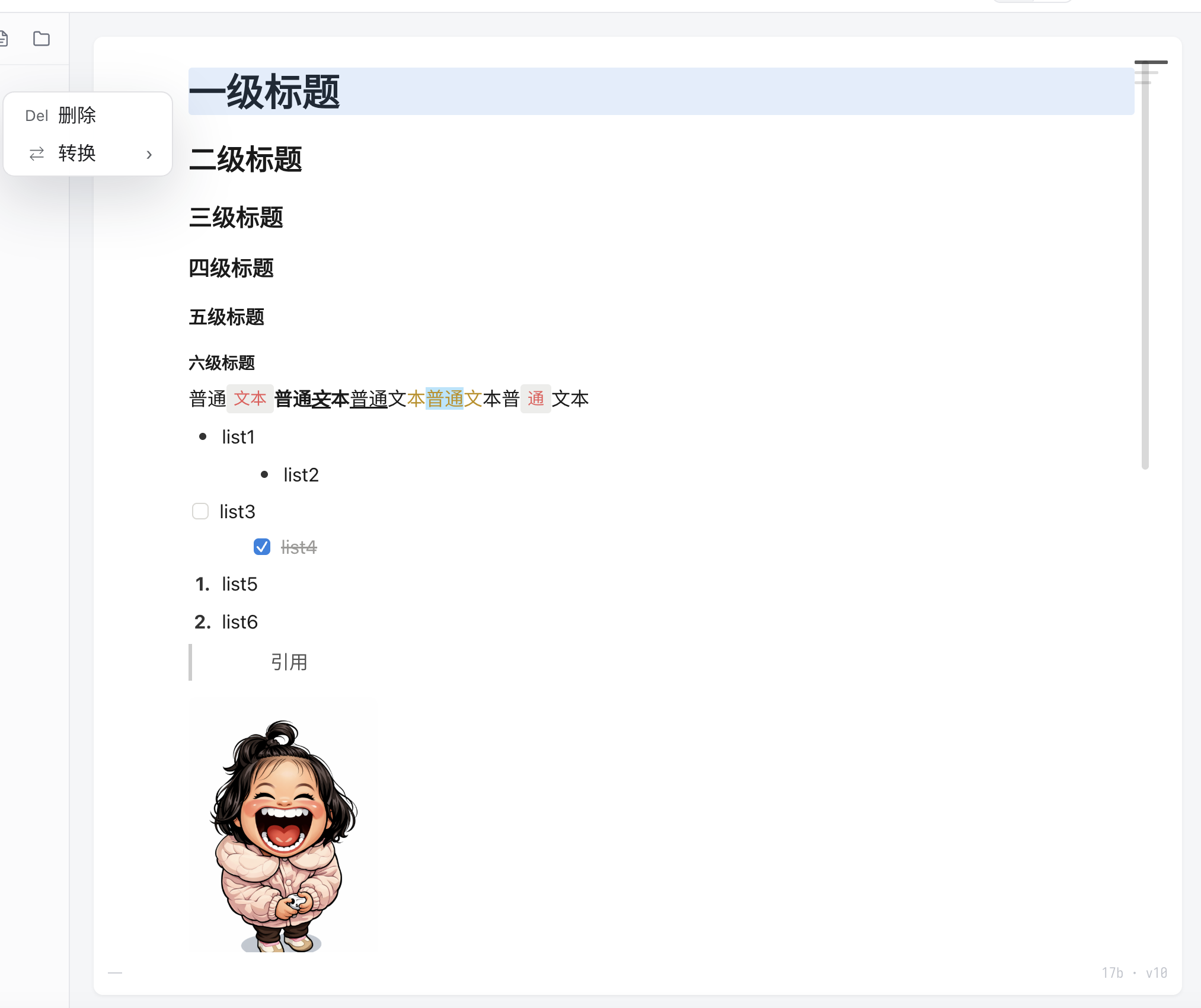
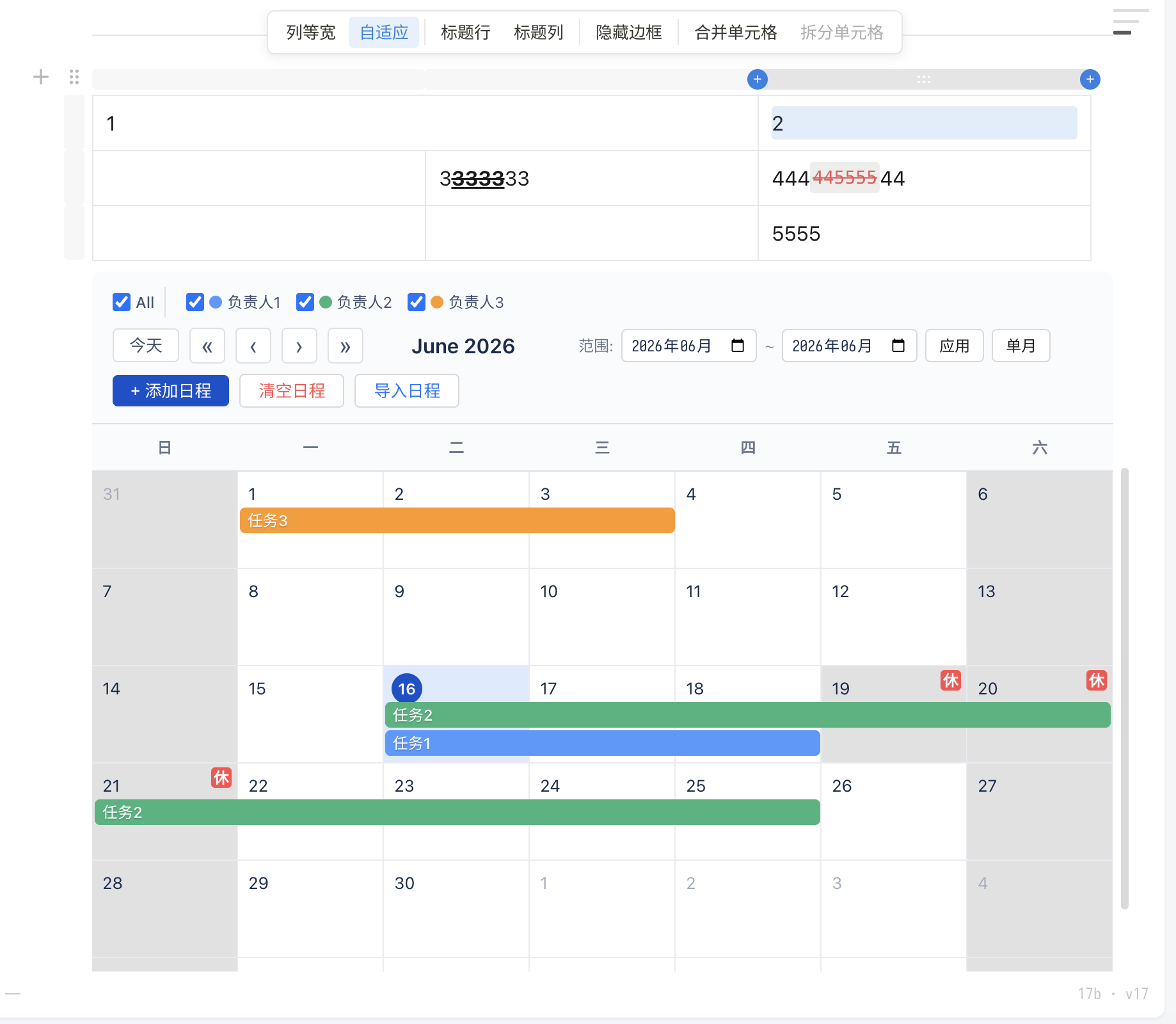
bbang-react-editor 是一个面向 React 应用的块编辑器组件,支持 Markdown 导入/导出、富文本编辑、表格、图片、日历、代码块、Slash Menu、功能开关、样式覆盖和多语言文案配置。组件提供受控的初始化能力和命令式 ref API,适合嵌入知识库、文档编辑、后台管理系统和内容生产工具。
功能预览
主要能力
- 块级编辑:段落、标题、列表、待办、引用、分割线、Callout、Toggle、表格、图片、日历和代码块。
- Markdown 支持:可导入 Markdown 初始化文档,也可随时导出当前内容。
- 可配置能力:通过
config.features控制功能开关,适合按业务场景裁剪编辑体验。 - 样式定制:通过
config覆盖字体、行高、颜色、占位符、代码块、表格、选区等样式。 - 国际化:通过
config.i18n覆盖内置文案,支持接入业务侧语言包。 - React 友好:支持
ref调用导入、导出、插入图片、获取文档对象等方法。
安装
npm install bbang-react-editor
# 或
pnpm add bbang-react-editor
# 或
yarn add bbang-react-editor要求:React 18+ 或 React 19+
快速开始
import { useRef } from 'react';
import { BbangEditor } from 'bbang-react-editor';
import type { BbangEditorHandle } from 'bbang-react-editor';
import 'bbang-react-editor/style.css';

function App() {
  const editorRef = useRef<BbangEditorHandle>(null);

  return (
    <BbangEditor
      ref={editorRef}
      defaultValue="# Hello BbangEditor\n\n开始编辑吧!"
      onChange={(markdown) => {
        console.log('内容变化:', markdown);
      }}
    />
  );
}
Props
| 属性 | 类型 | 默认值 | 说明 |
|------|------|--------|------|
| defaultValue | string | '' | Markdown 初始内容(仅首次挂载生效) |
| onChange | (markdown: string) => void | - | 内容变化回调,自动 debounce |
| config | EditorConfig | 内置默认配置 | 编辑器样式与功能配置 |
| readOnly | boolean | false | 只读/预览模式 |
| autoFocus | boolean | true | 挂载后自动聚焦 |
| className | string | - | 容器自定义 className |
| debounceMs | number | 300 | onChange 防抖延迟(ms) |
| onMentionInput | (event: MentionInputEvent) => void | - | @ 触发和查询更新;start 阶段同步 claim() 后进入候选态 |
| onMentionKeyDown | (event: MentionKeyDownEvent) => void | - | 候选态的方向键和 Enter 事件 |
| onMentionCancel | (event: MentionCancelEvent) => void | - | 候选取消,宿主应关闭弹窗 |
| onMentionConfirm | (event: MentionConfirmEvent) => void | - | mention 原子实体插入完成 |
Ref 方法 (BbangEditorHandle)
通过 ref 可调用以下命令式 API:
const editorRef = useRef<BbangEditorHandle>(null);

// 导入 Markdown 内容(替换当前文档)
editorRef.current?.importMarkdown('# 新内容\n\n段落');

// 导出当前文档为 Markdown 字符串
const md = editorRef.current?.exportMarkdown();

// 获取/设置底层 Document 对象(高级用法)
const doc = editorRef.current?.getDocument();
editorRef.current?.setDocument(doc);

// 滚动到指定 block
editorRef.current?.scrollToBlock('block-id');
受控 @Mention
Mention 默认关闭。开启 config.features.mention 后,编辑器负责候选会话、键盘拦截、光标封存和原子实体;候选数据、检索请求和弹窗 UI 由宿主控制。
import { useRef, useState } from 'react';
import { BbangEditor } from 'bbang-react-editor';
import type {
  BbangEditorHandle,
  MentionInputEvent,
  MentionKeyDownEvent,
} from 'bbang-react-editor';

type Option = { name: string; uid?: string; skillid?: string; mcpid?: string };

function MentionEditor() {
  const editorRef = useRef<BbangEditorHandle>(null);
  const selectedRef = useRef<Option | null>(null);
  const [session, setSession] = useState<MentionInputEvent | null>(null);

  const handleMentionInput = (event: MentionInputEvent) => {
    if (event.phase === 'start') event.claim();
    setSession(event);
    // 使用 event.query 请求/过滤候选;caretRect 可用于定位 Portal 弹窗。
  };

  const handleMentionKeyDown = (event: MentionKeyDownEvent) => {
    if (event.key === 'ArrowUp' || event.key === 'ArrowDown') {
      // 更新弹窗选中项。
      return;
    }
    if (event.key === 'Enter') {
      const option = selectedRef.current;
      if (option) {
        editorRef.current?.confirmMention({
          sessionId: event.sessionId,
          label: option.name,
          payload: option,
        });
      }
      // 没有匹配项时不调用 confirmMention:编辑器会结束会话并保留普通文本 @query。
    }
  };

  return (
    <BbangEditor
      ref={editorRef}
      config={{ license: yourLicense, features: { mention: true } }}
      onMentionInput={handleMentionInput}
      onMentionKeyDown={handleMentionKeyDown}
      onMentionCancel={() => setSession(null)}
      onMentionConfirm={() => setSession(null)}
    />
  );
}
关键约定:
start事件必须同步调用event.claim(),否则@始终是普通文本。- 需要有效 license,并开启
features.mention;缺失/无效 license 的受限配置会关闭 Mention。 - Enter 是一次同步确认窗口;有匹配项时必须在
onMentionKeyDown回调内调用confirmMention()。 - Enter 没有匹配项时无需主动取消。回调结束后会收到
enter-unhandled,@query保留为普通文本。 payload会随 Document、复制和剪切保留,支持 uid、skillid、mcpid 等任意无损 JSON 数据。- 确认后的 mention 是冻结原子实体,光标不能进入,Backspace/Delete 会整块删除。
- 弹窗通过 Portal 渲染时,为弹窗根节点添加
data-bbang-mention-interaction,或调用registerMentionInteractionElement(),避免点击弹窗导致编辑器失焦。
相关 ref API:
editorRef.current?.confirmMention({ sessionId, label, payload });
editorRef.current?.cancelMention(sessionId);
const cleanup = editorRef.current?.registerMentionInteractionElement(popoverElement);
cleanup?.();
样式配置 (EditorConfig)
支持细粒度的样式定制,所有字段均可选。未传入的字段会自动使用内置默认值:
<BbangEditor
  config={{
    // 编辑器容器
    editor: {
      fontSize: '16px',
      color: '#1a1a1a',
      lineHeight: '26px',
      padding: '20px 28px 36px',
      fontFamily: 'system-ui, sans-serif',
    },

    // 块级元素
    block: { lineHeight: '24px', minHeight: '24px' },

    // 段落
    paragraph: { lineHeight: '26px', minHeight: '26px' },

    // 行内文本
    text: {
      lineHeight: '26px',
      fontSize: '16px',
      colorOptions: ['#37352f', '#e03e3e', '#d9730d', '#0b6e99'],
      backgroundColorOptions: ['#f1f1ef', '#fbecdd', '#e7f3f8'],
    },

    // 标题(支持 H1-H6 分级配置)
    heading: {
      fontWeight: 'bold',
      levels: {
        1: { fontSize: '32px', lineHeight: '40px', marginTop: '22px' },
        2: { fontSize: '24px', lineHeight: '32px', marginTop: '21px' },
        3: { fontSize: '20px', lineHeight: '28px', marginTop: '19px' },
      },
    },

    // 列表
    list: {
      paddingLeft: '28px',
      todoCheckboxSize: '14px',
      todoCheckedColor: '#9b9a97',
    },

    // 引用
    quote: { fontSize: '14px', color: '#545454', borderColor: '#ccc' },

    // Callout 提示块
    callout: {
      borderRadius: '4px',
      colors: {
        gray: '#f1f1ef', blue: '#e7f0fd', green: '#e7f6e9',
        yellow: '#fef8e2', red: '#fde8e8', purple: '#f3e8fd',
      },
    },

    // Toggle 折叠块
    toggle: {
      iconSize: '24px',
      levels: {
        1: { fontSize: '2em' },
        2: { fontSize: '1.5em' },
        3: { fontSize: '1.25em' },
      },
    },

    // 表格
    table: { cellLineHeight: '26px', cellMinHeight: '22px' },

    // 光标
    cursor: { width: '1px', color: '#000', blinkInterval: 530 },

    // 占位符
    placeholder: {
      text: '请输入内容...',
      color: '#c0c4cc',
      mode: 'active',
      blockPlaceholders: {
        paragraph: '请输入内容',
        heading: '请输入标题',
        list: '请输入列表项',
      },
    },

    // 行内代码
    inlineCode: {
      backgroundColor: 'rgba(135, 131, 120, 0.15)',
      color: '#EB5757',
      fontSize: '14px',
    },

    // 代码块
    codeBlock: {
      defaultTheme: 'light',
      backgroundColor: '#f7f6f3',
      fontSize: '13.4px',
    },

    // 选区高亮
    selectionHighlight: {
      background: 'rgba(59,130,246,0.2)',
      borderRadius: '2px',
    },
  }}
/>
国际化文案 (i18n)
编辑器内置中文文案。业务侧可以通过 config.i18n 传入 key-value 字典覆盖任意文案;未覆盖的 key 会继续使用默认文案。
<BbangEditor
  config={{
    i18n: {
      'renderer.add_block_below': 'Click to add a block below\nOption-click to add above',
      'renderer.drag_to_move': 'Drag to move',
      'image.load_failed': 'Image failed to load',
      'image.align_left': 'Align left',
      'image.align_center': 'Align center',
      'image.align_right': 'Align right',
      'image.replace_image': 'Replace image',
      'image.size': 'Size',
      'image.style': 'Style',
      'image.placeholder_url': 'Paste image URL',
      'image.update_image': 'Update image',
      'table.equal_width': 'Equal width',
      'table.auto_fit': 'Auto fit',
      'table.merge_cells': 'Merge cells',
      'table.split_cell': 'Split cell',
      'calendar.new_event': 'New event',
      'calendar.edit_event': 'Edit event',
      'calendar.cancel': 'Cancel',
      'calendar.save': 'Save',
      'menu.paragraph': 'Text',
      'menu.heading_1': 'Heading 1',
      'menu.table': 'Table',
      'menu.image': 'Image',
      'toolbar.bold': 'Bold',
      'toolbar.italic': 'Italic',
      'toolbar.clear_format': 'Clear formatting',
      'block.copy': 'Copy block',
      'block.delete': 'Delete',
    },
  }}
/>
可覆盖的 key 参考包内默认语言配置;常见范围包括 renderer.*、image.*、table.*、calendar.*、menu.*、picker.*、toolbar.* 和 block.*。
功能开关 (FeatureFlags)
通过 config.features 控制编辑器功能的启用/禁用,适用于按需裁剪或 License 管控:
<BbangEditor
  config={{
    features: {
      // ── 块类型开关 ──
      heading: true,           // 标题(H1-H6)
      list: true,              // 有序/无序列表
      todoList: true,          // 待办列表(checkbox)
      code: true,              // 代码块(CodeMirror 集成)
      quote: true,             // 引用块
      divider: true,           // 分割线
      callout: true,           // 提示块(带图标 + 颜色)
      toggle: true,            // 折叠列表
      table: true,             // 表格(含合并、列宽调整)
      calendar: true,          // 日历视图
      image: true,             // 图片
      mention: true,           // 受控 @Mention 外部通信

      // ── 行内格式开关 ──
      bold: true,              // 加粗
      italic: true,            // 斜体
      underline: true,         // 下划线
      strikethrough: true,     // 删除线
      inlineCode: true,        // 行内代码
      textColor: true,         // 文字颜色
      backgroundColor: true,   // 背景颜色
      link: true,              // 超链接

      // ── 编辑器能力开关 ──
      blockDrag: true,         // 块拖拽排序
      slashMenu: true,         // / 斜杠命令菜单
      selectionToolbar: true,  // 选区浮动工具栏
      blockHandleMenu: true,   // 块操作菜单(⋮⋮ 按钮)
      findReplace: true,       // 查找 & 替换
      markdownShortcut: true,  // Markdown 快捷键(# → H1 等)
      markdownPaste: true,     // 粘贴时自动解析 Markdown

      // ── 块内子能力开关 ──
      tableMergeCell: true,    // 表格合并单元格
      tableResize: true,       // 表格列宽拖拽调整
      calendarDragCreate: true,// 日历拖拽创建事件
      codeLanguagePicker: true,// 代码块语言选择器

      // ── 交互行为开关 ──
      clickBlockToSelect: true,// 点击非文本区域选中整个块
      wps: false,              // WPS 精简编辑模式
    },
  }}
/>
功能开关说明
| 分类 | 开关 | 说明 |
|------|------|------|
| 块类型 | heading | H1-H6 标题,支持 6 级 |
| | list | 有序列表 / 无序列表 |
| | todoList | 待办事项列表(带 checkbox) |
| | code | 代码块,集成 CodeMirror,支持语法高亮、主题切换 |
| | quote | 引用块 |
| | divider | 分割线 |
| | callout | 提示块,支持自定义图标和颜色 |
| | toggle | 折叠/展开列表,支持嵌套 |
| | table | 表格,支持合并单元格、列宽调整、无边框模式 |
| | calendar | 日历视图,支持事件管理、拖拽创建、月范围选择 |
| | image | 图片插入与展示 |
| | mention | 受控 @Mention;候选数据、弹窗与确认由宿主提供 |
| 行内格式 | bold | 加粗 **text** |
| | italic | 斜体 *text* |
| | underline | 下划线 |
| | strikethrough | 删除线 ~~text~~ |
| | inlineCode | 行内代码 `code` |
| | textColor | 文字颜色选择器 |
| | backgroundColor | 文字背景色选择器 |
| | link | 超链接 |
| 编辑器能力 | blockDrag | 拖拽排序块,显示拖拽手柄 |
| | slashMenu | 输入 / 唤起命令菜单,快速插入块 |
| | selectionToolbar | 选中文字后弹出浮动工具栏 |
| | blockHandleMenu | 块左侧 ⋮⋮ 按钮菜单 |
| | findReplace | Ctrl+F / Cmd+F 查找替换 |
| | markdownShortcut | 输入 # 自动转为标题等 Markdown 快捷键 |
| | markdownPaste | 粘贴 Markdown 文本自动解析为块结构 |
| 子能力 | tableMergeCell | 表格单元格合并 |
| | tableResize | 表格列宽拖拽调整 |
| | calendarDragCreate | 日历中拖拽创建事件 |
| | codeLanguagePicker | 代码块语言切换选择器 |
| 交互 | clickBlockToSelect | 点击块的非文本区域时选中整个块 |
| | wps | WPS 精简编辑模式。开启后会禁用代码块、行内代码等复杂能力,历史 Markdown 中的 code / inlineCode 会按普通文本导入 |
只读/预览模式
<BbangEditor defaultValue={markdown} readOnly />只读模式下允许选中和复制,但禁止所有编辑操作。
Markdown 工具函数
import { documentFromMarkdown, serializeDocumentToMarkdown } from 'bbang-react-editor';

// Markdown → Document
const doc = documentFromMarkdown('# Title\n\nParagraph');

// Document → Markdown
const md = serializeDocumentToMarkdown(doc);
License 配置
编辑器需要通过 config.license 传入有效 license。缺失、过期或未授权的功能会自动进入受限配置。
const license = 'BBANG-LICENSE.v1...';

<BbangEditor
  defaultValue="# Hello"
  config={{
    license,
    features: {
      heading: true,
      list: true,
      inlineCode: true,
      code: true,
      wps: false,
    },
  }}
/>
当前 npm demo 使用的测试 license:
BBANG-LICENSE.v1.eyJwcm9kdWN0IjoiYmJhbmctZWRpdG9yIiwibGljZW5zZUlkIjoibGljLW1xZG54N3ZpIiwic3ViamVjdCI6InRlc3QiLCJpc3N1ZWRBdCI6IjIwMjYtMDYtMTRUMTA6NTA6MTMuODM5WiIsImV4cGlyZXNBdCI6IjIwMjctMDEtMDFUMTA6NDk6MDAuMDAwWiIsImZlYXR1cmVzIjp7ImhlYWRpbmciOnRydWUsImxpc3QiOnRydWUsInRvZG9MaXN0Ijp0cnVlLCJjb2RlIjp0cnVlLCJxdW90ZSI6dHJ1ZSwiZGl2aWRlciI6dHJ1ZSwiY2FsbG91dCI6dHJ1ZSwidG9nZ2xlIjp0cnVlLCJ0YWJsZSI6dHJ1ZSwiY2FsZW5kYXIiOnRydWUsImltYWdlIjp0cnVlLCJib2xkIjp0cnVlLCJpdGFsaWMiOnRydWUsInVuZGVybGluZSI6dHJ1ZSwic3RyaWtldGhyb3VnaCI6dHJ1ZSwiaW5saW5lQ29kZSI6dHJ1ZSwidGV4dENvbG9yIjp0cnVlLCJiYWNrZ3JvdW5kQ29sb3IiOnRydWUsImxpbmsiOnRydWUsImJsb2NrRHJhZyI6dHJ1ZSwic2xhc2hNZW51Ijp0cnVlLCJzZWxlY3Rpb25Ub29sYmFyIjp0cnVlLCJibG9ja0hhbmRsZU1lbnUiOnRydWUsImZpbmRSZXBsYWNlIjp0cnVlLCJtYXJrZG93blNob3J0Y3V0Ijp0cnVlLCJtYXJrZG93blBhc3RlIjp0cnVlLCJ0YWJsZU1lcmdlQ2VsbCI6dHJ1ZSwidGFibGVSZXNpemUiOnRydWUsImNhbGVuZGFyRHJhZ0NyZWF0ZSI6dHJ1ZSwiY29kZUxhbmd1YWdlUGlja2VyIjp0cnVlLCJjbGlja0Jsb2NrVG9TZWxlY3QiOnRydWUsIndwcyI6dHJ1ZX0sImFwcENvbmZpZyI6eyJzaG93RmlsZVNpZGViYXIiOnRydWUsInNob3dUYWJsZU9mQ29udGVudHMiOnRydWUsImRyYWdGaWxlVG9SZWFkIjp0cnVlLCJzaG93VG9vbGJhciI6dHJ1ZSwic2hvd1Nob3J0Y3V0SGludHMiOnRydWUsInNob3dTdGF0dXNCYXIiOnRydWV9fQ虚拟滚动
编辑器内置虚拟滚动支持,当文档超过 2000 个块时自动启用,确保大文档流畅编辑。
反馈与问题
如需反馈问题、提交建议或跟进示例项目,请在 GitHub Issues 中提交:
https://github.com/JiuYoStar/editor-demo/issues
License
PROPRIETARY - All rights reserved.